
其他
插件

dsh-bili-scroll
c1overzz
DSH 插件:每天替你刷一轮 B站,读字幕挑出值得的、写一份日报,值得的 @ 你
PROJECT TOPICS
PROJECT README
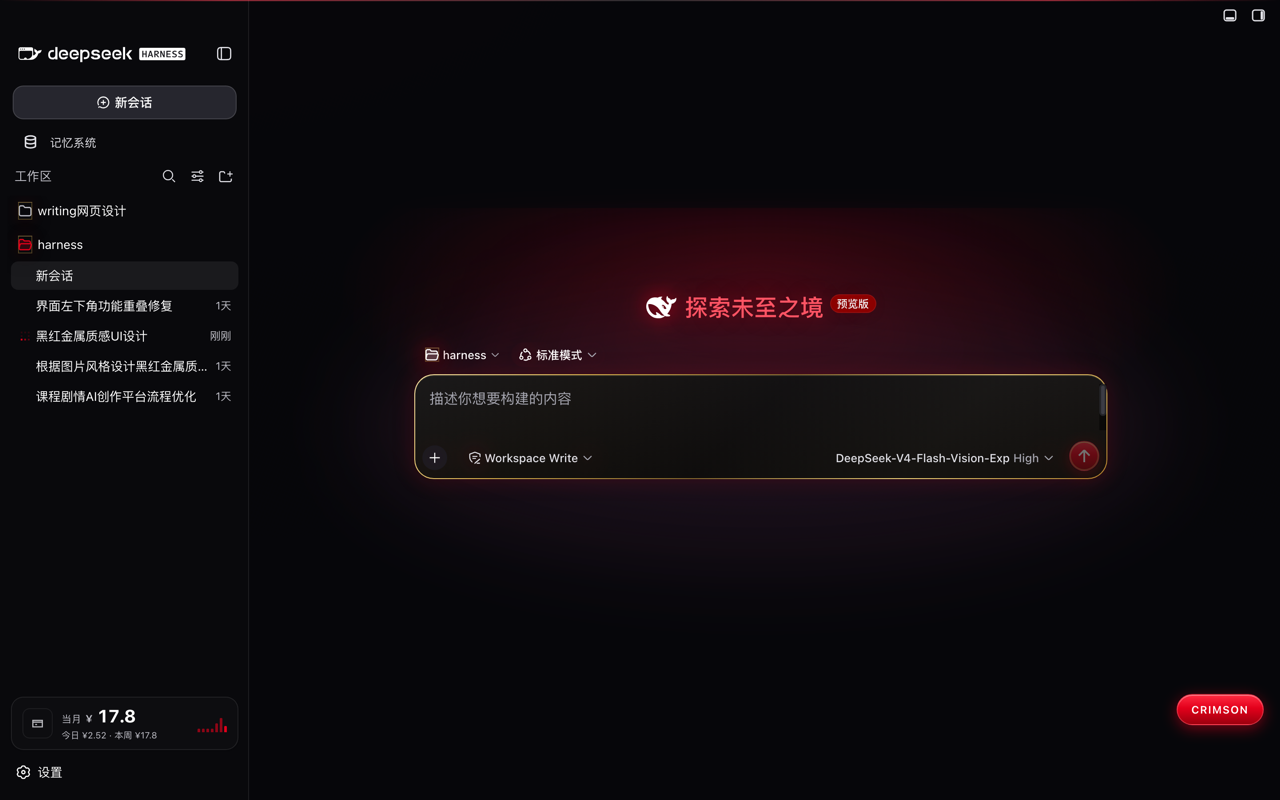
暗夜流火 · CRIMSON —— 为 DeepSeek Harness (DSH) 打造的黑红金属质感主题皮肤。
深黑碳灰底色 + 金属绯红点缀 + 渐变金色金属描边 + 红色氛围光,整体"高定超跑 / 科技 HUD"质感。 自带一个浮动控制面板(右下角 CRIMSON 按钮):一键开关主题、调节红色光晕浓度、金属纹理强度。
#050507 + 红色光晕 + 十字拉丝金属纹理:has(含输入框) 精确作用,不影响代码/消息卡片)#ffffff),输入区加高(76px),绯红光标在 DSH 的 插件市场 中搜索 crimson 一键安装。
在插件市场「添加」里输入仓库地址(你的 repo 名):
aze0695/dsh-crimson-theme把 dsh-crimson-theme-*.tgz 解压到 harness profile 的 node_modules/,并把它加进
profiles/web/package.json 的 dependencies 和 dsh.profile.bundles:
{
  "dependencies": { "dsh-crimson-theme": "file:packages/dsh-crimson-theme" },
  "dsh": { "profile": { "bundles": [/* ...其他 */, "dsh-crimson-theme"] } }
}
然后重启 DSH Desktop / 让 harness 重新加载。插件在 profile 目录,应用更新不会被清除。
dsh-crimson-theme/
├── package.json   # dsh.client 清单: client 浏览器入口 + immediately
├── lib/
│   ├── index.js   # 节点端(空 apply,host 侧行)
│   └── client.js  # 浏览器端:注入 CSS 主题 + 浮动控制面板
└── README.md
exports["./client"] 指向浏览器入口;dsh.client 声明它是 web 平台、立即加载。@deepseek-ai/dsh-client-ui-brand-official)。html body[data-ds-dark-theme] 高优先级选择器覆盖主题变量,且不依赖修改
node_modules 里的官方主题文件(只改这个插件即可,升级不会被覆盖)。localStorage(dsh:crimson:settings)。MIT
CLASSIFICATION EVIDENCE
系统优先读取 GitHub Topics,再与站内分类词典和词根规则比对。当前命中: 无有效分类标签。
c1overzz
DSH 插件:每天替你刷一轮 B站,读字幕挑出值得的、写一份日报,值得的 @ 你

hellowind777
一个自主的高级智能伙伴,不仅分析问题,更持续工作直到完成实现和验证。

xing-shuyin
Just open your browser — get all your work done.