

Agent 与会话
插件

nuwa-skill
alchaincyf
你想蒸馏的下一个员工,何必是同事。蒸馏任何人的思维方式——心智模型、决策启发式、表达DNA。Distill how anyone thinks.
PROJECT TOPICS
INSTALL REFERENCE
dsh plugin --profile web add github:ayuanxx-max/dsh-session-fork-tree
该命令指向仓库当前默认分支;尚无绑定当前 commit 的完整验证结果。
PROJECT README




30 秒理解:DSH 侧边栏把 fork 出来的会话挂到父会话下面,圆角导轨 + 绿色展开器 + 祖先链高亮,适合做分支实验。
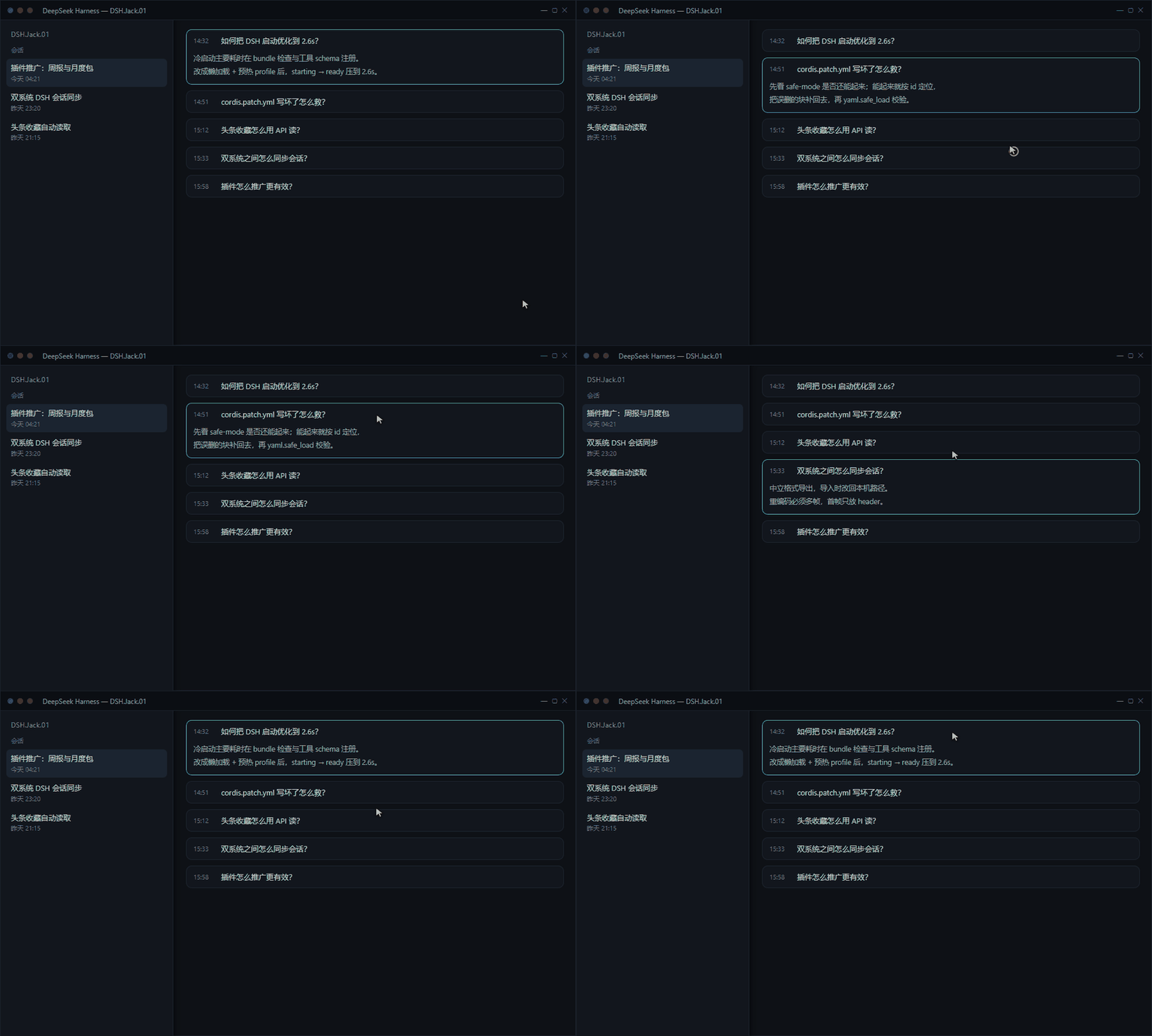
兼容 DSH Desktop / Web;安装见下方「安装」,卸载见「卸载」。
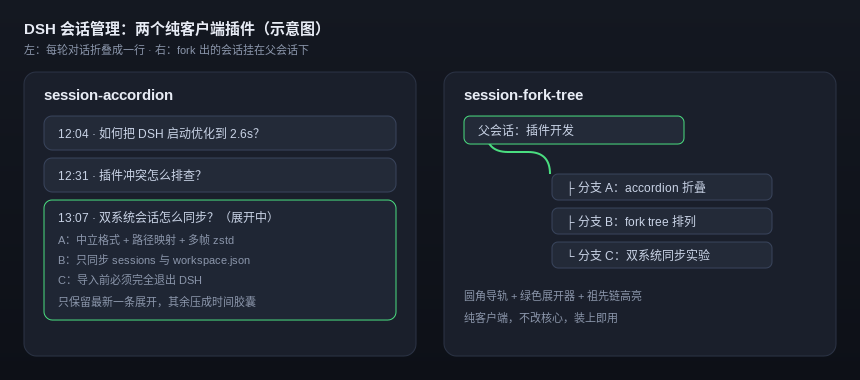
会话折叠
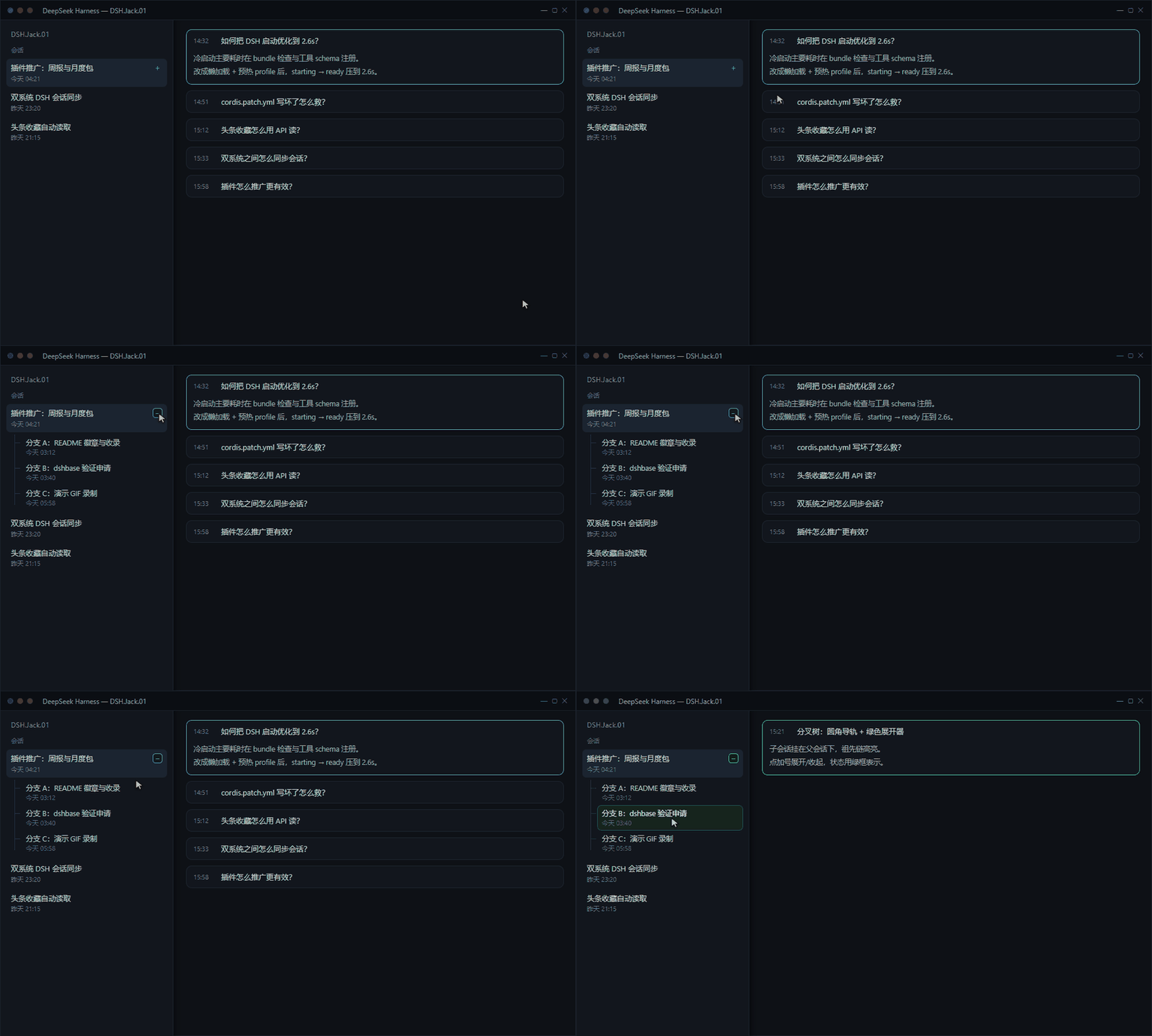
分叉树排列
| 平台 | 状态 |
|---|---|
| Windows 11(DSH Desktop) | ✅ 稳定运行(当前版本) |
| Ubuntu | 🧪 测试中,尚未承诺稳定 |
| macOS | 📋 计划中 |
修复与功能调整的优先级按评论 / 留言的反馈量排序——遇到问题请直接开 issue 或留言, 同类反馈越多越先修。欢迎提交你所在平台的环境信息。
【DSH 会话分叉树排列功能】把 DSH 侧栏里"另起一行"的分叉会话,变成挂在父会话下面的树:缩进 + 圆角连接线 + 绿色 + 折叠按钮 + 悬停祖先链高亮。
DSH Session Fork Tree Arrangement turns forked sessions that used to appear as unrelated rows into a tree under their parent: indent, rounded connector, a green + expander, and ancestor-chain highlighting on hover.
DSH 里"分叉"会新建一个会话,但它和父会话在侧栏里是两条互不相干的平行行,而且按最近活动排序,新分叉总是跳到最前面。会话一多,就分不清谁是谁的分支。
本插件把父子关系重新可视化:
workspace.sessionIds(持久化);╰(竖线到行高一半后转横线,圆角 8px,绝对像素,窗口变化自动重算);+;默认全部收起,点 + 展开、再点收起,逐层递归;展开时 + 显示绿色边框;父名 (1)),会被改成 父名 · 分叉N(N 为同父分叉的创建顺序);你手动改过的标题不会被覆盖。npm(推荐)
# 桌面版(profile=desktop)
dsh plugin --profile desktop add dsh-session-fork-tree@0.9.0

# 或免全局安装
npx -y @deepseek-ai/dsh plugin --profile desktop add dsh-session-fork-tree@0.9.0

# Web UI(profile=web)
dsh plugin --profile web add dsh-session-fork-tree@0.9.0安装后完全退出 DSH 再启动;卸载:
dsh plugin --profile desktop remove dsh-session-fork-tree以下为源码方式(开发 / 离线环境):
前置:DSH 桌面版或 dsh web,一个可用的 profile(默认 desktop)。
# 1. 取代码
git clone https://github.com/ayuanxx-max/dsh-session-fork-tree.git
$repo = "<克隆目录的绝对路径>"

# 2. 作为本地包登记到 profile
dsh plugin --profile desktop add link:$repo

# 3. 让它成为一个 bundle:在 profile 的 dsh.profile.bundles 里追加
#    %USERPROFILE%\.dsh\profiles\desktop\package.json
#      "dsh": { "profile": { "bundles": [ … , "dsh-session-fork-tree" ] } }

# 4. 完全退出 DSH 再启动
顺序:先
dsh plugin add(装依赖),再改bundles(声明组合),最后重启。只做前者插件不会加载;只做后者会因为包不存在而启动失败。
+(默认收起);+ 展开,按钮变为绿色边框;再点收起;+,逐层展开;在 profile 的 cordis.patch.yml 里覆盖该 bundle 的 config(升级不丢):
- id: fork-tree
  name: 'dsh-session-fork-tree'
  config:
    renames:                      # 同名分叉改名
      - sessionId: session-…
        title: '父会话 · 分叉1'
    reorder:                      # 把"子会话紧跟父会话"写进 sessionIds
      - sessionId: session-…
afterSessionId: session-…不配置也能用:客户端会在渲染层按父链排序;reorder 只是把顺序持久化,避免下次渲染回退。
| 层 | 做什么 |
|---|---|
| Host 半 | 从 sessionController.list() 读 SessionSummary.parentSessionId 生成谱系;提供 GET /fork-tree/lineage.json(谱系)、GET /fork-tree/style.css(样式,客户端每 15 秒重取,改样式无需重启)、POST /fork-tree/report(客户端自报,落盘 %TEMP%\fork-tree-report.json);可选执行改名与 insertSessionBefore 重排 |
| Client 半 | 注册官方槽位 sidebar.session.row.leading 与 sidebar.workspaces.session.row.action 拿到 sessionId;按父链先序排序;用行伪元素画 ╰;在标题后插入 + 按钮;MutationObserver 监听新增行,新建分叉 0.2–0.5 秒内归位 |
| 数据 | 只用官方 API(sessionController、workspaceController),不改 app.asar、不改核心渲染器 |
__ftReport() → 返回当前行、缩进、连接线坐标、折叠状态;%TEMP%\fork-tree-report.json(含 live、hidden、toggle、children 等字段);warn。SessionSummary.parentSessionId,属非公开契约,上游改版可能失效;失效时静默不动;MutationObserver 会再纠正;dsh.profile.bundles 移除 dsh-session-fork-tree;dsh plugin --profile desktop remove dsh-session-fork-tree;git clone https://github.com/ayuanxx-max/dsh-session-fork-tree.git
REPO="$(cd dsh-session-fork-tree && pwd)"
dsh plugin --profile desktop add "link:$REPO"
# 编辑 ~/.dsh/profiles/desktop/package.json,把 "dsh-session-fork-tree" 加入 dsh.profile.bundles
# 完全退出 DSH 后重启先恢复启动:不要动插件代码,在 profile 的 cordis.patch.yml 末尾追加
- id: fork-tree
  disabled: true
重启 DSH 即可正常启动(插件被禁用,其余不受影响)。
确认版本与 profile:DSH 0.2.x 及以上;profile 名与安装时一致(desktop 或 web)。
自己改过包名时:client.js 里 window.__ModuleLoader__.load({ id: ... }) 的 id 必须等于 package.json 的 name。DSH 按包名匹配客户端模块,id 不一致会让客户端条目激活失败,进而导致启动报错。
看日志:~/.dsh/logs 下最新一份日志里的 boot / activate 报错能直接指出是哪个条目失败。
MIT,见 LICENSE。
Forking a session in DSH creates a new session, but the sidebar shows it as an unrelated row, sorted by recent activity — new forks jump to the top. With enough sessions, you lose track of which row belongs to which branch.
This plugin re-visualises the parent/child relation:
workspace.sessionIds;╰ from the parent title's left edge (vertical down to half the row, then horizontal, 8px rounded corner, absolute pixels recomputed on resize);+ right of its name; everything is collapsed by default, click to expand, click again to collapse, recursively; an open + shows a green border;Parent (1)) becomes Parent · forkN; titles you renamed yourself are never overwritten.Requires DSH Desktop or dsh web with a working profile (default desktop).
git clone https://github.com/ayuanxx-max/dsh-session-fork-tree.git
$repo = "<absolute path of the clone>"

dsh plugin --profile desktop add link:$repo

# then append "dsh-session-fork-tree" to dsh.profile.bundles in
#   %USERPROFILE%\.dsh\profiles\desktop\package.json

# quit DSH completely and start it again
Order matters: install the dependency first, declare it in
bundlessecond, restart last.
+ (collapsed by default);+ to expand (button gains a green border), click again to collapse;+, layer by layer;Override the bundle's config in the profile's cordis.patch.yml:
- id: fork-tree
  name: 'dsh-session-fork-tree'
  config:
    renames:
      - sessionId: session-…
        title: 'Parent · fork 1'
    reorder:
      - sessionId: session-…
afterSessionId: session-…| Layer | Role |
|---|---|
| Host | Reads SessionSummary.parentSessionId from sessionController.list(); serves GET /fork-tree/lineage.json, GET /fork-tree/style.css (refetched every 15 s — style changes need no restart), POST /fork-tree/report (writes %TEMP%\fork-tree-report.json); optional rename and insertSessionBefore reordering |
| Client | Registers the official slots sidebar.session.row.leading / sidebar.workspaces.session.row.action for the row's sessionId; orders rows as a tree; draws ╰ with row pseudo-elements; inserts the + button next to the title; a MutationObserver places a fresh fork within 0.2–0.5 s |
| Data | Official APIs only (sessionController, workspaceController); never patches app.asar |
__ftReport() → rows, indent, connector coordinates, collapse state;%TEMP%\fork-tree-report.json;warn.SessionSummary.parentSessionId (a private contract); a redesign can break it, in which case it silently stops;MutationObserver re-corrects if the host re-sorts;Remove dsh-session-fork-tree from dsh.profile.bundles, run dsh plugin --profile desktop remove dsh-session-fork-tree, restart DSH.
git clone https://github.com/ayuanxx-max/dsh-session-fork-tree.git
REPO="$(cd dsh-session-fork-tree && pwd)"
dsh plugin --profile desktop add "link:$REPO"
# append "dsh-session-fork-tree" to dsh.profile.bundles in ~/.dsh/profiles/desktop/package.json
# quit DSH completely, then start it againRecover the boot first: append to the profile's cordis.patch.yml
- id: fork-tree
  disabled: true
and restart; DSH boots with the plugin disabled.
Check version and profile: DSH 0.2.x or newer, and the same profile you installed into.
If you renamed the package: the id inside window.__ModuleLoader__.load({ id: ... }) in client.js must equal the name in package.json. DSH matches client modules by package name; a mismatch fails the client entry and DSH refuses to boot.
Read the log: the newest file under ~/.dsh/logs names the failing entry in its boot / activate error.
MIT, see LICENSE.
排序只依赖公开契约,不认宿主类名:
[data-row-key^="session:"](回退 #session-*、[data-ft-session]),从不依赖 NSkPbW_* / _root_* 这类哈希类名。order,永不搬 DOM(0.9.9 之前的 insertBefore 会抛 NotFoundError 把整个 slot 打崩)。banded:普通列表(无 popover 控件)→ 标题 -m..-1、会话 0..n-1、页脚 n..;block 容器会转一次 flex。inplace:容器里有 [aria-haspopup] / [role=menu] / [role=dialog] 之类宿主控件(DSH 0.2.x 的分组就是这种)→ 只置换会话行的位次,按钮、菜单、toast、分隔线保持宿主给的槽位,容器样式不碰。banded 容器冻结(不重排),而不是把它挤到组首。+/− 照常」,不会抛错、不会破坏宿主 UI。| 页面 | 场景 | 断言 |
|---|---|---|
verify/arrange.html |
verify/scenarios/arrange.json |
13 项:DFS 序、子树连续、标题在前、页脚在后、零写入、点击后仍回树序、+/− |
verify/menu.html |
verify/scenarios/menu.json |
11 项:菜单不被挤走、锚点不动、首帧前拿到槽位、行间 toast 不动、容器不被改 flex |
verify/perf.html |
verify/scenarios/perf.json |
40 行:空跑 pass 0.21 ms、强制重排 0.245 ms/pass(一帧 16.7 ms) |
跑法:python <repo>/tools/verify-page.py --root . --page verify/menu.html --scenario verify/scenarios/menu.json --out %TEMP%/ft-menu
CLASSIFICATION EVIDENCE
系统优先读取 GitHub Topics,再与站内分类词典和词根规则比对。当前命中: session。
alchaincyf
你想蒸馏的下一个员工,何必是同事。蒸馏任何人的思维方式——心智模型、决策启发式、表达DNA。Distill how anyone thinks.

freestylefly
Prompt as Code | GPT Image 2 / 2.5 提示词与案例库,530+ 个案例、20+ 套工业级模板与可复用 Skills,新增 2.5 同提示词对比专区,附完整提示词与生成记录,持续更新。

titanwings
Distilly — Distill how they think into reusable Skills for any Agent or Bot. Formerly Colleague Skill(原同事 Skill).