
模型与 MCP
待识别

rea
morluto
Reverse engineer anything with agents, from app behavior down to native binaries.
PROJECT TOPICS
INSTALL REFERENCE
dsh plugin --profile web add github:awychoi/dsh-spendwatch
该命令指向仓库当前默认分支;尚无绑定当前 commit 的完整验证结果。
PROJECT README
 Spendwatch
A DeepSeek Harness plugin that keeps your DeepSeek balance, what each conversation costs, and what each workspace has spent in view.
Spendwatch puts your wallet, the current conversation, and every workspace in view at once. Workspace totals are the unusual part: they roll up all of a workspace's sessions, archived ones included, not just the conversation you have open. It reads the same DeepSeek account DSH uses, so there is no extra login or settings screen.
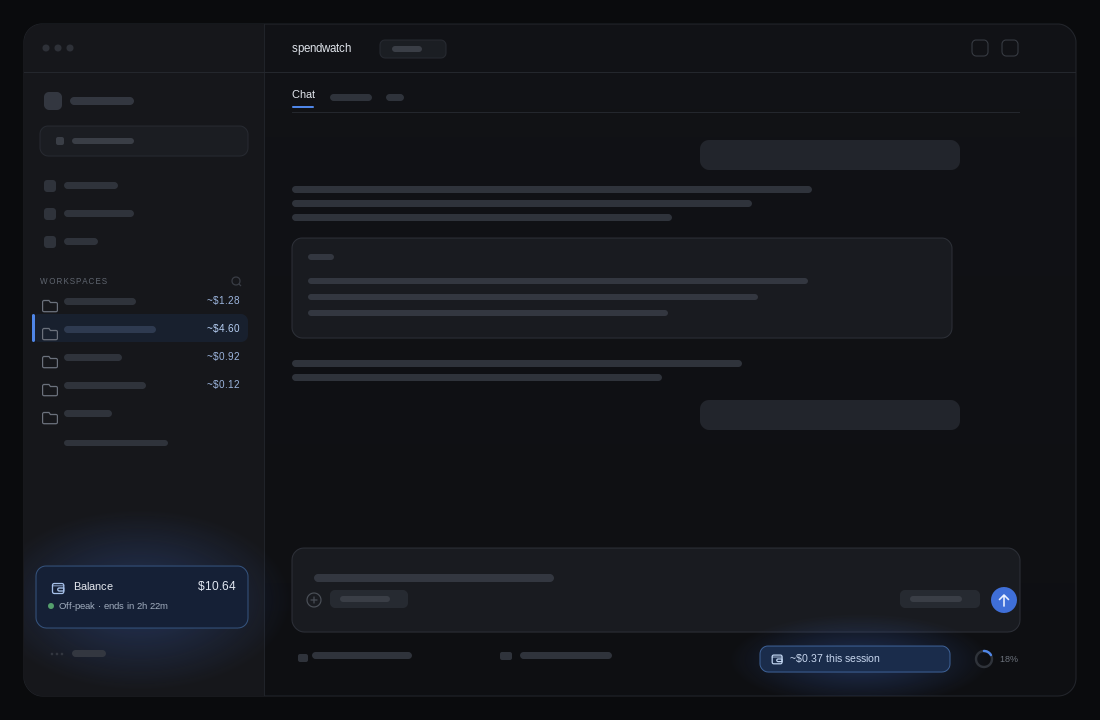
The balance is re-read when a conversation adds spend, when you return to the window, or when you click it. It does not poll while idle. The wallet has its own route, so the all-session spend fold cannot hold it up. Session totals follow the usage each model call reports, and a forked conversation is billed only for what it did after the fork. Workspace totals add live sessions on top of the durable fold, so archived sessions still count.
The peak / off-peak marker is derived from the same price book the Host uses, re-evaluates every 10 seconds, and includes the Beijing weekday rule and Chinese public holidays.
search.estimatedInputTokens +
search.estimatedOutputTokens per request at the search model's rates. That
estimate is approximate and tunable in pricing.json. The Search/Fetch APIs
bill $0.75 per 1K successful requests, but this profile uses Messages search
and local HTTP fetch, so that fee is not incurred. The search count includes
requests that later failed.Built against DSH 0.2.x; the host-coupling notes below are the parts most likely to need attention on upgrades.
inheritedEventCount, so inherited history is not billed twice.web/deepseek-search-llm-request event (one per
query) adds one to searchRequests and prices the period's estimated search
tokens (search.estimatedInputTokens / estimatedOutputTokens) at the search
model's rates. The estimate comes from observed request/result sizes; the
real auxiliary usage is not logged. The Search/Fetch APIs' $0.75/1K
per-successful-request billing is not modelled because this profile uses
Messages search and local HTTP fetch, which produce no API request events.data-row-key="workspace:<id>"; the wallet row
sits above the footer action through a scoped :has() wrap. If either host
detail changes, only that surface disappears.sessionQuery drops spend figures, no workspaceRegistry drops workspace
badges, and a missing or failed deepseekAccount falls back to DEEPSEEK_API_KEY.pricing.json at startup and serves it
to the Client, falling back to the bundled copy if the file is malformed or
missing. To update token rates, search token estimates, or holidays, add a
period with its effective from instant and restart DSH.https://github.com/awychoi/dsh-spendwatch.Spendwatch prefers the signed-in DeepSeek account. If that read fails or the
account is not connected, it falls back to DEEPSEEK_API_KEY, which reads the
same wallet through the public API. Credentials stay on the Host and never
reach the browser.
Remove Spendwatch from DSH's plugin list and restart DSH. Nothing else is stored.
icon.svg is the plugin icon. icon-white.svg is the transparent solid-white
mark for dark backgrounds. Exported as ./icon and ./icon-white.
MIT — free to use, change, and share, including commercially. Copyright © 2026 awychoi.
Not affiliated with DeepSeek.
CLASSIFICATION EVIDENCE
系统优先读取 GitHub Topics,再与站内分类词典和词根规则比对。当前命中: deepseek。
morluto
Reverse engineer anything with agents, from app behavior down to native binaries.

deepseek-ai
DeepSeek Harness: Everything is a Plugin.

nexu-io
The 1st Collaborative AI Design Agent Workspace. Local-first and open source. Create motion, prototypes, websites, apps, dashboards, presentations, images, and videos with your team and AI agents. Share work, exchange feedback, and iterate together in one workspace.