
模型与 MCP
待识别

rea
morluto
Reverse engineer anything with agents, from app behavior down to native binaries.
PROJECT TOPICS
INSTALL REFERENCE
dsh plugin --profile web add github:ashulam/dsh-session-delete
该命令指向仓库当前默认分支;尚无绑定当前 commit 的完整验证结果。
PROJECT README
English | 简体中文
Adds 「删除会话 / Delete session」 to the sidebar's Session context menu in DeepSeek Harness and performs a real, recoverable deletion.
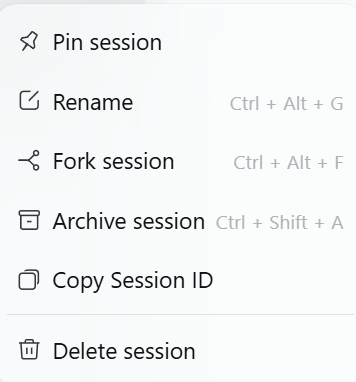
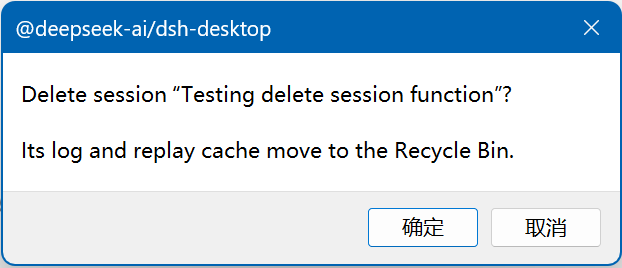
Hover a session row and click its ⋯ button → Delete session.
| Session state | Behaviour |
|---|---|
| Cold (not loaded in this app run) | Deleted immediately; its log and replay cache go to the Windows Recycle Bin (fallback: <DSH_HOME>/.session-trash/). The sidebar list refreshes itself through the client Session controller — no page reload needed. |
| Live (the session open right now, or one opened earlier in this run) | DSH exposes no "close a session" API, so the files cannot be removed safely. The plugin offers to queue it: POST /dsh-session-delete/queue writes <DSH_HOME>/.session-delete-queue.json, and the next start drains that queue before anything is opened. |
After a restart that removed queued sessions, a small notice in the corner lists what was deleted (titles, up to five, with a count for the rest) and reports any entry that could not be removed and stays queued.
For one session id:
| Path | What |
|---|---|
<DSH_HOME>/sessions/<project>/session-<id>/ |
the append-only event log |
<DSH_HOME>/storages/session_projcache/sessions/<id>.json |
the replay/projection cache |
Nothing else is touched. Attachments are shared, content-addressed blobs and are
deliberately left alone. The Workspace registry keeps its sessionIds entry —
the registry has no "unregister a session" API, and the sidebar already skips ids
whose stored session is gone.
Deleting a session removes its log and replay cache, but the Workspace registry
keeps its sessionIds entry: the registry has no "unregister a session" API, and
a running app rewrites workspace.json from memory, so editing it live is unsafe.
(The 2026-10-22 incident note is the cautionary tale: editing that file while DSH
ran, then hard-killing the app, lost in-memory workspace state and left the
workspace controller unavailable.)
The plugin only reports dangling references — GET /dsh-session-delete/dangling
returns the ids referenced by workspace.json that no longer have a stored
session, and every successful delete reports workspaceRef: true when its id
stays referenced. Cleaning them is an offline job on purpose:
# close DSH completely first
node tools/prune-dangling-sessionids.mjs            # dry run (read-only, safe anytime)
node tools/prune-dangling-sessionids.mjs --apply    # write: backup + atomic rename, UTF-8 without BOM
The tool backs workspace.json up under storages/backups/, refuses to write
while DSH is running (--force overrides), strips a BOM if it finds one, prunes
sessionIds plus pinnedSessionIds / archivedSessionIds, and verifies the
result parses back before it exits.
409); only the queue path can remove it, on the
next start.connection.requestRejection) and accept only session-<uuid> ids.<DSH_HOME>/.session-trash/.sidebar.workspaces.session.menu.item and
shell.overlay slots).Listed in the plugin market. Manual install:
dsh plugin --profile desktop add github:ashulam/dsh-session-delete
# or from a local checkout:
cd <profile dir>
pnpm add file:<path to this repo>
# then add "dsh-session-delete" to dsh.profile.bundles in package.jsonlib/index.js — host half: POST /dsh-session-delete/delete,
POST /dsh-session-delete/queue, GET /dsh-session-delete/last-drain
(plus the boot-time queue drain).client/client.js — browser half: the context-menu entry and the boot notice.cordis.patch.yml — inserts the host row into the profile.MIT
CLASSIFICATION EVIDENCE
系统优先读取 GitHub Topics,再与站内分类词典和词根规则比对。当前命中: deepseek-harness。
morluto
Reverse engineer anything with agents, from app behavior down to native binaries.

deepseek-ai
DeepSeek Harness: Everything is a Plugin.

nexu-io
The 1st Collaborative AI Design Agent Workspace. Local-first and open source. Create motion, prototypes, websites, apps, dashboards, presentations, images, and videos with your team and AI agents. Share work, exchange feedback, and iterate together in one workspace.