
其他
插件

dsh-bili-scroll
c1overzz
DSH 插件:每天替你刷一轮 B站,读字幕挑出值得的、写一份日报,值得的 @ 你
PROJECT TOPICS
INSTALL REFERENCE
dsh plugin --profile web add github:arfarfgit/dsh-ram-meter
该命令指向仓库当前默认分支;尚无绑定当前 commit 的完整验证结果。
PROJECT README
Live host memory and heap-ceiling meter for DeepSeek Harness, shown as a compact pill in the Web UI.
The pill reads the host process's own memory every two seconds and measures its ceiling instead of
assuming one: a stock host reports its ~4 GB V8 limit, a host launched with
--max-old-space-size=16384 reports ~16 GB, and the pill shows whichever number the running process
actually has.
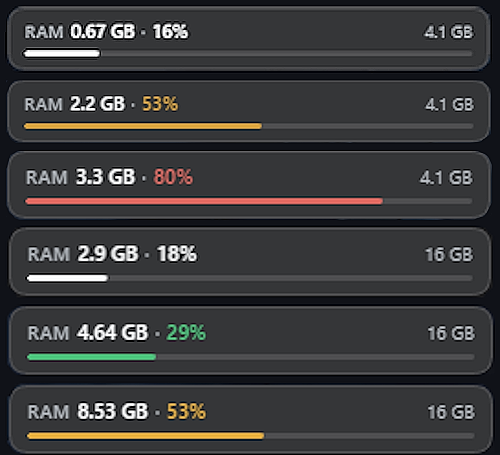
RAM 1.4 GB · 9%
[▁▁▁▁▁▁▁▁▁▁▁▁▁▁▁▁▁▁▁▁▁▁▁▁]
Hovering shows the details:
RAM 1.4 GB of 16 GB ceiling (8.8%)
Heap 0.40 GB / 0.60 GB
PID 4242 · uptime 1h 2m— and retries on the next tick. It never
throws and never writes to the browser console.dsh plugin --profile <name> add @npmghost/dsh-ram-meterOr, from a packed tarball, inside the profile directory:
pnpm add ./npmghost-dsh-ram-meter-0.1.1.tgzThen add the bundle to the profile's dsh.profile.bundles list — Plugin Manager's Add plugin
does both steps for you — and restart the host so the Client loads the new bundle generation.
Requirements: DeepSeek Harness >=0.2.2-rc.2 <0.3.0 (the engines.dsh field). The package has no
runtime dependencies: the Host half imports only node:v8, and the Client half receives React from
the page's module table.
The plugin row in a profile's cordis.patch.yml accepts two keys:
- id: ram-meter
  name: '@npmghost/dsh-ram-meter'
  config:
    refreshIntervalMs: 2000   # 500..10000, default 2000
placement: sidebar-footer # sidebar-footer | composer-dock | floating| Key | Default | Notes |
|---|---|---|
refreshIntervalMs |
2000 |
Clamped to 500..10000; a malformed value falls back to the default. |
placement |
sidebar-footer |
sidebar-footer → sidebar.footer.action, composer-dock → conversation.composer.dock, floating → shell.overlay. |
The values are validated by the plugin's Config (a Standard Schema object) when the row activates,
and the same resolution is clamped again in the Client, so a stale profile patch cannot produce a
hostile cadence. Changing the placement takes effect on the next configuration refresh (within 30 s)
without a reload.
| Route | Response |
|---|---|
GET /dsh-ram |
{ rss, heapUsed, heapTotal, heapLimit, uptimeSec, pid } |
GET /dsh-ram/config |
{ refreshIntervalMs, placement } |
Both are exact-path, loopback-only, cache-control: no-store, and answer 403 to a non-loopback
peer and 405 to any method other than GET.
heapLimit is v8.getHeapStatistics().heap_size_limit of the host process — the same number the
pill divides by. rss is process.memoryUsage().rss.
npm install
npm run build      # tsdown → lib/index.js (Host) + lib/client.js (Client script)
npm run typecheck
npm test           # unit, route and polling-store tests (vitest)
npm run test:e2e   # headless Edge over CDP against a scratch profile
lib/index.js is ESM and exports apply, inject and Config. lib/client.js is a plain script
with no module syntax: it registers a lazy factory in window.__ModuleLoader__ whose id is the
package name, and its only module request is react.
composer-dock maps to conversation.composer.dock, which DSH renders only inside an open
conversation. The landing page has no conversation, so with that placement the pill appears once a
session with a composer is open — it is not visible on the start screen. sidebar-footer and
floating are visible everywhere.floating placement sits above the frame's overlay layer, so another overlay plugin may
render above it.MIT © npmghost
CLASSIFICATION EVIDENCE
系统优先读取 GitHub Topics,再与站内分类词典和词根规则比对。当前命中: 无有效分类标签。
c1overzz
DSH 插件:每天替你刷一轮 B站,读字幕挑出值得的、写一份日报,值得的 @ 你

hellowind777
一个自主的高级智能伙伴,不仅分析问题,更持续工作直到完成实现和验证。

xing-shuyin
Just open your browser — get all your work done.