
其他
完整应用

deepseek-harness
deepseek-ai
DeepSeek Harness: Everything is a Plugin.
PROJECT TOPICS
INSTALL REFERENCE
dsh plugin --profile web add github:april-jk/dsh-mobile-plugin
该命令指向仓库当前默认分支;尚无绑定当前 commit 的完整验证结果。
PROJECT README
Access a local DeepSeek Harness Web UI from a paired phone through an outbound-only Relay connection.
Community project: this is an unofficial project, independently developed and maintained by the community. It is not reviewed, endorsed, or supported by DeepSeek.
Complete project, signed Android APK, and private Relay package: DSH Mobile Suite
The current release is tested against @deepseek-ai/dsh@0.1.0-rc.6. DeepSeek Harness is in Developer Preview and may introduce breaking plugin changes. CI pins this version so compatibility changes are explicit.
Requirements:
0.1.0-rc.6The immutable GitHub tag is the recommended public installation path. It requires neither a global DSH installation nor a local plugin directory:
npx @deepseek-ai/dsh plugin --profile web add "github:april-jk/dsh-mobile-plugin#v0.1.4"
npx @deepseek-ai/dsh web
Each GitHub Release also contains a prebuilt .tgz. DSH can install it directly from its release URL without a manual download or local path:
npx @deepseek-ai/dsh plugin --profile web add "https://github.com/april-jk/dsh-mobile-plugin/releases/download/v0.1.4/april-jk-dsh-mobile-0.1.4.tgz"
npx @deepseek-ai/dsh web
The package metadata is ready for npm, but @april-jk/dsh-mobile is not yet published to the public npm registry. After its first npm release, the registry command will be:
npx @deepseek-ai/dsh plugin --profile web add "@april-jk/dsh-mobile@<published-version>"
npx @deepseek-ai/dsh web
To uninstall:
npx @deepseek-ai/dsh plugin --profile web remove @april-jk/dsh-mobileFor local development, clone the repository and let the shell supply its current path:
git clone https://github.com/april-jk/dsh-mobile-plugin.git
cd dsh-mobile-plugin
npm ci
npm run build
npx @deepseek-ai/dsh plugin --profile web add "$PWD"
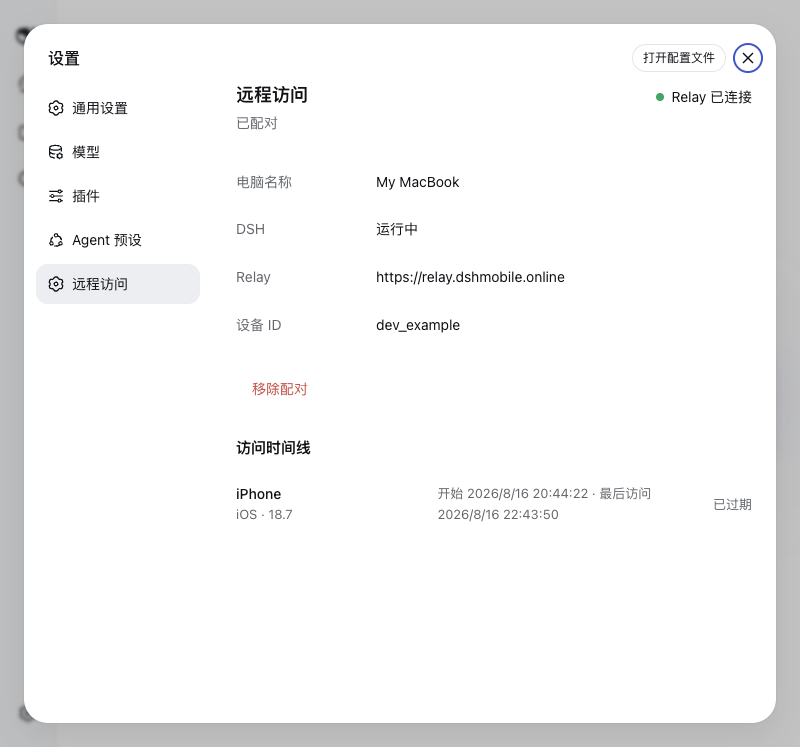
npx @deepseek-ai/dsh webOpen Settings > Remote Access in the local DSH Web UI and scan the QR code with iPhone Camera or the mobile app. New QR codes open the Relay browser client directly; their one-time code and end-to-end encryption key stay in the URL fragment and are not sent in the page request. A six-digit code by itself is not sufficient. Later DSH starts reuse the device credential stored in ~/.dsh-remote/config.json with owner-only permissions.
The same settings page can remove the pairing. Removal revokes the Relay device credential, disconnects active remote access, and clears the local credential only after the Relay confirms the operation. The dsh-mobile unpair command provides the same behavior when the Web UI is unavailable.
127.0.0.1:3080; the plugin never creates a public listener.https://relay.dshmobile.online by default. Set DSH_RELAY before starting DSH to use another compatible Relay.~/.dsh-remote/config.json and never sends that token to the mobile client.For a private Relay, start DSH with the same HTTPS origin configured in the mobile app:
DSH_RELAY=https://relay.example.com npx @deepseek-ai/dsh webThe fallback CLI is installed as dsh-mobile and supports start, pair, status, and unpair. Normal users should manage pairing through the DSH settings page.
npm ci
npm run build
npm test
npm pack --dry-run
dist/ is committed intentionally so GitHub installs have a complete plugin without lifecycle scripts. CI runs build, tests, bundle freshness checks, and an npm pack check on Node.js 18, 20, and 22. It also verifies installation against the pinned DSH Developer Preview.
To publish a release, update package.json and package-lock.json, rebuild dist/, and push a tag that exactly matches v<package.version>. The tag workflow repeats all release checks, then creates an immutable GitHub Release with the prebuilt npm tarball and SHA256SUMS. A rerun succeeds only when the existing asset set and both asset contents are identical; it never overwrites an existing asset. A mismatched tag fails before any artifact is uploaded.
npm publishing is disabled by default. Repository maintainers can opt in by setting the Actions variable NPM_PUBLISH_ENABLED to true and adding an NPM_TOKEN Actions secret with publish access to @april-jk/dsh-mobile. With either setting absent, GitHub Releases continue normally and no npm publish is attempted.
The repository should use the dsh-plugin and deepseek-harness GitHub topics. A single-project post for the official plugin Discussion category can use:
DSH | DSH Mobile Remote | Access your local DSH Web UI from a paired phone
A ready-to-post project description is maintained in docs/SHOW-YOUR-PLUGIN.md.
CLASSIFICATION EVIDENCE
系统优先读取 GitHub Topics,再与站内分类词典和词根规则比对。当前命中: 无有效分类标签。
deepseek-ai
DeepSeek Harness: Everything is a Plugin.

walkinglabs
Harness engineering beginner tutorial, from 0 to 1

anywhere-labs
为 DeepSeek Harness (DSH) 插件生态打造的现代化桌面端解决方案。万物皆「插件」,桌面本身也是「插件」。