模型与 MCP
待识别

rea
morluto
Reverse engineer anything with agents, from app behavior down to native binaries.

aobakaolengmian/dsh-projects
Claude-Desktop-style Projects sidebar plugin for DeepSeek Harness Desktop: group conversations into projects, per-conversation working directories, drag-and-drop migration, permanent empty-conversation cleanup.
PROJECT TOPICS
INSTALL REFERENCE
dsh plugin --profile web add github:aobakaolengmian/dsh-projects
该命令指向仓库当前默认分支;尚无绑定当前 commit 的完整验证结果。
PROJECT README


Claude-Desktop-style Projects for DSH Desktop (the desktop DSH profile
only — Web and headless profiles are untouched).
The shipped DSH sidebar groups conversations by Workspace (directory). This plugin replaces that sidebar region with a project-first browser:
workingDirectory service — the same durable, model-visible
mechanism as the working_directory tool;blank: true); only
the empty Session that is currently open is shown. The Host also scans legacy
Sessions whose catalog row is not marked blank but whose log contains no
conversation events at all (only tiny header/metadata logs are inspected), so
old "Badstuff"-style empty chats are hidden too. View options → Delete empty
conversations (N) permanently removes both kinds from disk through a
validated Host route (never touches a conversation with content; sessions
still live in the current app run are archived and can be purged after the
next start);+ (new conversation directly in
that directory — assigned to the containing project, or ungrouped under
Other conversations) and ⋯ menu (new conversation, move to another
project, rename, remove from project, delete workspace);The plugin ships as a normal DSH bundle and is published on npm as
@wxysskd/dsh-projects.
Three equivalent ways to install it into the desktop profile
(~/.dsh/profiles/desktop):
# 1. from npm (registry install; also works from Plugins -> Add plugin)
plugin_manager install_bundle target=@wxysskd/dsh-projects@1.0.0
#   or: desktop-cli plugin --profile desktop add @wxysskd/dsh-projects@1.0.0

# 2. from the self-contained release tarball
npm run pack                                  # -> dist/wxysskd-dsh-projects-1.0.0.tgz
plugin_manager install_bundle target=/abs/path/dist/wxysskd-dsh-projects-1.0.0.tgz

# 3. source link for development (client.js edits hot-reload)
desktop-cli plugin --profile desktop add link:"$PWD"
The npm package contains only runtime files (index.js, client.js,
cordis.patch.yml, locale/*.json, icon.svg, package.json, README.md,
LICENSE), plus SHA-256/manifest in dist/. See
docs/INSTALL.md for installation, the market index,
activation/verification and rollback details.
DSH has no official built-in market; the Discover tab reads index sources the user adds. This repository publishes a format-1 index with a commit-pinned Git install target:
https://aobakaolengmian.github.io/dsh-projects/market/index.jsonAdd that URL as an index source in Plugins → Discover and install
Projects from the card; the same index is readable by the plugin_market
tool and by any other DSH Desktop user:
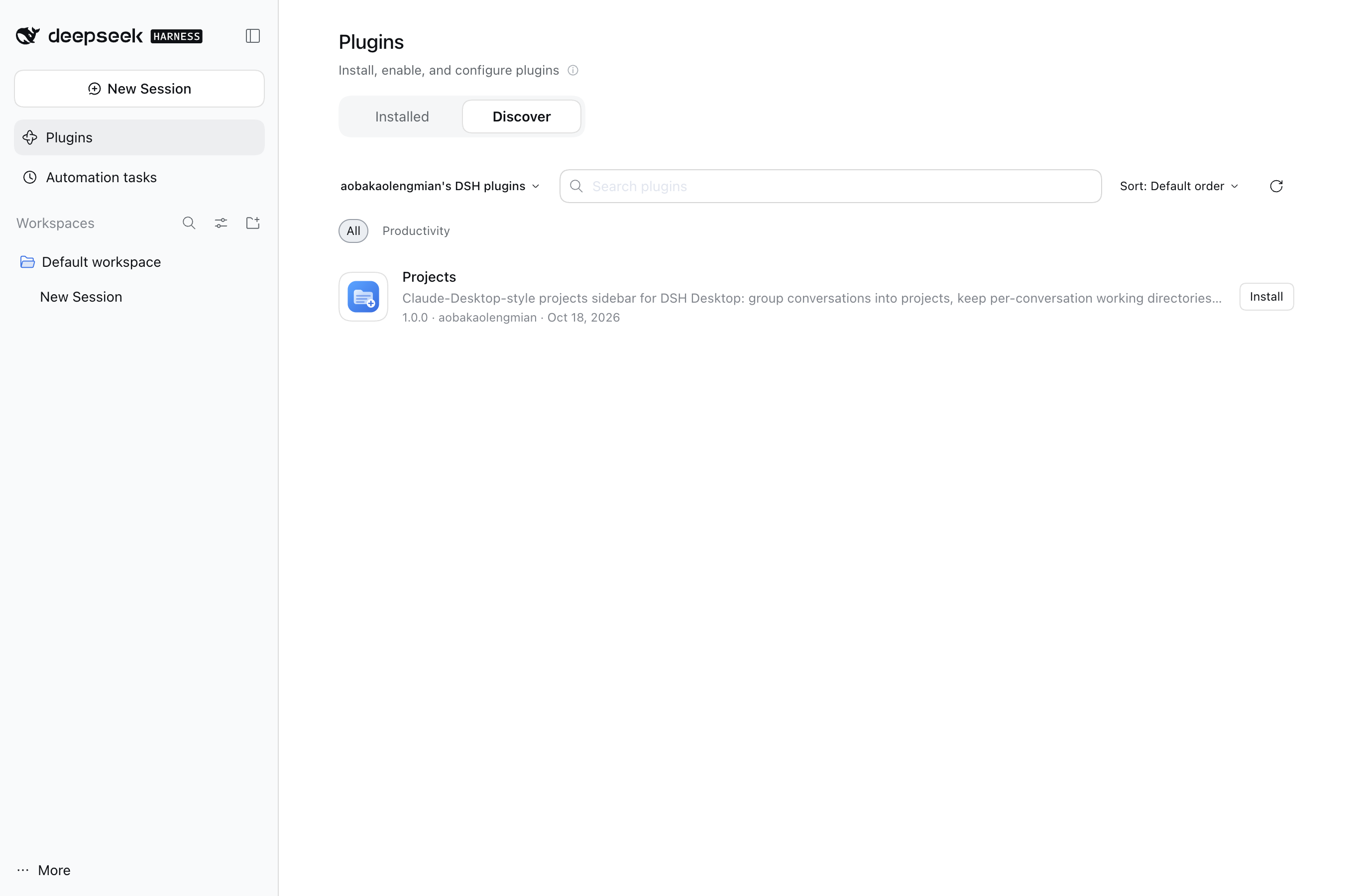
The market entry installs the published npm package
(@wxysskd/dsh-projects@<version>), the same artifact as the tarball. See
market/README.md for the format and how to regenerate it
(npm run market). Installing from the market still needs one app restart for
the Host row.
Project metadata is Host-owned and durable, independent of session logs:
$DSH_HOME/storages/dsh-projects.json — projects, session→project
assignments, last recorded working directory per session;HTTP routes served from the existing DSH web server (same origin as the GUI):
| Method | Path | Purpose |
|---|---|---|
| GET | /dsh-projects/state |
complete project state |
| GET | /dsh-projects/health |
liveness + counts |
| POST | /dsh-projects/mutate |
project.create, project.update, project.delete, session.assign |
| POST | /dsh-projects/cwd |
change one conversation's working directory |
| POST | /dsh-projects/purge |
permanently remove validated empty sessions (rejects content) |
| GET | /dsh-projects/empty-sessions |
list sessions that hold no conversation content |
POST routes require content-type: application/json and x-dsh-projects: 1
and a 64 KiB body limit.
npm install          # dev-only: esbuild, react, react-dom, playwright
node scripts/build.mjs   # src/client/* -> client.js (committed artifact)
npm run pack             # build + dist/<name>-<version>.tgz + SHA-256 + manifest
node harness/build.mjs   # mock harness bundle
node harness/shoot.mjs   # screenshots -> harness/shots/
npm test # host/model tests (node --test)sidebar.workspaces single slot
at priority: -1, shadowing ui-workspace's browser. The shipped entry stays
registered underneath: if our component crashes, its entry is abdicated and
the original sidebar comes back.react / react-dom / react/jsx-runtime
from the shell's shared module table and uses ctx services for everything
else (sessions, workspaces, uiWorkspace, locale, slots).--dsw-* theme tokens; literals are limited to project accent
artwork. All classes are prefixed pj-.Everything can be migrated without deleting or recreating sessions, through the project metadata only (session logs are never touched):
⋯ → Move workspace to project → pick the target;⋯ → Move working directory to another project… → pick the
directory → pick the target project (or Remove from project (back to Other
conversations));⋯ → Move to project → pick the target (or No project).Moving a directory between projects also makes future sessions created in that directory (including the shipped Cmd+N flow) land in the target project, and the project keeps the workspace title as a nested folder group.
Workspace headers (both inside projects and under Other conversations) expose their own menu: Rename workspace…, Move workspace to project, Remove from project and Delete workspace. Deleting a workspace removes only its registration, puts its conversations back under Other conversations, and never deletes a conversation.
Symptom: opening any historical session shows Session unavailable in the composer, session rows vanish from the sidebar and titles fall back to session ids. It reproduces with this plugin disabled, so it is a runtime/profile problem, not a bug in this bundle.
Two different causes were diagnosed by booting the shipped runtime against a
copy of a real ~/.dsh:
rc.5 mounts @deepseek-ai/dsh-tool-subagent/model-selection-settings as a
standing row while its presets request modelSelectionSettings: true inside a
preset scope, so every session whose recorded preset carries the flag fails with
agent-preset/invalid and renders without a live composer. Fixed upstream in
0.2.2 (the flag is gone); apply scripts/fix-rc5-session-unavailable.mjs only on
rc.5, and --remove it after upgrading:
node scripts/fix-rc5-session-unavailable.mjs --presets <app>/dsh/node_modules/@deepseek-ai/dsh-web-app/presets
node scripts/fix-rc5-session-unavailable.mjs --remove # after upgrading0.2.2 genuinely fixed the upstream bug — its shipped presets no longer contain
modelSelectionSettings (verified: 0 occurrences in dsh-web-app/presets).
The regression right after the update came from the rc.5 workaround still
being applied: the preset override block restated the old preset definitions,
so it replaced 0.2.2's presets with rc.5 wiring. On 0.2.2 the stale
tool-subagent-control/list-agents row never starts and session creation fails:
agent-preset/invalid — tool-subagent-list-agents
(@deepseek-ai/dsh-tool-subagent-control/list-agents): never started
which the conversation view renders as "Session unavailable" again. Measured by booting 0.2.2-rc.1 against a profile copy: stale block + old packages → create fails with the error above; stale packages alone → create succeeds.
Therefore the workaround must be removed when the runtime no longer needs it:
node scripts/fix-rc5-session-unavailable.mjs --remove # idempotentThe script also refuses to apply when the shipped presets carry no
modelSelectionSettings flag, so it cannot be re-applied on 0.2.2+.
@deepseek-ai/* copies left in the profile after an updateIndependently, packages older than the app that sit in
~/.dsh/profiles/<profile>/node_modules shadow the copies bundled in the app.
A stale @deepseek-ai/dsh-tool-subagent (0.2.1-rc.5 inside a 0.2.2 runtime) is
declared incompatible, so tool-subagent, tool-subagent-fork and
subagent-model-selection-settings get disabled and the delegation tools go
missing; bundles pinned to the old version (dsh-subagent-codex,
dsh-subagent-claude-code, …) are skipped. Session creation still works, but
subagent features silently disappear.
Fix: move the stale copies out of the profile so the app's matching versions are resolved, then restart:
cd ~/.dsh/profiles/<profile>
mkdir -p .removed-stale-$(date +%Y%m%d)
mv node_modules/@deepseek-ai/dsh-tool-subagent \
   node_modules/@deepseek-ai/dsh-brand \
   node_modules/@deepseek-ai/dsh-sdk-protocol \
   .removed-stale-$(date +%Y%m%d)/ 2>/dev/null
# bundles pinned to the old runtime: update them in Plugins -> Installed,
# or drop them from dsh.profile.bundles
This plugin is compatible with both runtimes: with either fix in place its
sidebar renders (including inside 0.2.2-rc.1) and sessions open and send
normally. 0.2.1 also labels user forks as origin: "subagent"; the plugin hides
only spawned teammates (delegationDepth > 0), so forks stay visible.
The installed sidebar-touching plugins were audited and the browser keeps their integration surfaces intact:
| Plugin | Integration surface | Status with Projects |
|---|---|---|
dsh-timeline |
DOM-injects its starred-folder section before [data-slot="sidebar.workspaces"]; resolves session rows as div[role="treeitem"][aria-selected]; injects "Star Chat to Folder" into host menus found as body > [role="menu"] |
Works: the slot anchor is preserved (its folder section renders above Projects), every row follows the shipped treeitem/title DOM contract, and menus/modals are portaled to document.body, so its injected menu item appears and opens its own dialog |
dsh-cost-meter |
Registers sidebar.footer.action entries and styles its own footer stack |
Works unchanged: footer actions are outside the replaced region |
dsh-notification, dsh-plugin (hub), dsh-thoughtdag, dsh-dafeiyu, dsh-plugin-whale-pet |
No sidebar.workspaces DOM or row-slot usage (audited client bundles) |
No interaction |
shipped ui-workspace browser |
Registers the slot at priority 0; its child row-extension slots (e.g. schedule marks) are only rendered by its own component | Our entry shadows it at priority -1; if our component crashes it abdicates and the shipped browser returns. Child-slot extensions are not rendered while Projects is active (non-crashing degradation) |
Live verification with dsh-timeline + dsh-cost-meter + Projects mounted in one
real DSH host: our sidebar rendered 57/57 sessions as timeline-compatible
treeitems, timeline's starred-folder section appeared above Projects, timeline's
"Star Chat to Folder" item was injected into our session menu and opened its
dialog, cost-meter's footer card rendered normally, our menus/search stayed
functional, and the browser console reported no errors.
ui-workspace browser's child extension slots
(sidebar.workspaces.session.menu.item, sidebar.session.row.leading, …) are
not rendered by our browser, so shipped/third-party row decorations registered
there (for example the schedule mark) do not appear while it is active. The
shipped built-in session actions are re-implemented directly in the project
menus, and dsh-timeline's DOM-based decorations do work (see above).ui-workspace (Cmd+N / Cmd+K) keep their shipped
behavior; our search field is opened through the header icon.localStorage; project data lives Host-side.CLASSIFICATION EVIDENCE
系统优先读取 GitHub Topics,再与站内分类词典和词根规则比对。当前命中: deepseek-harness。
morluto
Reverse engineer anything with agents, from app behavior down to native binaries.

deepseek-ai
DeepSeek Harness: Everything is a Plugin.

nexu-io
The 1st Collaborative AI Design Agent Workspace. Local-first and open source. Create motion, prototypes, websites, apps, dashboards, presentations, images, and videos with your team and AI agents. Share work, exchange feedback, and iterate together in one workspace.