
模型与 MCP
待识别

rea
morluto
Reverse engineer anything with agents, from app behavior down to native binaries.
PROJECT TOPICS
PROJECT README
A read-only panel in the DeepSeek Harness Web GUI that answers "what is actually inside preset X?" — and a pair of CLIs that answer the same question from a terminal, plus one that moves a plugin between presets.
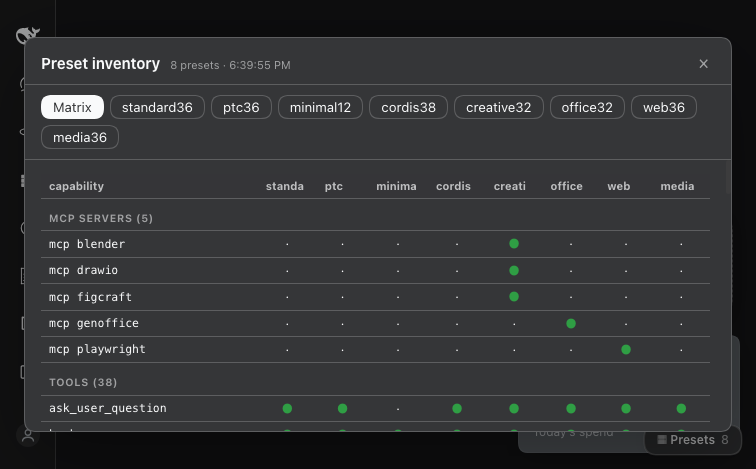
A DSH profile runs several agent presets (Standard, Web, Media, Creative, …). Each preset declares a complete child plugin list, and those rows decide the tools, skills and MCP servers a session gets. Three things make that hard to see:
This plugin makes all of it visible, and gives you one command to change it.
The host half reads ctx.agentPresets — the same registry the GUI picker uses —
flattens each preset's config.plugins, resolves every module to its package
directory and attributes the tool names that package registers. Host rows that
register tools are added to every preset, because ToolRuntime.view(scope)
inherits ancestor layers.
The browser half is a client module (exports["./client"]): the host ships the
snapshot as globalThis.__dshPresets through a global index-injection row, and
the client module renders it. No bundler, no route, no auth work.
dsh plugin --profile web add github:anonamerjaxon-dev/dsh-preset-inspectorOr from a checkout:
dsh plugin --profile web add /path/to/dsh-preset-inspectorThen add dsh-preset-inspector to dsh.profile.bundles in
~/.dsh/profiles/web/package.json and restart dsh web. A ▦ 9 button
appears in the sidebar footer, next to the settings icon, and opens the panel.
Where the button lives matters. It is registered into the shell's own
sidebar.footer.action seat rather than floated over the page, because the
bottom-right corner is the busiest rectangle in this GUI: the composer puts its
Send button and model picker there, the usage dashboard parks its card there,
and plugin toasts stack there. A fixed pill parked in that corner renders but
cannot be clicked (measured at 1280x800: 2696px² of intersection with the usage
card, and the toast stack over its centre). A host that does not offer the seat
still gets a floating ▦ Presets fallback, one step above the toast layer.
It registers no tools of its own, so it costs a session nothing in tool schemas.
bin/ carries the terminal side of the same idea. node bin/dsh-presets and
node bin/dsh-preset-plugin, or symlink them onto your PATH.
dsh-presets list                 # presets with tool / skill / MCP counts
dsh-presets show creative        # everything in one preset
dsh-presets matrix               # capability × preset grid
dsh-presets diff standard web    # what differs between two presets
dsh-presets json                 # machine-readable snapshot

dsh-preset-plugin list           # every plugin and where it is mounted
dsh-preset-plugin where <plugin> # one plugin, with its row ids
dsh-preset-plugin move <plugin> creative,web   # these presets only
dsh-preset-plugin everywhere <plugin>          # back to every session (default)
dsh-preset-plugin off <plugin>                 # mounted in no preset
Both read dsh --profile <name> --dump-config, which composes the profile and
exits without binding a port — so they work while a server is running, and they
never touch one.
dsh-preset-plugin writes with a backup, recomposes to verify, and rolls back if
the composition fails. A move followed by everywhere leaves the file
byte-identical.
0.2.1-rc.2 or newer in the 0.2.1 line (verified against
0.2.1-rc.4 on 2026-10-31; it reads the preset registry API).>= 22.No runtime dependencies.
MIT.
CLASSIFICATION EVIDENCE
系统优先读取 GitHub Topics,再与站内分类词典和词根规则比对。当前命中: deepseek-harness。
morluto
Reverse engineer anything with agents, from app behavior down to native binaries.

deepseek-ai
DeepSeek Harness: Everything is a Plugin.

nexu-io
The 1st Collaborative AI Design Agent Workspace. Local-first and open source. Create motion, prototypes, websites, apps, dashboards, presentations, images, and videos with your team and AI agents. Share work, exchange feedback, and iterate together in one workspace.