
其他
完整应用

deepseek-harness
deepseek-ai
DeepSeek Harness: Everything is a Plugin.
PROJECT TOPICS
INSTALL REFERENCE
dsh plugin --profile web add github:anonRTtty/dsh-api-balance-displayer-plugin
该命令指向仓库当前默认分支;尚无绑定当前 commit 的完整验证结果。
PROJECT README
A lightweight, zero-build plugin for DeepSeek Harness (DSH) that shows your DeepSeek API account balance in the web session header, right next to the built-in "Session log" button:
[Balance: 12.34¥ ↻] [Session log]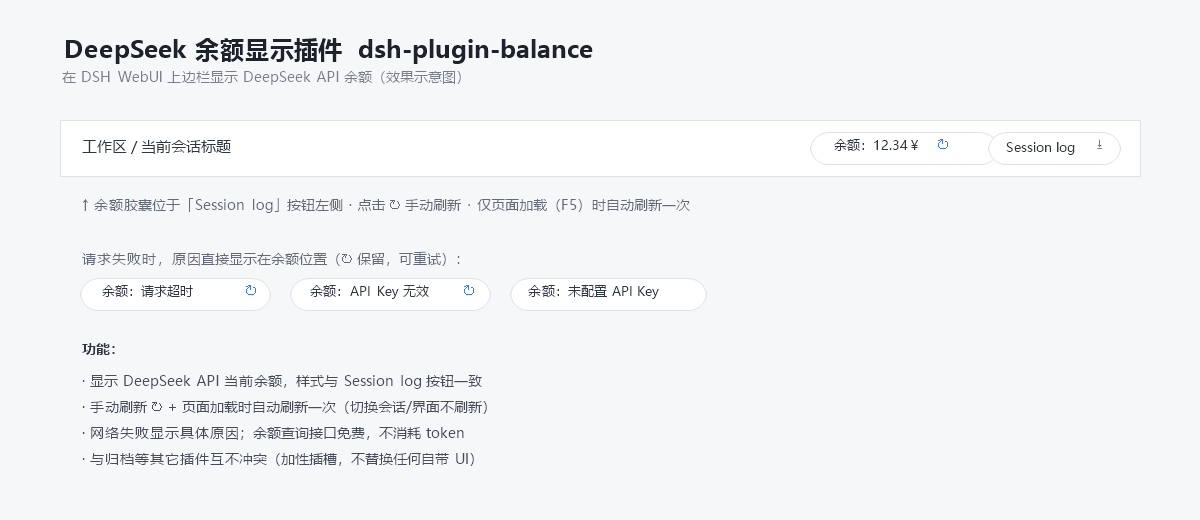
Balance/余额), the loading text, and every error reason follow your DSH UI language (English / Simplified Chinese).Balance: Request timed out, Balance: Invalid API key, Balance: No API key configured).GET https://api.deepseek.com/user/balance) consumes no API tokens.conversation.session.header.utilities (replaceRisk: none) — it never replaces any built-in UI.The API key is resolved through DSH's own credential seam (~/.dsh/.credentials.yaml → DEEPSEEK_API_KEY) and never leaves the host process.
Clone:
git clone https://github.com/anonRTtty/dsh-api-balance-displayer-plugin.gitOr download the ZIP: open the repository page → Code → Download ZIP, then extract dsh-plugin-balance/.
Pick one of the three methods — do not mix them (mixing may register the plugin twice). After installing, restart DSH (or let the patch HMR apply), then hard-refresh the browser (
Ctrl+Shift+R).
No clone needed; the script downloads the release ZIP, copies it into the profile and enables it:
irm https://raw.githubusercontent.com/anonRTtty/dsh-api-balance-displayer-plugin/main/scripts/install.ps1 | iexOr after cloning/extracting:
cd dsh-plugin-balance
powershell -ExecutionPolicy Bypass -File .\scripts\install.ps1
Non-default profile: powershell -ExecutionPolicy Bypass -File .\scripts\install.ps1 -ProfileName headless
dsh plugin)dsh plugin --profile web add github:anonRTtty/dsh-api-balance-displayer-pluginThis plugin declares dsh.bundle, so the official command adds it to dsh.profile.bundles and applies the in-package cordis.patch.yml automatically — no manual config editing needed.
Copy the whole dsh-plugin-balance/ directory to:
C:\Users\Administrator\.dsh\profiles\node_modules\dsh-plugin-balance\Append to the insert list in C:\Users\Administrator\.dsh\profiles\web\cordis.patch.yml:
- insert:
    - id: dsh-plugin-balance
      name: dsh-plugin-balance
Restart DSH.
One-command (Windows PowerShell):
irm https://raw.githubusercontent.com/anonRTtty/dsh-api-balance-displayer-plugin/main/scripts/uninstall.ps1 | iexOr locally: powershell -ExecutionPolicy Bypass -File .\scripts\uninstall.ps1
Or manually: remove the dsh-plugin-balance entry from cordis.patch.yml, delete C:\Users\Administrator\.dsh\profiles\node_modules\dsh-plugin-balance\, then restart DSH.
(If you installed via Method 2, also run dsh plugin --profile web remove dsh-plugin-balance.)
dsh-plugin-balance/
├── package.json        # package manifest + dsh.bundle (auto-activate via CLI) + dsh.client
├── cordis.patch.yml    # bundle patch (applied automatically on CLI installs)
├── src/
│   ├── index.js        # Host half: /api/plugin.balance route (webServer exact route)
│   └── client.js       # Browser half: localized balance capsule (module-loader bundle)
├── scripts/
│   ├── install.ps1     # Windows one-command install script
│   └── uninstall.ps1   # Windows uninstall script
├── screenshot.png      # Screenshot
├── README.md           # English
├── README.zh-CN.md     # Simplified Chinese
└── LICENSEGET https://api.deepseek.com/user/balance (free, consumes no tokens). The credential is read from DEEPSEEK_API_KEY in ~/.dsh/.credentials.yaml (the same seam the built-in model route uses); the key never leaves the host process./api/plugin.balance via webServer (same extension point as dsh-plugin-session-delete); the browser fetches it same-origin.CLASSIFICATION EVIDENCE
系统优先读取 GitHub Topics,再与站内分类词典和词根规则比对。当前命中: 无有效分类标签。
deepseek-ai
DeepSeek Harness: Everything is a Plugin.

anywhere-labs
为 DeepSeek Harness (DSH) 插件生态打造的现代化桌面端解决方案。万物皆「插件」,桌面本身也是「插件」。

walkinglabs
Harness engineering beginner tutorial, from 0 to 1