

其他
完整应用

deepseek-harness
deepseek-ai
DeepSeek Harness: Everything is a Plugin.
PROJECT TOPICS
INSTALL REFERENCE
dsh plugin --profile web add github:alpacachen/dsh-kanban
该命令指向仓库当前默认分支;尚无绑定当前 commit 的完整验证结果。
PROJECT README
A collaborative kanban board where you and your AI agent plan, organize, and ship work together—without leaving DeepSeek Harness.



Simplified Chinese · English
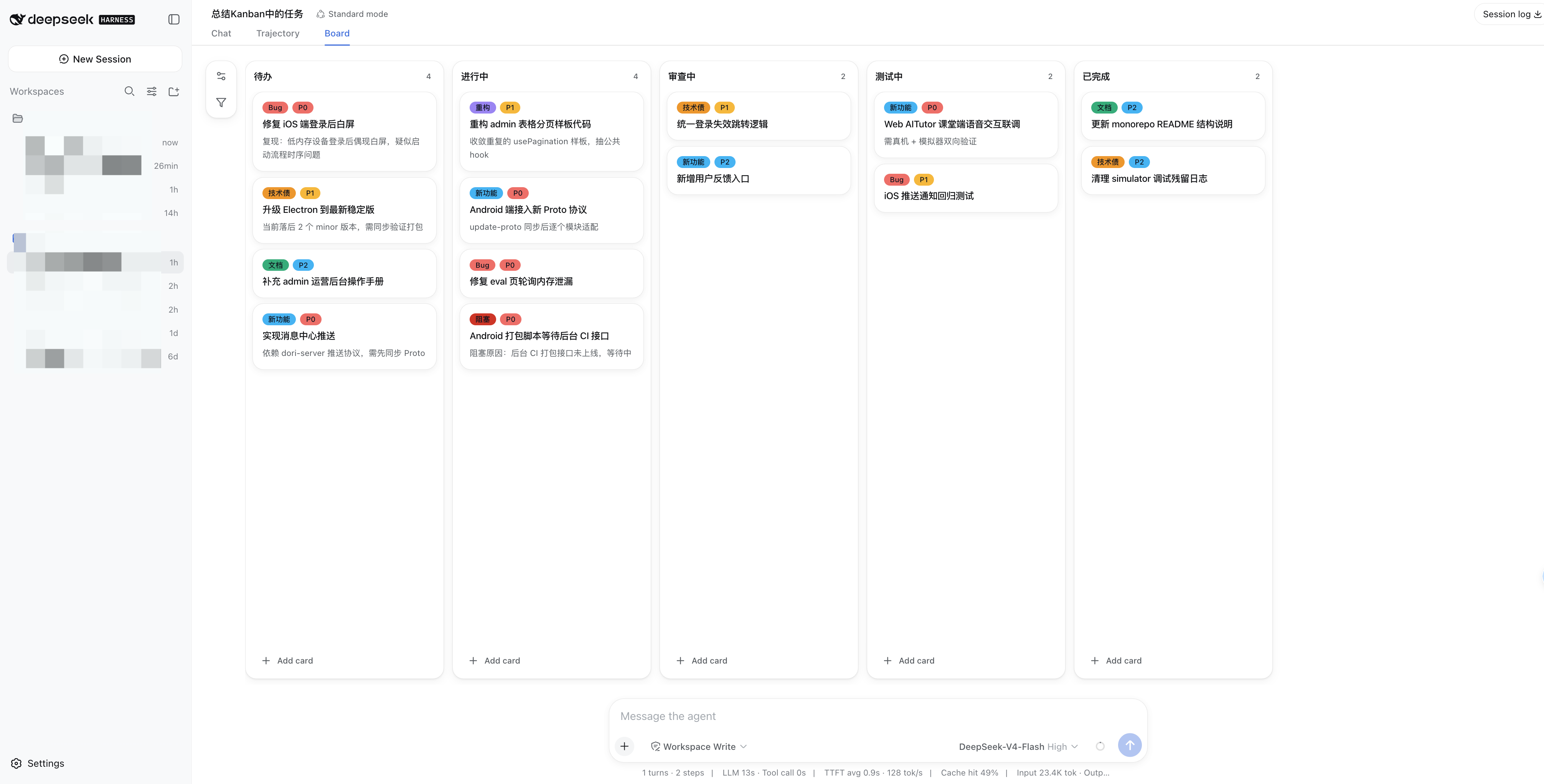
Stop copying AI-generated plans into a separate project tracker. Tell your agent what you want to build, and watch it turn the plan into cards, priorities, labels, and workflow updates on the Board tab.
You can take over at any time—drag a card, refine a note, reorder a list—and the agent immediately works from the same board.
| 💬 Plan naturally | 🧭 Stay in control | ⚡ Start instantly |
|---|---|---|
Manage the board with 15 built-in kanban_* tools. |
Edit, comment, drag, prioritize, label, and filter from the UI. | Install the prebuilt plugin—no frontend setup required. |
| 🗂️ Keep work separate | 🌓 Feel at home | 🤝 Share one source of truth |
| Every DSH workspace gets its own board. | Follows your DSH language, theme, and dark mode. | You and the agent always see the same tasks and status. |
dsh plugin --profile web add @alpacachen/dsh-kanbanRestart dsh web so the plugin bundle is loaded. You can confirm the installation with:
dsh --profile web --dump-configLook for a dsh-kanban layer in the output.
Enter any workspace and choose the Board tab beside the conversation views. A fresh board starts with four familiar stages:
Todo → In Progress → Review → Done
Try this:
Break the authentication feature into implementation tasks, create one card per step, and mark the security review as P0.
The cards appear directly on your board. Continue in conversation, or switch to the Board tab and shape the plan by hand.
Open a card and choose Chat with agent. dsh-kanban carries its ID, title, label, and notes into either the current conversation or a fresh one, so the agent has the context it needs immediately. The content is inserted as an editable draft—it is never sent until you choose to send it.
The plugin automatically gives the agent these tools in every workspace:
| Area | Tools |
|---|---|
| Board | kanban_get |
| Cards | kanban_get_card, kanban_add_comment, kanban_add_card, kanban_update_card, kanban_delete_card, kanban_move_card |
| Lists | kanban_add_column, kanban_rename_column, kanban_delete_column, kanban_move_column |
| Labels | kanban_get_label, kanban_add_label, kanban_update_label, kanban_delete_label |
“Summarize what is currently in progress.”
“Move ‘Fix login redirect’ to In Progress and set it to P0.”
“Add a Blocked list after In Progress.”
“Create a red Urgent label and apply it to the release card.”
“I'm a lawyer. Set up a board for my day-to-day casework, create the workflow stages and labels I’ll need, and keep them up to date as my work evolves.”
You do not need to design the workflow first. Tell the agent your role, situation, or goal, and it can create suitable stages and labels—then keep refining them as you work.
MIT
CLASSIFICATION EVIDENCE
系统优先读取 GitHub Topics,再与站内分类词典和词根规则比对。当前命中: 无有效分类标签。
deepseek-ai
DeepSeek Harness: Everything is a Plugin.

anywhere-labs
为 DeepSeek Harness (DSH) 插件生态打造的现代化桌面端解决方案。万物皆「插件」,桌面本身也是「插件」。

awesome-dsh-plugin
A curated list of plugins for DeepSeek Harness (dsh) · DeepSeek Harness 插件精选列表