
模型与 MCP
待识别

rea
morluto
Reverse engineer anything with agents, from app behavior down to native binaries.
PROJECT TOPICS
INSTALL REFERENCE
dsh plugin --profile web add github:alienzhou/html-workbench
该命令指向仓库当前默认分支;尚无绑定当前 commit 的完整验证结果。
PROJECT README
English · 中文
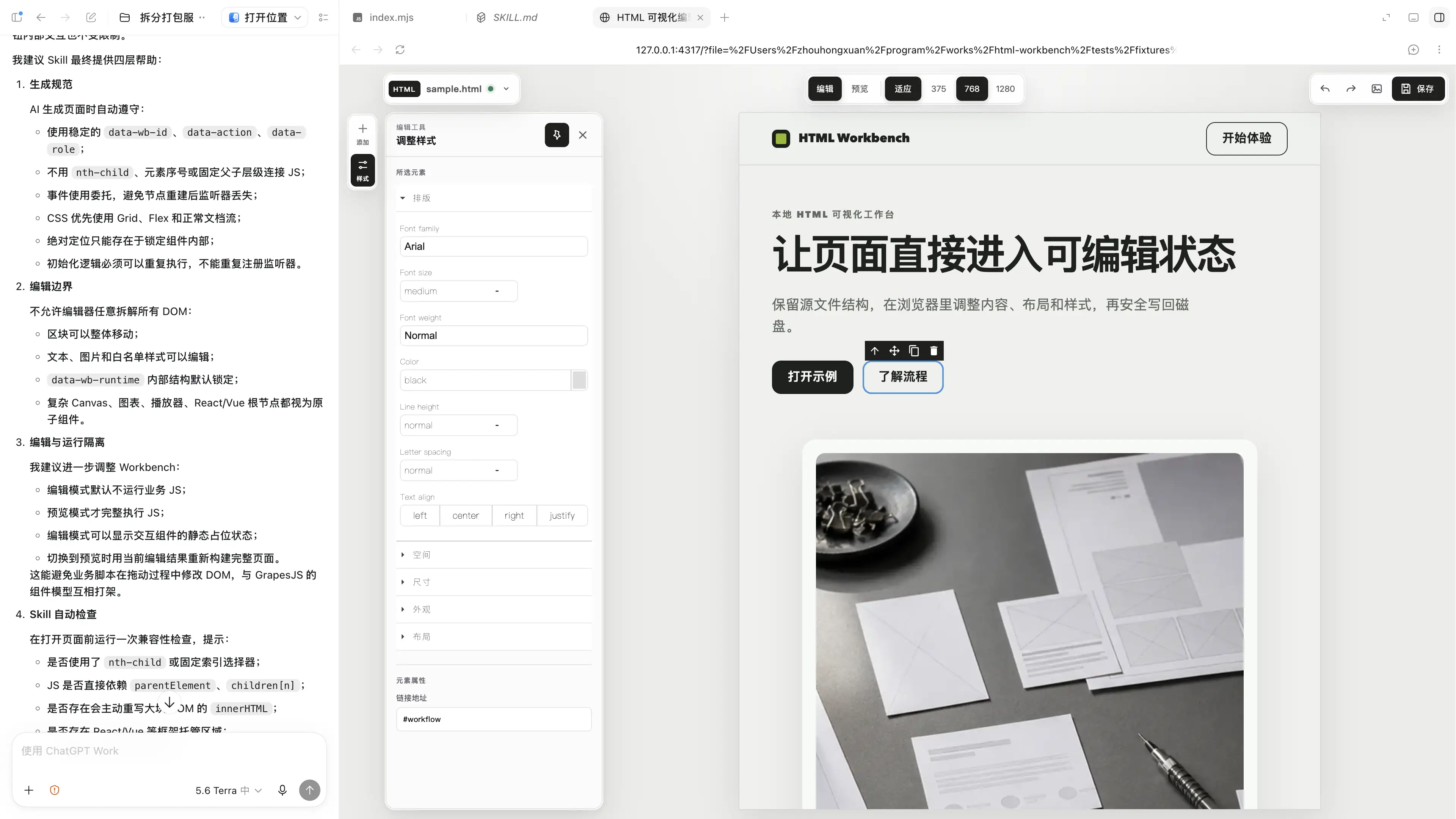
Turn an existing HTML page into a local workspace where people can edit it visually, preview its interactions, and save changes back to disk.
The workflow is simple: create a page with the tool you prefer, refine copy, images, layout, and styling directly in the browser, then switch to Preview to test buttons, links, and page behavior. Both people and AI continue to work from the same HTML source file.
HTML Workbench is not an HTML generator. Create HTML however you prefer—with any AI, design tool, template, or hand-written code—then give that file to HTML Workbench. It turns the existing document into a visual editor with preview and real-time collaboration against the same source file.
HTML Workbench is also a first-class plugin for DeepSeek Harness — the agent harness this tooling plugs into — published as @vibe-x/dsh-html-workbench. DeepSeek Harness ships a built-in plugin system, and this plugin brings the visual editor straight into its web UI's right sidebar: no separate browser window and no manual open command.
As the agent creates or edits .html files (through the write / edit tools), the panel tracks them automatically. Open one to edit copy, images, layout, and styles in the embedded GrapesJS editor, switch to Preview to test interactions, then Save to write the result back to the same source file.
Install DeepSeek Harness, pnpm, and Python 3.9+. Use the Node.js version required by your DSH release. For DSH 0.2.2-rc.1, use Node.js 24.9.0 or newer.
dsh plugin --profile web add -w @vibe-x/dsh-html-workbenchRestart dsh web and refresh the browser. If the installed version is 0.3.1 and the diagnostics show shell.start is not a function, install a package built from source.
.html file in the workspace. The plugin picks it up automatically.The plugin reuses a running local HTML Workbench service when one exists, or starts one in the background — and stops the process it started when the plugin unloads. Everything stays on 127.0.0.1.
Development: the plugin source lives in
dsh-plugin/. Build its distributable artifacts (client bundle, bundled Python service, frontend) withnode dsh-plugin/build.mjs, orcd dsh-plugin && npm run build.
For troubleshooting, click HTML Workbench at the top of the panel and select 复制排查提示词 (Copy troubleshooting prompt). Give it to an agent on the affected computer so it can collect the local logs and draft an issue for review. Log locations and fallback prompt
127.0.0.1; files are never exposed to the LAN.First create one self-contained HTML page with the tool of your choice, then open it in Workbench. Keep its HTML, CSS, JavaScript, and required visual assets in one .html file, without a CDN or extra project directory. This makes the page easier to copy, open, edit, and share reliably.
Generate interactions according to the Workbench compatibility rules. Use stable semantic markers instead of relying on nth-child, DOM ancestry, or node ordering. The Skill checks these common risks before opening the page.
Create one HTML file
        ↓
Compatibility validation
        ↓
Open and edit in HTML Workbench
        ↓
Switch to Preview and verify interactions
        ↓
Save back to the original HTML fileEnd users need Python 3.9 or later—no Node.js, npm, or pip packages.
Validate a newly created single-file page:
python3 skill/html-workbench/scripts/validate_html.py \
  --require-self-contained \
  /absolute/path/page.html
Then open it:
python3 skill/html-workbench/scripts/workbench.py open /absolute/path/page.htmlopen is the only service command needed in normal use. It reuses a running local service when available, or starts one in the background when needed. Its JSON output contains the editor url; open that URL in any browser. Agents with browser control can open it automatically.
Only use the following command when you explicitly want to manage a foreground service:
python3 skill/html-workbench/scripts/workbench.py serveThe distributable Skill lives in skill/html-workbench. When an Agent is also asked to create or edit an HTML file, it guides this handoff:
open.Read the generation guide and validation rules for details.
Source code stays in service/, build/, and tests/; the distributable Skill is maintained in skill/html-workbench/, and the DeepSeek Harness plugin in dsh-plugin/.
npm install
npm run build
npm test
The build bundles the workbench frontend into one workbench.html and copies the dependency-free Python service and validator into the Skill. GrapesJS is downloaded at first service launch, hash-verified, and cached locally. The download sequence prefers npmmirror, then falls back to other public sources; later launches can reuse the local cache offline.
CLASSIFICATION EVIDENCE
系统优先读取 GitHub Topics,再与站内分类词典和词根规则比对。当前命中: deepseek-harness。
morluto
Reverse engineer anything with agents, from app behavior down to native binaries.

deepseek-ai
DeepSeek Harness: Everything is a Plugin.

nexu-io
The 1st Collaborative AI Design Agent Workspace. Local-first and open source. Create motion, prototypes, websites, apps, dashboards, presentations, images, and videos with your team and AI agents. Share work, exchange feedback, and iterate together in one workspace.