
Agent 与会话
插件

nuwa-skill
alchaincyf
你想蒸馏的下一个员工,何必是同事。蒸馏任何人的思维方式——心智模型、决策启发式、表达DNA。Distill how anyone thinks.
PROJECT TOPICS
INSTALL REFERENCE
dsh plugin --profile web add github:alexz949/dsh-personal-agent
该命令指向仓库当前默认分支;尚无绑定当前 commit 的完整验证结果。
PROJECT README
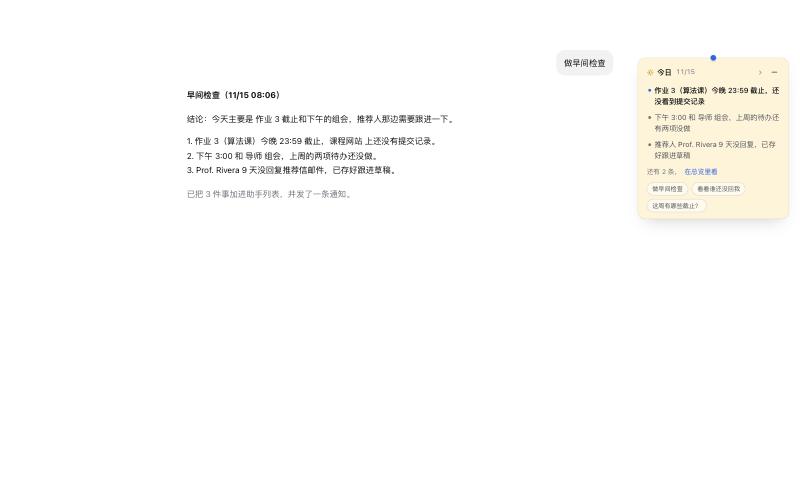
A personal assistant plugin for DeepSeek Harness (DSH) on macOS. It adds a Personal agent preset that works with your Apple Calendar, Reminders, Notes and Mail, keeps a 今日 (today) sticky note and a weekly work journal, and makes DSH open on your main conversation.
| 今日 note over the main conversation | Overview page |
|---|---|
 |
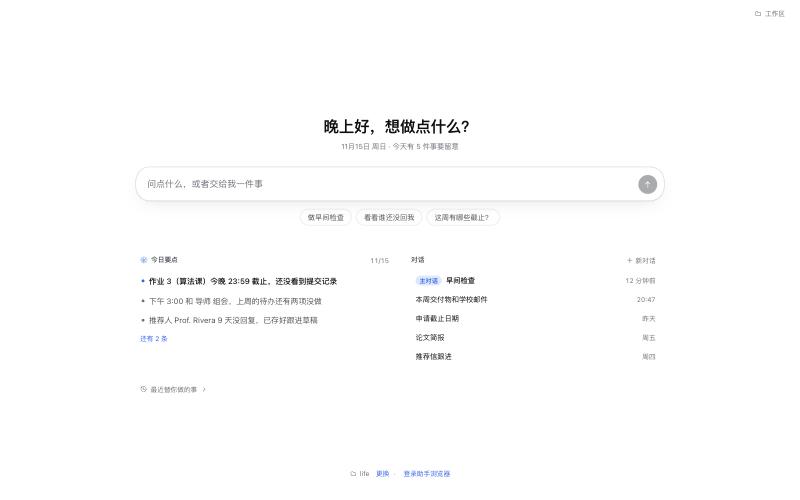 |
Screenshots use made-up sample data.
Status: early, macOS only. The persona and the interface are in Chinese for now (an English version is on the roadmap); the tools themselves work in any language.
today_update).tasks.json keeps only links and context, and the 今日 note is a view.task_list checks Reminders and Mail first, so a reminder ticked off or a reply sent directly in those apps shows up. It tells "draft saved" apart from "reply sent", and when a check fails it says so instead of reporting everything done.reminders_update, calendar_update), including "remind me tomorrow" or "push it a week" as relative moves that keep the time of day across daylight-saving changes. A moved reminder no longer rings at its old time.calendar_update with repeat). The card says how many later occurrences drop off.calendar_delete): a single event, one week of a repeating event, or this and all later occurrences. The card shows the event and, for a series, how many occurrences go. Deleted events cannot be restored from Calendar.journal/2026/2026-W46.md) with a section per day.AGENTS.md, or switch mid-conversation.arxiv_search.bib_add, which appends a paper to your BibTeX/JabRef library.ask_research) that the main agent delegates paper searches to.It also uses DSH's own tools: files, web search, bash in the DSH sandbox, schedules, Office files, skills and memory (with the Mnemon plugin). It can optionally drive a headless Chrome through Microsoft's Playwright MCP, with a visible window only when you need to sign in.
0.2.2-rc.3 or a later 0.2.x.xcode-select --install) for the Swift helper.git clone https://github.com/alexz949/dsh-personal-agent.git
cd dsh-personal-agent
npm run build
npm testThen link the folder into your DSH desktop profile and restart DSH (⌘Q, then open it again):
"/Applications/DeepSeek Harness.app/Contents/Resources/runtime/cli/bin/dsh" plugin --profile desktop add link:$PWDWith a link, updating is git pull && npm run build, then restart DSH. dsh plugin forwards its arguments to pnpm in the profile folder.
In DSH, open Plugins → Add plugin and enter dsh-personal-agent, or run:
"/Applications/DeepSeek Harness.app/Contents/Resources/runtime/cli/bin/dsh" plugin --profile desktop add dsh-personal-agentRestart DSH afterwards. The package includes a prebuilt universal helper (Apple silicon and Intel).
Add https://raw.githubusercontent.com/alexz949/dsh-personal-agent/main/market.json as an index source under Plugins → Discover (DSH's experimental custom plugin market), then install from there.
template/ somewhere private and fill in shared/USER_PROFILE.md and the "This user's setup" section of agents/life/AGENTS.md (mail accounts, folders, default personality). Your notes, journal and profile must never go into a public repository.agents/life as a DSH workspace and start a conversation with the Personal preset. The home asks which workspace to use the first time.helper/ may ask again.Assistant in Reminders for todo_add, or set another name (see Settings).Optional, in ~/.dsh/personal-agent/config.json. You can override the path with PERSONAL_AGENT_CONFIG.
{
  "todoList": "Assistant",
  "notesFolder": "Assistant",
  "bibLibrary": "~/Documents/JabRef/library.bib",
  "actionLog": "~/.dsh/personal-agent/actions.md",
  "browserProfile": "~/.dsh/mcp/playwright/profile",
  "tasksFile": "~/.dsh/personal-agent/tasks.json"
}
bib_add is offered only when bibLibrary is set.
The preset starts Playwright MCP from ~/.dsh/mcp/playwright, using /usr/local/bin/node:
mkdir -p ~/.dsh/mcp/playwright && cd ~/.dsh/mcp/playwright && npm install @playwright/mcp
node node_modules/playwright-core/cli.js install chromium
The second line downloads Playwright's own Chrome for Testing (about 250 MB). The assistant uses it instead of your Google Chrome: it is a separate app with its own Dock icon, so links from other apps never open in it and quitting it never quits your Chrome. The plugin keeps ~/.dsh/mcp/playwright/Chromium.app linked to the newest installed build (setting browserApp), and both the background browser and the sign-in window start from that link. Run the install line again after updating @playwright/mcp.
On Apple Silicon with Homebrew, Node is usually /opt/homebrew/bin/node. Change command in the mcp-browser row of cordis.patch.yml. If it is not installed, the other tools keep working.
The browser runs headless, so no window opens while the assistant works. It uses its own profile in ~/.dsh/mcp/playwright/profile and never sees your everyday Chrome logins.
When a site needs you to sign in (for example a two-step school login), the assistant closes the background browser and calls browser_login. That opens the same profile in a visible Chrome for Testing window. Sign in, quit that window with ⌘Q, and the background browser reuses the saved login from then on. Many school portals sign in with session cookies, which Chrome drops on its next start; when the window quits, the plugin turns the session cookies used there into cookies that last 30 days (in the assistant's profile only, logged in the action log). It remembers those sites and does this again whenever the background browser closes, since sites like Canvas replace their session cookie on every page. The site can still end the session on its side, and two-step login may ask again. You can also start this from 登录助手浏览器 at the bottom of the overview page. The profile path can be changed with browserProfile in the settings file.
To read pages the assistant links to without leaving DSH, set DSH's chat link preference to open links in the in-app sidebar. DSH's own sidebar browser is for you only: the model cannot see or control it.
| Tool | What it does | Asks first? |
|---|---|---|
calendar_events, reminders_list, notes_search, notes_read, mail_accounts, mail_list, mail_read |
read | no |
calendar_create, reminders_create |
create an event / reminder (optionally repeating; shows conflicts) | yes (DSH card) |
calendar_delete |
delete an event, one occurrence, or this and later occurrences | yes (the event and how many occurrences go) |
reminders_update, calendar_update |
change or move a reminder / event, change its repeat rule or end a series early | yes (old and new values, and what drops off) |
task_create, task_update, task_list |
record and track tasks linked to reminders and emails | no |
todo_add |
add a to-do to the assistant list | no |
reminders_complete |
mark a reminder done | no for the assistant list, yes for others |
mail_draft, mail_reply_draft |
save a draft in Mail (never sends) | no |
notes_create |
new note in the assistant folder | no |
today_update |
change the 今日 note (today.md) |
no |
journal_status, journal_write |
read / write the weekly journal | no |
bib_add |
append a paper to your BibTeX file | no |
arxiv_search |
search arXiv | no |
notify |
macOS notification banner | no |
browser_login |
open the assistant browser's profile in a visible Chrome window for signing in | no |
browser_save_output |
copy a browser screenshot into the workspace's files/ so it shows inline in the chat |
no |
mcp/server.js is a stdio MCP server that gives Claude Code the same Apple, notification, arXiv and BibTeX tools. Confirmation cards become MCP elicitations, or the host's permission prompt with --confirm=permission.
cordis.patch.yml adds the personal and personal-research agent presets and the client bundle.
Host tools are ordinary DSH tool modules: lib/apple.js, today.js, journal.js and others.
The client (lib/client.js) uses DSH's public client services where they exist: layout, workspaces, sessions, workspace files, right-sidebar tabs and the shell.overlay slot.
A few internal pieces are used with fallbacks when they are missing:
sessions.binding(...).session.prompt).A future DSH release may change them.
npm run build   # writes lib/ and, on macOS, rebuilds the helper only when helper/ changed
npm test # node --test; uses no network and none of your settingsCLASSIFICATION EVIDENCE
系统优先读取 GitHub Topics,再与站内分类词典和词根规则比对。当前命中: ai-agent、personal-assistant。
alchaincyf
你想蒸馏的下一个员工,何必是同事。蒸馏任何人的思维方式——心智模型、决策启发式、表达DNA。Distill how anyone thinks.

freestylefly
Prompt as Code | GPT Image 2 / 2.5 提示词与案例库,530+ 个案例、20+ 套工业级模板与可复用 Skills,新增 2.5 同提示词对比专区,附完整提示词与生成记录,持续更新。

titanwings
Distilly — Distill how they think into reusable Skills for any Agent or Bot. Formerly Colleague Skill(原同事 Skill).