

学习研究
技能

last30days-skill-cn
Jesseovo
last30days-cn 是一个 AI Agent 技能(Skill),能够自动搜索中国互联网 8 大主流平台最近 30 天的内容,综合分析后生成有据可查的研究报告。
PROJECT TOPICS
INSTALL REFERENCE
dsh plugin --profile web add github:alaliqing/claude-paper
该命令指向仓库当前默认分支;尚无绑定当前 commit 的完整验证结果。
PROJECT README
Transform research papers into comprehensive learning environments


A research-paper learning plugin for Claude Code, Codex, OpenCode, and DeepSeek Harness. It preserves the same study workflow, generated materials, code demonstrations, and interactive web viewer across supported agents.
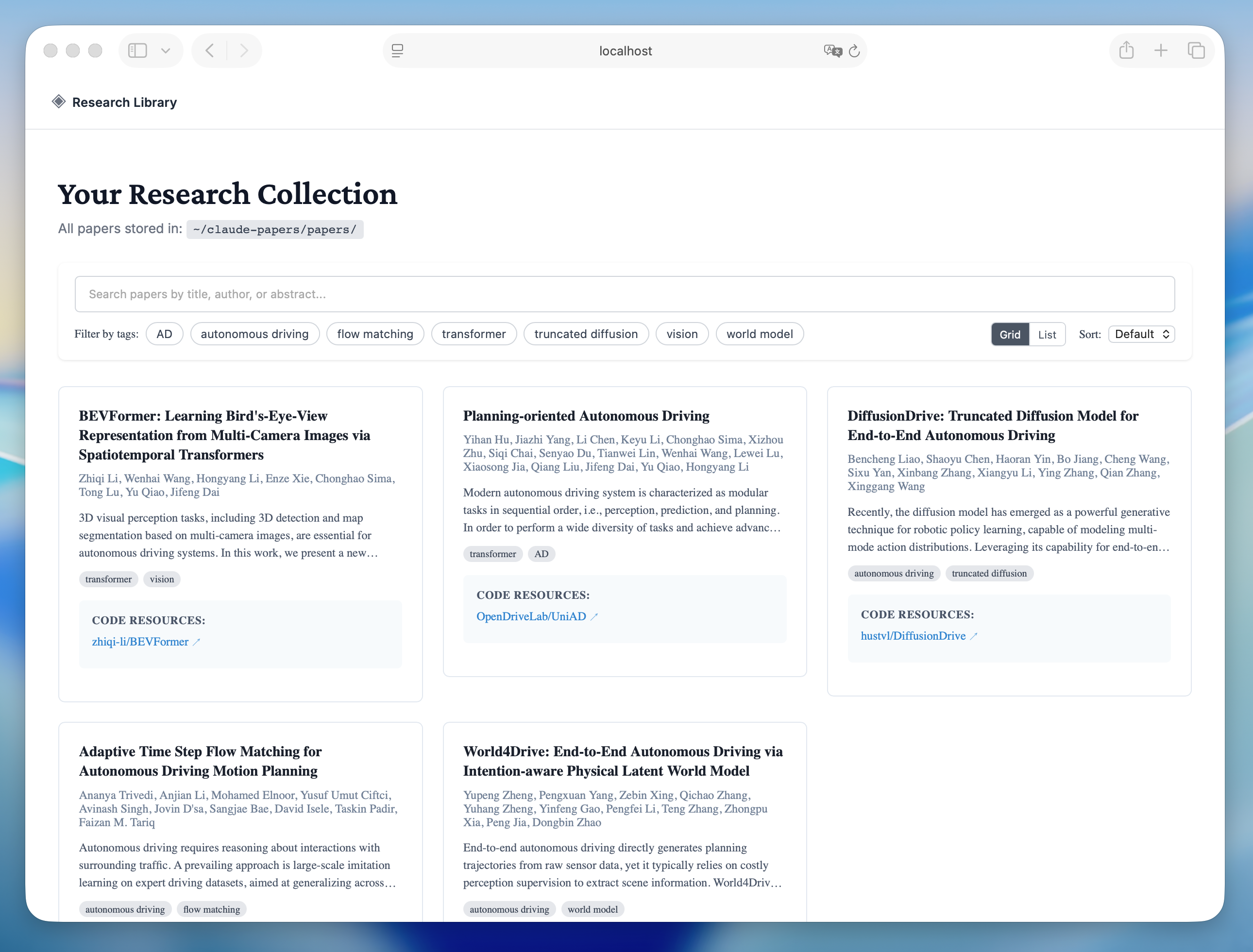
Library View - Browse and search your paper collection |
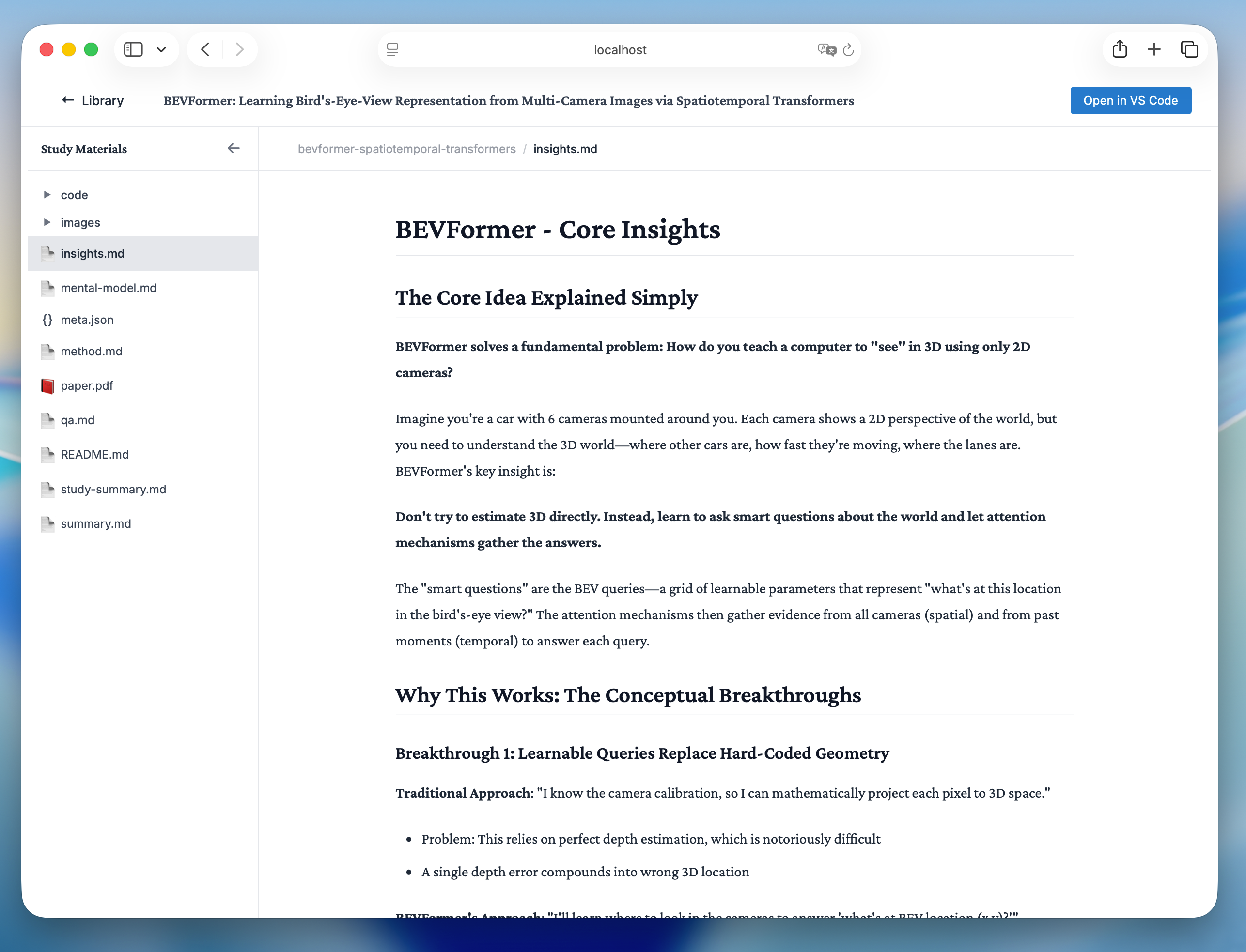
Reading View - Study papers with rich formatting and math support |
paper.txt while keeping a 50k preview in metadataInstall Claude Code, Codex, OpenCode, and DeepSeek Harness with one command—no repository clone required:
npx --yes @zlzliqing/claude-paper@latest installThe default all target covers all four agents. For Claude Code, the installer uses the official Claude CLI to register the package-local marketplace and install or update the user-scoped plugin. For the other agents, it installs the shared Skills and OpenCode commands where applicable.
Install only selected agents when needed:
npx --yes @zlzliqing/claude-paper@latest install --target claude-code
npx --yes @zlzliqing/claude-paper@latest install --target codex
npx --yes @zlzliqing/claude-paper@latest install --target opencode
npx --yes @zlzliqing/claude-paper@latest install --target deepseek-harness
Upgrade an existing installation with the same formal distribution channel:
# Upgrade all supported agents
npx --yes @zlzliqing/claude-paper@latest upgrade

# Keep upgrading only the agents selected during installation
npx --yes @zlzliqing/claude-paper@latest upgrade --target codex,opencode
The default upgrade target is all. If the existing installation only targets selected agents, pass the same --target list during upgrade so no additional agent integrations are added.
The npm package copies its packaged plugin runtime to the user data directory, installs the generated compatibility Skills in ~/.agents/skills/ when a shared-Skills host is selected, and adds OpenCode commands when OpenCode is selected. It initializes ~/claude-papers/ only when the library does not already exist. Restart the selected agents after installation or upgrade.
If you only use Claude Code, you can still install directly from its marketplace:
/plugin marketplace add alaliqing/claude-paper
/plugin install claude-paper
Claude Paper currently runs through Agent Skills; no separate MCP server installation or configuration is required.
all or claude-code is selectedbrew install popplersudo apt-get install poppler-utilssudo pacman -S popplerAsk the selected agent for a quick summary, or use the host command directly:
# Claude Code
/claude-paper:summary /path/to/paper.pdf

# OpenCode
/claude-paper-summary /path/to/paper.pdf
In Codex or DeepSeek Harness, ask for a quick paper summary or explicitly load the claude-paper-summary Skill. This creates quick-summary.md while preserving the PDF, complete paper.txt, and metadata in the shared paper library.
Simply ask the selected agent to study a paper:
Help me study the paper at ~/Downloads/attention-is-all-you-need.pdfYou can also use URLs:
# Direct PDF URL
Help me study the paper at https://arxiv.org/pdf/1706.03762.pdf

# arXiv abstract URL (automatically converted to PDF)
Help me study the paper at https://arxiv.org/abs/1706.03762
The agent will automatically trigger the study workflow and:
# Claude Code
/claude-paper:webui

# OpenCode
/claude-paper-webui
In Codex or DeepSeek Harness, ask the agent to start the Claude Paper web viewer or explicitly load the claude-paper-webui Skill.
Opens the interactive web interface at http://localhost:5815 where you can:
Papers are organized in ~/claude-papers/papers/{paper-slug}/:
~/claude-papers/
├── papers/
│   └── {paper-slug}/
│       ├── paper.pdf                     # Original PDF file
│       ├── paper.txt                     # Complete extracted text
│       ├── meta.json                     # Paper metadata (title, authors, etc.)
│       ├── quick-summary.md               # Concise screening summary (quick workflow)
│       ├── README.md                     # Quick navigation and overview
│       ├── summary.md                    # Detailed summary
│       ├── insights.md                   # Key insights (most important!)
│       ├── method.md                     # Methodology (if complex)
│       ├── mental-model.md              # Paper categorization (if needed)
│       ├── reflection.md                # Future directions (if needed)
│       ├── qa.md                         # Learning questions
│       ├── index.html                    # Interactive HTML explorer
│       ├── images/                       # Extracted figures and tables
│       │   ├── fig1.png
│       │   └── fig2.png
│       └── code/                         # Code demonstrations
│           ├── core-demo.py              # Clean reference implementation
│           └── concept-demo.ipynb        # Interactive Jupyter notebook
│
└── index.json # Global search indexclaude-paper/
├── package.json # npm distribution manifest
├── bin/
│ └── claude-paper.mjs # npx install and upgrade entry point
├── .claude-plugin/
│ └── marketplace.json # Claude Code marketplace catalog
├── .codex-plugin/
│ └── plugin.json # Codex plugin manifest
├── .agents/skills/ # OpenCode and DSH discovery entries
├── .opencode/commands/ # OpenCode slash-command wrappers
├── skills/ # Codex packaged Skill adapters
├── scripts/
│ ├── sync-agent-adapters.mjs # Deterministic adapter generator
│ └── install-agent-adapters.mjs # Cross-agent installer and upgrader
├── plugin/
│ ├── .claude-plugin/
│ │ └── plugin.json # Plugin manifest
│ ├── skills/
│ │ ├── study/
│ │ │ ├── SKILL.md # Study workflow definition
│ │ │ └── scripts/
│ │ │ ├── parse-pdf.js # PDF parsing utility
│ │ │ └── extract-images.py # Image extraction
│ │ ├── summary/
│ │ │ └── SKILL.md # Quick summary workflow definition
│ │ └── webui/
│ │ └── SKILL.md # Web viewer workflow definition
│ ├── commands/
│ │ └── webui.md # /webui command
│ ├── hooks/
│ │ ├── hooks.json # Session lifecycle hooks
│ │ └── check-install.sh # Installation verification
│ ├── src/
│ │ └── web/ # Nuxt.js web viewer
│ │ ├── components/ # Vue components
│ │ ├── composables/ # Vue composables
│ │ ├── server/ # API endpoints
│ │ └── package.json
│ └── package.json
└── README.md# Verify cross-agent adapters and reviewed canonical Claude Skills
npm test
# Verify generated adapters are synchronized
npm run check:adapters
# Test PDF parsing
node plugin/skills/study/scripts/parse-pdf.js /path/to/paper.pdf
# Test web viewer
cd plugin/src/web
npm run dev
# Test full workflow
cd /path/to/claude-paper
claude --plugin-dir ./plugin
/claude-paper:study /path/to/paper.pdf# Runs adapter checks and tests before producing the publishable tarball
npm pack --dry-run# Build web viewer
cd plugin/src/web
npm run build
# The built viewer will be in .output/No configuration required! The plugin uses sensible defaults:
~/claude-papers/581550,000 characters; complete extracted text remains in paper.txtYou can modify behavior by editing the skill file at:
plugin/skills/study/SKILL.md
Contributions are welcome! Please:
git checkout -b feature/amazing-feature)git commit -m 'add amazing feature')git push origin feature/amazing-feature)This project is licensed under the MIT License - see the LICENSE file for details.
CLASSIFICATION EVIDENCE
系统优先读取 GitHub Topics,再与站内分类词典和词根规则比对。当前命中: agent-skills、academic-tools、claude-code、code-generation、learning-management、pdf-parser、research-papers。
Jesseovo
last30days-cn 是一个 AI Agent 技能(Skill),能够自动搜索中国互联网 8 大主流平台最近 30 天的内容,综合分析后生成有据可查的研究报告。

Tiger3807861189
GLM-5.3-Flash × J-Space capability realization — benchmark presentation of the J-Space Cognition Suite

Electricitysheep
DeepSeek Harness (dsh) 从 0 到 1 深度手册:安装/插件开发/性能调优/实测案例/同模型多 Agent 实测对比(中文 + 英文 PDF)