
模型与 MCP
待识别

rea
morluto
Reverse engineer anything with agents, from app behavior down to native binaries.
PROJECT TOPICS
INSTALL REFERENCE
dsh plugin --profile web add github:airainal/dsh-codex-mode
该命令指向仓库当前默认分支;尚无绑定当前 commit 的完整验证结果。
PROJECT README
A Codex-style execution mode for DSH. It adds a switch at the top of the permission menu, keeps a durable plan, emits visible progress while tools run, and continues a turn that stops with unfinished work.
The important difference from a prompt-only mode: if the model emits a tool call without text, the host driver commits a short progress message before the tool runs, as part of the durable assistant message. A long turn is not a silent tool loop.
codex_mode storage domain. Turning it on or off applies to every live root
session; new and resumed sessions inherit it automatically.codex-read-only,
codex-workspace-write, or codex-danger-full-access, so the mode appears in
the session log and survives resume.0.2.2-rc.3.engines.dsh: ^0.2.1-rc.1; install it on a 0.2.x
runtime.Start a new DSH session and send:
Install this DSH plugin bundle from GitHub: https://github.com/airainal/dsh-codex-modeThe agent can call the plugin_manager tool with that URL. The manager checks
the GitHub repository, installs the bundle, and enables it. You can also open
Plugins → Install bundle and paste:
https://github.com/airainal/dsh-codex-modeIf your DSH version wants an explicit git spec, use:
github:airainal/dsh-codex-modeDownload the asset from
Releases and paste either
the release asset URL or the downloaded .tgz path into Plugins → Install
bundle:
https://github.com/airainal/dsh-codex-mode/releases/download/v1.1.1/dsh-codex-mode-1.1.1.tgzRead Only, Workspace Write, or Full access exactly as before. The
mode and the permission level are independent.HMR applies the change immediately in the desktop app. If your profile has HMR disabled, restart DSH after installation.
To remove it, open Plugins → Codex Mode → Remove, or ask the agent to remove the bundle.
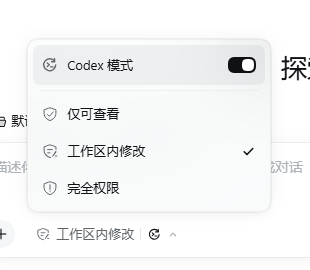
The menu has two dimensions:
Turning Codex on while Workspace Write is selected moves every live root
session to its matching codex-workspace-write identity, but each sandbox stays
workspace-write. The last switch state is remembered; a new or resumed session
is moved to its matching codex-* identity automatically. Changing permission
while the mode is on keeps the global mode and changes only that session's
permission base.
The same toggle is available as a Host command:
/codex-mode on
/codex-mode off
Auto review is disabled while Codex is on because there is no codex-auto
identity. Turn Codex off first if you want Auto review.
The trigger shows a Codex mark on the right when the mode is on. It slides out with a 240 ms width/opacity transition, and the menu stays open while switching.
The package is a DSH bundle with a Host half and a Web client half.
cordis.patch.yml adds the three codex-* permission presets and mounts the
Host plugin.codex_mode storage domain keeps { enabled, updatedAt }.
The /codex-mode on|off command writes it first, then applies the matching
codex-* or base preset to every live root session. The agent/created
listener applies the remembered value to new and resumed root agents.codex:mode system-prompt section and wraps each
live agent's step. In Codex mode, an assistant/message that contains only
tool calls gets a leading progress text block before it is committed; the
matching text-chunks record is added to the stream and tool-call block
indexes are shifted so content and stream stay aligned.agent/turn-stopping provides one continuation steer when the plan is
unfinished and the reply is not a question.This is a Codex step driver, not a second tool runtime. DSH still owns turn construction, tool dispatch, approvals, retries, compaction, and the event log. A full fork of those systems would duplicate a large amount of tested infrastructure; the driver changes the part users actually see: progress output and turn continuation.
The line is not a UI status chip. In a test turn that explicitly told the model
not to emit text, the model's stream contained only reasoning and tool-call
chunks, with no text-chunks. The committed assistant message was:
[reasoning, "我先读取 `dsh-codex-mode/client.js`。", tool-call]The matching stream indexes were reasoning 0, text 1, tool-call 2. The
text could only come from the Host driver. The test was run locally against DSH
0.2.1-rc.3; the session log itself is not published.
0.2.1-rc.x. It uses the live agent's step and the
session append boundary; a future DSH release can change those internals.apply_patch, Codex-style
one-tool scheduling, shell/output limits, and Codex compaction thresholds are
not implemented.permission row to add the codex-* presets. If you
maintain custom permission presets in a profile, carry them into
cordis.patch.yml before installing./permission command also lists the codex-* identities. Use the
composer menu or /codex-mode on|off for the global switch; a direct
/permission change is a per-session override.codex-* presets because
they are ordinary permission presets; the composer menu is the intended place
to switch a running session.| Menu, light | Trigger |
|---|---|
|
 |
| Dark risk gate | Narrow layout |
|---|---|
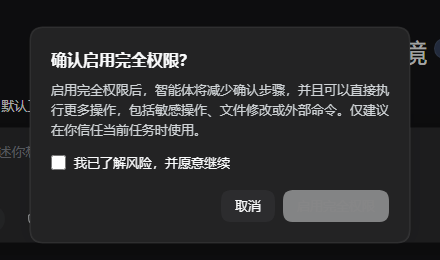 |
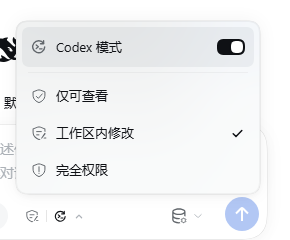 |
There is no build step.
git clone https://github.com/airainal/dsh-codex-mode.git
cd dsh-codex-mode
Install the directory as a bundle through Plugins → Install bundle, or ask a
DSH agent to install that path with plugin_manager. The Host plugin exports
apply(), the client is a plain window.__ModuleLoader__ module, and the bundle
patch is cordis.patch.yml.
To build the release tarball:
pnpm pack把下面这句直接发给新的 DSH 会话:
安装这个 DSH 插件 bundle:https://github.com/airainal/dsh-codex-mode装好后打开任意会话,点输入框下方的权限按钮,在菜单顶部打开 Codex 模式。 开关状态会被记住并同步到所有会话,新会话自动继承;权限级别不会改变。
MIT. See LICENSE.
CLASSIFICATION EVIDENCE
系统优先读取 GitHub Topics,再与站内分类词典和词根规则比对。当前命中: deepseek-harness。
morluto
Reverse engineer anything with agents, from app behavior down to native binaries.

deepseek-ai
DeepSeek Harness: Everything is a Plugin.

nexu-io
The 1st Collaborative AI Design Agent Workspace. Local-first and open source. Create motion, prototypes, websites, apps, dashboards, presentations, images, and videos with your team and AI agents. Share work, exchange feedback, and iterate together in one workspace.