
模型与 MCP
待识别

rea
morluto
Reverse engineer anything with agents, from app behavior down to native binaries.

adithyanraj03/dsh-schedule-later
Schedule a message into a dsh chat for later: a Schedule button in the message box with a date and time picker, a sidebar panel of pending messages across chats, host-side delivery with the browser closed, and model tools plus a skill.
PROJECT TOPICS
INSTALL REFERENCE
dsh plugin --profile web add github:adithyanraj03/dsh-schedule-later
该命令指向仓库当前默认分支;尚无绑定当前 commit 的完整验证结果。
PROJECT README

English | 中文





A DeepSeek Harness plugin that schedules a message into a dsh chat for later — picked by you from a date and time picker in the message box, or by the model with its own tools.
It runs on the host, not in the browser. Schedule it, close the tab, go to sleep: the dsh process sends it on time as a normal user bubble, and the model replies to it exactly as if you had pressed Send.
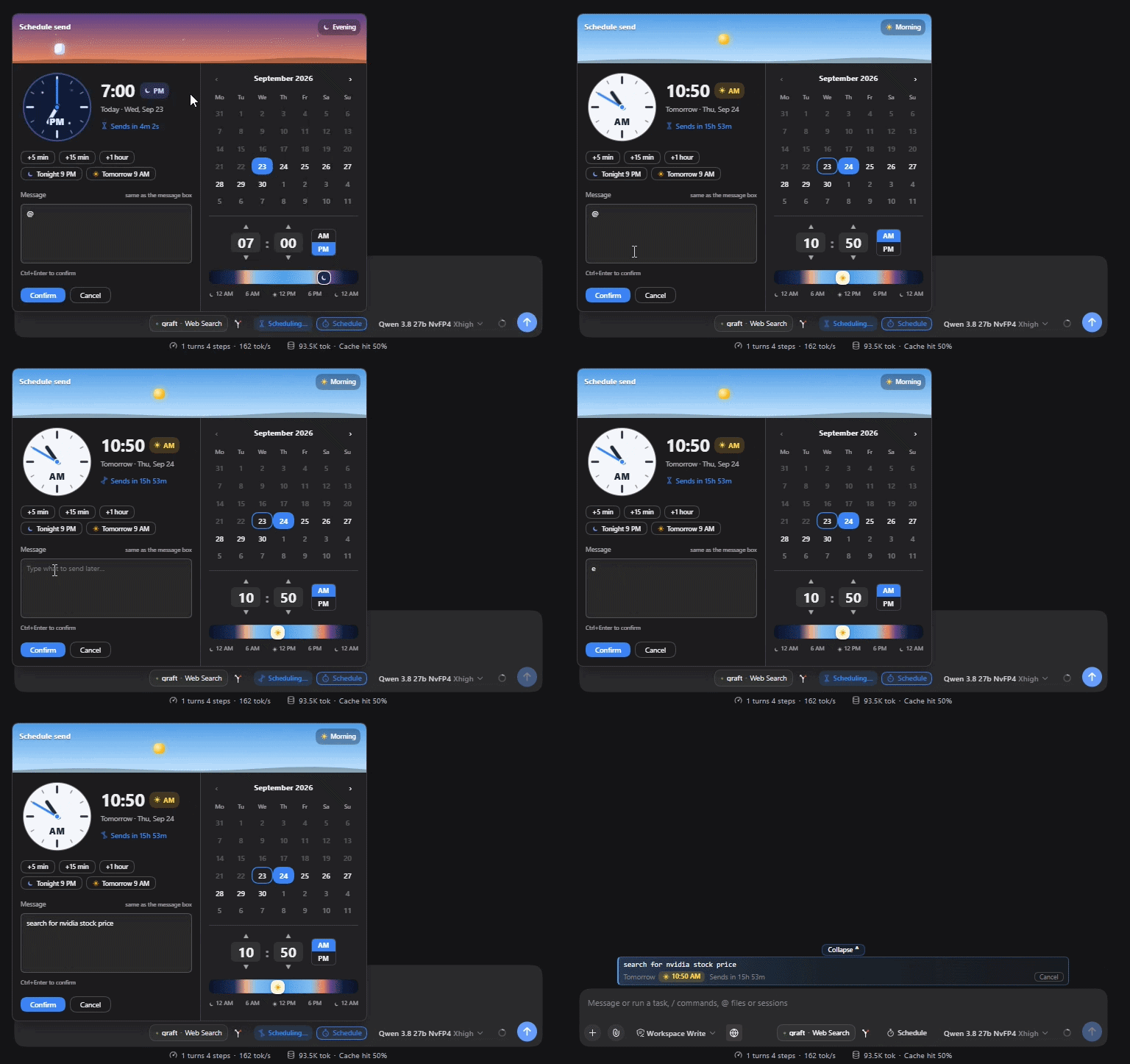
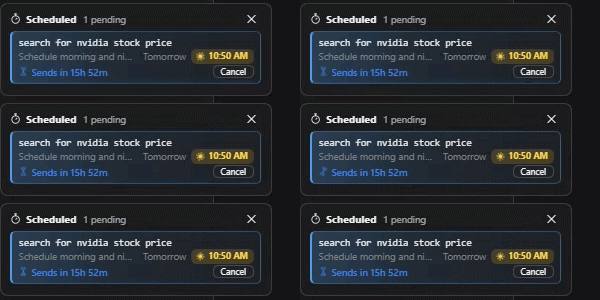
It does five things:
schedule_message, list_scheduled_messages, cancel_scheduled_message — so the assistant can come back to a chat on its own.schedule-later skill — teaches the model when to schedule its own check-ins unprompted.Requires a working dsh with a web profile.
dsh plugin --profile web add dsh-schedule-later
dsh --profile web
Or install from GitHub or a local folder instead:
dsh plugin --profile web add github:adithyanraj03/dsh-schedule-later
dsh plugin --profile web add /path/to/dsh-schedule-later
Then restart dsh (dsh --profile web) if it was already running, and hard-refresh the browser (Ctrl+Shift+R / Cmd+Shift+R) — a plain refresh can serve a cached client bundle. A ⏱️ Schedule button appears in the message box row, and a ⏱️ Scheduled entry appears at the bottom of the sidebar.
dsh-send-later?This is the same plugin under its published name. Do not run both in one profile: they register the same three model tools and the same message-box button, so remove the old one first — its row from the profile's cordis.patch.yml and its entry from the profile's package.json.
Pending messages live in a folder named after the plugin, so to keep them, copy the queue across while dsh is stopped:
mkdir -p ~/.dsh/dsh-schedule-later
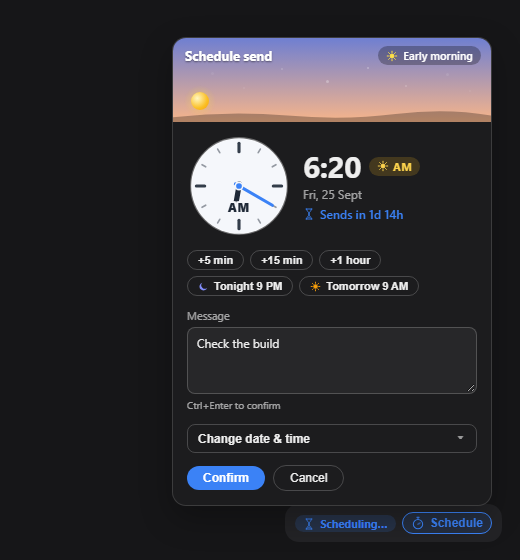
cp ~/.dsh/dsh-send-later/tasks.json ~/.dsh/dsh-schedule-later/tasks.jsonSits on the message box row, next to Send. Type as usual → click ⏱️ Schedule → the scheduler opens (defaults to now + 5 minutes, any future time allowed) → Confirm turns the draft into a scheduled message and clears the box. Nothing is sent immediately. Multi-line text and Markdown source are kept exactly as typed.
The header is a sky that follows the chosen time — dawn, day, dusk, night — with the sun or moon moving along its arc, and an analog clock sweeping to the hour, its face light by day and dark with stars by night. The time carries an AM/PM pill with a sun or a moon, so 9:00 PM is never mistaken for 9:00 AM. Quick picks: +5 min, +15 min, +1 hour, Tonight 9 PM, Tomorrow 9 AM, and a live “Sends in …” underneath.
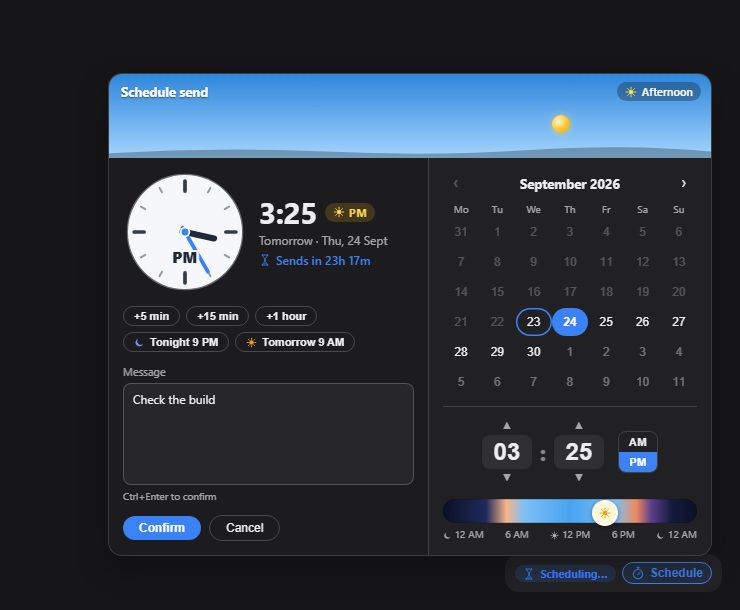
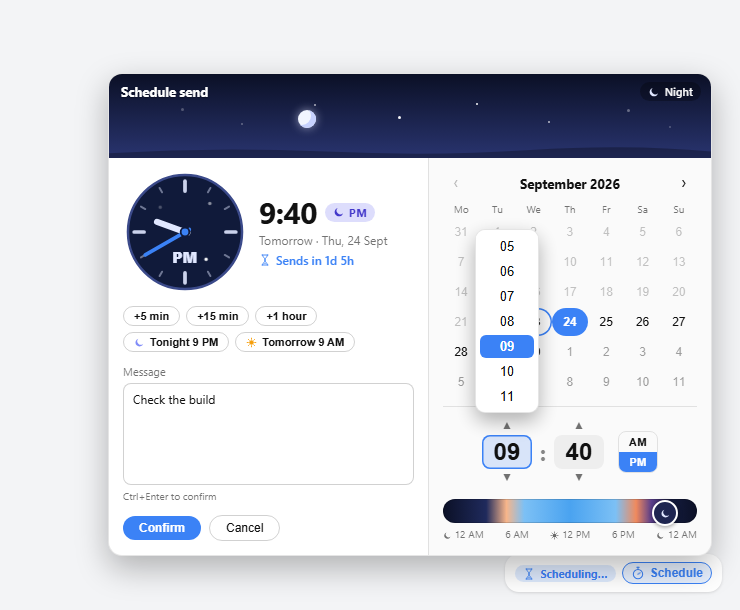
It animates without being noisy: the stopwatch sweeps while you schedule and nudges on hover, the sidebar icon ticks slowly while anything is pending, and the hourglass turns over on every countdown. All of it stops when the OS asks for reduced motion.
On phones and narrow windows (≤480px) the picker folds into a near-full-width popover, with touch targets at least 40px tall:
Cancel any pending message from the chip or the sidebar panel — both ask first.
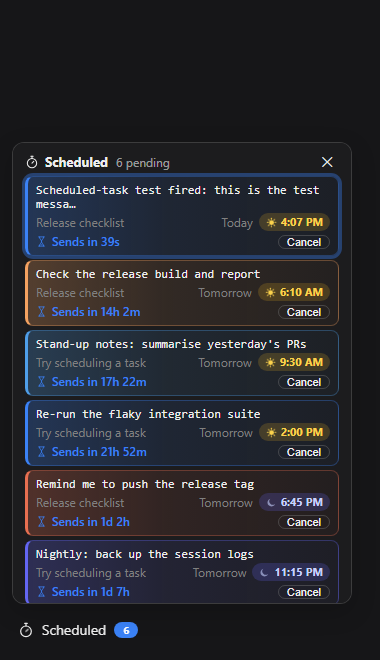
An entry at the bottom of the sidebar, with a badge counting every pending message, opens a panel listing pending messages across all chats, soonest first, each row showing the message in monospace (clamped to two lines), the send time and a countdown. Messages are grouped under their chat — click the chat's name to open it. Click a message for its details: the full text, who scheduled it and when, and Send now, Change time and Cancel. Send now and Cancel ask for confirmation first. Cancel from here for any chat. Entries whose chat was deleted are greyed out but can still be cancelled.
Per-message model. The details card has a Model row: the selection that message will run on, or "Chat default" to follow whatever the chat itself is set to. Change opens dsh's own model list — every provider and model, each with its reasoning levels as chips — and picking one stores it on that message only. At delivery the host switches the chat's agent to that selection for the single turn, then puts the chat's own model straight back, so a scheduled message can be a cheap model overnight and the chat keeps its expensive one.
Pending messages for the current chat also appear as a one-line chip fused to the top of the message box — the soonest message truncated, its time, a live countdown and a ✕ that cancels it after asking. With more than one pending, a “+N” badge counts the rest. Click the chip and the sidebar panel opens straight on that message, where the full text lives.
Three tools let the assistant schedule messages into the chat it is working in — to come back to something later without you having to remember:
| Tool | What it does |
|---|---|
schedule_message |
Schedule a message into this chat, by delay_minutes or an ISO 8601 at (no offset = this machine's local time). |
list_scheduled_messages |
List what is pending in this chat — yours and the assistant's — and the current local time. |
cancel_scheduled_message |
Cancel a message the assistant scheduled. |
Ask things like “remind me at 6pm to push the release” or “check the CI run again in 20 minutes”. When it fires, it arrives as a new turn and the model acts on it.
Guard rails, because an assistant that can wake itself up could otherwise do so forever:
[Scheduled by the assistant], so nobody mistakes them for you typing live.The plugin ships a schedule-later skill (SKILL.md), registered with dsh's skills service, whose catalog entry the model sees every turn. It teaches when to come back unprompted — a build, deploy or job still running, a page or status that will change, something you said you would do later — how to write the message so its future self can act on it cold, and to tell you what it scheduled and when. Edit SKILL.md to change that behaviour; it is re-read on every catalog refresh.
web dsh profile — engines: dsh >= 0.1.0reactMIT — see the LICENSE file.
CLASSIFICATION EVIDENCE
系统优先读取 GitHub Topics,再与站内分类词典和词根规则比对。当前命中: deepseek-harness。
morluto
Reverse engineer anything with agents, from app behavior down to native binaries.

deepseek-ai
DeepSeek Harness: Everything is a Plugin.

nexu-io
The 1st Collaborative AI Design Agent Workspace. Local-first and open source. Create motion, prototypes, websites, apps, dashboards, presentations, images, and videos with your team and AI agents. Share work, exchange feedback, and iterate together in one workspace.