
其他
完整应用

deepseek-harness
deepseek-ai
DeepSeek Harness: Everything is a Plugin.
PROJECT TOPICS
PROJECT README


A HUD status panel plugin for DeepSeek Harness (dsh) web: one button in the input toolbar opens a floating panel with git status, MCP servers, skills, official usage info and balance.
Unofficial project: independently developed and maintained by a community member, not an official DeepSeek product.

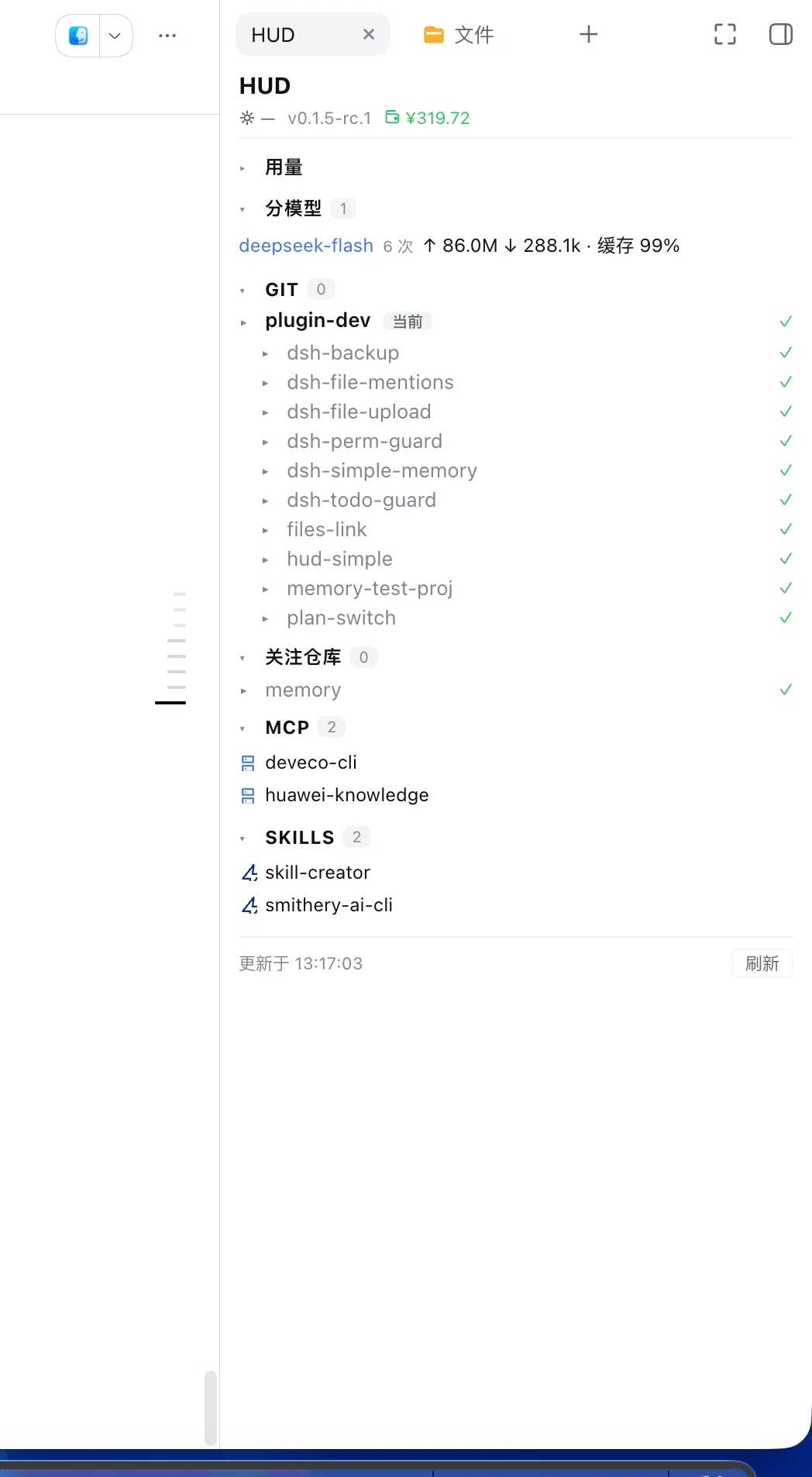
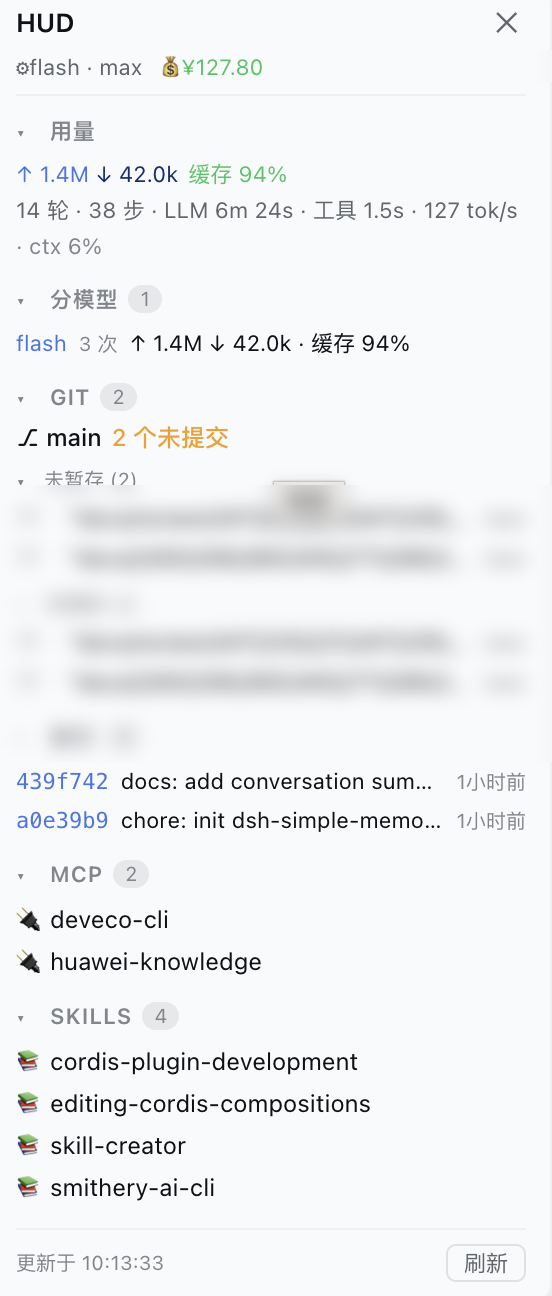
Default form: a tab in the official right sidebar (DSH 0.1.5+), toggled by the HUD button left of the composer — clicking it again collapses the sidebar. It can also run as a floating panel (older hosts fall back automatically) with drag-resizable position and width. The panel shows git status, commit history, watched repos, MCP servers, skills and official usage info (tokens in/out, cache hit rate, per-model breakdown, context usage).
+N/-N summaries, click a file to expand its full diff, last 10 commits
(commitCount, 1–50; the commit list starts collapsed)✓ N repos), and no
sub-folder names are listed at all; when something is dirty only the dirty sub-repos are
listed and the rest fold into one ▸ N more clean repos row. Clicking the parent row expands
the whole group+/- details stay fresh. Net effect: a clean workspace costs 1 shell call per change
(previously one shell call per repo)mcp__<server>__<tool> tool names)GET /user/balance using the DEEPSEEK_API_KEY credential (the key never leaves
the host; shows -- when unavailable)The button also shows a live badge with the number of uncommitted files, so you can see at a glance that a project has pending changes without opening the panel.
This repository is an official bundle plugin (dsh.bundle + dsh.client in the root
package.json), installed through the official profile manager:
# DSH 0.1.7 and later:
dsh plugin --profile web add "github:a903067276-rgb/dsh-hud#main"
# DSH 0.1.5 and older (this release needs 0.1.7+):
# dsh plugin --profile web add "github:a903067276-rgb/dsh-hud#v1.4.1"
Then restart dsh web (bundle layers are composed at startup; HMR does not apply).
Requires pnpm on PATH (dsh plugin forwards to pnpm).
Manual mount fallback: see docs/install.md.
Click the gauge icon in the input toolbar (official DSH design tokens, follows
dark/light theme). The panel opens on the left side by default (240px wide), clear of the
official right-edge turn navigator; drag its title bar to move it anywhere (position
remembered in localStorage, restored on reopen); drag its left edge to resize
(200–480px, remembered in localStorage). Section headers
with count badges are clickable to collapse/expand. Data auto-refreshes every 30s (when
the panel is closed, only the lightweight git badge keeps polling).
| Platform | Status |
|---|---|
| macOS | ✅ Fully tested (development environment) |
| Linux | ⚠️ Not yet tested — expected to work, see docs/install.md |
| Windows | ⚠️ Not yet tested — expected to work, see docs/install.md |
npx @deepseek-ai/dsh web)v1.8.1): it declares peerDependencies: {"@deepseek-ai/dsh": "^0.1.7-rc.1 || ^0.2.0-rc.1"}, so a mismatched host refuses to load it with an explicit reason instead of failing quietly. Settings move to the 0.1.7 model (plugin Config, live-editable .volatile() fields), so changes apply without a restart.^0.1.7-rc.1 || ^0.2.0-rc.1) and dsh.compatibility.dshReleases adds "0.2.0-rc.1": "compatible" — verified on a real 0.2.0-rc.1 host and a shadow instance. Since 0.2 the host gates profile bundles on peer compatibility and skips the whole bundle when the declared range misses the running host, so this range is what keeps the plugin loading.v1.4.1: that line keeps the old behavior and uses no 0.1.7-only API.v1.4.1) are not supported on 0.1.7 — every git command fails (shell.run is gone) so the Git block is empty, and the right-sidebar tab form is never used. Upgrade the plugin together with the host.| Your DSH version | Install this | Note |
|---|---|---|
| 0.1.1-rc.1 and newer | main (v1.2.15+) |
Full features |
| 0.1.0-rc.7 – 0.1.0-rc.8 | v1.2.11 — dsh plugin add github:a903067276-rgb/dsh-hud#v1.2.11 |
Last release with the pre-0.1.1 projection contract |
| 0.1.0-rc.6 and older | rc6-compat — dsh plugin add github:a903067276-rgb/dsh-hud#rc6-compat |
Frozen, no maintenance — upgrade recommended |
git CLI on PATHshell service executes everything via bash -c on all
platforms (Git Bash on Windows), so if DSH runs, this plugin runs.┌─ Host (Node, cordis plugin) ──────┐ ┌─ Browser (client bundle) ──┐
│ lib/index.js │ │ lib/client.js │
│ │ │ │
│ webServer.register(/api/dsh-hud) │──fetch──▶ input.left seat: button │
│ ├ /api/dsh-hud git/mcp/... │ │ shell.overlay seat: panel │
│ └ /api/dsh-hud/diff per-file │ │ │
└───────────────────────────────────┘ └────────────────────────────┘The host serves JSON over the webServer prefix route and runs all git commands in a
single bash -c call with __HUD_[BHSLN]__ segment markers (fast project switches).
The client is a hand-written window.__ModuleLoader__.load(...) bundle with zero build
step, sharing state between the button and the panel through a module-level store
(useSyncExternalStore). Details and known pitfalls for maintainers:
docs/architecture.md.
dsh instance. The only outbound call is the
balance request: balanceMode picks off (never request, never show) / official (default,
DeepSeek GET /user/balance with the DEEPSEEK_API_KEY credential) / custom (your own
endpoint — balanceUrl plus optional balanceHeader (default authorization: Bearer <key>),
balanceTokenEnv (default DEEPSEEK_API_KEY), balancePath (e.g. data.balance) and
balanceCurrency). The key is only ever sent to the address you configured yourself; anything
unavailable shows -- instead of a guessed number.balancePreset): kimi / siliconflow / openrouter (total_credits − total_usage) /
zai / one-api (needs balanceScale, e.g. 500000 per unit, plus your own balanceUrl) / deepseek.
Fields you set yourself always win over the preset. Custom URLs must be https (localhost/LAN excepted),
redirects are never followed (so Authorization can't be bounced to another host), the key only ever
travels in a header, and a 200 response that yields no number gets a one-time hint.DSH_HUD_NO_WATCH=1 disables file watching entirely — the HUD then refreshes purely
via its 30s polling + manual/focus refresh. Useful on machines with enormous directory
trees (e.g. a parent folder containing dozens of repos) where macOS file watchers are
unreliable; the watcher is also capped at 128 by default (deeper changes surface via
polling within ~30s).DSH_HUD_BALANCE=off disables the balance request entirely — no outbound call, no log
line, the panel just shows --./user/balance) is the
official one and the credential is DEEPSEEK_API_KEY; if that variable holds a
relay/gateway key, the request returns 401, so the panel shows --. Such a failure is
reported once and then backed off for 30 minutes (older versions retried every 60s and
logged every attempt). Support for non-official API balances is planned
(#10).lib/index.js host half — data routes (git / mcp / skills / model)
lib/client.js client half — UI (button + panel), final bundle, no build step
cordis.patch.yml bundle patch — single package-name mount (official bundle flow)
docs/ install guide & architecture notes
examples/ manual double-mount example (fallback install path)To test locally: symlink (or dsh plugin --profile web link) into the web profile's
node_modules, add the two mount entries, restart dsh web.
Simple by design. dsh-hud is deliberately minimal:
It is an independent community project: not an official DeepSeek product, and not affiliated with, forked from, or sharing code with any other DSH plugin project. If your workflow needs heavyweight SCM operations (commit/push UI, file trees, git graphs), other plugins cover that; dsh-hud deliberately stays a glanceable status HUD and coexists with them.
This is a plugin for DeepSeek Harness. Find more plugins via the
dsh-plugin topic.
CLASSIFICATION EVIDENCE
系统优先读取 GitHub Topics,再与站内分类词典和词根规则比对。当前命中: 无有效分类标签。
deepseek-ai
DeepSeek Harness: Everything is a Plugin.

anywhere-labs
为 DeepSeek Harness (DSH) 插件生态打造的现代化桌面端解决方案。万物皆「插件」,桌面本身也是「插件」。

walkinglabs
Harness engineering beginner tutorial, from 0 to 1