dsh-file-upload ⬆️
English | 简体中文


One upload button + drag-and-drop files straight into the conversation — a plugin for DeepSeek Harness (dsh) web.
Unofficial project: independently developed and maintained by a community member, not an official DeepSeek product.
⚠️ DISCONTINUED (2026-09-10)
dsh 0.1.5-rc.1 ships a built-in attachment system that covers this plugin's core capability (attach any file type; the model reads it on demand through its saved read-only path). This plugin is no longer maintained.
- Highest supported DSH version: 0.1.2 (last verified on 0.1.2-rc.1). No further fixes or compatibility work.
- Upgrading to dsh 0.1.5 or newer? You MUST disable/remove this plugin first — together with 0.1.5's attachment system it breaks the boot (the web app fails to start). Remove
dsh-file-upload from dsh.profile.bundles in your profile's package.json before upgrading.
- Thanks to everyone who used it. For file attachments, use the official feature (drag or paste files into the composer).
Screenshot

The upload icon button in the composer tool row (official DSH design tokens, follows dark/light theme); either the file's path is inserted into the input box, or — for supported images — the image lands in the official attachment rail (auto file_id reuse).
Features
| Action |
Effect |
| Click upload icon |
System file picker (multi-select) → smart routing → attachment rail and/or path text |
| Drag a file into the window |
Images & any file type are taken over (no "unsupported" toast) → smart routing |
| Drag a folder into the window |
Recursively reads the whole folder → rebuilds it under the attachment library with its original layout → only the folder path goes into the draft (contents not expanded) |
| Image (PNG/JPEG/WebP/GIF) |
① archived to the attachment directory (by-day folders) ② added to the official draft attachment rail → sent with automatic DeepSeek Files API file_id (same image reuses the id; 7-day expiry auto-reuploads) |
| Any other file |
Archived to the library's files/ subfolder, <prefix> <path> text goes into the draft |
| Model without image support |
Image falls back to archive + path text (never sent as an image block, no 400) |
- Single-file limit: 64 MB (DeepSeek Files API hard limit; the local attachment store defaults to 20 MB — see Large images below)
- Everything lands in the attachment library:
~/Documents/DSH/Attachments/images/<YYYY-MM-DD>/ (images) or .../files/<YYYY-MM-DD>/ (other files) — configurable in Settings
- Button shows busy state while uploading; failures surface as Chinese notices
Settings card
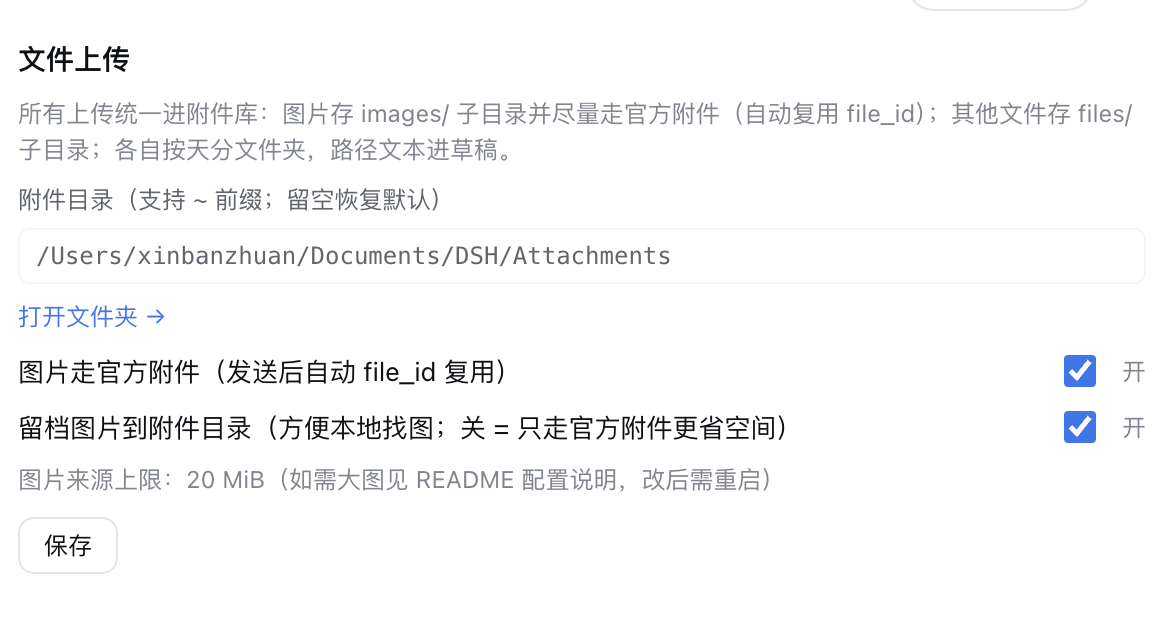
- Attachment directory (
~/Documents/DSH/Attachments default, ~ supported) — only used for image archives
- Path prefix (
[上传文件] default) — text prepended to paths in the draft; clear it to send bare paths
- Images via official attachment (default on) — off = images follow the old path-text logic
- Archive images to the attachment directory (default on) — off = official attachment only (saves disk; if the official channel is unavailable, the image is still force-archived)
- Allow public uploads (default off) — off = same-origin check keeps allowing localhost only (CSRF-safe); on = any origin may upload, for public/port-forwarding access (e.g. ddnsto). Enable only if you trust everyone who can reach your DSH.
- Clipboard listener (default off, keeping official built-in paste; options: off / images only / all files) — paste interception mode. Off = official built-in paste; images only = the plugin takes over pasted screenshots/images (works even when the model has no vision support — falls back to path text); all files = any pasted file is handled (archived to the library + path text in the draft). Changing the mode takes effect immediately after saving, no page reload.
- Read-only display: current image size limit from the host
Large images (20–64 MB)
DeepSeek accepts up to 64 MB per image. DSH's local attachment store defaults to 20 MB; images above that (and ≤64 MB) are archived + path-text referenced (the model can still read them via read_image, which follows the same store limit).
To let large images through the official attachment path too, add this to ~/.dsh/profiles/web/cordis.patch.yml and restart dsh web:
- id: attachment-local
  config:
    maxImageBytes: 67108864   # 20 MiB → 64 MiB (DeepSeek hard limit)
Note: the whole config row is replaced, so keep every key you need; re-check against the DSH version after upgrades. The model always sees the harness-normalized version (≤2048px / ≤4 MiB, ≤384 tokens per image) regardless of the original size.
Install
Official bundle install (one line):
dsh plugin --profile web add "github:a903067276-rgb/dsh-file-upload#main"
Restart dsh web (bundle layers are composed at startup). Requires pnpm on PATH (dsh plugin forwards to pnpm).
Manual mount (fallback): see docs/install.md — symlink into ~/.dsh/profiles/web/node_modules/ plus a single entry in ~/.dsh/cordis.patch.yml (a double entry makes the plugin apply twice and crash on duplicate route registration), then restart.
Usage
- Click the upload icon and pick files (multi-select), or drag files/folders anywhere into the window.
- Images (when the current model accepts images): archived to the attachment directory and shown in the official attachment rail — send, and the model sees the image (DeepSeek Files API
file_id, auto-reused).
- Images when the model does not accept images (or you turned the official path off): archived to
images/, then <prefix> <absolute path> lines go into the draft — e.g. [上传文件] /path/to/Attachments/images/xxx.png — and your existing draft text is kept.
- Other files: archived to
files/, path text goes into the draft. Press send; the model reads the file by path.
- Folders: drag one in and it is rebuilt under the attachment library with its original layout; only the folder path (one line) goes into the draft.
Platform support
| Platform |
Status |
| macOS |
✅ fully tested (development environment) |
| Linux |
✅ expected to work (pure Node implementation), untested |
| Windows |
⚠️ expected to work (pure Node implementation, Windows-safe filename sanitization, platform separator paths), untested |
Requirements
- DSH web >= 0.1.0-rc.7 (run with
dsh web)
- Version compatibility (best effort — verified locally on 0.1.2-alpha.2 / 0.1.2-rc.1 and 0.1.1-rc.2; on 0.1.0-rc.7/rc.8 the official image rail can't be fully checked, not guaranteed):
- Maintenance policy: DISCONTINUED (2026-09-10) — superseded by the official attachment system shipped in dsh 0.1.5-rc.1. Highest supported DSH version: 0.1.2. No further updates.
| Your DSH version |
Install this |
Note |
| 0.1.5 and newer |
⛔ do not install |
Replaced by the official attachment system; this plugin breaks the boot — disable/remove it before upgrading |
| 0.1.1-rc.1 – 0.1.2 |
main (v0.1.5+) |
Last supported range (full features, including the official image rail) |
| 0.1.0-rc.7 – 0.1.0-rc.8 |
main (v0.1.5+) |
Works fine; the official image rail auto-degrades to path text unless the session model accepts images. Conservative fallback: v0.1.4 — dsh plugin add github:a903067276-rgb/dsh-file-upload#v0.1.4 |
| 0.1.0-rc.6 and older |
v0.1.2 — dsh plugin add github:a903067276-rgb/dsh-file-upload#v0.1.2 |
Last release without the settings card (the card uses the rc.7+ keyed slot contract) |
- No extra shell needed: the host half is pure Node (
node:fs), no system commands required on any platform.
How it works
- Host (
lib/index.js): POST /api/file-upload/save — validates the session and size, writes the base64 payload to <library>/images/<YYYY-MM-DD>/ (mode=image) or <library>/files/<YYYY-MM-DD>/ (mode=file) with pure Node; POST /api/file-upload/save-folder — takes a relative-path + base64 list and rebuilds the tree under <library>/files/<date>/<timestamp>-<folder>/ (each segment sanitized, .. rejected to prevent traversal); GET/POST /api/file-upload/config reads/writes the settings (official settings service) and exposes the host image limit plus whether the current session's model accepts images — resolved from the same model-route source the official UI uses (model-selection projection → request header → agentDefaultModel, with the legacy apiProxy.sessions.models fallback on older DSH releases).
- Client (
lib/client.js): registers the upload icon in the conversation.input.left seat; capture-phase document listener takes over file drags and reads dragged folders via webkitGetAsEntry; routing: supported image + official on + model supports + within host limit → archive + conversation.createDraftImages + inputActions.addImages (the official InputBar's own mechanism) → official attachment rail (no path text); anything else degrades to archive + path text; >64 MB is refused with a notice.
- Error boundary: a render crash degrades to a small "⚠ upload component error" chip instead of unmounting the whole composer.
Notes
- The attachment library only grows; it is never cleaned automatically (we don't delete your files) — remove files manually when needed.
- After modifying the plugin, restart
dsh web for changes to take effect (client-side edits apply on a page refresh; host edits need a restart).
Why this plugin exists
DSH natively rejects dragged-in images when the current model doesn't support them. This plugin routes images through the official attachment path when the model can see them (so they ride the DeepSeek Files API with file_id reuse), keeps a user-accessible archive copy you can find later, and falls back to plain path text otherwise — a plain-text message that passes the model's image check and works with any model or vision plugin (it bypasses DSH's native image rejection because no image block is ever submitted on the fallback path).
License
MIT


