dsh-backup 📦
English | 简体中文

Unofficial project: independently developed and maintained by a community member, not an official DeepSeek product.
Automated backups of your DSH data — sessions, profile config and any custom directories — packed into .zip archives with scheduled or manual runs and automatic rotation.
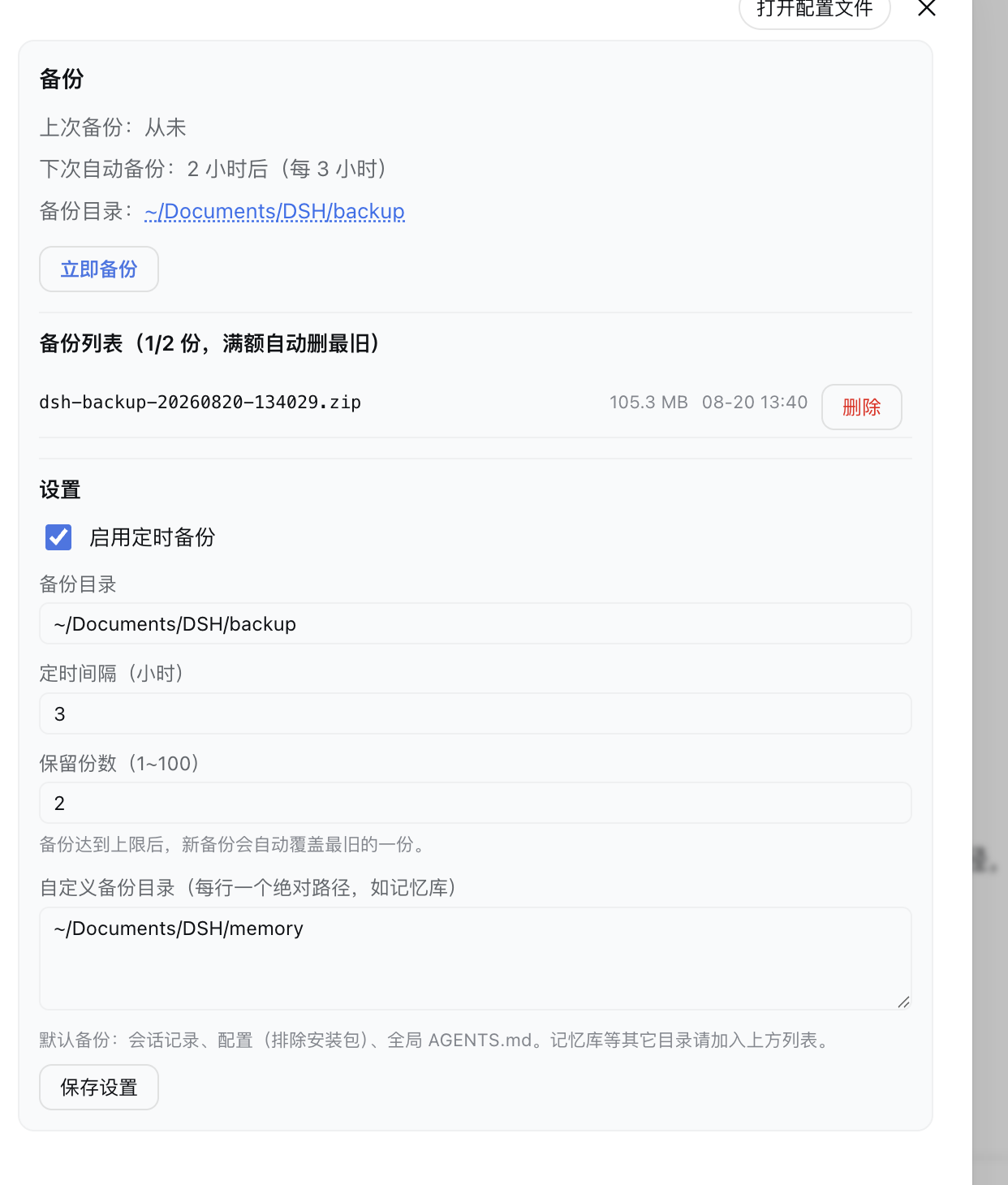
Screenshot
| Action |
Effect |
| Scheduled backup |
Packs DSH data on a timer (default every 6 h) |
| Manual backup |
One-click "Back up now" from the Settings page |
| Custom directories |
Add extra paths (e.g. your memory library) per line |
| Rotation |
Keeps only the latest N archives (default 10), old ones are deleted |
| Restore |
Manual only — extract an archive back to its original location (steps in docs/install.md) |
What is backed up by default (expanded in v0.4.0): ~/.dsh/sessions (conversation history), ~/.dsh/profiles (config, excluding node_modules), ~/.dsh/AGENTS.md (global conventions), ~/.dsh/cordis.patch.yml (global patch layer), ~/.dsh/storages (scheduled tasks / workspaces, excluding the projection cache), ~/.dsh/bin (your own scripts), root-level small configs (*.json/yml/yaml/txt, < 1 MB), ~/.dsh/attachments (uploaded originals — on by default, toggle it off in Settings), and credentials (.credentials.yaml / llm-deepseek, on by default; ⚠️ the zip is not encrypted — turn it off and a restore needs you to sign in / re-enter keys). Everything else — like your memory library — goes into the custom directory list.
Skipped automatically (noise / rebuildable): .DS_Store, *.lock, *.bak-fix, *-shm/*-wal, storages/session_projcache*. Never backed up (reinstall/rebuild): session-index.sqlite, cache/, dsh-runtimes/, speech-to-text/.
Install
# DSH 0.1.7 and later:
dsh plugin --profile web add "github:a903067276-rgb/dsh-backup#main"
# DSH 0.1.5 and older (this release needs 0.1.7+):
# dsh plugin --profile web add "github:a903067276-rgb/dsh-backup#v0.1.4"
Then restart dsh web. Manual fallback: docs/install.md.
Usage
Open Settings → Backup:
- Status row: last backup / next scheduled run / backup folder
- Back up now button
- Backup list: name, size, time, delete
- Settings: backup folder, schedule toggle + interval (hours), retention count, custom directories (one absolute path per line)
Platform support
| Platform |
Status |
| macOS |
✅ tested |
| Linux |
✅ expected (pure Node, no system zip required) |
| Windows |
✅ expected (pure Node, no system zip required) |
Requirements
- DSH web >= 0.1.0-rc.6
- Version compatibility (best effort — the settings card uses dual-field
key+id registration to satisfy both rc.6 (id) and rc.7+ (key); verified locally on rc.6/rc.8/0.1.1-rc.2/0.1.5-rc.1, not guaranteed on every DSH version):
- DSH 0.1.0-rc.6 and newer (incl. 0.1.1-rc.1/rc.2): try
main (default).
- DSH 0.1.7: live config — the plugin now declares its fields with an exported
Config schema (all .volatile()), so Settings saves go through the official settings service and apply immediately, no restart. Host config the plugin writes lands in its own profile entry (settings.update(entryId, patch)); needs @deepseek-ai/schemastery ≥ 3.18.3 (ships with 0.1.7).
- DSH 0.1.5-rc.1: load-verified (host half loads cleanly); it only uses stable services such as
settings/shell and touches none of the contracts changed in 0.1.5. The end-to-end backup/restore flow was not re-tested on 0.1.5.
- Conservative fallbacks (the last pre-0.1.1 build): DSH 0.1.0-rc.7/rc.8 →
v0.1.2 (dsh plugin add github:a903067276-rgb/dsh-backup#v0.1.2); DSH 0.1.0-rc.6 → frozen rc6-compat tag (no maintenance).
- Node.js ≥ 16.7 (bundled with DSH)
- ✅ DSH 0.1.7 and later — use this release (
v0.3.2): it declares peerDependencies: {"@deepseek-ai/dsh": "^0.1.7-rc.1 || ^0.2.0-rc.1"}, so a mismatched host refuses to load it with an explicit reason instead of failing quietly. Settings move to the 0.1.7 model (plugin Config, live-editable .volatile() fields), so changes apply without a restart.
- ✅ DSH 0.2.0-rc.1 — verified compatible: the peer range now covers both lines (
^0.1.7-rc.1 || ^0.2.0-rc.1) and dsh.compatibility.dshReleases adds "0.2.0-rc.1": "compatible" — verified on a real 0.2.0-rc.1 host and a shadow instance. Since 0.2 the host gates profile bundles on peer compatibility and skips the whole bundle when the declared range misses the running host, so this range is what keeps the plugin loading.
- ⚠️ DSH 0.1.5 and older — install the previous tag
v0.1.4: that line keeps the old behavior and uses no 0.1.7-only API.
- ⛔ Old plugin releases (up to
v0.1.4) are not supported on 0.1.7 — settings silently become defaults (settings.register/get are gone). Upgrade the plugin together with the host.
- Maintenance policy: this plugin keeps evolving with the latest DSH releases; compatibility with older DSH versions is best-effort only and not guaranteed going forward.
How it works
- Host: a zero-dependency zip packer (
lib/zip.js, pure Node streams — no system zip, no shell, immune to the session sandbox), a timer-driven schedule, and a /api/dsh-backup/* route for the Settings page.
- Client: one Settings section (
settings.section, "备份") that lists backups and edits configuration; saving goes through the official settings service into the plugin's profile-entry config (volatile fields — takes effect immediately, no restart; a restart is only needed on pre-0.1.7 hosts, which fall back to writing the patch file).
Notes
- Restore is intentionally manual: stop DSH, extract the archive over the original paths, and keep the current data around until you are sure the restore is correct. The plugin never overwrites anything by itself.
- The backup folder defaults to
~/Documents/DSH/backup and can be changed in Settings.
- Only backups the plugin owns (
dsh-backup-*.zip) are listed/deleted — other files in the folder are left alone.
License
MIT


