

模型与 MCP
待识别

rea
morluto
Reverse engineer anything with agents, from app behavior down to native binaries.
PROJECT TOPICS
INSTALL REFERENCE
dsh plugin --profile web add github:Znk1314/dsh-workspace-categories
该命令指向仓库当前默认分支;尚无绑定当前 commit 的完整验证结果。
PROJECT README
English · 简体中文
Tired of a workspace list that has grown out of control? Tired of scrolling for ages every single time you need to find a session?
This plugin fixes both. File your workspaces into custom categories, then reach any session without hunting: All / Recent / Categories tabs, a fold on every level, and long-press drag to move things where they belong.
It exists because this was a real pain point — and it is almost certainly the same pain point for most DSH users.


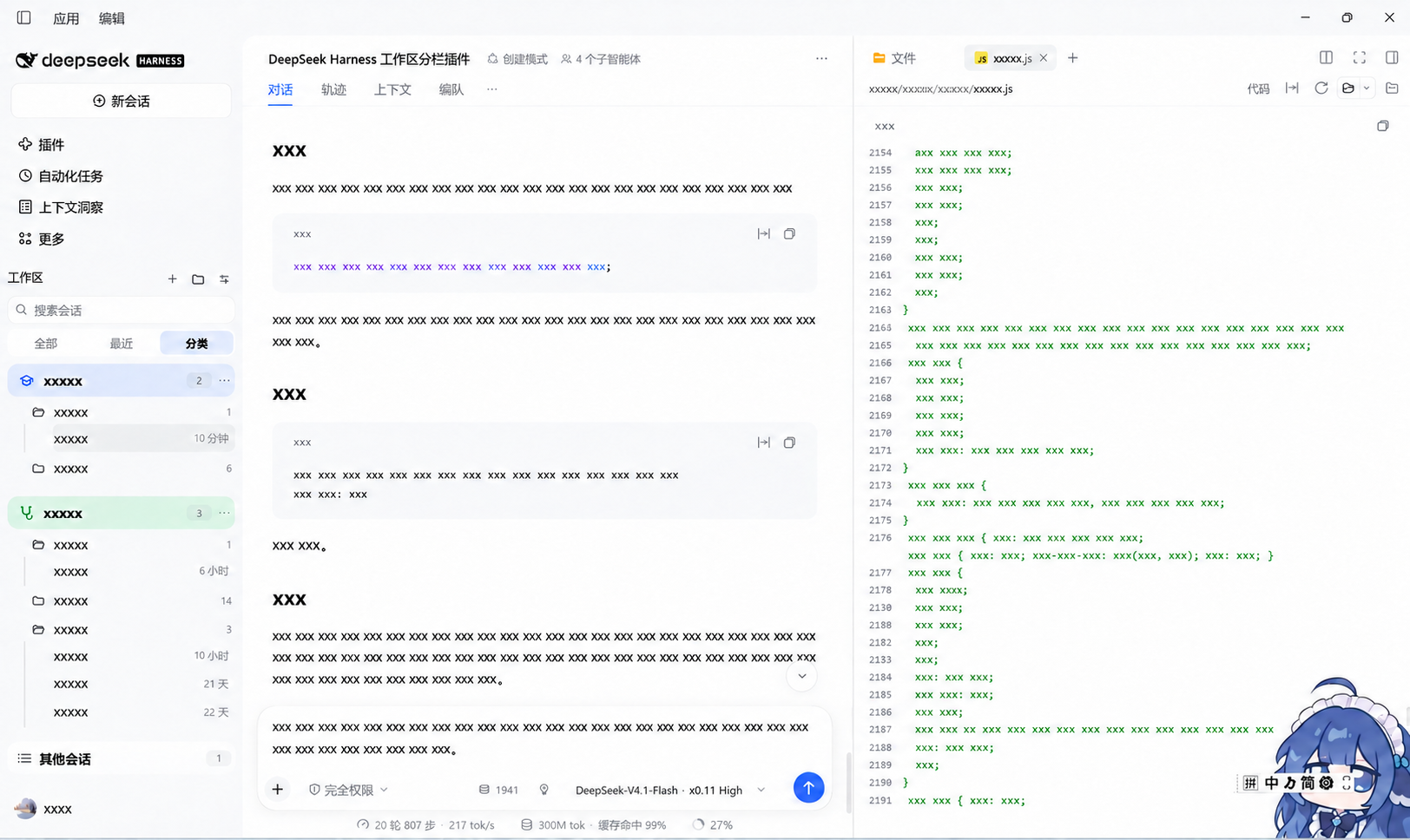
The built-in sidebar is one flat list of workspaces. That is fine at five workspaces and unusable at fifty: every workspace expands all of its sessions inline, so the list grows without bound and finding anything means scrolling.
This plugin keeps the same data but changes how you reach it:
| Built-in | This plugin | |
|---|---|---|
| Grouping | none — one flat list | your own categories, pinned and re-ordered |
| Finding a session | scroll the whole list | All (flat session list), Recent (recently used), or fold to a category |
| Visual weight | every workspace expanded | fold any category or any workspace |
| Long lists | scroll past everything | sessions are nested under their workspace, one indent guide deep |
Nothing is removed: search, archived filtering, add/rename/delete workspace, and the full right-click session menu all still work.
>= 0.2.0-rc.2. Developed and verified against
0.2.2-rc.3.The plugin is a local bundle: DSH links the directory into the active profile rather than copying it.
git clone https://github.com/Znk1314/dsh-workspace-categories.git
or use the repository's Code → Download ZIP and extract it.package.json and cordis.patch.yml, not a parent folder and not a file.Open the sidebar. You should see the Workspaces header with All / Recent / Categories tabs under the search box, and the + button beside the header creates your first category.
If the sidebar looks unchanged, the plugin did not activate. Check Settings → Plugins that the entry is present and enabled, then reload the window. A plugin that throws while rendering silently falls back to the built-in sidebar, so an enabled-but-broken plugin looks identical to a disabled one.
After replacing client.js (or pulling a new version), remove and re-add the
plugin. A local install is a link, and DSH does not hot-swap an already loaded
client module. Your categories live on the Host, so they survive the reinstall.
Remove the plugin in Settings → Plugins. Your data stays at
<DSH_HOME>/plugin-data/dsh-workspace-categories/categories.json; delete that
file to remove it too. No session, workspace, or message is ever deleted by this
plugin.
| Action | How |
|---|---|
| Create a category | the + beside the sidebar's Workspaces title |
| New workspace directly in a category | hover the category row and click its + — the workspace is created and filed in one step |
| File a workspace | press and hold its title, then drag into a box — or use its ⋯ menu → Move to category |
| Re-order inside a box | press and hold, then drop on the upper/lower half of another workspace row; the box tail shows an insertion line |
| Re-order categories | press and hold a category header, or its ⋯ menu → Move up / Move down |
| Pin a category | category ⋯ menu → Pin category (pinned boxes stay on top) |
| Change icon or colour | category ⋯ menu → Icon and colour, then pick a glyph and a swatch |
| Collapse / expand a category | click the category's icon; expand shows it open, collapse hides its workspaces |
| Collapse / expand one workspace | click its folder icon (open folder = expanded, closed = folded), or its ⋯ menu → Collapse workspace |
| Remove a workspace from a category | drag it into Unassigned, or its ⋯ menu → Remove from category |
| Delete a category | category ⋯ menu → Delete category (its workspaces return to Unassigned; no session is deleted) |
| Switch view | the All / Recent / Categories tabs under the search box |
| Archived filter | the sliders button at the right |
Every drag-only action also has a menu path, so a keyboard or touch user can do all of it.
Esc mid-drag to cancel. Losing window focus or a cancelled pointer also
ends the drag cleanly — no stuck ghost, no locked text selection.Categories live in one JSON document, served by the Host half over an
authenticated route (/api/workspace-categories.doc; only the owner peer may
reach it):
<DSH_HOME>/plugin-data/dsh-workspace-categories/categories.jsonWrites are debounced 240 ms and serialised through a temporary file plus rename. A failed save shows a notice in the panel and is retried every 5 seconds; the notice clears once a write succeeds.
{
  "version": 1,
  "categories": [
    { "id": "c1", "name": "Client work", "color": "blue", "icon": "briefcase",
      "pinned": true, "collapsed": false, "workspaceIds": ["w1", "w2"] }
  ],
  "view": { "tab": "categories", "archived": "default" },
  "unassignedCollapsed": false,
  "collapsedWorkspaces": ["w3"]
}
color accepts ink | red | orange | amber | green | blue | violet | pink | slate;
view.tab accepts categories | recent | all; view.archived accepts
default | show | only; collapsedWorkspaces lists folded workspace ids; icon names one of the 30 built-in glyphs
(folder, book, graduation, briefcase, terminal, palette, brain, plant, …) and falls back to folder.
The Host repairs malformed or hostile input, so a
damaged file never takes the sidebar down.
sidebar.workspaces is a single slot. This plugin registers into it with
priority: -1000; the slot keeps the lowest priority, so it replaces the
shipped browser instead of sitting beside it.container-type, which makes
position: fixed resolve against the sidebar. Menus, dialogs, and the drag
ghost therefore portal into document.body.useContextMenu seat, and the shipped rename/archive dialogs keep working
because they live in shell.overlay, outside the replaced region.--dsw-alias-*,
--dsw-radius-*), so light and dark themes both work.DSH's sidebar browsing region (sidebar.workspaces) is a single slot: only
one occupant renders. That is the framework's design, not a choice this plugin
makes, and it has two consequences you should know before installing.
Any other plugin that also takes over the browsing region — a different grouping UI, a tabbed sidebar, a replacement session list — competes for the same seat. Exactly one of them renders; the others do nothing, and nothing reports the conflict. If the sidebar does not look the way you expect, disable one of the two and reload.
This plugin registers at a negative shadowing priority, below the shipped browser's implicit 0, which is what makes it win the seat. If you fork it and remove that value, the shipped browser takes the sidebar back — the plugin then looks uninstalled even though it is loaded.
The browsing region declares child seats that other plugins register into. A plugin that replaces the region must forward those seats itself, or every extension seated there silently disappears. This plugin forwards all three:
| Seat | Where it renders |
|---|---|
sidebar.session.row.leading |
before the session title |
sidebar.session.row.trailing |
after the title, before the timestamp |
sidebar.workspaces.session.row.action |
in the row's action strip |
Each is offered with the sessionId (and the display title for the action seat)
that the shipped browser passes, so an extension cannot tell the difference.
A seat with nothing registered adds no DOM, and a seat that throws is skipped
rather than taking the sidebar down.
Two seats the shipped browser offers are not forwarded, because this plugin does not build the UI they belong to:
sidebar.session.row.hover — session rows have no hover card here.sidebar.workspaces.directoryFlow — there is no directory-flow step.Extensions that target those two specific seats will not render. Everything in
the right-click session menu (contextMenu) is unaffected and works normally.
See CONTRIBUTING.md. The verification harness is in tools/:
node tools/check-keys.js client.js
node tools/test-gestures.cjs client.js
node tools/test-regressions.cjs client.js
node tools/test-host.mjsMIT © 2026 Znk1314
CLASSIFICATION EVIDENCE
系统优先读取 GitHub Topics,再与站内分类词典和词根规则比对。当前命中: deepseek-harness、deepseek-harness-plugin、deepseek-harness-plugins。
morluto
Reverse engineer anything with agents, from app behavior down to native binaries.

deepseek-ai
DeepSeek Harness: Everything is a Plugin.

nexu-io
The 1st Collaborative AI Design Agent Workspace. Local-first and open source. Create motion, prototypes, websites, apps, dashboards, presentations, images, and videos with your team and AI agents. Share work, exchange feedback, and iterate together in one workspace.