
学习研究
插件

Study-Mate
Miaotofu01
你的AI学习搭档:定路线、讲知识、做项目,边学边做,学透一门科目
PROJECT TOPICS
INSTALL REFERENCE
dsh plugin --profile web add github:Zilize/parallax-dsh
该命令指向仓库当前默认分支;尚无绑定当前 commit 的完整验证结果。
PROJECT README







Quick start · Usage · Development · Try online
English · 简体中文
Parallax is a DeepSeek Harness (dsh) plugin for finding the arXiv papers on a topic from a local corpus. It harvests arXiv metadata into SQLite. The agent then searches it with set operations (keyword recall, union, subtract, AI screening and classification), and each intermediate set shows up in the dsh sidebar, where you can open it.

A typical graph: recall routes → merge → AI screening → AI classification. The semantic-search routes shown here are from Parallax online; this plugin recalls by keyword.
A general-purpose agent searches the open web through a black-box search API: it sees only the top-k results, can't tell you how many papers a topic really has, and spends effort cleaning up noise. Parallax works the other way round. The agent recalls exhaustively from a corpus with known boundaries, keeps every intermediate result as a set you can inspect, and leaves per-paper judgement to Jev, a judge model that returns calibrated probabilities rather than free-text verdicts.
The corpus, the graphs and every judgement stay in a SQLite file on your machine.
Searching papers is not like ranking a feed, and a recall → coarse filter → fine filter funnel isn't enough:
Merging, deduplicating and removing are set operations. So in Parallax the unit the agent works with is a set of papers, and every set is an immutable node in a graph:
Screening is where a plain LLM gets slow and expensive: it has to write a verdict for every paper, and long batches of structured output break easily. Jev answers typed questions with probabilities directly, so it is both faster and cheaper:
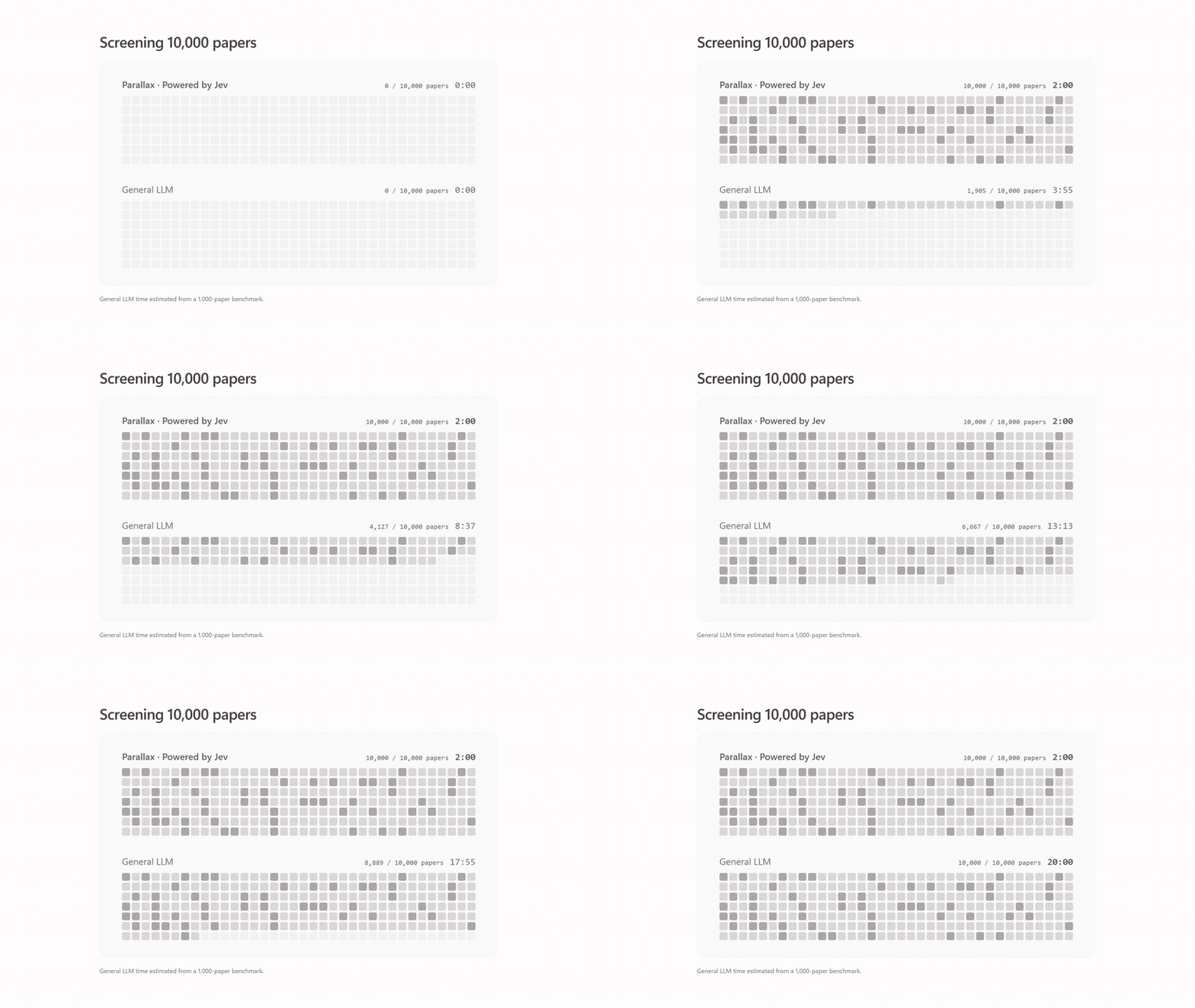
Screening 10,000 papers: about 2 minutes with Jev versus about 20 with a general LLM (LLM time estimated from a 1,000-paper benchmark).
The graph is drawn live in the Build graph tab of the right sidebar. Click any node to see which papers it kept, which it excluded, and the probability behind each judgement.
Keeping sets in a database with indexes, rather than having the agent track them as text or JSON in the conversation, buys two things. It scales: a single Jev run takes up to 20,000 candidates. And it moves large, deterministic work into code, which holds up against model hallucination and against details lost when the context gets compacted. Because nodes are immutable, a change is always a new node, and the full chain of reasoning stays on the graph.
This plugin is the local, open-source edition of Parallax. Parallax online runs the same set-graph search with a larger corpus and more of the work around it:
| This plugin | Parallax online | |
|---|---|---|
| Corpus | The categories and days you harvest yourself | All arXiv subjects since 2020, ready to search |
| Recall | Keyword, category, date | Keyword, category, date, and semantic search |
| Screening and classification | Jev, with your own API key | Jev |
| After the search | Export the set as JSON | Generate a field survey from the papers, plus a reading view and daily / weekly / monthly progress reports |
| Where it runs | Your machine, inside DeepSeek Harness | In the browser, nothing to install |
Pick the plugin if you want everything local or want to change how it works. If you just want to see what a Parallax search feels like, sign up for Parallax online and try it there first.
Just want to try it? Parallax online needs no install or harvesting.
@deepseek-ai/dsh-web-app)node:sqlite, so there is no native module to compile)git clone https://github.com/Zilize/parallax-dsh.git
cd parallax-dsh
npm install
npm run buildA dsh profile is a named setup (which plugins and components are loaded), stored as a folder under ~/.dsh/profiles/. Each way of running dsh uses its own profile; on a typical install that means desktop for the desktop app, web for the web UI and dsh-tui for the terminal UI. Install Parallax into the profile you use, from the parallax-dsh folder:
dsh plugin --profile desktop add .Then restart the desktop app. If you start dsh from the command line instead, launch it with that profile:
dsh --profile <profile>A new profile starts with the base components only. If it has no web UI, run
dsh --profile <profile> --from-default-profile webto reset it to the web template, thenadd.
Open the dropdown next to the Parallax icon in the conversation header → Settings:
| Setting | What it does |
|---|---|
| arXiv categories | The harvest scope, e.g. cs.CL, cs.AI, or a whole group such as cs.*. The coverage calendar is measured against it. |
| Jev judge model | The API key is kept in the dsh credential file, never in the plugin database, and the browser never sees it. You can also tune how many requests run at once (default 6) and how many papers go into each (default 30). |
| Network | An HTTP proxy shared by harvests and Jev requests. Node's built-in fetch ignores HTTPS_PROXY, so on a network that needs a proxy, set it here, e.g. http://127.0.0.1:7890. |
The agent can set the categories and proxy for you. The API key can only be entered in Settings, so it never ends up in a conversation transcript.
Type /parallax-skills in the composer (or pick Literature retrieval from the + menu), then ask your question as usual:
/parallax-skills What's new on planning for LLM agents in the first half of October? I'd like a short reading list.The agent will roughly:
You can watch the graph grow in the right sidebar the whole time. If a route looks wrong, tell the agent: it builds a new node to correct it rather than quietly rewriting the old one.
| Tab | What's there |
|---|---|
| History | One card per conversation that built sets; open one to see its graph |
| Ingest | A full-year coverage calendar (done / partial / not harvested), the harvest dialog and the job list |
| Build graph | The current conversation's graph: select a node to list its papers, use its info button for details and JSON export, or expand the graph |
| Settings | arXiv categories, the Jev judge model, and the network proxy |
| Tool | Purpose |
|---|---|
parallax |
Read-only: corpus coverage, keyword search, full abstracts by id, and the research skill's documents |
parallax_set |
The set graph: probe, create nodes, trial, screen, classify, page through members, wait / resume / cancel, export |
parallax_ingest |
Harvesting: coverage, start / wait / cancel a harvest, job history, category scope and proxy |
Harvests and judging runs the agent starts are registered as dsh background jobs: the conversation header shows their progress with a stop button, and the agent is notified when they finish instead of having to wait on them.
The research skill ships with the plugin (skills/parallax/): a playbook plus guides split by scenario, covering reading lists, topic surveys, method searches, trend tracking, citation lineage and evidence for a decision. Only a one-line description stays in context; the playbook and guides load when they're needed.
An export is the set's paper list, one item per paper:
[
  {
    "id": "2610.20603",
    "title": "…",
    "authors": ["Xiaoli Xu", "Zhengtao Wu"],
    "published_at": "2026-10-14T17:59:48.000Z",
    "primary_category": "cs.CV",
    "categories": ["cs.CV"],
    "abstract": "…",
    "abs_url": "https://arxiv.org/abs/2610.20603v1",
    "pdf_url": "https://arxiv.org/pdf/2610.20603v1.pdf"
  }
]$DSH_HOME/storages/parallax.db (~/.dsh by default).oaipmh.arxiv.org, at least 4 seconds apart as arXiv asks. AI screening and classification go to the Jev endpoint you configure, and send only each paper's title, abstract, authors, date and categories, plus your criteria.PARALLAX_JEV_API_KEY environment variable works too.npm run watch # rebuild on change; the browser half hot-reloads
npm run typecheck # type-check both halves
npm run smoke # host-half smoke test (build first)The plugin layout, how dsh plugins work, and the pitfalls I ran into are in the development guide (in Chinese).
CLASSIFICATION EVIDENCE
系统优先读取 GitHub Topics,再与站内分类词典和词根规则比对。当前命中: arxiv。
Miaotofu01
你的AI学习搭档:定路线、讲知识、做项目,边学边做,学透一门科目

1692775560
Mimir — 一站式科研工作台插件:LaTeX 论文边写边编译、arXiv 文献管理、实验追踪、指标图表、GPU 服务器 SSH 任务编排,管理科研全周期。An open-source research workbench plugin for the whole research cycle.

Li-Evan
Open-source AI tutor for personalized learning: Socratic, adaptive lessons to learn anything. Claude Code skill + self-hosted web app. Bloom 2 Sigma · 开源 AI 家教