
Agent 与会话
插件

nuwa-skill
alchaincyf
你想蒸馏的下一个员工,何必是同事。蒸馏任何人的思维方式——心智模型、决策启发式、表达DNA。Distill how anyone thinks.
PROJECT TOPICS
INSTALL REFERENCE
dsh plugin --profile web add github:ZhuFrank/dsh-master-plugin
该命令指向仓库当前默认分支;尚无绑定当前 commit 的完整验证结果。
PROJECT README
English · 中文
A project lead for DeepSeek Harness. Open a session in a project folder with the dsh-master 总管 preset, and that session becomes the folder's master. It breaks your requests into tasks, hands them to member sessions, collects their structured reports, and stops at every gate until the work has been checked. It runs as a plain DSH plugin bundle. There is no external service and no cloud component, and its state lives on your own machine.
Status: early (0.2.x). Developed and used daily on macOS with DSH
0.2.1-rc.5; the full test suite also passes on DSH0.2.2-rc.1(Node 24). On DSH 0.2.2 the host's "read before write" file guard is off by default (see Requirements). The UI, the role prompts and the tool descriptions are in Chinese, and timestamps are shown in China Standard Time (UTC+8).
A single DSH session works well for a single task. Once you have several streams of work going in parallel, you become the scheduler: you switch sessions, remember who was doing what, re-read logs to see whether anything stalled, and keep it all in your head. dsh-master moves that bookkeeping into the plugin:
| Project-based masters | Starting a session with the dsh-master 总管 preset in a folder registers that folder as a project. Each project has its own master, members, database, task specs, handbooks and devlog. The master's preset has no write/edit tools: it dispatches and reviews, and leaves the editing to members. |
| Structured dispatch & reports | master_dispatch, master_send, master_spawn and master_close handle the master's side; master_report (progress / waiting / blocked / failed / ready / done) handles the member's. Messages go straight to the target agent under the plugin's own message source. They never pose as user messages. They are de-duplicated and retried with backoff, and pending deliveries survive a restart. |
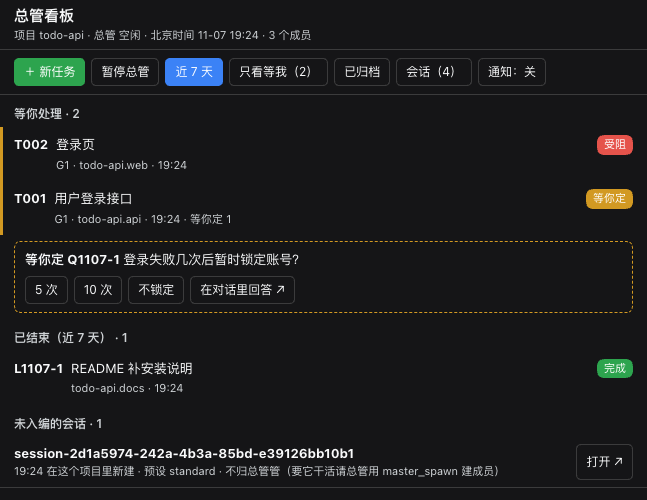
| Gates & reviews | Heavy tasks need a task spec first (task_spec_write): goal, deliverables, acceptance criteria, red lines, expected duration. Gates appear on the board, and master_review records each pass or send-back on the timeline. |
| Ask the user, on the board | Members cannot interrupt you. When a decision is yours, the master asks through master_ask_user. The question shows up as a "needs you" card with clickable options, and your answer is relayed back. |
| Devlog memory | devlog_add / devlog_recall / decision_add / memory_write keep a tagged development log, a decision log and memories per project. Recall matches on tags (weighted by IDF), and relevant entries are pushed automatically before a step touches related files or topics. |
| Guards | Agents cannot write the plugin's state directly, only through its tools. Members cannot git add/commit/push in a shared project root; the master commits after review. When dispatching, the master can claim files and directories for a task; a member writing into another task's claim is blocked. Only the master can read the instance log directory. |
| Patrol & safety-net schedule | Every 10 minutes the plugin checks for stalls, overlong turns, failed deliveries and unanswered questions, and tells the master only when the set of findings changes. A host schedule (every 6 h) is the safety net. When nothing new turned up, the plugin skips that run without calling the model. |
| Pause / resume | One button on the board. While paused, the project's schedule is removed, patrol only takes backups, and members finishing a turn without reporting no longer trigger reminders. Talking to the master directly still works. |
| Heavy-job queue | heavy_run queues renders, transcriptions or local inference behind a free-memory check, one job at a time, and notifies the session when the job finishes. |
| Native board | A right-side panel with lists, task detail, timeline, products preview, "needs you" and "waiting for your click" banners, and @task mentions in the composer. Your turns are attributed to tasks automatically. |
| Talk to a member directly (0.2.0) | You can talk to a member in its own session without waking the master: a turn you open does not trigger the "no report" reminder, answering a needs you card on the board goes straight to the member in charge (the master only gets a note), and patrol tells the master about direct conversations that change a conclusion or need its decision. Set directToMember: false for the old behaviour. |
| Master status bar (0.2.0) | The top of the board shows what the master is doing (tool name plus the model's one-line description, never the full command), when the next safety-net run is due, and three clickable counts: needs you, waiting for your click, blocked. Members on duty are listed with their open tasks. |
| Focus & date groups (0.2.0) | Star a task to pin it in a ★ Focus group. The default list shows the last 5 days grouped by date, older work is collapsed, and each group can be folded. |
dsh web, version >=0.2.1-rc.5 <0.3.0-0, i.e. the 0.2.1 and 0.2.2 lines (declared in engines.dsh; DSH refuses to install or load it outside this range). Tested on 0.2.1-rc.5 and 0.2.2-rc.1.node:sqlite). DSH 0.2.2 itself needs Node >= 24.9.fs-observation-policy in the dsh-base bundle) is off by default. While it is off, two members editing the same file are not stopped by the host, so the plugin's "optimistic lock" conflict notice does not fire. Task claims (a member writing into another task's claimed paths is blocked) are the plugin's own and still work. To turn the guard on, set that entry to disabled: false in your profile; this applies to every session in the profile, so the plugin does not change it for you.Where to install. All profiles under one
DSH_HOMEshare the session list, schedules and model credentials. If you install into your everyday profile, the master and member sessions appear next to your everyday sessions (see What it changes). To keep them apart, run a separate instance with its ownDSH_HOME(option B).
From the plugin market (easiest). DSH has no official plugin market; the community plugin dshmarket adds one. Install it once with dsh plugin --profile web add dshmarket and restart dsh web. Then open Plugins → Plugin Market, search ZhuFrank, and click Install on dsh-master; reload the page when it asks. The market's catalog refreshes about once a day, so a new release can take a day to show up there; to install a specific release right away, use option A below.
A. Into your everyday profile (web). Stop dsh web, then:
dsh plugin --profile web add https://github.com/ZhuFrank/dsh-master-plugin/releases/download/v0.2.0/dsh-master-0.2.0.tgzStart dsh web again and reload the page.
B. A separate instance (own DSH_HOME, own port):
export DSH_HOME=~/.dsh-master DSH_AGENTS_HOME=~/.dsh-master/agents-home
dsh --profile master --from-default-profile web --dump-config > /dev/null   # create the profile once
dsh plugin --profile master add https://github.com/ZhuFrank/dsh-master-plugin/releases/download/v0.2.0/dsh-master-0.2.0.tgz
dsh --profile master --port 3090                                            # then open http://127.0.0.1:3090
In a separate instance, add a model key on its own Models settings page.
From source:
git clone https://github.com/ZhuFrank/dsh-master-plugin && cd dsh-master-plugin
pnpm install && pnpm build
dsh plugin --profile web add link:$PWD/packages/dsh-mastermaster_spawn) and dispatches.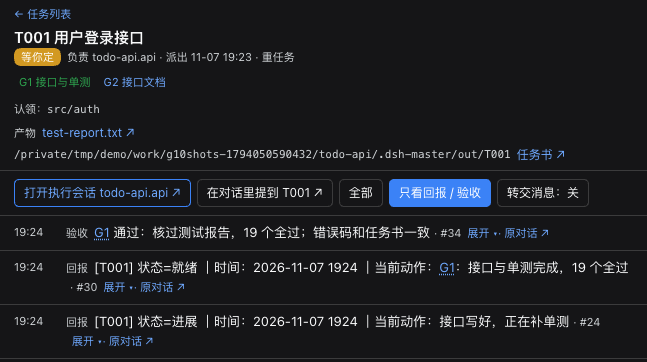
Settings go in your profile's cordis.patch.yml:
- id: dsh-master
  config:
    projectMasterPreset: workspace-write   # default; use danger-full-access to let masters write outside the project
    projectMemberPreset: workspace-write   # default
    scheduleEverySeconds: 21600            # safety-net schedule; 0 turns it off
secretPaths: [] # default [$DSH_HOME/logs]; directories only the master may read| Key | Default | Meaning |
|---|---|---|
projectMasterPreset |
workspace-write |
Permission preset applied to every project master at startup. |
projectMemberPreset |
workspace-write |
Permission preset for members: they can write inside the project root only. |
scheduleEverySeconds |
21600 |
Interval of the safety-net host schedule for each master. 0 disables it. |
patrol.intervalMs |
600000 |
In-plugin patrol interval. |
idleGraceMs |
120000 |
How long after a member's turn ends without a report before the master is reminded. |
directToMember |
true |
Talking to members directly (see Talk to a member directly). false restores the 0.1.x behaviour: every user turn and board answer goes through the master. |
secretPaths |
[$DSH_HOME/logs] |
Directories that non-master sessions may not read (the DSH log contains the login token). |
stateDir |
$DSH_HOME/dsh-master |
Plugin state: SQLite databases, docs, backups. |
legacy |
auto | The pre-project "single master" mode. New installs leave it off; set active only if you want one global master that is not tied to a project. |
autoRecall |
{ byFile: true, byTopic: true } |
Automatic devlog pushes before writes and before steps. |
Before installing, you should know exactly what the plugin touches:
secretPaths, and they cannot write the plugin's state directories ($DSH_HOME/dsh-master, <project>/.dsh-master/ except out/). All other rules apply only to masters and members..dsh-master/ folder in each project root (task specs, handbooks, devlog, products). Nothing outside these places is touched.Remove the plugin from the Plugins page, or run dsh plugin --profile web remove dsh-master while dsh web is running, then restart. When the profile no longer selects the plugin, the plugin deletes the safety-net schedules it created. If you remove it while DSH is stopped, delete the dsh-master 定时巡检保底 entries from Automations by hand. Your sessions, $DSH_HOME/dsh-master and <project>/.dsh-master/ are left in place; delete them if you no longer need them.
git command inside DSH fails with missing config key GIT_CONFIG_KEY_0 (exit 128). This happens when the environment that starts dsh web contains GIT_CONFIG_COUNT / GIT_CONFIG_KEY_n / GIT_CONFIG_VALUE_n: DSH's bash sandbox drops the GIT_CONFIG_KEY_* variables but passes the other two. It is not caused by this plugin. Workaround: start DSH with unset GIT_CONFIG_COUNT (or env -u GIT_CONFIG_COUNT dsh web …).DeepSeek Harness's team published Super-agent 设计探索 (Oct 2026) together with dsh-superagent-prototype. dsh-master is a personal, single-machine implementation of the Super-agent design: one person, one computer, running as a plugin inside a local DSH instance. Cloud-hosted state, IM / GitHub / e-mail triggers and remote execution are left out (see below). This is a personal project, not affiliated with DeepSeek. Where it maps to the design:
What dsh-master does not do: IM, GitHub or e-mail triggers, cloud-hosted state, or remote execution daemons. It runs inside one local DSH instance.
pnpm install
pnpm check          # typecheck + unit tests + build + end-to-end tests
node scripts/mutate.mjs --only <id>   # mutation tests: break one line, the named test must go red
The end-to-end tests start a throw-away DSH instance with a mock model, plus a headless Chrome, under ~/dsh-master-e2e (override with DSH_E2E_ROOT). They never touch your real ~/.dsh.
MIT. The two agent presets in packages/dsh-master/cordis.patch.yml are adapted from deepseek-ai/dsh-superagent-prototype (MIT).
CLASSIFICATION EVIDENCE
系统优先读取 GitHub Topics,再与站内分类词典和词根规则比对。当前命中: session、sessions。
alchaincyf
你想蒸馏的下一个员工,何必是同事。蒸馏任何人的思维方式——心智模型、决策启发式、表达DNA。Distill how anyone thinks.

freestylefly
Prompt as Code | GPT Image 2 / 2.5 提示词与案例库,530+ 个案例、20+ 套工业级模板与可复用 Skills,新增 2.5 同提示词对比专区,附完整提示词与生成记录,持续更新。

titanwings
Distilly — Distill how they think into reusable Skills for any Agent or Bot. Formerly Colleague Skill(原同事 Skill).