
模型与 MCP
待识别

rea
morluto
Reverse engineer anything with agents, from app behavior down to native binaries.
PROJECT TOPICS
INSTALL REFERENCE
dsh plugin --profile web add github:ZhangShurong/dsh-vista
该命令指向仓库当前默认分支;尚无绑定当前 commit 的完整验证结果。
PROJECT README

Visual memory and active inspection for DeepSeek Harness.




Your agent sees an image once. dsh-vista makes it addressable forever.
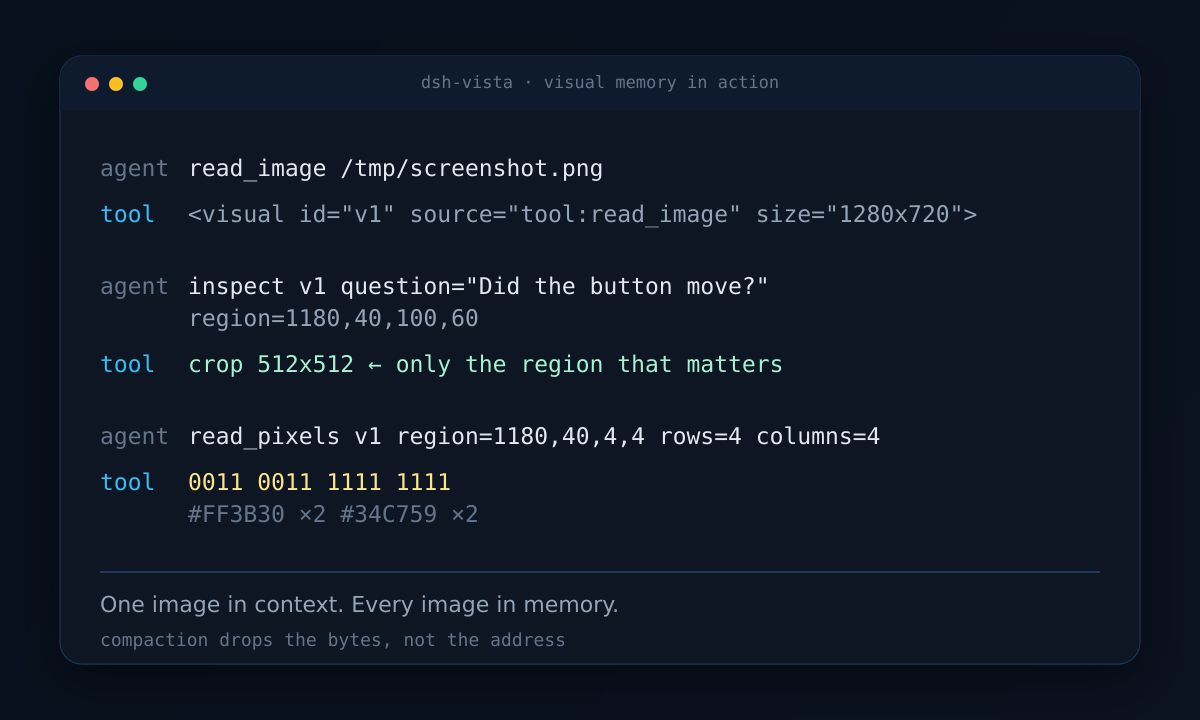
DSH agents work with screenshots, charts, and rendered pages, but the image that matters is often gone after the next tool call or compaction. dsh-vista keeps every image it has seen in an addressable archive and gives the agent a visual history plus active inspection and persistent task memory:
inspect — revisit any past image and crop any region, enlarged without
smoothing;read_pixels — sample exact colors from a region as a compact symbol
matrix;history / visuals — recover prior turns, frames, and stable ids;GUIDE.md / WORKING.md — keep durable knowledge and compact-handoff
state across context boundaries.Every image that reaches the model is automatically tagged with a stable id:
<visual id="v12" source="tool:read_image" size="1280x720"></visual>The model can reference v12 later even if the original image has fallen out of
the context window.
dsh-vista is an adaptation of VISTA: A Visual Harness for Reasoning in an Interactive World by Qiushi Han, Keya Hu, Linlu Qiu, Cathy Wu, and Kaiming He (MIT):
It brings VISTA's core ideas — lossless visual memory, active visual inspection, and exact pixel reading — into DeepSeek Harness. It is not the official VISTA implementation; it is a DSH-native adaptation.
read_pixels works even when the model route accepts
text only.dsh plugin --profile web add dsh-vistaOr pin a version:
dsh plugin --profile web add dsh-vista@0.1.3Then verify:
dsh --profile web --dump-config | grep dsh-vista
dsh --profile web
From a GitHub checkout:
dsh plugin --profile web add github:ZhangShurong/dsh-vista#v0.1.3| Tool | What it does | Output |
|---|---|---|
inspect |
Select an archived visual and an optional region; crops from the original and enlarges with nearest-neighbour. |
Image blocks |
read_pixels |
Divide a region into equal rows and columns; sample each centre pixel. | Palette + symbol rows |
visuals |
List recent visuals with id, source, size, and timestamp. | JSON |
history |
List visual-bearing events and their ordered turn/frame references. | JSON |
register_image |
Archive an explicit local path that was not captured automatically. | JSON |
read_guide / write_guide |
Read or replace durable workspace-scoped visual knowledge. | Text / status |
read_working / write_working |
Read or replace temporary continuation state. | Text / status |
save_compact_checkpoint |
Save WORKING and optionally replace GUIDE before a context handoff. | Status |
Example inspect:
{
  "question": "Did the button move after the click?",
  "views": [
    {
      "label": "button before",
      "visual": "v11",
      "region": { "x": 1180, "y": 40, "width": 100, "height": 60 }
    }
  ]
}
Example read_pixels result:
{
  "palette": { "0": "#FF0000", "1": "#0000FF" },
  "views": [
    { "label": "quadrant", "visual": "v1", "rows": 2, "columns": 2, "samples": ["01", "11"] }
  ]
}
read_pixels only measures. It does not align, transform, or interpret pixels.
tool result / attachment
        │
        ▼
tools/post-execute ──► archive bytes, assign vN, prepend <visual id="vN">
        │
        ▼
     model sees: <visual id="v12" ...></visual>  [image]
        │
        ├── inspect(v12, region)      ──► cropped + enlarged image
        ├── read_pixels(v12, region)  ──► palette + symbol rows
        └── visuals()                 ──► index of previous images
The archive is content-addressed and append-only (index.jsonl plus files under
archiveDir). DSH's attachment service still owns the image that reaches the
model; dsh-vista keeps a second copy so visual ids survive compaction and image
offload.
Defaults live in src/config.ts. Override them in the bundle row or the
profile patch:
- id: dsh-vista
  config:
    archiveDir: /home/me/.dsh/dsh-vista/archive
    displaySize: 1024
    maxInspectViews: 16
    maxPixelViews: 64
    maxPixelSamples: 4096
    annotate: true
retentionDays: 7| Field | Default | Meaning |
|---|---|---|
archiveDir |
$DSH_HOME/dsh-vista/archive |
Byte store and index.jsonl. |
displaySize |
1024 |
Longest edge of an inspected crop. |
maxInspectViews |
16 |
Views per inspect call. |
maxPixelViews |
64 |
Views per read_pixels call. |
maxPixelSamples |
4096 |
Total samples per read_pixels call. |
annotate |
true |
Insert <visual id="..."> before every archived image. |
retentionDays |
7 |
Delete older archived visuals; 0 keeps forever. |
play / act action tools.Those belong in follow-up plugins. This one answers a narrower question: does addressable visual memory plus active inspection improve a DSH agent's visual work?
MIT
你的 agent 只见过一张图一次,dsh-vista 让它永久可寻址。
DSH agent 经常要处理截图、图表和渲染后的页面,但真正重要的那张图,往往在下一次工具调用或上下文压缩之后就消失了。dsh-vista 会把 agent 见过的每一张图保存进一个可寻址的归档,并提供 turn/frame 历史、主动检视与持久任务记忆:
inspect —— 重新查看任意历史图像并裁剪任意区域,以无平滑插值的方式放大;read_pixels —— 把某个区域采样成紧凑的符号矩阵,读取精确颜色;history / visuals —— 找回历史 turn、frame 与稳定 id;GUIDE.md / WORKING.md —— 跨上下文边界保存长期知识和续跑状态。每一张送到模型面前的图像都会自动带上一个稳定的 id:
<visual id="v12" source="tool:read_image" size="1280x720"></visual>即使原图已经掉出上下文窗口,模型之后仍然可以引用 v12。
dsh-vista 基于何恺明团队(MIT)的 VISTA: A Visual Harness for Reasoning in an Interactive World 实现,作者为 Qiushi Han、Keya Hu、Linlu Qiu、Cathy Wu 和 Kaiming He:
本插件把 VISTA 的核心思想——无损视觉记忆、主动视觉检视、精确像素读取——带进 DeepSeek Harness。它不是 VISTA 官方实现,而是面向 DSH 的原生适配。
read_pixels 依然可用。dsh plugin --profile web add dsh-vista或锁定版本:
dsh plugin --profile web add dsh-vista@0.1.3然后验证:
dsh --profile web --dump-config | grep dsh-vista
dsh --profile web
从 GitHub 源码安装:
dsh plugin --profile web add github:ZhangShurong/dsh-vista#v0.1.3| 工具 | 作用 | 输出 |
|---|---|---|
inspect |
选择一个已归档的 visual 和可选区域;从原图裁剪,并用最近邻插值放大。 |
图像块 |
read_pixels |
把区域划分成等分的行和列,采样每个格子中心像素。 | 调色板 + 符号行 |
visuals |
列出最近的 visual,包含 id、来源、尺寸和时间戳。 | JSON |
history |
列出含视觉的事件及有序 turn/frame 引用。 | JSON |
register_image |
登记未被自动捕获的本地图像路径。 | JSON |
read_guide / write_guide |
读写工作区隔离的长期视觉知识。 | 文本 / 状态 |
read_working / write_working |
读写当前续跑状态。 | 文本 / 状态 |
save_compact_checkpoint |
压缩交接前保存 WORKING,并可选更新 GUIDE。 | 状态 |
inspect 示例:
{
  "question": "点击之后按钮移动了吗?",
  "views": [
    {
      "label": "点击前的按钮",
      "visual": "v11",
      "region": { "x": 1180, "y": 40, "width": 100, "height": 60 }
    }
  ]
}
read_pixels 返回示例:
{
  "palette": { "0": "#FF0000", "1": "#0000FF" },
  "views": [
    { "label": "四个象限", "visual": "v1", "rows": 2, "columns": 2, "samples": ["01", "11"] }
  ]
}
read_pixels 只做测量,不对像素做对齐、变换或解释。
工具结果 / 附件
        │
        ▼
tools/post-execute ──► 归档字节、分配 vN、在前面插入 <visual id="vN">
        │
        ▼
     模型看到:<visual id="v12" ...></visual>  [image]
        │
        ├── inspect(v12, region)      ──► 裁剪并放大的图像
        ├── read_pixels(v12, region)  ──► 调色板 + 符号行
└── visuals() ──► 历史图像索引归档采用内容寻址、仅追加的方式(index.jsonl 加上 archiveDir 下的文件)。送到模型面前的图像仍然由 DSH 的 attachment 服务管理;dsh-vista 额外保留一份副本,让 visual id 在上下文压缩和图像卸载之后依然存活。
默认值位于 src/config.ts。可以在 bundle 配置行或 profile 补丁中覆盖:
- id: dsh-vista
  config:
    archiveDir: /home/me/.dsh/dsh-vista/archive
    displaySize: 1024
    maxInspectViews: 16
    maxPixelViews: 64
    maxPixelSamples: 4096
    annotate: true
retentionDays: 7| 字段 | 默认值 | 含义 |
|---|---|---|
archiveDir |
$DSH_HOME/dsh-vista/archive |
字节存储与 index.jsonl 所在目录。 |
displaySize |
1024 |
检视裁剪图的最长边。 |
maxInspectViews |
16 |
单次 inspect 调用允许的视图数。 |
maxPixelViews |
64 |
单次 read_pixels 调用允许的视图数。 |
maxPixelSamples |
4096 |
单次 read_pixels 调用的采样总数。 |
annotate |
true |
在每张已归档图像前插入 <visual id="...">。 |
retentionDays |
7 |
删除超过该天数的归档;0 表示永久保留。 |
play / act 动作工具。这些都属于后续插件。本插件只回答一个范围更窄的问题:可寻址的视觉记忆加上主动检视,能否提升 DSH agent 的视觉工作表现?
MIT
CLASSIFICATION EVIDENCE
系统优先读取 GitHub Topics,再与站内分类词典和词根规则比对。当前命中: deepseek、deepseek-harness。
morluto
Reverse engineer anything with agents, from app behavior down to native binaries.

deepseek-ai
DeepSeek Harness: Everything is a Plugin.

nexu-io
The 1st Collaborative AI Design Agent Workspace. Local-first and open source. Create motion, prototypes, websites, apps, dashboards, presentations, images, and videos with your team and AI agents. Share work, exchange feedback, and iterate together in one workspace.