
其他
插件

dsh-bili-scroll
c1overzz
DSH 插件:每天替你刷一轮 B站,读字幕挑出值得的、写一份日报,值得的 @ 你
PROJECT TOPICS
INSTALL REFERENCE
dsh plugin --profile web add github:Zero-Kq/dsh-web-update
该命令指向仓库当前默认分支;尚无绑定当前 commit 的完整验证结果。
PROJECT README




One-click updater for DeepSeek Harness Web on Linux. It checks npm for a newer @deepseek-ai/dsh at startup and every 24 hours, shows a small light-green badge at the right edge of your account row when an update exists, and — after one confirmation — installs the release and restarts dsh web by itself. The page reloads itself into the new version.
给 Linux 上的 DeepSeek Harness Web(dsh web) 加一个一键更新入口:启动时和之后每 24 小时检查 npm 上的新版本,有更新时在侧边栏底部「头像 + 用户名」那一行右侧显示一个淡绿色小徽标;点开可查看当前/最新版本并二次确认,确认后自动安装并重启 dsh web,页面自动刷新到新版本,无需手动启动或刷新。
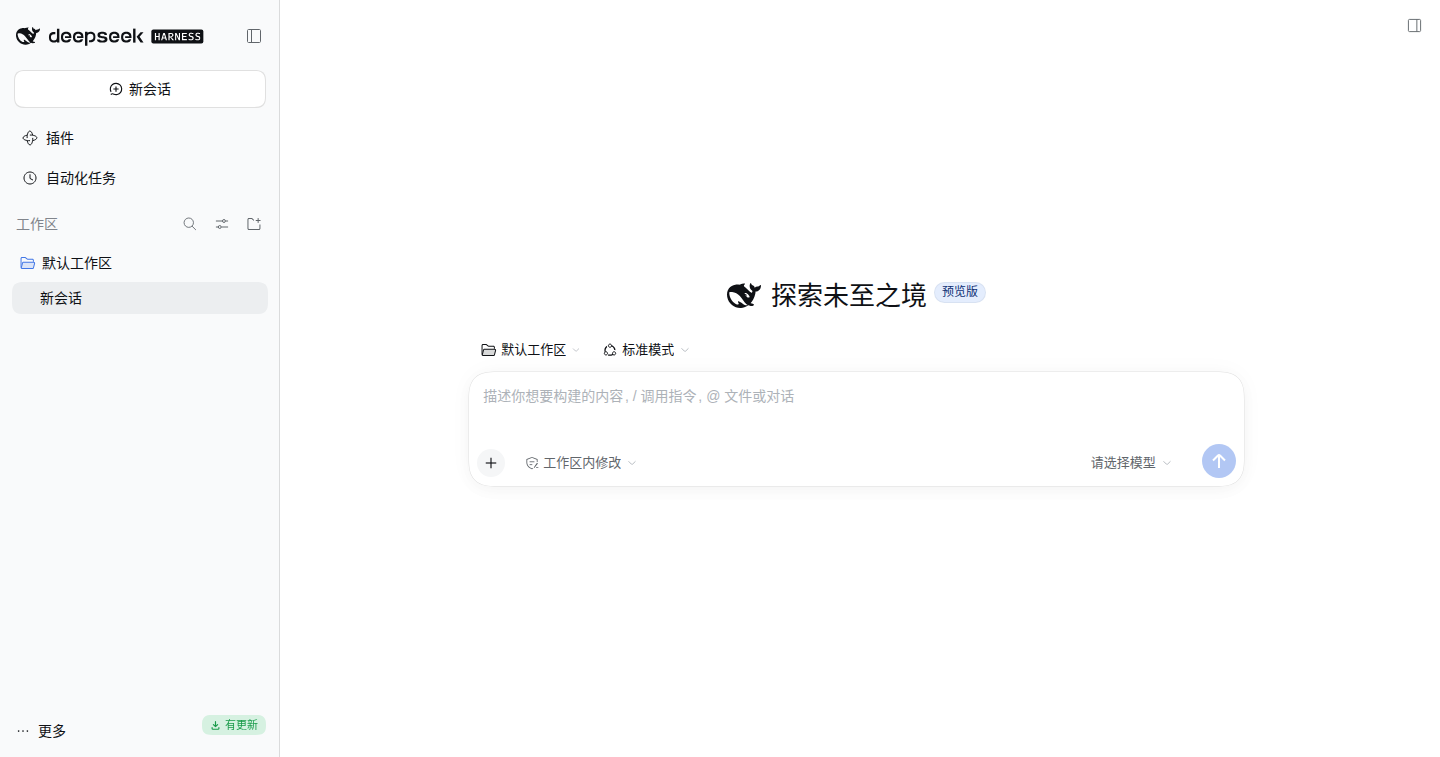
dsh web starts, then every 24 hours while it keeps running (configurable).sidebar.footer.action slot, anchored to the measured sidebar foot), theme-aware for light and dark.npm install -g @deepseek-ai/dsh@<latest> with the npm that owns the running installation.dsh web stopped.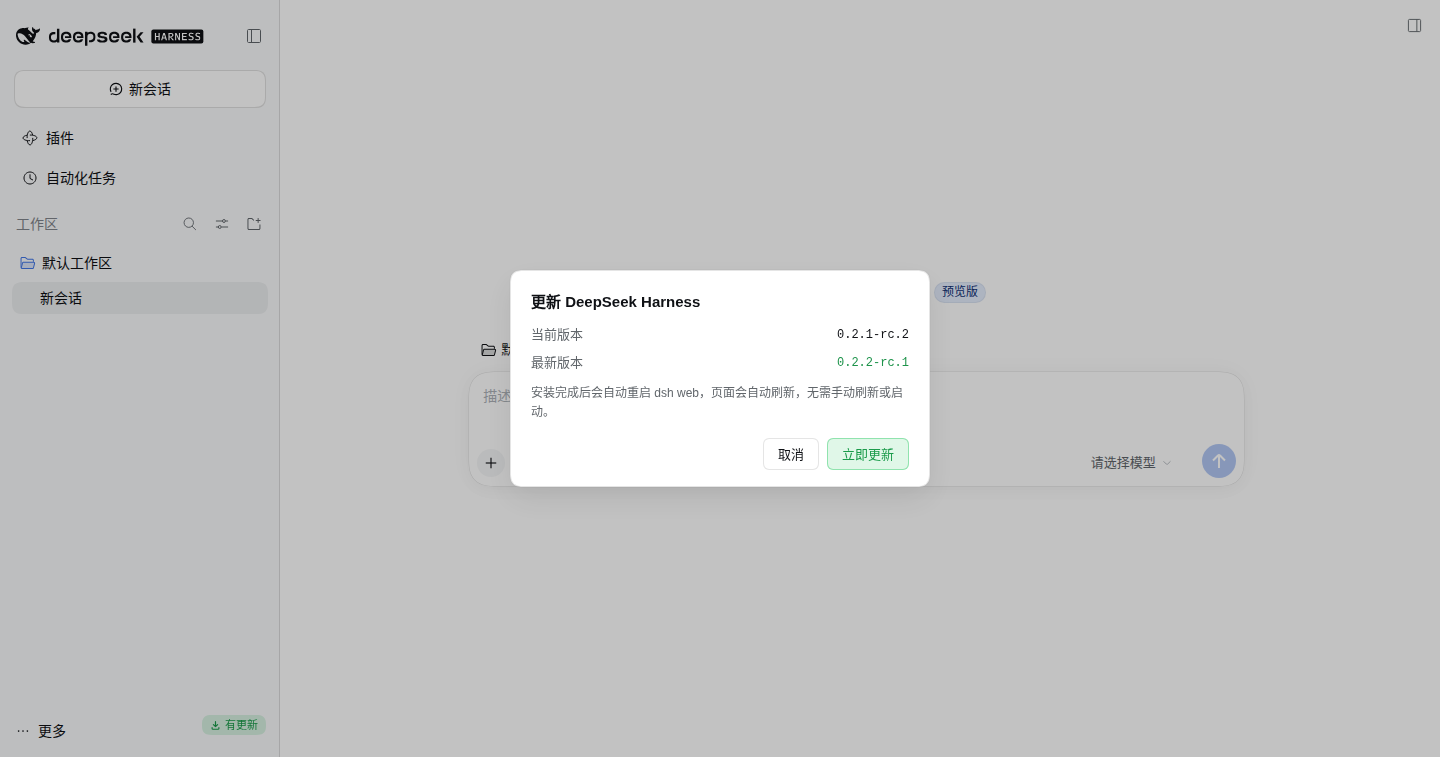
| DSH | dsh web, Linux (the restart helper uses /bin/bash and bash's /dev/tcp; macOS is untested) |
| Installation | @deepseek-ai/dsh installed by npm globally (package under <prefix>/lib/node_modules/@deepseek-ai/dsh) |
| Runtime | Node.js >= 22; npm on PATH (or set npmCommand) |
| Not supported | the Desktop (Electron) app, source checkouts, pnpm/yarn installs — the update button reports why instead of guessing |
| Host composition | a dsh web host with the Connection service enabled (the trust fence); without it the routes fail closed with 503 |
Tested with @deepseek-ai/dsh 0.2.1-rc.2 → 0.2.2-rc.1 on Linux.
1. From the Web UI (recommended) — open 插件 (Plugins) → 添加插件 (Add plugin), enter the npm spec dsh-web-update, and install. The plugin manager adds the package dependency and selects the bundle, so no manual config is needed.
2. From a DSH session — ask the agent to run the plugin manager for the target directory:
plugin_manager install_bundle target=dsh-web-update3. Manually — pnpm add alone only installs the dependency, it does not activate the bundle:
dsh plugin --profile web add dsh-web-update
# then add "dsh-web-update" to dsh.profile.bundles in ~/.dsh/profiles/web/package.json
After installing, reload the page once so the browser loads the plugin's client half.
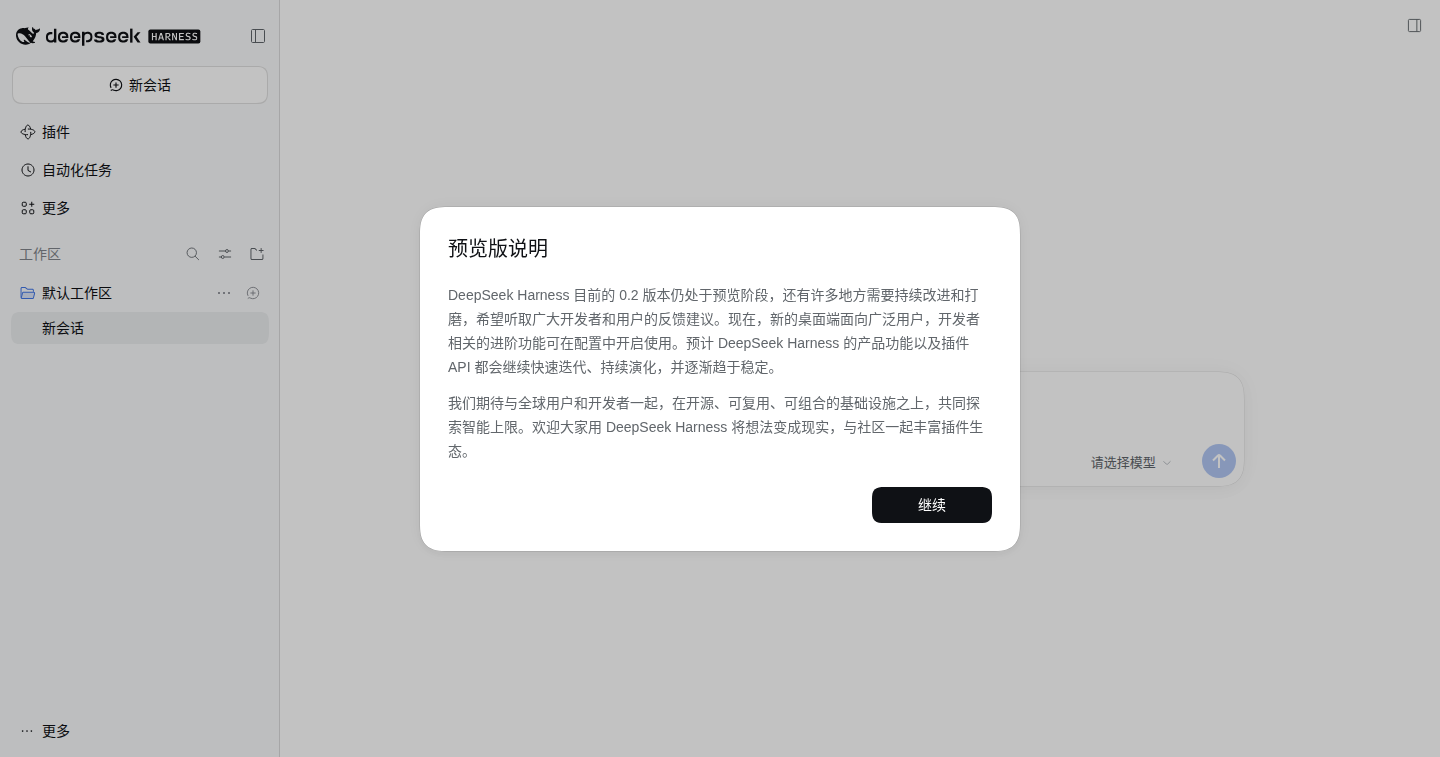
An upgrade replaces the whole client release, so the open page keeps the release it booted from while the new Host serves another one. DSH intentionally pauses applying the new plugin graphs until the page reloads — and the page does not reload by itself, so it could end up blank until a manual refresh.
This plugin ships a module-level watchdog (owned by the plugin context, not by the React tree, so it keeps running even when the app root is empty). It compares window.__DSH_BOOT__.release.version with the Host's /state.currentVersion; when they differ and the new Host answers, it reloads the page once. A sessionStorage guard caps attempts per Host release, so it can never reload in a loop.
| Before (stale page stays blank) | After (auto-reloads into the new version) |
|---|---|
 |
 |
dsh web (Host)                                    browser (Client)
├── index.js  ── routes /dsh-web-update/{state,check,update}
│               registry check, npm install,      ├── client.js
│               restart helper                    │   ├── badge + confirm dialog
├── host/update.js  version + registry + npm       │   └── auto-refresh watchdog
└── host/restart.js detached bash helper └── polls /state (1.2s … 60s)GET /dsh-web-update/state returns the running version (detected from the process's own package), the version behind the npm dist-tag, and whether it is newer.POST /dsh-web-update/update spawns npm install -g …, streams the log tail into the dialog, then verifies the installed package.json really reports the target version.process.execPath + argv (adding --no-open, so no extra tab opens), and succeeds only when the new process is alive and the port accepts connections.last-restart.json and the log.Optional, in the profile's cordis.patch.yml (~/.dsh/profiles/web/cordis.patch.yml). Every key is optional:
- id: dsh-web-update
  name: 'dsh-web-update'
  config:
    checkIntervalHours: 24      # periodic check while dsh web keeps running
    autoCheckOnStart: true      # one check after activation
    registryUrl: https://registry.npmjs.org
    packageName: '@deepseek-ai/dsh'
    distTag: latest             # e.g. next for another channel
    npmCommand: ''              # empty = the npm next to the running dsh install
    installArgs: null           # full argument template; {target} is replaced
    restartTimeoutSeconds: 90   # budget for the new server to become healthy
    allowPrereleaseUpdates: true
installArgs defaults to [install, -g, --no-audit, --no-fund, {target}]. For a custom npm prefix, e.g.:
installArgs: ['install', '-g', '--prefix', '/custom/prefix', '--no-audit', '--no-fund', '{target}']| Path | Content |
|---|---|
$DSH_HOME/dsh-web-update/update.log |
npm output plus every restart-helper step |
$DSH_HOME/dsh-web-update/last-restart.json |
outcome of the last restart: restarted / rolled-back / failed |
$DSH_HOME/dsh-web-update/restart-dsh-web.sh |
the generated helper script (rewritten per update) |
connection service (or its requestRejection) is missing, the routes fail closed with 503 and a one-time warning is logged when the first such request is refused. There is deliberately no weaker local fallback, so a local process without the browser cookie cannot start an install on a shared machine.@deepseek-ai/dsh); no user input is interpolated into a shell string — npm runs as an argument array, and the restart helper is a generated file with shell-quoted constants.$DSH_HOME/.credentials.yaml) untouched, so open pages stay authenticated.install-scripts … not yet covered by allowScripts — that is an npm notice, not a failure. Install scripts still run by default (strict-allow-scripts is off); the update result and the restart health check decide success.dsh is not a global npm install (source checkout, pnpm -g, …). The plugin refuses to update instead of installing elsewhere. Update with the tool that installed it.dsh web under systemd / a container — the helper starts its own process; your supervisor may also restart one, so prefer the supervisor's restart path in that deployment.npm install -g @deepseek-ai/dsh@1.0.0 style: run npm install -g @deepseek-ai/dsh@<version> and reload the page.lastRestart is null right after a restart — the freshly started Host may read the status file before the helper writes it; the log is authoritative./tmp, its own DSH_HOME, port elsewhere): real npm install -g @deepseek-ai/dsh@0.2.2-rc.1 → automatic restart → new process on the same command line → /state reports the new version → the page reloaded itself once and came back healthy. The real serving process and the user's global install were not touched.dsh web on the old version, plugin installed from its packed npm tarball): badge → confirm dialog → real install → detached restart helper → auto page refresh into 0.2.2-rc.1, with exactly one reload and no refresh loop. The host's dsh version, global package, profile and running server were byte-for-byte unchanged afterwards.GET /state and POST /update return 401; a cross-site POST returns 403.No build step — the client half is plain JavaScript served as a module.
npm test        # node:test — version comparison, install-arg expansion, restart-script quoting
npm pack --dry-run
Repo layout: index.js (Host entry), client.js (browser module), host/*.js (version/registry/restart helpers), cordis.patch.yml (bundle row), locale/ (plugin metadata), icon.svg (+ assets/*.png storefront tiles), docs/ (screenshots).
CLASSIFICATION EVIDENCE
系统优先读取 GitHub Topics,再与站内分类词典和词根规则比对。当前命中: 无有效分类标签。
c1overzz
DSH 插件:每天替你刷一轮 B站,读字幕挑出值得的、写一份日报,值得的 @ 你

hellowind777
一个自主的高级智能伙伴,不仅分析问题,更持续工作直到完成实现和验证。

xing-shuyin
Just open your browser — get all your work done.