
模型与 MCP
待识别

rea
morluto
Reverse engineer anything with agents, from app behavior down to native binaries.
PROJECT TOPICS
PROJECT README
A DeepSeek Harness plugin that puts every MCP server definition on your machine in one place: it scans the config files of the clients you already use, normalises them, verifies that each server actually answers the MCP handshake, and keeps a small editable pool of its own.
Modelled on the idea of dsh-skills-manager, but for MCP servers instead of skills — and in English only.
Distributed as @zarpyk/dsh-mcp-manager (MIT). Source: https://github.com/Zarpyk/dsh-mcp-manager.
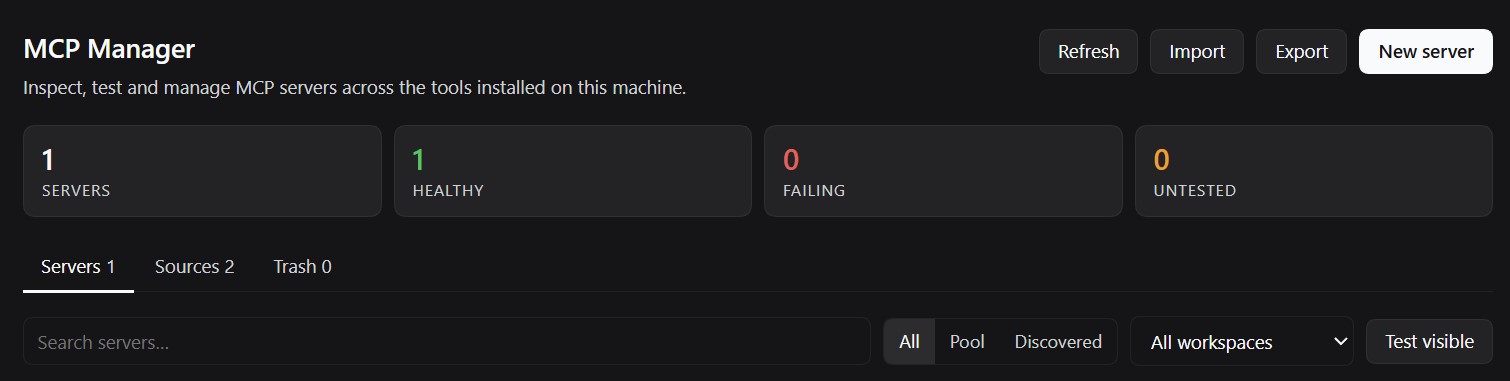
initialize handshake and lists the tools the server
exposes, over stdio, streamable HTTP or legacy SSE. Failures come with a plain-English hint
(missing executable, 401, DNS, certificate, timeout, unsupported protocol version)./mcp-<server> turns the bridge on for one conversation and
every tool that server publishes is registered there as mcp_<server>_<tool>, callable directly — no
separate MCP connector plugin needed. A chat's own choice always beats the pool-wide switch in
Settings → MCP Manager, so a server can be on everywhere and off in one chat (or the other way round).
Sessions reopen automatically when the server changes and follow notifications/tools/list_changed.mcp_<server>_status
placeholder tool, and a prompt-context line tells the model the MCP is connected but has no tools right now,
so a disconnected host app is never mistaken for a missing server.mcpServers JSON, VS Code servers JSON or Codex config.toml.It also registers six agent tools so the model can inspect and maintain the same inventory:
mcp_inventory, mcp_probe, mcp_save_server, mcp_expose_server, mcp_export_config, mcp_remove_server.
Exposure is per chat. Every pool server gets its own /mcp-<server> command, so the composer's
command palette completes the name for you, and the first run exposes that server in the chat where you
typed it:
/mcp-<server>           toggle that server in this chat, e.g. /mcp-unity-mcp
                        first run: expose its tools here · next run: hide them here
/mcp stays available for the finer-grained verbs when you want them:
/mcp                    what is in the pool and what this chat can call right now
/mcp list               every pool server, its transport and its state here
/mcp on <name>          expose a server in this chat
/mcp <name>             shorthand for toggling it here
/mcp off <name>         hide it here again
/mcp tools <name>       the tool names currently published
/mcp refresh <name>     re-read the server's tool list (use after starting the app behind it)
/mcp test <name>        run the MCP handshake and report latency and tools
Local always wins: a choice made in a chat — either direction — beats the pool-wide switch in Settings → MCP Manager, and only affects that chat. Toggling a server on the settings page changes the default for every chat that has not made its own choice. Hiding a pool-wide server in one chat leaves it available everywhere else.
Some servers — Unity's relay is the usual example — only publish tools while their host application is
connected. While such a server is exposed and reports zero tools, the bridge re-reads its list every
15 seconds, so the tools appear on their own once the app connects; /mcp refresh <name> forces that read
immediately. Until tools show up the server is still visible to the agent: the bridge registers one
mcp_<server>_status placeholder tool for it (calling it re-reads the list and explains what to do) and a
prompt-context line names the server, its transport and its current state, so the model knows the MCP is
connected but has no tools instead of assuming it is missing.
The outcome renders in the conversation and never enters the model's context. Aliases: ls, enable,
disable, probe, reload. Only the plugin's own pool can be exposed — discovered servers stay read-only until you
copy them into the pool.
Two entry points, both disabled independently if their slot is unavailable:
The client half is a single plain-JS module (lib/client.js), so after changing it only a window reload is
needed — no rebuild step.
Published as @zarpyk/dsh-mcp-manager. From the profile that should load it:
dsh plugin --profile <profile> add @zarpyk/dsh-mcp-manageror, from a checkout of this repository:
plugin_manager install_bundle # target: this package directoryUsing the Harness UI: Settings → Plugins → install from npm or from a local package directory.
Requirements: Node.js 20+ (the stdio probe spawns node-based servers) and a Harness build that provides
@deepseek-ai/dsh-client-ui-slots and @deepseek-ai/dsh-client-locale at >=0.2.0-rc.1 <0.3.0-0.
The bundle patch is intentionally empty apart from the insert row:
- insert:
    - id: mcp-manager
      name: '@zarpyk/dsh-mcp-manager'
All behaviour is driven from the settings page; there is no required config.
$DSH_HOME/mcp-manager/state.json
(%USERPROFILE%\.dsh\mcp-manager\state.json on Windows by default).The page talks to the host half over two routes, registered on the plugin's own connection:
| Method | Path | Purpose |
|---|---|---|
GET / HEAD |
/api/dsh-mcp-manager/state?workspace= |
Snapshot: servers, sources, trash, stats |
POST |
/api/dsh-mcp-manager/action |
All mutations and probes |
Every POST must carry x-dsh-mcp-manager: 1, a JSON content type and a same-origin Origin header when one
is sent; anything else is rejected with 403 / 415.
Actions: refresh, probe, spec, save, set-enabled, set-expose, delete, restore, purge,
empty-trash, import, export.
Responses are { "ok": true, "data": … } or { "ok": false, "error": "…", "code": "…" }.
•••••• plus the last four characters) before they reach the
browser, except through the explicit spec action used to pre-fill the editor.lib/sources.js where MCP configs live, per client
lib/parse.js JSON/TOML config parsing, normalisation, masking
lib/probe.js real MCP client (stdio, streamable HTTP, legacy SSE)
lib/bridge.js keeps exposed pool servers connected and registers their tools
lib/state.js pool state file
lib/discovery.js file scanning and normalisation
lib/index.js host half: HTTP routes, actions, agent tools, the /mcp command
lib/client.js web half: settings page (plain JS, no build step)Tests use the Node test runner and need no dependencies:
node --test test/parse.test.js test/probe.test.js test/plugin.test.js test/client.test.js test/render.test.js test/bridge.test.jstest/render.test.js renders the settings page with a tiny React substitute and a fixture snapshot, so the
whole tree (rows, details, tabs, editor) is exercised without a browser. The probe tests spawn a fake stdio
server and start throwaway HTTP servers on 127.0.0.1; nothing touches your real config files (the plugin
tests point HOME and DSH_HOME at a temporary directory).
notifications/tools/list_changed, which only flows on stdio; HTTP servers are
re-read when you run /mcp refresh <name> (or reopen the page). Servers that publish no tools are polled
every 15 seconds while exposed.state.json for that session id.MIT.
CLASSIFICATION EVIDENCE
系统优先读取 GitHub Topics,再与站内分类词典和词根规则比对。当前命中: mcp。
morluto
Reverse engineer anything with agents, from app behavior down to native binaries.

deepseek-ai
DeepSeek Harness: Everything is a Plugin.

nexu-io
The 1st Collaborative AI Design Agent Workspace. Local-first and open source. Create motion, prototypes, websites, apps, dashboards, presentations, images, and videos with your team and AI agents. Share work, exchange feedback, and iterate together in one workspace.