

模型与 MCP
待识别

rea
morluto
Reverse engineer anything with agents, from app behavior down to native binaries.
PROJECT TOPICS
PROJECT README


DeepSeek-鲸鱼娘 (Whale Girl) theme for the DeepSeek Harness (DSH) Web UI — a native light theme built from the DreamSkin palette, with the whale-girl artwork behind a light paper layer and live glass, wallpaper and conversation-paper controls.
English | 中文
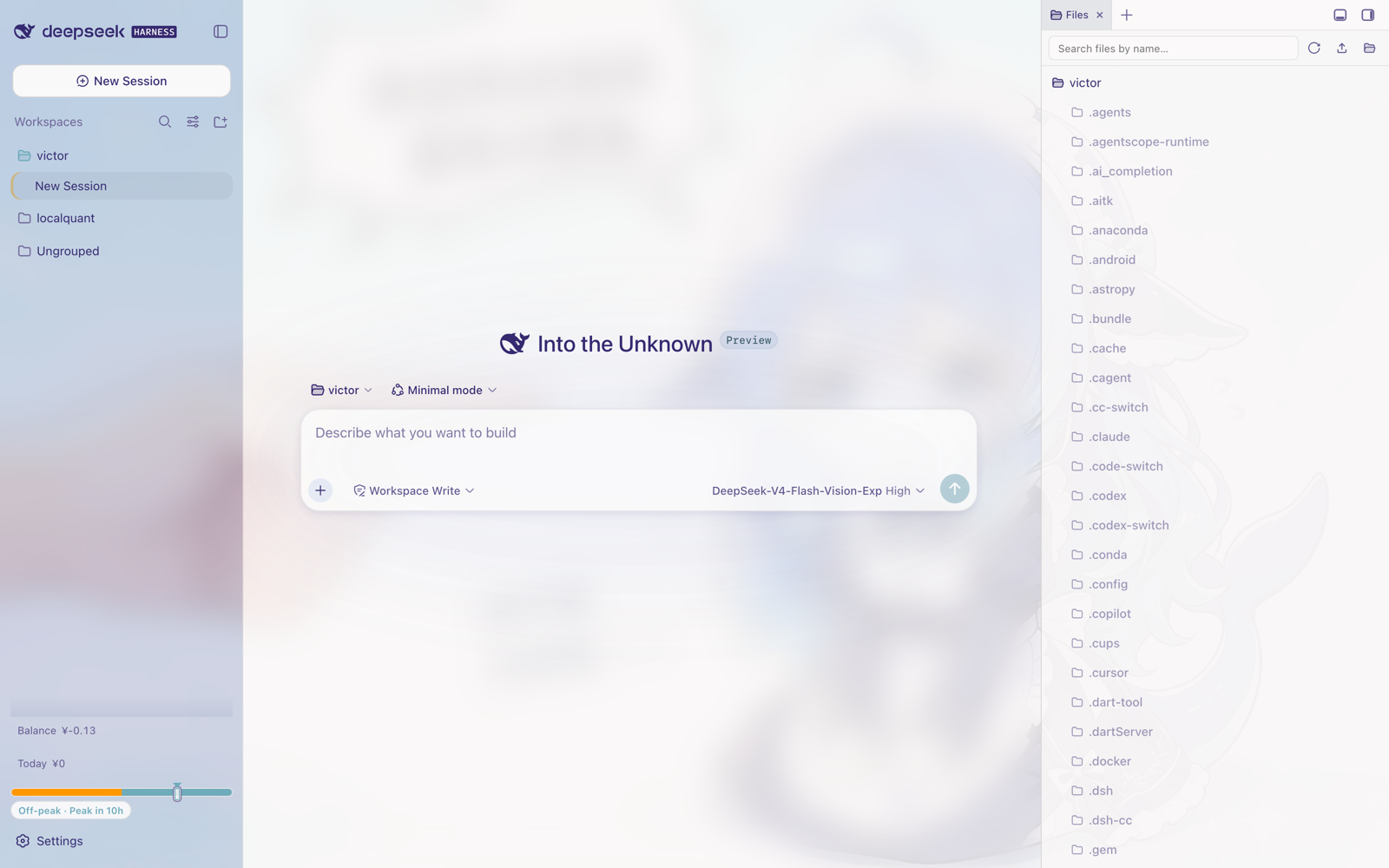
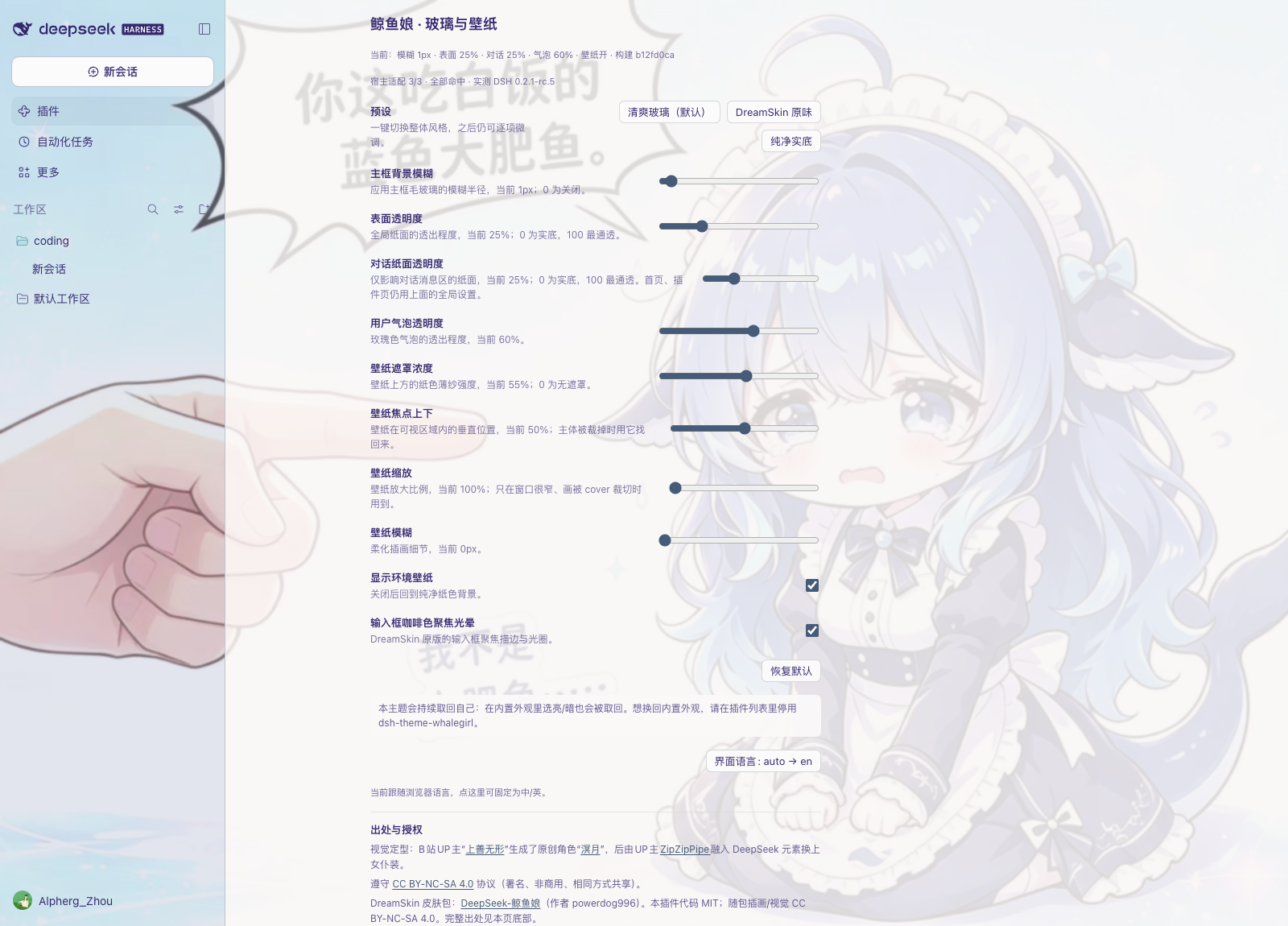
Artwork credit. The original character 溟月 (Mingyue) was created by Bilibili creator 上善无形; Bilibili creator ZipZipPipe later combined her with DeepSeek elements and the maid outfit. The artwork is licensed CC BY-NC-SA 4.0 (attribution, non-commercial, share-alike) and is not covered by the plugin's MIT license. The DreamSkin package was published by powerdog996. Full credits: CREDITS.md.
deepseek-whalegirl) into DSH's native theme runtime with a complete --dsw-* dictionary (174 tokens): every surface, label, border, button, markdown block, scrollbar and state color derives from the DreamSkin palette.plugins.bundle.config), so it appears on Plugins → Installed → dsh-theme-whalegirl, above the component list. It is no longer part of the built-in configuration cards.theme.setTheme() and a theme/change guard re-asserts it whenever anything else writes another preference. That includes an explicit light/dark pick in Appearance, because the desktop shell writes exactly that when it adopts its stored settings after plugins mount: the way back to the built-in appearance is to disable this plugin, in the market Themes tab or on its installed-package page. The settings card says the same thing where you would look for it.宿主适配 3/3 · 实测 DSH 0.2.1-rc.5 on the settings card, naming any miss in the console as well.Palette anchors taken from the source skin:
| Role | Source value | Used for |
|---|---|---|
| text | #352970 |
primary labels, ink ladder |
| highlight | #455b78 |
brand & primary buttons |
| accent | #7a4e29 |
composer focus ring |
| accentAlt | #ceb683 |
active nav accent, selection |
| secondary | #85c1cc |
blue/info ladder |
| panel / panelAlt | #abb4cf / #c3cee4 |
periwinkle sidebar glass |
| background | #bd9999 |
rose paper tint, bubbles |
npm (recommended — versioned, easily upgradable, and no build step):
dsh plugin --profile web add -w dsh-theme-whalegirlOr install from the dsh-market plugin's Themes tab (search "whalegirl").
Other sources:
# prebuilt tarball from GitHub Releases (use if the npm registry is unavailable)
dsh plugin --profile web add -w https://github.com/ZHOUcourier/dsh-theme-whalegirl/releases/latest/download/dsh-theme-whalegirl.tgz

# git (tracks main)
dsh plugin --profile web add -w github:ZHOUcourier/dsh-theme-whalegirl

# local checkout
dsh plugin --profile web add -w link:/path/to/dsh-theme-whalegirl
Then restart the profile:
dsh --profile webThe theme applies immediately once the plugin mounts. While the plugin is enabled it owns the appearance: a light/dark pick in Settings → General → Appearance is reclaimed, because the same write happens on the desktop's own cold start. To switch back to the built-in appearance, disable the plugin (market Themes tab, or its installed-package page); toggling it on again brings the theme back.
Open Plugins → Installed → dsh-theme-whalegirl and use the 「鲸鱼娘 · 玻璃与壁纸」 form. Every change applies instantly; values are stored in this browser's localStorage (dsh-whalegirl.prefs.v2), not in the profile.
| Control | Range | Default | Effect |
|---|---|---|---|
| Presets | — | 清爽玻璃 | One-click 清爽玻璃 / DreamSkin 原味 / 纯净实底 |
| 主框背景模糊 | 0–24px | 1px | App-frame backdrop blur radius; 0 = off |
| 表面透明度 | 0–100% | 25% | Global paper opacity (home, menus, plugin pages); 0 = solid, 100 = most open (~55%) |
| 对话纸面透明度 | 0–100% | 25% | Conversation transcript only; 0 = solid, 100 = most open (~45% paper) |
| 用户气泡透明度 | 0–100% | 60% | Translucency of the dusty-rose user bubbles |
| 壁纸遮罩浓度 / Wallpaper veil | 0–100% | 55% | Strength of the paper veil over the artwork |
| 显示环境壁纸 / Show wallpaper | on/off | on | Hides artwork + veil for a plain paper background |
| 壁纸焦点上下 / Wallpaper focus | 0–100% | 50% | Vertical position of the artwork, for windows whose crop cuts the subject off |
| 壁纸缩放 / Wallpaper zoom | 100–200% | 100% | Scale of the artwork, for narrow windows where cover crops hard |
| 壁纸模糊 / Wallpaper blur | 0–16px | 0px | Softens the artwork itself |
| 输入框咖啡色聚焦光晕 / Focus glow | on/off | on | The DreamSkin composer focus ring |
| 界面语言 / Language | auto → zh → en | auto | Card copy follows the host UI language (<html lang>), with the browser language only as a fallback; pin it here |
The card header also prints the current values, the stylesheet build id, and the host-hook report (宿主适配 3/3 · 实测 DSH 0.2.1-rc.5).
恢复默认 / Restore defaults restores the defaults above. Upgrading from 0.1.x starts from the new (lighter) defaults; nothing is migrated.
Uninstall:
dsh plugin --profile web remove dsh-theme-whalegirldsh.client.platform: "web", client bundle via exports["./client"]).>= 0.1.6 is declared in engines.dsh; tested on DSH 0.2.1-rc.5. The client declares inject: ["theme", "slots"], so the settings form's ctx.slots access is legal and every service probe falls back to ctx.get() instead of throwing. A host without the slots service still gets the full theme; only the optional settings entry is skipped.宿主适配 2/3 and log the missing selector — please paste that line into an issue.data-dsh-whalegirl is touched when disabled.The host's surface ownership differs per shell: the macOS titlebar layout gives the center/right columns --dsw-alias-bg-base, while the browser layout paints no column background and lets each page (conversation root, dock tab host) paint it. The skin owns the column surface itself: [class*="_centerCol"]/[class*="_rightbarCol"] carry the paper on every platform, the conversation root and [class*="_tabHost"] stay transparent, so every page has exactly one paper layer (~86% opaque at the default, ~14% wallpaper). The sidebar paints the same token twice (the layout column and the sidebar's own _root); the skin blanks the inner fill and paints the wash once from the column.
Since 0.3.0, [class*="_centerCol"]:has([data-slot="conversation.header"]) re-emits --dsw-alias-bg-base with the conversation-only value. The right sidebar, home, menus and plugin pages keep the global 表面透明度.
npm run build        # wrap src/client.js into lib/client.js + embed assets/background.jpg
npm test             # smoke test: register/guard/card/dispose against a mocked DOM
npm run check        # verify lib/ matches src/ (CI)
npm run test:browser -- --url "http://127.0.0.1:5190/?token=…"   # real Chromium, computed styles
The build is dependency-free (plain Node). lib/ is committed so installs never need a build step.
npm test proves the plugin's logic; it cannot see the things that actually broke in the past (two paper layers composing to ~99% white, the web sidebar rendering solid where the desktop showed the wallpaper, a cold-start presenter overwriting the palette). npm run test:browser boots a real DSH web profile and asserts computed styles instead of strings: the label colour lands on #352970, the wallpaper paints behind a single translucent column (alpha ≈ 0.86 at the default, ≈ 0.48 at 95%), preferences survive a reload, and no page error is raised. Boot any profile for it — a throwaway one keeps your own clean:
dsh --profile whalecheck --from-default-profile web --dump-config   # create without booting
dsh plugin --profile whalecheck add -w link:"$PWD"
dsh --profile whalecheck --no-open --port 5190                      # prints the token URL
Playwright is resolved from a local install, npm root -g, or the npx cache; if its Chromium was never downloaded the script falls back to the system Chrome.
视觉定型:B站UP主“上善无形”生成了原创角色“溟月”,后由UP主ZipZipPipe融入DeepSeek元素换上女仆装。遵守 CC BY-NC-SA 4.0 协议(署名、非商用、相同方式共享)。
Visual identity: the original character Mingyue (溟月) was created by Bilibili creator 上善无形; Bilibili creator ZipZipPipe later combined her with DeepSeek elements and the maid outfit. The visual is licensed under CC BY-NC-SA 4.0 (attribution, non-commercial, share-alike).
The theme was ported from the DreamSkin package DeepSeek-鲸鱼娘 ver_cb557ececaa5de3f3dbe by powerdog996. That page lists the package as MIT; this plugin treats that MIT as covering the DreamSkin package's packaging/code, while the character and artwork remain under the original CC BY-NC-SA 4.0 terms. See CREDITS.md for the full chain and the license split.
assets/background.jpg, derived character layers, previews, icons); CC does not cover the plugin code.See CHANGELOG.md or GitHub Releases for the changes in each version.
CLASSIFICATION EVIDENCE
系统优先读取 GitHub Topics,再与站内分类词典和词根规则比对。当前命中: deepseek、deepseek-harness。
morluto
Reverse engineer anything with agents, from app behavior down to native binaries.

deepseek-ai
DeepSeek Harness: Everything is a Plugin.

nexu-io
The 1st Collaborative AI Design Agent Workspace. Local-first and open source. Create motion, prototypes, websites, apps, dashboards, presentations, images, and videos with your team and AI agents. Share work, exchange feedback, and iterate together in one workspace.