dsh-skill-manager
A visual Skill manager for the DeepSeek Harness web GUI: enable, auto-load, categorize, and author your SKILL.md rules — without touching files.
English | 中文
The problem it solves
DeepSeek Harness skills are plain SKILL.md files (Markdown + YAML frontmatter) discovered under ~/.dsh/skills. Once your skill library grows, managing it by hand means:
- You can't see what you have — skills are flat files, no overview, no enable/disable.
- You can't organize — every skill sits in one folder, and "which skill is for what" lives only in each file's description.
- You repeat yourself — the rules you use in every conversation (agile sync, data analysis, …) have to be invoked manually each time.
- Editing is error-prone — a wrong frontmatter key silently breaks routing; there was no GUI to author a skill at all.
dsh-skill-manager turns all of that into point-and-click from the sidebar.
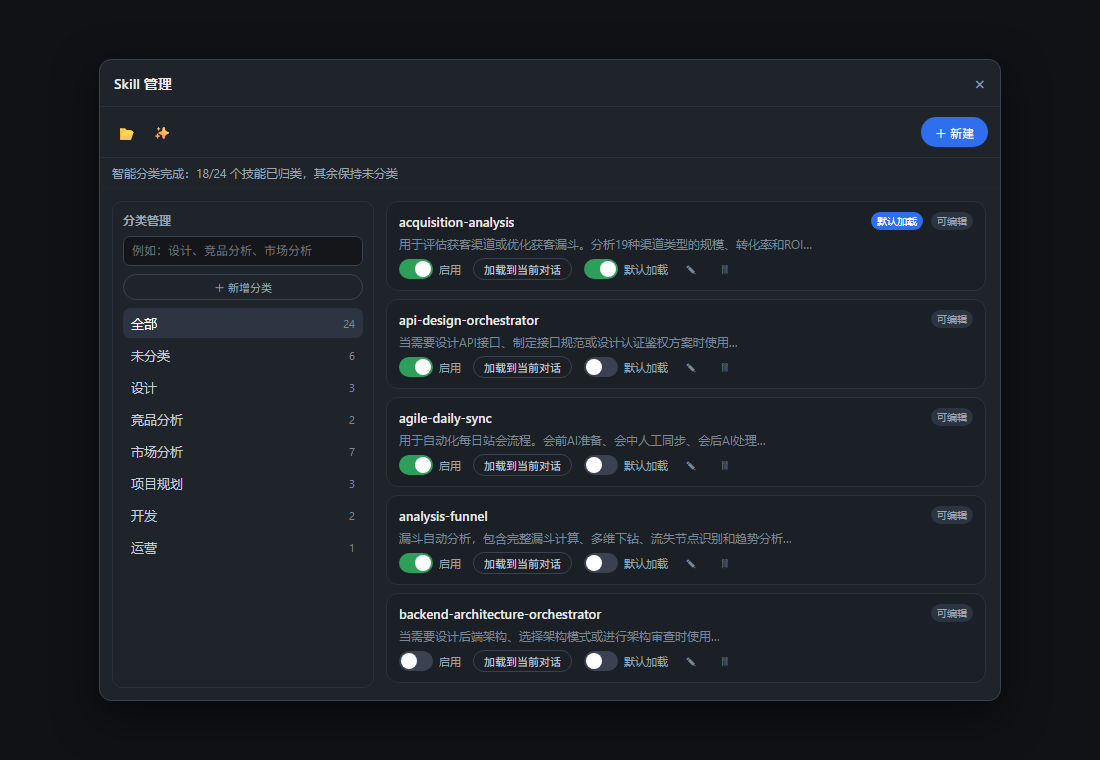
Features
| Capability |
What it does |
| 启用 / 禁用 (Enable) |
One switch per skill. Disabled skills disappear from the /name catalog; the list always shows the real state. |
| 加载到当前对话 (Load into conversation) |
Copies /skill-name to the clipboard — paste it into the composer and send to bring that skill's rules into the current chat. Never auto-sends a message. |
| 默认加载 (Default load) |
One switch per skill marking it "always loaded into new conversations", so the rules you always need are there from the start. |
| 分类管理 (Categories) |
Create / rename / delete categories, assign skills by checkbox, live member counts. Skills can belong to several categories. |
| 智能分类 (Smart classify) |
One click assigns every skill to a category by keyword rules (local, no API key, explainable). Categories carry editable keywords; on first use it auto-seeds 6 default categories (设计 / 竞品分析 / 市场分析 / 项目规划 / 开发 / 运营). |
| 编辑 SKILL.md (Author) |
Create, edit, and delete user-owned skills in-panel with validation (kebab-case names, never-overwrite create, readable errors). Writes go to $DSH_HOME/skills/<name>/SKILL.md and invalidate the skill catalog. |
| 打开文件夹 (Open folder) |
Reveal $DSH_HOME/skills in the host file manager. |
Three-layer model
The manager separates three concepts that are easy to confuse — each is a different control in the panel:
- 启用 (Enable) — is the skill visible/invocable at all (
skill-preferences.json → enabled).
- 加载到当前对话 (Load into this conversation) — bring a skill's rules into the current chat, on demand (clipboard copy of
/name, you decide when to send).
- 默认加载 (Default load) — a global default: the skill is loaded automatically into new conversations (
defaultLoaded).
Enablement and default-loading are switches; "load into conversation" is a one-shot action.
Installation
The feature has two halves — a host capability (RPCs + preferences store, applied as a git patch) and the client panel (this repo's client/ package). The client depends on the host RPCs, so apply the host patch first.
# 1. In your deepseek-harness checkout, apply the host patch
cd deepseek-harness
git apply /path/to/dsh-skill-manager/host/0001-skill-manager-host.patch

# 2. Bring the client package into the workspace (see docs/INSTALL.md — three routes:
#    monorepo workspace member, bundle dependency, or standalone bundle)
pnpm install
pnpm run build:lib:client

# 3. Restart the web GUI and hard-refresh the browser
pnpm run dev:web
Then the Skills button appears in the sidebar above Settings.
See docs/INSTALL.md for the three supported routes and host/README.md for what the host patch changes.
How it works
- Host side (
host/0001-skill-manager-host.patch): skill.* RPCs (list/read/create/update/delete/openFolder/preferencesRead/preferencesUpdate/smartClassify) through the full apiproxy stack; a skill-preferences store ($DSH_HOME/skill-preferences.json) for enablement / default-loading / categories; a skill-filesystem writer for authoring; smart classification by keyword rules.
- Client side (
client/): a @deepseek-ai/dsh-client-ui-skill-manager plugin registering into the sidebar.footer.action slot. The panel is a self-drawn portal dialog; the injected face calls connection.api.skills.* — the component never touches ctx or the RPC client. zh/en locales included.
Development
# in client/
pnpm --filter @deepseek-ai/dsh-client-ui-skill-manager bundle   # build lib/client.js
pnpm exec vitest run packages/client/ui-skill-manager           # browser spec (13 tests)
License
MIT


