
其他
完整应用

deepseek-harness
deepseek-ai
DeepSeek Harness: Everything is a Plugin.
PROJECT TOPICS
PROJECT README
📖 中文使用教程:使用教程.md · 📦 源码:github.com/Yugitan/dsh-skin · 🏷 dsh-plugin
A customizable skinning plugin for the DeepSeek Harness Web UI. It adds a 「换肤 / Skin」panel to 设置 → 通用 (Settings → General) that lets you:
~/.dsh/skins/ and served from /skins/<file> (no base64 bloat in settings)./skins/... or external).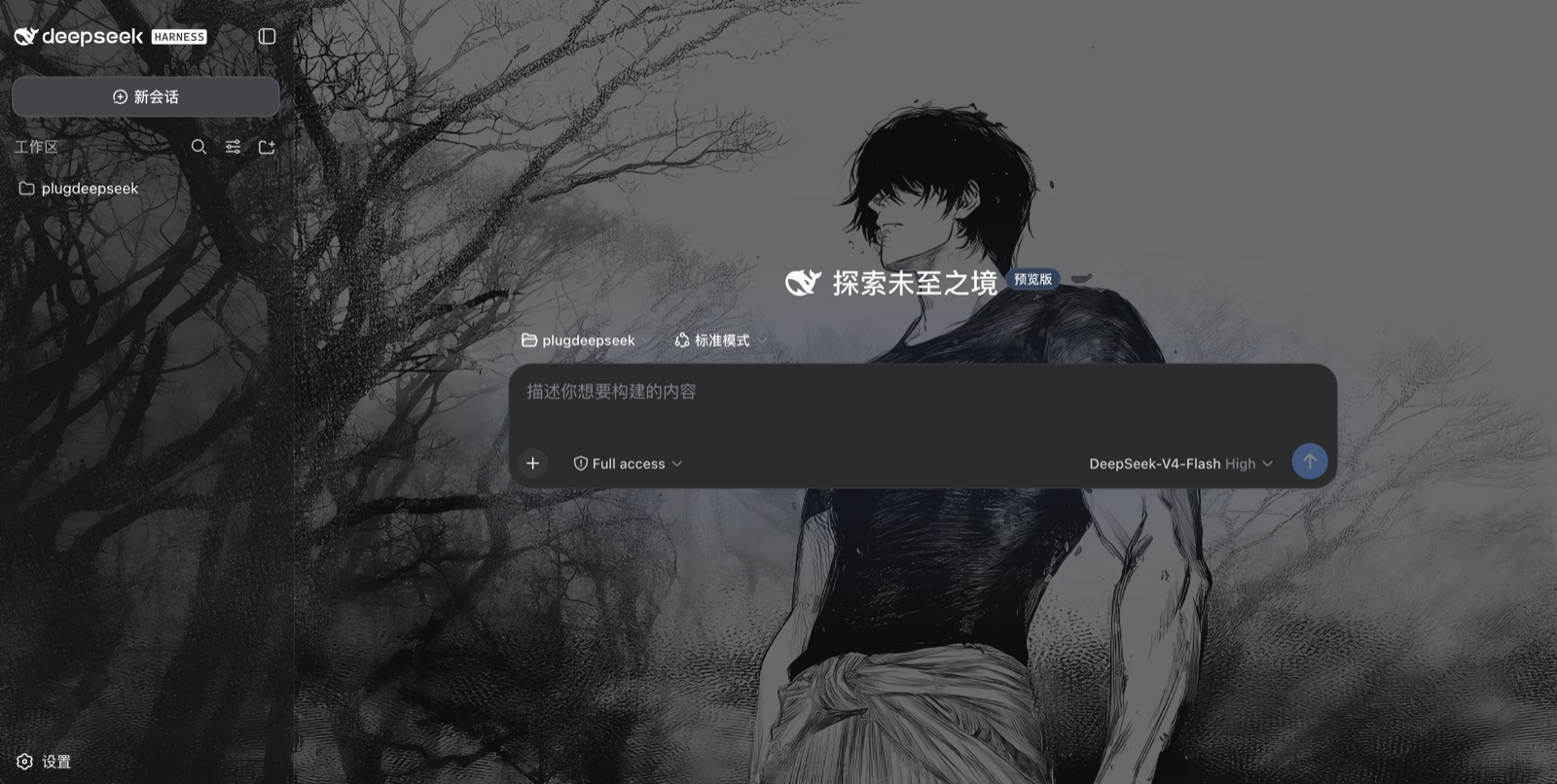
Everything is persisted in the DSH user-settings document
(~/.dsh/settings.yaml → skin: section), survives restarts, and re-applies
before the React app mounts (host-injected boot style, no flash).
lib/index.js, runs in the dsh web process)skin settings namespace + schema,POST /skin/upload (magic-byte image sniffing, 10 MiB cap) and
GET/HEAD /skins/<file> (immutable cache, path-traversal guarded),--dsh-skin-* CSS custom properties and the
body[data-ds-skin] attribute.lib/client.js, loaded by the client module system)SkinRuntime mirrors the settings section into CSS custom properties,
toggles data-ds-skin / data-ds-skin-accent on <body>, and removes the
host boot nodes once active,settings.general.item slot
(order 20, right below the built-in Appearance row).The wallpaper is painted by a fixed full-viewport body::before layer
(z-index: -1), the dim overlay by body::after, and the app surfaces are
made translucent through --dsw-alias-bg-* token overrides (!important
beats the ui-layout ThemePresenter's inline tokens), so the image shows
through panels while text stays readable via the dim overlay.
From the dsh-skin/ directory, run the bundled manager script. It does all
three steps — module install, cordis.patch.yml entry, host allowlist patch —
and is idempotent (safe to re-run):
node manage.mjs install        # one-click install (copy mode, moved-folder safe)
node manage.mjs install --link # dev mode: live symlink, browser HMR picks up client.js edits
node manage.mjs status         # verify (also checks the live server bundle)
node manage.mjs uninstall      # one-click uninstall
node manage.mjs uninstall --clean   # also delete ~/.dsh/skins/ + the skin: settings
node manage.mjs install --profile ~/.dsh/profiles/<other>   # custom profile
node manage.mjs --help
Or via npm scripts in this package: npm run plugin:install /
npm run plugin:uninstall / npm run plugin:status.
Restart the server afterwards and refresh the browser:
dsh --profile web (or npm exec @deepseek-ai/dsh web).
Install modes.
installcopies a self-contained plugin into<profile>/node_modules/dsh-skinby default, so moving, renaming or deleting this source folder afterwards never breaks the installed skin; re-runinstallto refresh the copy with your edits. Use--linkwhile developing so the profile links straight to this folder and the client HMR hot-reloadslib/client.jsedits in the browser without re-installing. A dangling symlink left behind by a moved folder is repaired automatically on the nextinstall(no--forceneeded).
git clone https://github.com/Yugitan/dsh-skin.git
cd dsh-skin
node manage.mjs install        # one-click install (links + registers + patches)
# restart the server, then refresh the browser:
#   cd ~ && npm exec @deepseek-ai/dsh web
On a new machine, recreate the
node_modulessymlink inside the clone (ln -s ~/.dsh/profiles/node_modules node_modules) or runnpm installthere so the harness resolvesreact/@deepseek-ai/*.
# from this repository root
PROFILE=~/.dsh/profiles/web
ln -s "$PWD/dsh-skin" "$PROFILE/node_modules/dsh-skin"
Append to $PROFILE/cordis.patch.yml:
- insert:
    - id: skin
      name: 'dsh-skin'
Then apply the one-line platform patch (required — see below), and restart the
server: dsh --profile web (or npm exec @deepseek-ai/dsh web).
node patch-host.mjs        # adds the "skin" settings namespace to the API-gateway allowlist
node patch-host.mjs --check
Platform patch (required). DeepSeek Harness's API gateway (
dsh-host-apiproxy) only lets configuration clients read/write a hard-coded allowlist of settings namespaces (WEB_SETTINGS_NAMESPACES). A third-party namespace — even one registered throughsettings.register()— is refused withsettings-not-exposed, so the skin row would render but every toggle/preset write silently fails and nothing persists (nothing is written tosettings.yaml).patch-host.mjsidempotently adds"skin"to that allowlist (with--check/--revertmodes). Re-run it after any harness reinstall/update, then restart the server.
While developing, edit dsh-skin/lib/client.js — the client HMR watcher
polls the bundle and hot-reloads it in the browser without a server restart
(when installed with --link; in copy mode re-run install first).
node manage.mjs install --link — dev install (live symlink → HMR).node patch-host.mjs — reapply the one-line API-gateway allowlist patch
(--check to verify, --revert to undo); needed after a harness reinstall.node test-client.mjs / node test-runtime.mjs — execute the browser bundle
in Node and render the Skin row with react-dom/server (smoke + runtime
projection + row actions).node test-host.mjs — mounts the upload/skins handlers on a throwaway
node:http server and exercises upload, serving, traversal guard, and the
index tap.node_modules symlink inside the package points at the profile module
fallback so the harnesses resolve react / @deepseek-ai/* without an
install.The plugin row accepts a config to relocate the image storage root:
- id: skin
  name: 'dsh-skin'
  config:
    root: /absolute/path/to/skins
Default: ~/.dsh/skins.
CLASSIFICATION EVIDENCE
系统优先读取 GitHub Topics,再与站内分类词典和词根规则比对。当前命中: 无有效分类标签。
deepseek-ai
DeepSeek Harness: Everything is a Plugin.

anywhere-labs
为 DeepSeek Harness (DSH) 插件生态打造的现代化桌面端解决方案。万物皆「插件」,桌面本身也是「插件」。

awesome-dsh-plugin
A curated list of plugins for DeepSeek Harness (dsh) · DeepSeek Harness 插件精选列表