dsh-sessions-diagnosis
Diagnose and repair DSH sessions that stopped opening after a harness upgrade —
from the CLI, from an agent tool, or from a dashboard in the DSH web UI.
中文说明 · Root cause write-up
The problem
DSH stores each session as a directory holding one immutable file per format
generation, and migrates old files lazily when you open them. Since 0.1.5 the
final migration step is a closed-vocabulary audit: every message must carry a
source.kind from a fixed set of fifteen values, and anything else aborts the
whole migration.
One retired value is enough to make a conversation unopenable. The culprit in the
wild is at-file-mention — the provenance tag older builds wrote for the
synthetic user message created by an @path mention. So the breakage looks
arbitrary: it hits exactly the sessions where somebody once typed @.
The session still lists (listing only reads the header), but opening it fails
with a generic gateway/internal error that says nothing about the cause. And a
failed migration writes nothing, so there is no evidence on disk to inspect.
→ Full root-cause analysis
What this does
|
|
| Diagnose |
Runs DSH's own released migration chain over your stored logs, so the reported reason is exactly what the harness hit — not a reimplementation or a guess. Classifies every session as ok, unmigrated, repairable, unrepairable, corrupt, too-new, empty, or unknown (nothing was checked — this build of DSH ships no codec), down to the offending field — what each verdict means. |
| Repair |
Produces a valid current-format successor and lets DSH select it. Verified before anything is written. The original file is never modified. |
| Visualise |
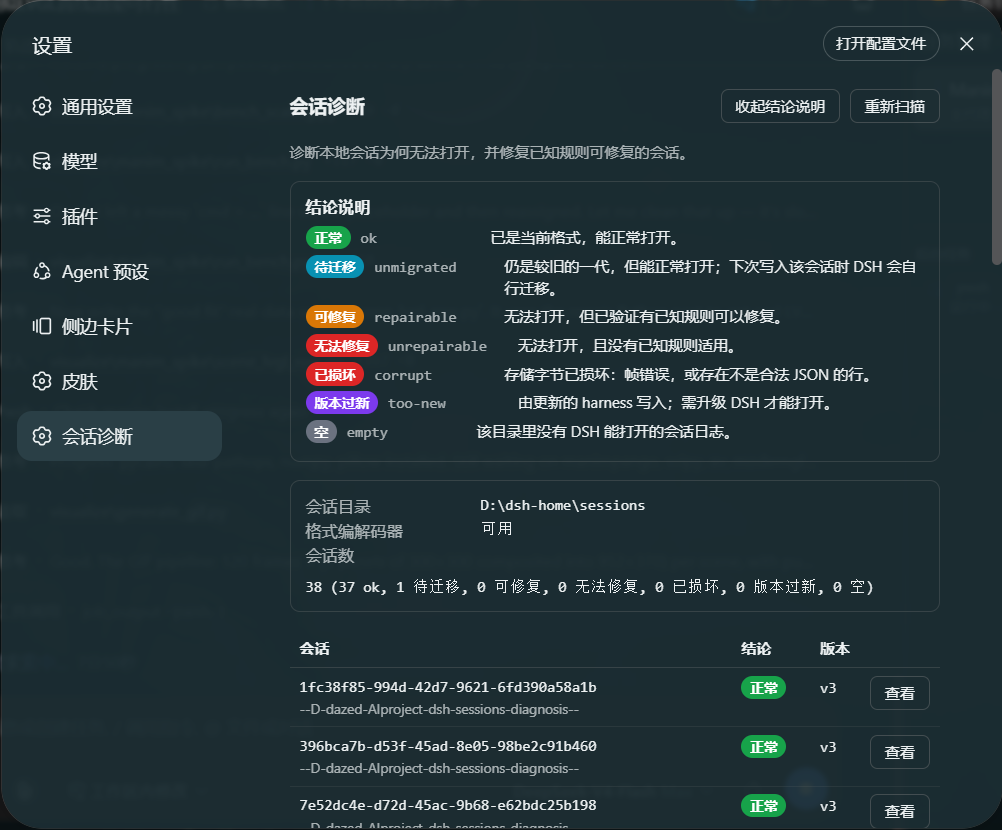
A dashboard in the DSH web UI: every session with its verdict and reason, plus one-click repair with a dry-run confirmation step. |
Screenshots
The dashboard — Settings → Session diagnosis. Every stored session with its
verdict and the reason behind it, one Inspect per row, and a repair that
always shows its planned edits before it writes anything.
One session's detail, expanded beneath its own row: the artifact DSH opens,
the findings behind the verdict, and what a repair guarantees.
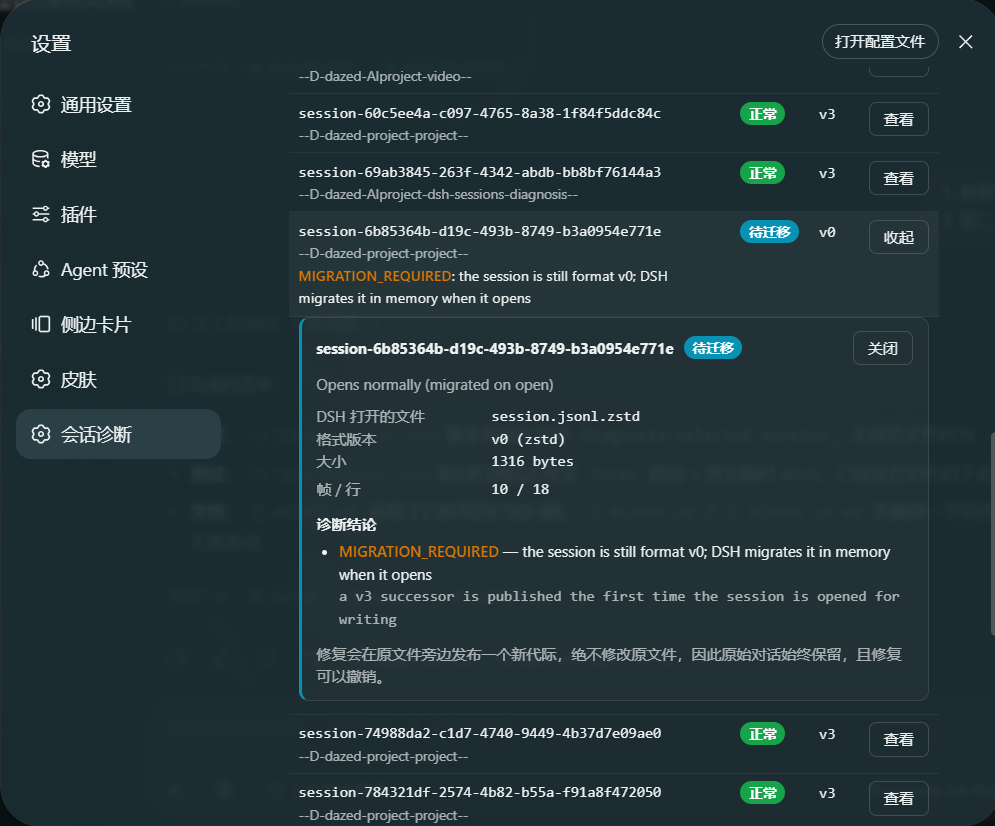
The panel is localized — both screenshots happen to be running in Chinese.
Install
From a checkout. The . needs no absolute path: dsh rewrites a relative spec
against the directory you run it in (pnpm itself runs inside the profile, where
. would otherwise mean the profile).
git clone https://github.com/YouHui1/dsh-sessions-diagnosis.git
cd dsh-sessions-diagnosis
dsh plugin --profile web add .
dsh detects dsh.bundle.patch, links the package into the profile, and appends
dsh-sessions-diagnosis to dsh.profile.bundles. The dependency is saved as
link:<your checkout>, so the profile reads the code where you cloned it — pull
and restart to update, no re-install. Then restart DSH and hard-refresh the
browser. The dashboard appears in Settings → Session diagnosis.
To install without keeping a checkout, take the same package straight from GitHub:
dsh plugin --profile web add github:YouHui1/dsh-sessions-diagnosis
That fetches a copy rather than linking to your directory, so a newer version
arrives with dsh plugin --profile web update dsh-sessions-diagnosis.
Either way there is no build step and no dependency install: the plugin ships
prebuilt JavaScript and resolves DSH's own format codec at runtime.
Repairing a session does not require a restart — DSH resolves generations at
open time, so a repaired session opens on the next click.
Usage
Command line
The CLI is a script in this repo, so it works straight from a checkout with no
install step:
node bin/dsh-session-doctor.mjs scan
The examples below drop the node bin/ prefix for readability — read
dsh-session-doctor scan as node bin/dsh-session-doctor.mjs scan. To get the
bare command instead, run npm link once from the repo root (it writes to your
global npm prefix); after that dsh-session-doctor is on PATH like dsh.
dsh-session-doctor scan                    # what is in the store
dsh-session-doctor diagnose                # classify every session
dsh-session-doctor diagnose <id>           # one session, in detail
dsh-session-doctor repair <id>             # dry run — writes nothing
dsh-session-doctor repair <id> --apply     # perform the repair
dsh-session-doctor repair --all --apply    # repair everything repairable
dsh-session-doctor rollback <id>           # undo a repair this tool made
dsh-session-doctor verify                  # restore every session with DSH's codec
dsh-session-doctor demo                    # create a synthetic broken session
dsh-session-doctor demo --remove --apply   # delete it again
dsh-session-doctor rules                   # list the repair rules
--json on any command for machine-readable output; --dsh-home <path> to point
at a non-default store.
Try it without risking your data
dsh-session-doctor demo                          # a retired source.kind (low-risk rule)
dsh-session-doctor demo --scenario descriptor    # a stale descriptor version (medium-risk rule)
dsh-session-doctor demo --cwd D:\my\project      # record a specific working directory
dsh-session-doctor demo --id my-demo-session     # pin the session id
This writes a synthetic broken session — no real conversation is involved. It is
a genuine released-v0 log, so DSH refuses it for exactly the reason it refuses a real
one, and the same rules repair it.
A demo never goes into your session store. It is a deliberately unreadable
session: putting it where DSH actually reads would place a broken conversation beside
yours, add a row to a sidebar the demo has no business being in, and make the demo's
id part of your harness's durable state. So demo writes to a throwaway store of its
own — by default <tmp>/dsh-session-doctor-demo, relocatable with DSH_DEMO_HOME —
and refuses --root pointed at the real store, whatever spelling reaches it:
refusing to create a demo in the real session store (C:\Users\you\.dsh\sessions).
A demo is a deliberately broken session; it must not join your conversations.
The demo store is a complete DSH home, so the whole flow runs against it exactly as
it would against yours:
dsh-session-doctor demo                                  # create it
dsh-session-doctor diagnose <id> --root <demo-store>      # it will not open
dsh-session-doctor repair   <id> --root <demo-store> --apply
dsh-session-doctor rollback <id> --root <demo-store>
dsh-session-doctor demo --remove --apply                  # delete it again
To watch the same flow in the dashboard, point a throwaway harness at that home —
never the one you are using:
$env:DSH_HOME = "<tmp>/dsh-session-doctor-demo"; dsh web
Cleanup is guarded twice, because a demo is an ordinary session once it exists:
- Ownership is proved, not assumed. A demo carries a
session.diag-demo.json
marker that only this tool writes, and it must name the directory it sits in.
The session id is never trusted — an id is just a string, and a real conversation
could end up with a demo-looking one. Such a session is invisible to cleanup.
- A demo you have talked in is kept. The marker records the exact bytes that
were generated, so cleanup can tell an untouched demo from one that has been
resumed. Anything containing content this tool did not write is reported and left
alone unless you pass
--force.
Earlier versions of this tool did write demos into the real store, and archiving one
in the sidebar leaves its id in the workspace registry afterwards. Such a leftover is
harmless — a stale id matches nothing, and this tool does not edit that file — and
demo --remove still cleans those stores up. New demos are never created there.
Agent tools
Three tools are registered for the model:
session_store_overview — cheap census (header frames only)session_diagnose — full classification, store-wide or one sessionsession_repair — dry run by default; writes only with apply: true, and
action: "rollback" undoes a repair it made
Dashboard
Settings → Session diagnosis. Scan, inspect a verdict with its exact planned
edits, and repair — the button always runs a dry run first and shows you what it
will change before it touches anything. What the verdicts mean explains all
seven verdicts in the panel, and every badge carries the same sentence as a
tooltip, so a label like "unmigrated" never needs a trip to this file to be
understood. A session repaired by this plugin shows its repair record and an
Undo this repair button. Inspect expands that session's detail directly
beneath its own row (click again to collapse it), so opening a session near the
bottom of a long list never scrolls you back to the top.
Safety model
Every guarantee below is asserted by the test suite, not merely intended.
Your original data is never modified
The default strategy publishes a new generation beside the original and leaves
the original byte-for-byte untouched — the same additive publication DSH itself
does. Verified by comparing the SHA-256 of the source before and after, on real
sessions and in the tests.
The conversation content is provably preserved
Structural validity is not content preservation: a migration could emit a
perfectly readable log that quietly dropped messages. So every repair extracts
each message payload from the source and requires all of them to appear in the
result. Additions are allowed — v2→v3 is specified to insert an empty system head
and to promote the recorded prompt out of the request header — and so are the
restructurings the specification performs: v3→v4 lifts a tool-result wrapper into
a first-class tool message and namespaces extension content tags. Both are folded
away on both sides before comparing, so the gate measures what a message says
rather than how it is laid out. A loss or a rewrite aborts the repair before
anything is written. The result is reported in every repair outcome.
Nothing is written until it has been proven twice
- The patched log is migrated with DSH's real v0→current chain.
- The result is encoded with DSH's own current-format encoder.
- The bytes are re-read and must pass the storage layer's structural admission
and a full restore under both validation policies.
- Every source message payload must survive.
Any failure means no file appears at all.
Since DSH 0.2.0 the last migration edge also records the session's subagent
children, which live in their own logs rather than in the parent's. The evidence
is collected the way DSH's own persistence layer collects it, and if the store
cannot be listed the repair is refused — an unproven "this parent has no
children" is a claim DSH accepts and acts on, and it would publish a successor that
had quietly forgotten a child.
Failures are atomic
Publication stages a complete file and then hard-links it into place, so a reader
sees either a complete generation or none. Where hard links are unavailable the
exclusive-copy fallback is verified and removed again on mismatch — a
partially written generation would be worse than none, because DSH selects it in
preference to the readable older one.
Repair is reversible
Each repair records what it did in a sidecar (session.diag-repair.json, which
DSH ignores) holding the SHA-256 of both files. rollback then:
- moves the published generation aside — it is never deleted — and
- refuses if that file has changed since the repair, because DSH appends to
the current generation once you use the session again, and undoing then would
discard everything written since.
patch-source is the careful fallback
Only for environments where DSH's codec cannot be reached. It verifies the backup
copy is byte-identical before touching the original, confirms the original has
not changed since it was read, and replaces it via a staged file and a rename
rather than truncating it in place.
The one thing no tool can undo is a session you delete yourself. Nothing here
ever removes a session log.
See also trap #2.
Repair rules
| Rule |
Risk |
What it fixes |
unclassified-message-source |
low |
Rewrites a retired source.kind (e.g. at-file-mention) to user. The @-mention path is not lost — it is already in the message content. |
subagent-descriptor-version |
medium |
Corrects a stale subagent/descriptor.data.version to the 3 the released codec requires. |
A repair runs every rule that matches, so a session the diagnosis called
repairable is always actionable, and the result reports which risk tiers ran. The
risk label is a disclosure, not a hidden gate: the dry run and the explicit
apply are the consent step.
The one exception is a bulk sweep: repair --all stays on the low-risk rules
unless you pass --include-medium-risk, because there is no per-session dry run to
look at. It names the sessions it left alone rather than skipping them silently.
Adding a rule
A rule is data, not code paths: one entry in lib/core/rules.js.
{
  id: 'my-rule',
  title: 'One line describing the fix',
  risk: 'low',                       // 'low' runs by default, 'medium' is opt-in
  rationale: 'Why this edit is correct, in prose.',
  detect (rows) {                    // -> Finding[]
    return rows.filter(...).map((row) => ({
      ruleId: 'my-rule', seq: row.seq, type: row.type,
      path: 'data.someField', before: ..., after: ...,
      detail: 'shown to the user'
    }))
  },
  apply (rows, findings) {           // mutate rows in place, return edit count
    ...
  }
}
The framework does the rest: findings are shown as before/after pairs, the repair
is simulated before it is offered, and every write is verified. Add a test to
test/run.mjs.
How it works
lib/core/
  frames.js     concatenated-Zstandard-frame container (scan / decode / encode)
  store.js      locate DSH_HOME, enumerate generations, the source-kind vocabulary
  format.js     find DSH's format catalog at runtime; run its real migration
  rules.js      the repair-rule catalogue
  diagnose.js   static audit + live migration probe + repair simulation
  repair.js     plan, verify, publish
lib/index.js    host half: agent tools + dashboard JSON API
lib/client.js   browser half: the dashboard panel
bin/            standalone CLI
The core is plain Node.js with no DSH imports — DSH's codec is located and
imported at runtime — so the identical code backs the plugin, the CLI, and the
tests.
Nested frames are decoded by walking frame and block headers structurally rather
than by decompressing, because zstdDecompressSync() stops after the first frame
of a concatenated container.
Gotcha: DSH's JSON Schema subset is enforced at boot
If you extend this plugin with a tool, note that ctx.tools.register() validates
your output.schema immediately — while the profile is booting. A schema
outside DSH's supported subset does not degrade gracefully; it throws, the loader
entry fails, and dsh web refuses to start:
Error: dsh: plugin tree failed to load: failed to apply loader entry <id> ...
unsupported JSON schema: schema.properties.<x>.additionalProperties is not supported on type "array"
The subset allows one scalar type, properties / required / boolean
additionalProperties (objects only), items (arrays only), scalar
enum / const, and exact-one oneOf. Misplaced keywords reject rather than
being ignored.
test/run.mjs guards against this by running DSH's own
assertSupportedJsonSchema and validateJsonSchemaValue over every definition
and over every value the tools return, and by mounting the plugin against the
real cordis Context and ToolRuntime — the same call that fails at boot.
Requirements
- Node.js ≥ 22.15 (for built-in
node:zlib Zstandard support)
- DSH 0.1.5-rc.2 or later for the plugin halves; this release was verified
against 0.2.0-rc.2 (session format v4)
- The CLI needs a session store and, for the strongest diagnosis, a DSH install to
borrow the format codec from
- The CLI also runs under older DSH builds: with no
@deepseek-ai/dsh-session-format-catalog (first shipped in 0.1.3-alpha.2) it
reports older logs as unknown instead of guessing
Version differences
The tool never hard-codes a format version: it asks the running DSH which
generation is current and borrows that build's own migration chain. What it does
depend on is how a generation is migrated — and DSH 0.2.0 changed that, because its
last edge (V3→V4) is assembled per parent from the session's subagent children,
which live in their own logs.
| Tool |
DSH |
Formats |
Behaviour |
| 0.2.0 |
0.2.0-rc.2 and later |
v4, and v0–v3 by migration |
Collects each session's child evidence the way DSH's persistence layer does, and probes with a catalog bound to it. If the store cannot be listed at all, the session is reported unknown rather than accused. A repair it cannot prove is refused, instead of declaring the parent childless (an empty child list is a claim DSH believes and acts on). The content gate folds away the two restructurings V3→V4 performs — result lifting and extension-tag namespacing — so a safe repair is not refused as data loss, and successor verification uses the published generation's own row admission. |
| 0.1.0 – 0.1.1 |
0.2.0 and later |
v4, and v0–v3 by migration |
Probes with the released static catalog, which refuses the V3→V4 edge outright. Every pre-v4 session is then reported "will not open — no known repair applies" although DSH opens all of them, and every repair fails with V3 catalog migration requires explicit historical child facts…. If a whole store is reported that way, check the tool version before believing it. |
| 0.1.0 – 0.1.1 |
0.1.x |
v3 |
Correct for that harness: there is no V3→V4 edge, so the static catalog is the whole answer. |
Under an older DSH the 0.2.0 tool asks the installed chain whether child evidence is
needed and gets "no", so it behaves exactly like 0.1.1 there. The reverse is not
true: only 0.2.0 is correct on DSH 0.2.0.
Checking which build you are running
Both facts the table turns on are one command away:
dsh-session-doctor --version   # e.g. "dsh-session-doctor 0.2.0"
dsh-session-doctor scan        # names the installed format, e.g. "… on the current format v4, … older"
If scan names v4 while a whole store comes back "will not open", the tool is
older than the harness — update the checkout (git pull and restart DSH, since the
profile links to it) or the GitHub copy
(dsh plugin --profile web update dsh-sessions-diagnosis).
Tests
node test/fetch-fixtures.mjs   # copy a broken generation from your own store (optional)
node test/run.mjs
The suite covers the frame container, generation naming, the rule engine, the
diagnosis verdicts, and the full repair path end-to-end. Real-session tests read a
fixture from .scratch/ and skip cleanly when it is absent, so the suite runs
in a bare checkout.
The fixture is a verbatim copy of one of your conversations. .scratch/ is
git-ignored — do not commit it or attach it to an issue.
License
MIT


