
模型与 MCP
待识别

rea
morluto
Reverse engineer anything with agents, from app behavior down to native binaries.
PROJECT TOPICS
INSTALL REFERENCE
dsh plugin --profile web add github:YINGCHAO-98/dsh-private-plugins
该命令指向仓库当前默认分支;尚无绑定当前 commit 的完整验证结果。
PROJECT README
私有插件:在 设置 侧栏新增独立的「私有插件」入口(与「插件市场」并列),把 云端 Git 仓库安装插件 与 本地插件导入 放在同一个界面。
社区维护的 DSH Plugin,与 DeepSeek AI 无隶属关系,也不代表 DeepSeek AI 官方。

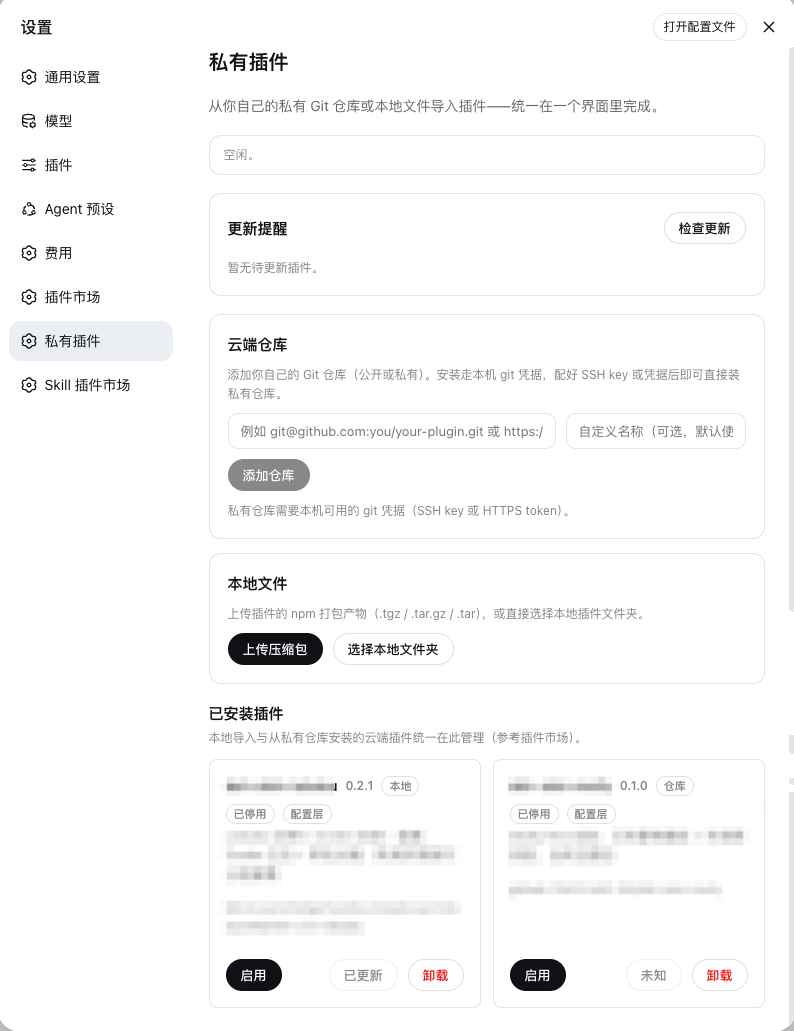
.tgz / .tar.gz / .tar 压缩包,或选择本地插件文件夹。cordis.patch.yml 补丁层,重启后生效;dsh plugin --profile <p> add|remove <spec> 执行,与 DSH Desktop / dsh-market 同一安装链路;完成后提示重启 Harness 生效(桌面版提供一键重启按钮)。无需克隆仓库,直接从 GitHub 安装;脚本会识别 Desktop 实际使用的 DSH_HOME、web / desktop profile 和匹配的 pnpm 主版本:
curl -fsSL https://raw.githubusercontent.com/YINGCHAO-98/dsh-private-plugins/main/scripts/install.sh | bash -s -- --remote已经下载本仓库时,也可以安装当前本地代码:
./dsh-private-plugins/scripts/install.sh            # 有多个 profile 时交互选择
./dsh-private-plugins/scripts/install.sh --all      # 装进所有检测到的 profile
./dsh-private-plugins/scripts/install.sh --check    # 只打印检测结果
./dsh-private-plugins/scripts/install.sh --reinstall   # 已安装则先移除再重装
./dsh-private-plugins/scripts/install.sh --home <DSH_HOME>   # 指定 DSH_HOME
./dsh-private-plugins/scripts/install.sh --profile <name>   # 指定 profile(如 desktop / web)
脚本会自动探测 dsh CLI,并读取 DSH Desktop 实际存在的 profile(例如 desktop 或 web)。它优先使用 Desktop 自带的 pnpm,避免全局 pnpm 主版本不同导致 ERR_PNPM_UNEXPECTED_STORE。也可用 --profile desktop 或 --profile web 显式指定。macOS 上会探测正式版、dev 版和 ~/.dsh;Windows 请用 --home 指定 DSH_HOME。
所有用户都可以直接复制下面的命令,从 GitHub 安装本插件(公开仓库无需填写 Token):
# 仅当已确认 DSH_HOME、profile 和 pnpm 版本匹配时使用
dsh plugin --profile web add "git+https://github.com/YINGCHAO-98/dsh-private-plugins.git"

# 独立 CLI 使用 ~/.dsh/profiles/desktop 时
dsh plugin --profile desktop add "git+https://github.com/YINGCHAO-98/dsh-private-plugins.git"

# 在本项目根目录执行:安装当前本地代码(macOS Desktop 开发调试用)
DSH_HOME="$HOME/Library/Application Support/dsh-desktop/harness" \
  dsh plugin --profile web add "$PWD"
手动命令要求当前终端已经使用正确的 DSH_HOME 和 pnpm 主版本,因此普通用户应优先使用上面的一键脚本。安装完成后,从菜单 Harness → 重启 Harness,然后打开 设置 → 私有插件 即可使用;安装了 dsh-market 时,该入口紧随「插件市场」。
界面支持以下地址写法(添加时自动归一化为 pnpm 的 git spec):
| 输入 | 归一化结果 |
|---|---|
https://github.com/you/repo |
git+https://github.com/you/repo.git |
git@github.com:you/repo.git |
git+ssh://git@github.com/you/repo.git |
github:you/repo |
github:you/repo(原样,pnpm 简写) |
git+https://… / git+ssh://… |
原样 |
git+file:///… |
原样(本地 git 仓库,用于测试) |
#分支名(如 git+https://github.com/you/repo.git#main)。git,与你在终端 git clone 使用同一套凭据——SSH key(git@… / git+ssh://)、HTTPS token(https://,配合 credential helper)或全局 git 配置。<profile>/.dsh-private-plugins/repos.json,重启后仍在。打开「私有插件」页面会自动检查由本页管理的插件更新(结果缓存 1 小时,可点「检查更新」强制刷新),有新版时对应插件行直接显示「更新」按钮,点击即更新为最新版本;插件市场安装的项目仅在「插件市场」内显示:
npm_config_registry,默认 npmjs.org)的 dist-tags.latest,与已装版本比较。github:owner/repo):对比 pnpm-lock.yaml 里记录的已解析 commit 与 git ls-remote 的远端 HEAD/分支 commit。私有仓库若本机凭据不可用,显示「更新状态未知」,不会误报。file: / link:):可识别 Git 工作区;link: 源码目录为实时链接,已直接生效。非 Git 本地来源显示「未知」。isTrustedRequest)。dsh plugin,属于特权操作:只导入可信来源的插件(插件的 cordis.patch.yml / client.js 会获得与主进程同等的执行权限)。dsh-private-plugins/
├── package.json # dsh.bundle(配置层)+ dsh.client(浏览器端入口)
├── cordis.patch.yml # 把插件行插入配置树
├── lib/ # 宿主端(Node)
│ ├── index.js # apply(ctx) + HTTP 路由 + 操作编排
│ ├── profile.js # profile 解析与已安装清单
│ ├── dsh.js # 重新调用 dsh CLI(超时/进程树清理)
│ ├── repos.js # 私有仓库地址归一化/校验 + repos.json 持久化
│ ├── toggle.js # 插件启用/停用(写入 profile 的 cordis.patch.yml 补丁层)
│ └── validate.js # spec/文件名/路径校验 + HTTP 工具
├── client/client.js # 浏览器端 UI(零构建 ModuleLoader 格式)
├── scripts/install.sh # 一键安装/重装脚本(自动探测 profile 与 dsh CLI)
└── test/ # node:test 单元测试node --test test/unit.test.mjs浏览器端 client.js 是手写的 window.__ModuleLoader__.load({ id, factory }) 格式,无需构建;宿主端为纯 ESM、零运行时依赖。
CLASSIFICATION EVIDENCE
系统优先读取 GitHub Topics,再与站内分类词典和词根规则比对。当前命中: deepseek。
morluto
Reverse engineer anything with agents, from app behavior down to native binaries.

deepseek-ai
DeepSeek Harness: Everything is a Plugin.

nexu-io
The 1st Collaborative AI Design Agent Workspace. Local-first and open source. Create motion, prototypes, websites, apps, dashboards, presentations, images, and videos with your team and AI agents. Share work, exchange feedback, and iterate together in one workspace.