
其他
插件

dsh-bili-scroll
c1overzz
DSH 插件:每天替你刷一轮 B站,读字幕挑出值得的、写一份日报,值得的 @ 你
PROJECT TOPICS
INSTALL REFERENCE
dsh plugin --profile web add github:XingPeng-Pixel/dsh-commandcode-usage
该命令指向仓库当前默认分支;尚无绑定当前 commit 的完整验证结果。
PROJECT README
中文 | English
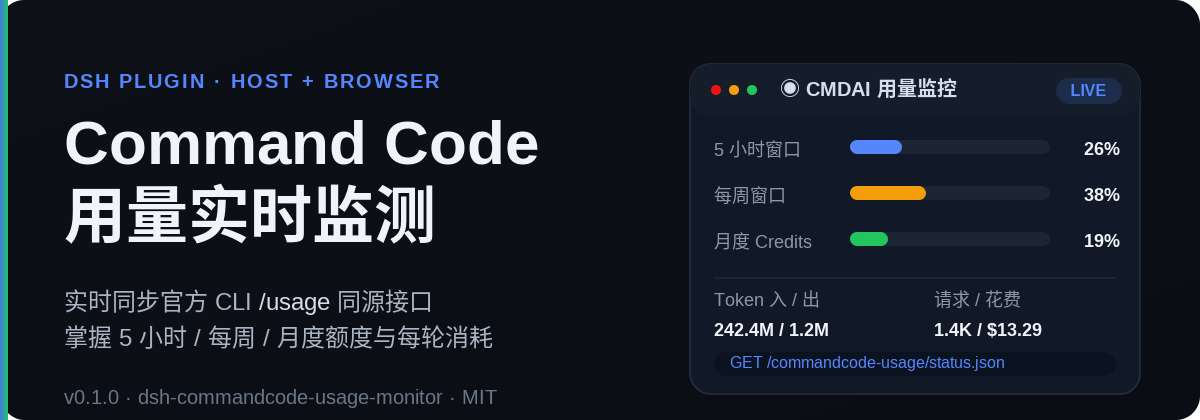
DSH(DeepSeek Harness)插件:Command Code 实时用量监测系统。
本插件运行在 DSH Host 侧,通过调用官方 CLI /usage 同源的 Command Code 账号接口(/alpha/*),实时抓取:
并暴露为 DSH Web 同源 HTTP JSON 查询接口,供前端挂件、设置页与聊天节点消费。
插件已发布到 npm,可直接用 DSH 官方插件命令一键安装:
dsh plugin --profile web add dsh-commandcode-usage-monitor# 1. 克隆仓库
git clone https://github.com/XingPeng-Pixel/dsh-commandcode-usage.git
# 2. 进入项目目录
cd dsh-commandcode-usage
# 3. 安装依赖并构建(首次需要,生成 lib/)
npm install
npm run build
# 4. 使用 DSH 官方插件命令添加本地源码
# link:$(pwd) 会自动展开为当前仓库的绝对路径
dsh plugin --profile web add "link:$(pwd)"通过环境变量(默认引用名 COMMANDCODE_API_KEY):
export COMMANDCODE_API_KEY=user_xxx也可以在 DSH 设置页的 CMDAI 监控 页面填写;浏览器侧只调用 Host 凭据路由,不会接触明文 Key。
curl http://127.0.0.1:3099/commandcode-usage/status.json
curl http://127.0.0.1:3099/commandcode-usage/turn-cost.json
curl http://127.0.0.1:3099/commandcode-usage/health/alpha/whoami、/alpha/usage/summary、/alpha/billing/credits、/alpha/billing/subscriptions 四类数据。used / cap / exceeded / resetAt。invalid-key / service-unavailable / network 分类。ctx.credentials → 启动环境变量 → 官方 CLI auth.json。src/client/locales.ts 提供完整双语键集。status.json、turn-cost.json、health、credential.json、refresh.json 等。/commandcode-usage 直接展示当前快照用量仪表盘。session/event 的 assistant/message usage,turn/end 结算,并通过递增 seq 通知前端。src/plan.ts 内置套餐月度 / 每周 / 5 小时额度,可计算“本月已用”。
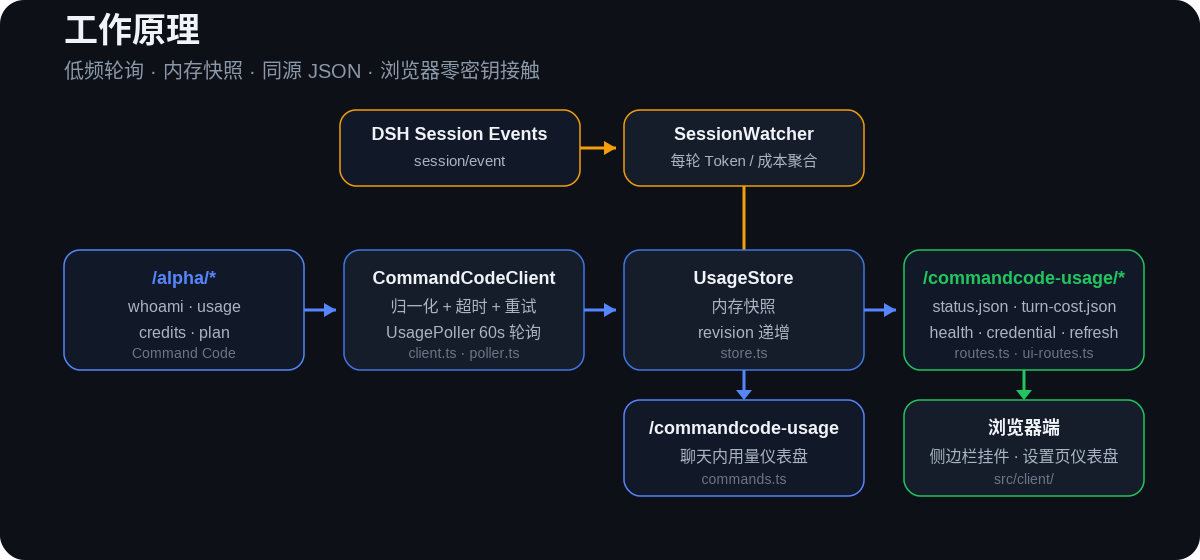
UsagePoller 按配置间隔调用 CommandCodeClient 抓取 /alpha/*。UsageStore。routes.ts 将 UsageStore 暴露为同源 JSON 路由。src/client/ 通过 JSON 路由读取数据并渲染挂件 / 设置页。SessionWatcher 监听 session/event,聚合每轮消耗并发布到 turn-cost.json。关键边界:所有解析、抓取、错误分类都在 Host 侧完成;浏览器端只拿聚合后的 JSON,API Key 永远不会离开 Host。
所有路由均为同源 JSON,Cache-Control: no-store,并带 Access-Control-Allow-Origin: *。
| 路由 | 方法 | 说明 |
|---|---|---|
/commandcode-usage/health |
GET | 健康检查 |
/commandcode-usage/status.json |
GET | 完整用量快照 + revision + lastError |
/commandcode-usage/turn-cost.json |
GET | 最近一轮消耗 + seq(前端轮询判断新轮) |
/commandcode-usage/credential.json |
GET / POST / DELETE | 查询 / 写入 / 清除 Host 侧凭据状态 |
/commandcode-usage/credential-test.json |
POST | 测试当前解析到的 API Key 是否可用 |
/commandcode-usage/refresh.json |
POST | 立即触发一轮 Host 抓取并等待完成 |
status.json 中的核心字段:
| 字段 | 说明 |
|---|---|
updatedAt |
最近一次成功抓取时间(ms) |
stale |
最近一次抓取是否有失败;true 表示数据可能不是最新 |
accounts[].configured |
该账户是否解析到 API Key |
accounts[].mark |
ok / rate-limit / invalid-credential / unknown |
accounts[].report.failures |
各端点失败信息 |
accounts[].report.blocked |
全失败原因:invalid-key / service-unavailable / network |
credits.fiveHour/weekly |
个人 Usage 余量核心:used、cap、exceeded、resetAt |
完整示例与字段说明见 API 文档。
插件配置由 Schemastery schema 定义在 src/config.ts。
| 配置项 | 类型 | 默认值 | 说明 |
|---|---|---|---|
apiKeyEnv |
string | COMMANDCODE_API_KEY |
凭据引用名(环境变量 / credentials ref) |
apiKey |
string | 空 | 组合配置字面量 API Key(优先) |
apiBase |
string | https://api.commandcode.ai |
Command Code API 地址 |
pollIntervalMs |
number | 60000 |
轮询间隔(ms) |
errorBackoffMs |
number | 15000 |
失败后退避间隔(ms) |
requestTimeoutMs |
number | 15000 |
单请求超时(ms) |
accountConcurrency |
number | 1 |
每轮多账户并发抓取数(保守默认 1) |
accounts |
array | [] |
额外账户列表 |
activeAccount |
string | 空 | 固定活动账户 slot id(预留,尚未参与运行时选择) |
enableSessionCost |
boolean | true |
是否启用每轮消耗聚合 |
enableRoutes |
boolean | true |
是否注册 webServer JSON 路由 |
storagePath |
string | 空 | 可选状态持久化路径(尚未实现,预留) |
config:
  accounts:
    - label: Account A
      apiKeyEnv: COMMANDCODE_API_KEY
    - label: Account B
apiKeyEnv: COMMANDCODE_API_KEY_2config.apiKey(组合配置字面量)ctx.credentials 服务(若 profile 提供)apiKeyEnv 指定的名字)~/.commandcode/auth.json实现见 src/credentials.ts。完整配置说明见 配置文档。
config.apiKey → ctx.credentials → 启动环境变量 → 官方 CLI auth.json。更多细节见 安全文档。
turn-cost.json 的 amount 目前为 null(尚未内置价格表);tokens 为真实 token 数。后续可通过 SessionWatcher 注入 costFor 价格换算。storagePath 与 activeAccount 为预留配置,尚未参与运行时行为。/alpha/* 接口与官方 CLI /usage 同源,不属于公开 Provider API 合同;上游接口变化时插件可能需要同步更新。>=22npm install
npm run typecheck
npm test
npm run buildtypecheck:TypeScript 类型检查test:Node built-in test + tsx 运行单元测试build:tsc 生成类型声明 + tsdown 生成 Host / Browser bundleCLASSIFICATION EVIDENCE
系统优先读取 GitHub Topics,再与站内分类词典和词根规则比对。当前命中: 无有效分类标签。
c1overzz
DSH 插件:每天替你刷一轮 B站,读字幕挑出值得的、写一份日报,值得的 @ 你

hellowind777
一个自主的高级智能伙伴,不仅分析问题,更持续工作直到完成实现和验证。

xing-shuyin
Just open your browser — get all your work done.