
模型与 MCP
待识别

rea
morluto
Reverse engineer anything with agents, from app behavior down to native binaries.
PROJECT TOPICS
INSTALL REFERENCE
dsh plugin --profile web add github:XiaHouSheng/dsh-token-tracker
该命令指向仓库当前默认分支;尚无绑定当前 commit 的完整验证结果。
PROJECT README
简体中文 · Read this page in English
A dsh (DeepSeek-Harness) web plugin that folds provider token usage from the
durable session log, prices it with a peak/off-peak table, and surfaces totals in
the dsh web GUI — a header badge + period tag, a Tracker button, a composer dock
line, a closed-turn tail, an injected conversation.view Token tab — plus a
standalone overview page and a JSON API.
This repository is itself a directly installable dsh plugin package: lib/
is prebuilt and committed, and the repo root ships the dsh.bundle +
dsh.client manifests together with cordis.patch.yml. You can install it via
dsh plugin add <git-url>, dsh plugin add <local-path>, or (as a fallback)
dsh plugin add ./dsh-token-tracker-<version>.tgz. No manual pack step or
separate tarball download required.
This is not the in-repo
@deepseek-ai/dsh-token-trackerpackage (which lives inside the harness monorepo and is built by the workspace). It is the samesrc/, wrapped for independent distribution.
| Token badge & period tag in the GUI header | Conversation Token tab / dock line | Standalone overview page |
|---|---|---|
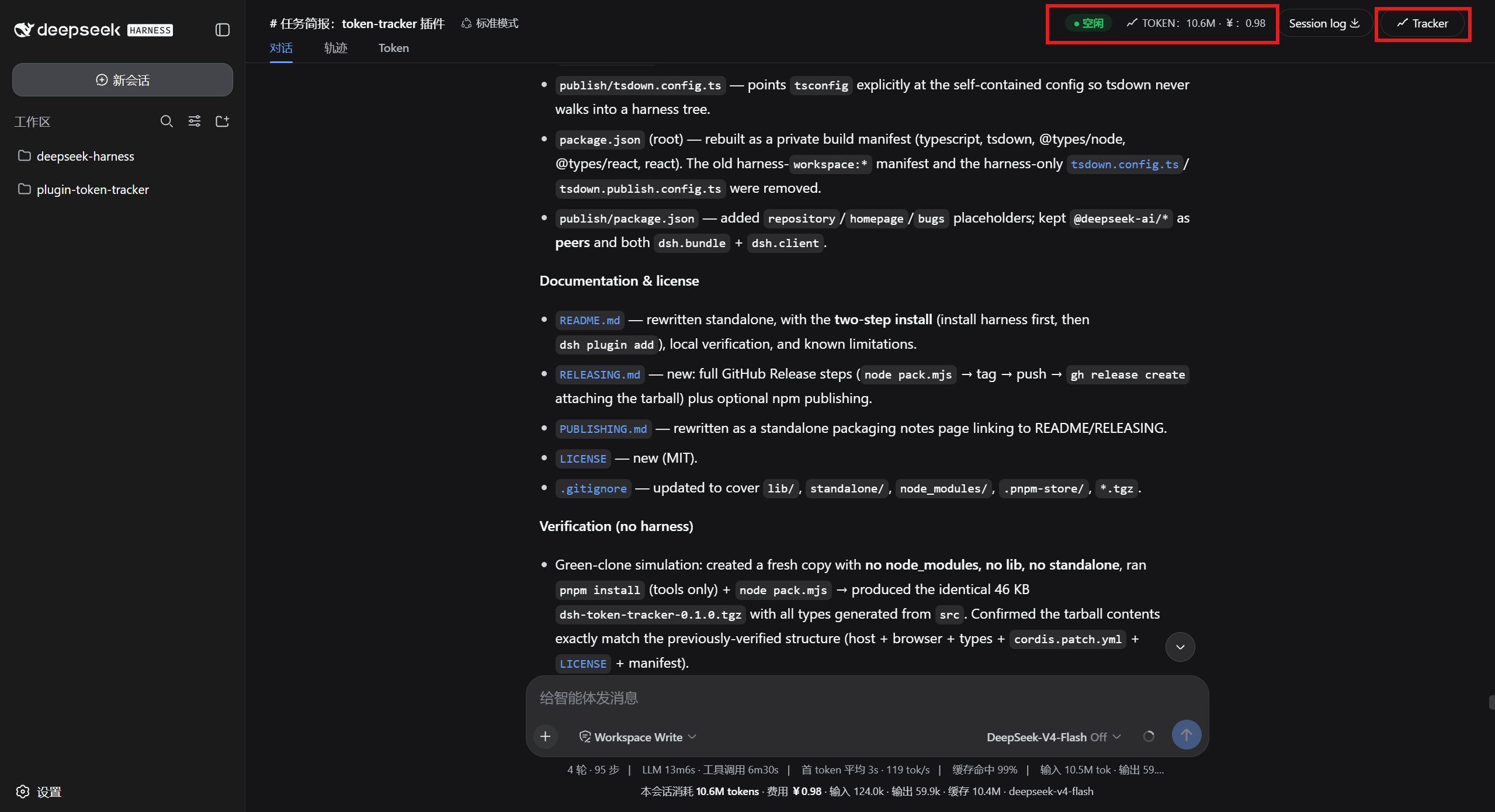 |
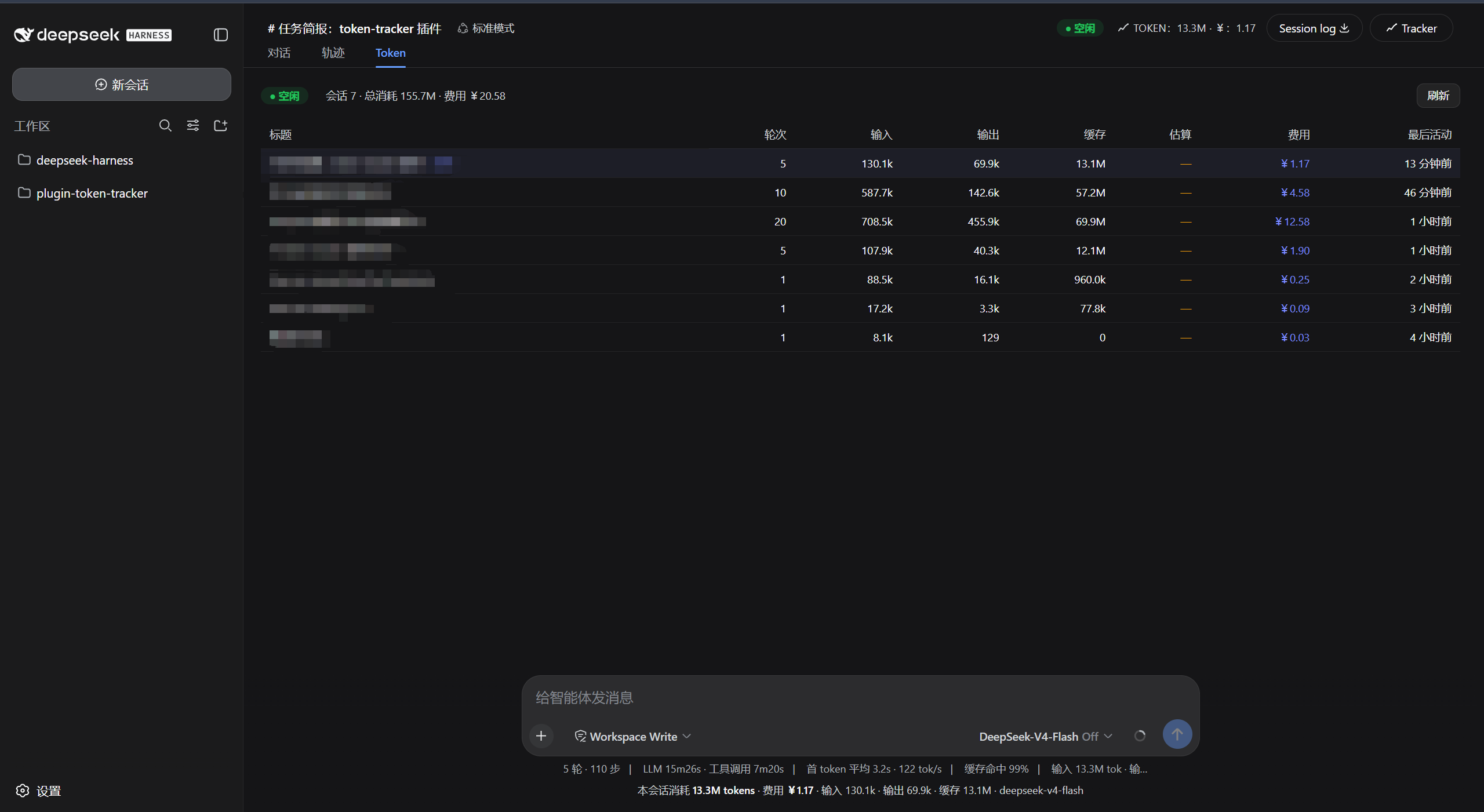 |
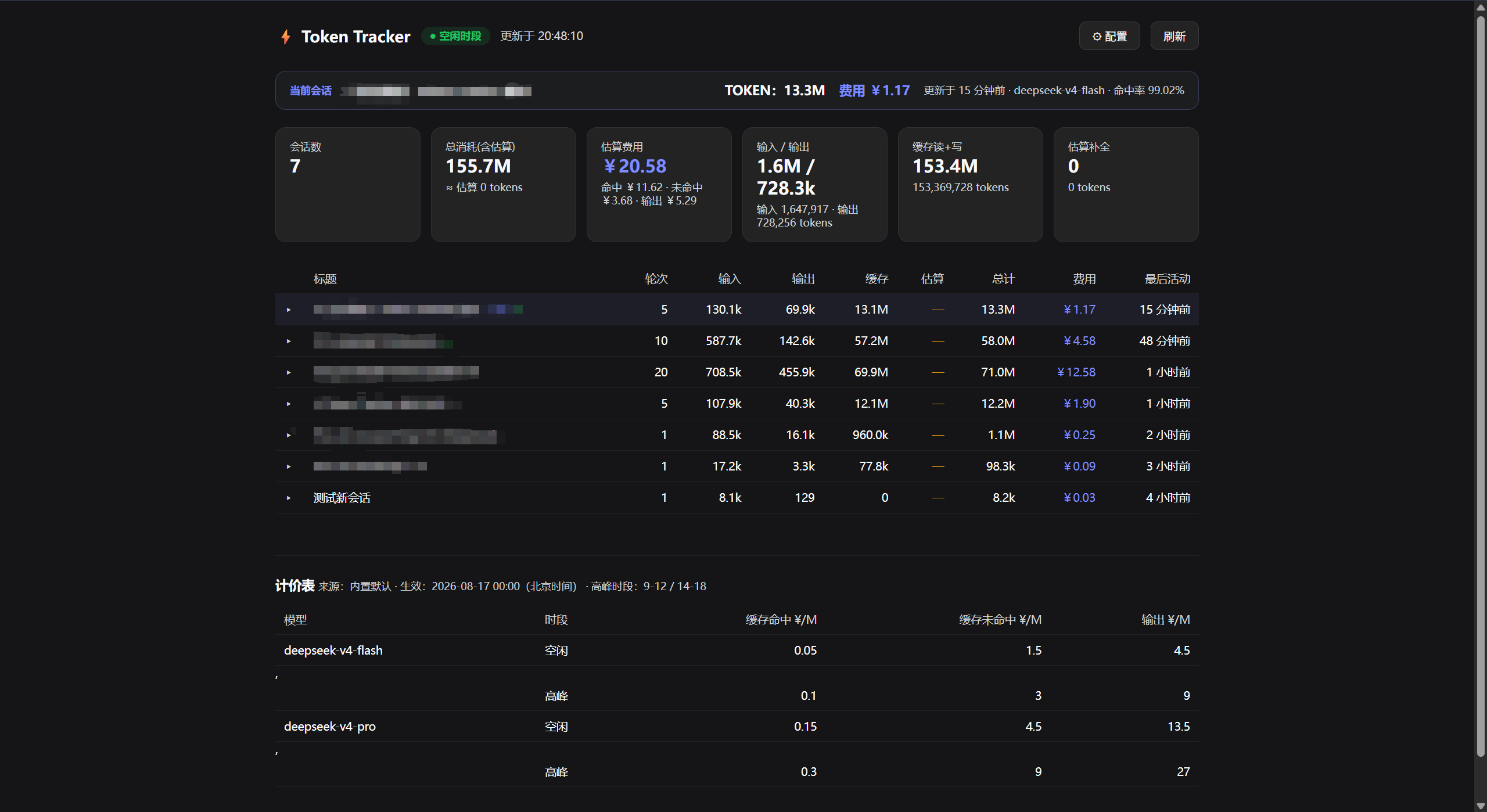 |
The package has a Host half and a Browser half.
Host half (TokenTrackerService, mounted as a webServer service consumer):
session/event and folds assistant/message provider usage into
per-session/per-turn token buckets, attributing each message to the model named
by the latest request/header and to the Beijing hour of its event time.GET /dsh-token-tracker and the JSON
API at GET /dsh-token-tracker/api (?session=<id> returns one session's
totals plus a per-turn breakdown).token-pricing.json
file in the workspace root or a session cwd, then the built-in default (see
src/pricing.ts). Overrides are picked up on a short cache.Browser half (src/client/): registers the header token badge + period tag,
the Tracker button, the composer dock line, the closed-turn tail, and the
conversation.view "Token" tab. All data is fetched from the Host JSON API, so
no typert Remote surface has to ride the browser assembly bus.
dsh host.@deepseek-ai/dsh-* runtime packages and does not bring them itself.Important. This plugin declares the
@deepseek-ai/dsh-*harness packages as peer dependencies, notdependencies. It deliberately does not pull them from the npm registry. This makes the install order matter: harness first, then the plugin.
dsh needs a harness installation to satisfy the peers. Clone and install DeepSeek-Harness first:
git clone --depth 1 https://github.com/deepseek-ai/deepseek-harness.git
cd deepseek-harness
pnpm install # installs the full @deepseek-ai/dsh-* tree locallyThis repository exposes three equivalent install paths. Use whichever fits your environment.
On any machine that already has the harness installed:
dsh plugin --profile web add https://github.com/XiaHouSheng/dsh-token-tracker.gitHow it works: after pnpm clones the repo it automatically runs the repo's
prepack hook, which injects the exact @deepseek-ai/* peer version ranges
into the packed manifest, then packs the already-built lib/ +
cordis.patch.yml into a tarball and installs it. No build step required on
your side.
Run pnpm run build in this repo once first (see Development & build flow
below), then:
dsh plugin --profile web add /path/to/dsh-token-trackerpnpm run build drops a complete lib/, the cordis.patch.yml layer patch,
and a publish-shaped package.json with the exact harness peer ranges straight
into the repo root. The directory is then a self-contained installable dsh
plugin package.
Download dsh-token-tracker-<version>.tgz from the Releases page,
then add it to a dsh profile:
dsh plugin --profile web add ./dsh-token-tracker-<version>.tgzAll three options produce the same result: a bundle layer is activated
(dsh.bundle → cordis.patch.yml) so the token-tracker row is inserted, and
the browser half is auto-discovered via the same package's dsh.client
manifest and served from the web app.
dsh --profile web --dump-config     # should list the token-tracker layer
dsh --profile web                   # boot the GUI + web server
Then open:
http://127.0.0.1:<port>/dsh-token-tracker — overview pagehttp://127.0.0.1:<port>/dsh-token-tracker/api — JSONIf
dshis not on yourPATH, use the harness-local binary:./node_modules/.bin/dsh ...from the harness checkout.
If/when this package is published to npm under a personal scope, the same
peer-rule applies. Point dsh plugin add at the package instead of a tarball:
# scope-rename the package first (see RELEASING.md), then:
dsh plugin --profile web add @your-scope/dsh-token-trackerDrop a token-pricing.json in the workspace root or a session cwd. It is
picked up on a short cache:
{
  "timezone": "Asia/Shanghai (UTC+8)",
  "peakHours": [{ "start": 9, "end": 12 }, { "start": 14, "end": 18 }],
  "models": {
    "my-model": [{
      "effectiveFrom": "2026-01-01T00:00:00+08:00",
      "prices": {
        "inputCached": { "offpeak": 0.05, "peak": 0.1 },
        "inputUncached": { "offpeak": 1.5, "peak": 3.0 },
        "output": { "offpeak": 4.5, "peak": 9.0 }
      }
    }]
  }
}
The built-in default prices 09–12 and 14–18 Beijing hours as peak (2×
off-peak) for deepseek-v4-flash and deepseek-v4-pro.
This section is for plugin authors / maintainers. If you only install and use the plugin, you can skip it.
The root package.json intentionally toggles between two shapes:
| Form | Active when | @deepseek-ai/* in peerDependencies |
Purpose |
|---|---|---|---|
| Dev | Fresh git clone / after restore-dev |
only react |
Lets pnpm install succeed at the plugin dev repo: the harness ^0.1.0-rc.5 versions are not on the public npm registry, so they must be omitted from the dev-time lockfile. |
| Publish | After build / pack, or during the prepack hook |
all 10 harness packages with exact ranges | Required for a git push or a local install: dsh's pnpm layout needs them declared as explicit peers so the plugin sandbox can require('@deepseek-ai/cordis') etc. at runtime. |
Two helper scripts manage the swap:
pnpm run build        # build lib/, switch root manifest to Publish shape (commit / local-dir install)
pnpm run restore-dev  # revert to Dev shape (use before pnpm install / version bumps / adding devDeps)
Plain git checkout -- package.json does the same thing if you prefer.
# Only needed if package.json is currently in Publish form:
pnpm run restore-dev

pnpm install            # only build tooling (tsc, tsdown, react types, node types)
# …edit files under src/…

pnpm run build          # -> lib/ populated, cordis.patch.yml copied to root, manifest becomes Publish
# Then you can:
dsh plugin --profile web add /path/to/dsh-token-tracker      # local install for verification
# And/or commit & push:
git add lib cordis.patch.yml package.json src scripts pack.mjs
git commit -m "feat: …"
git push origin main    # After this push, anyone else can run:
# dsh plugin --profile web add https://github.com/XiaHouSheng/dsh-token-tracker.gitpnpm run pack # = node pack.mjs: same as build, plus `pnpm pack` inside the stage
# -> dsh-token-tracker-0.1.0.tgz appears at the repo rootpack.mjs is fully self-contained:
standalone/ from src/ + publish/.src/ by tsc with the
repo-local tsconfig.json (self-contained; @deepseek-ai/* resolves to the
ambient stubs under types.stub/, so no peer package is pulled at build
time).tsdown from the self-contained
publish/tsdown.config.ts (which includes TypeScript decorator lowering so
the @Remote markers run).lib/ for "direct install"
usage; the stage is also packed with pnpm pack to produce the .tgz.No harness checkout or in-repo lib/ is required or read.
Inside a fresh harness checkout (with Step 1 pnpm install already done):
# Direct local directory:
dsh plugin --profile web add /path/to/dsh-token-tracker
# Or the tarball:
dsh plugin --profile web add ./dsh-token-tracker-0.1.0.tgz

dsh --profile web --dump-config      # token-tracker layer present
dsh --profile web                     # boot; then check:
#   /dsh-token-tracker               (overview page)
# /dsh-token-tracker/api (JSON)usage on
assistant/message events; without it the plugin falls back to a
character-count estimate (marked ≈), which is not a billing-grade count.^0.1.0-rc.5). They
are satisfied by a matching harness install; keep them in step with the
deployed harness edition, or dsh plugin add will warn about unsatisfied
peers.CLASSIFICATION EVIDENCE
系统优先读取 GitHub Topics,再与站内分类词典和词根规则比对。当前命中: deepseek-harness。
morluto
Reverse engineer anything with agents, from app behavior down to native binaries.

deepseek-ai
DeepSeek Harness: Everything is a Plugin.

nexu-io
The 1st Collaborative AI Design Agent Workspace. Local-first and open source. Create motion, prototypes, websites, apps, dashboards, presentations, images, and videos with your team and AI agents. Share work, exchange feedback, and iterate together in one workspace.