dsh-plugin-proxy-toggle
DeepSeek Harness 桌面插件的出站代理开关
侧边栏一键切换 · Google 204 连通测试 · 系统层只读提示 · 不改 Clash、不改系统设置



中文 | English
中文
是什么
一个装进 DeepSeek Harness 桌面版(DSH Desktop)的小插件:在侧边栏底部加一个代理开关,一键让 Harness 的出站流量在“启动时的网络策略”和“本地 HTTP 代理”之间切换。它只改 Harness 自己的进程内路由,不修改 Clash 配置、不打开 macOS 系统代理、不动 TUN。
功能
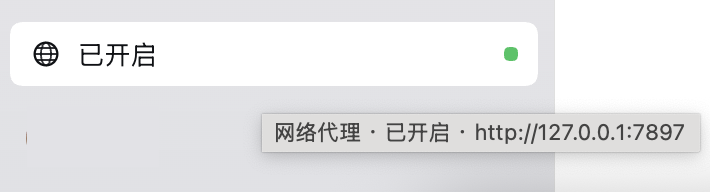
- 侧边栏开关:单击直接开/关,圆点表示空闲 / 连接中 / 可用 / 失败。
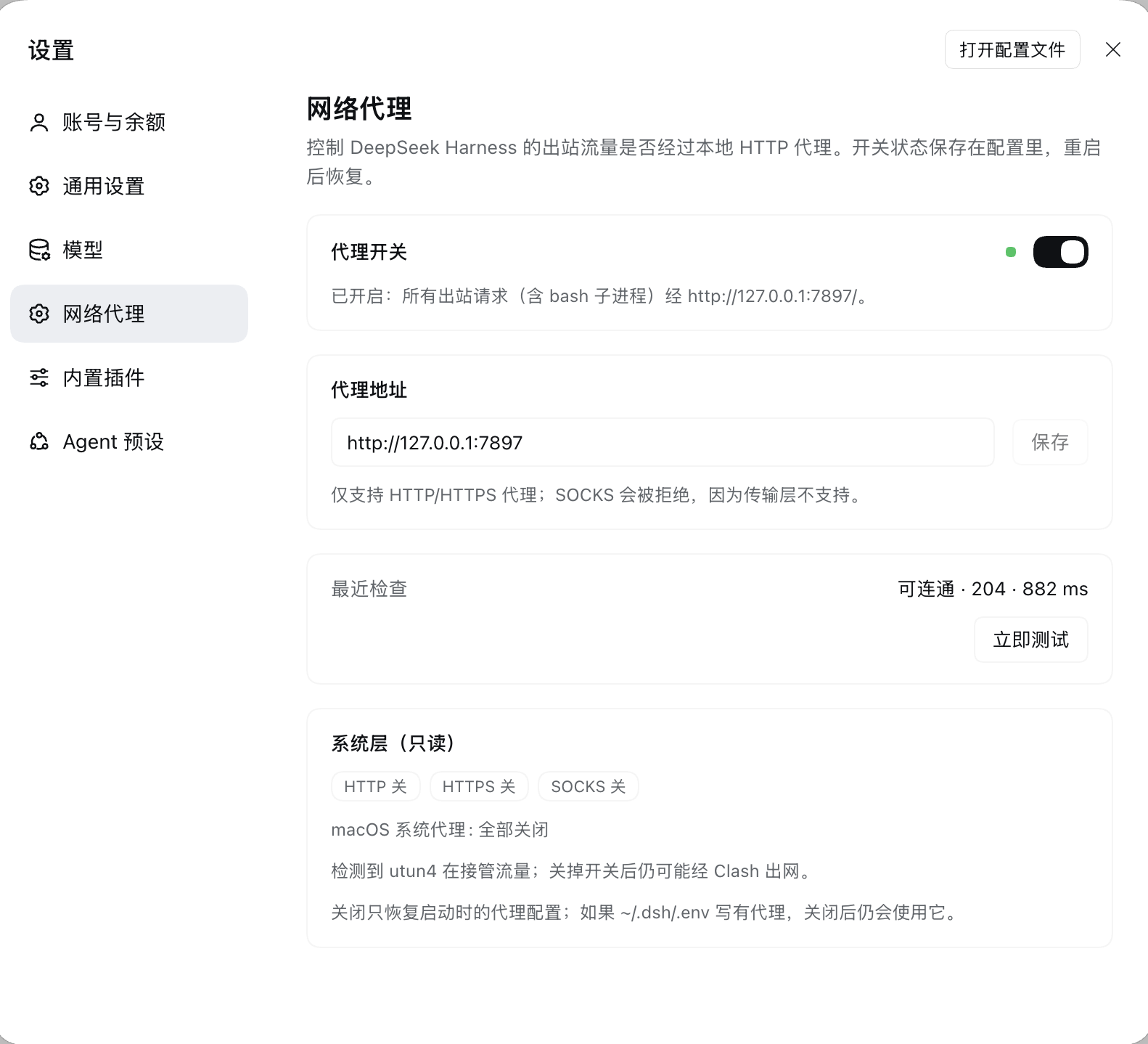
- 设置页:同一个开关、代理地址编辑、手动测试、最近一次检查结果。
- 作用范围:所有出站
fetch(web_fetch、模型请求、HTTP MCP),以及之后启动的子进程(bash 里的 curl、git、pnpm 等)。
- 状态持久化:开关与地址写进插件自己的 profile 配置,DSH 重启后自动恢复。
- 系统层提示:只读展示 macOS 系统代理与 TUN 路由;发现
utun 在接管流量时会明确提醒“关闭开关不等于真直连”。
安装
需要 DeepSeek Harness Desktop(Electron)。安装任选一种:
- 侧边栏 Plugins 页面安装外部 bundle,填入仓库地址:
https://github.com/WosLovesLife/dsh-plugin-proxy-toggle
- 在对话里让 agent 用
plugin_manager 的 install_bundle 安装同一地址或本地 clone 路径。
- CLI 可用时:
dsh plugin add https://github.com/WosLovesLife/dsh-plugin-proxy-toggle
安装后刷新页面(⌘R / Ctrl+R),侧边栏底部应出现地球图标按钮。
使用
- 开 / 关:点侧边栏按钮,或设置 →「网络代理」里的开关。
- 改地址:设置 →「网络代理」→ 代理地址,默认
http://127.0.0.1:7897(Clash 的 Mixed 端口)。
- 测试:点「立即测试」,或每次开启时自动测。
连通测试测什么
开启代理、修改地址或点「立即测试」时,插件会通过刚装上的代理请求:
GET https://www.google.com/generate_204
10 秒超时、失败重试一次、不带 cookie 与凭据,user-agent: dsh-proxy-toggle/1.0。Google 在国内直连不通,所以拿到 204 才能证明请求确实走了代理,而不是悄悄回落直连。代价是这个端点不返回出口 IP 与地区,页面只显示“可连通 · 204 · 延迟”。
测试失败时,开关保持开启并标红,同时显示底层错误(例如 connect ECONNREFUSED 127.0.0.1:7898),不会静默切回直连。
“关闭”到底意味着什么
关闭会撤销插件装的代理层,恢复到启动时的 dispatcher 与代理环境变量。也就是说:
- 如果
~/.dsh/.env 里写了代理,关闭后 Harness 仍会使用它;
- 如果 Clash 开着 TUN,关闭后流量仍可能在 IP 层被接管。
设置页会如实标注这两点,不会把“关闭”说成“真直连”。
兼容性
- 实测环境:DSH Desktop 0.2.2-rc.1(macOS)。
- 插件通过
process.resourcesPath/app.asar/dsh/node_modules 加载宿主自带的 dsh-http-proxy 与 undici,以保证与启动器共享同一份策略与 dispatcher。因此源码运行或 npm CLI 安装的 DSH 不在支持范围内,换了 DSH 版本也可能因内部路径变化而失效。
- Windows/Linux 的 Desktop 未实测;系统层提示用到的
scutil / netstat 是 macOS 专用,缺失时只是不显示该项。
隐私与安全
- 只在开启代理或点「立即测试」时访问
google.com;不发送 cookie、凭据或 Harness 数据。
- 系统代理与路由信息只在本机读取(
scutil --proxy、netstat -rn),不上传。
- 插件注册的两个本地 HTTP 端点只接受 owner 连接;不修改系统代理、TUN 或 Clash 配置。
- 代理地址会以明文保存在 DSH profile 配置里;如地址包含账号密码,请注意 profile 文件的访问权限。
已知限制
- 只支持 HTTP/HTTPS 代理;
socks5:// 会被传输层拒绝。
- 不显示出口 IP / 地区(Google 204 没有这些信息)。
- 已有子进程不会回溯更新环境,只有之后启动的子进程继承新的代理变量。
- 每个 DSH profile 各自保存开关状态。
开发
git clone https://github.com/WosLovesLife/dsh-plugin-proxy-toggle
node scripts/check-manifest.mjs
代码结构:
index.js:Host 半体。用 installProxyFromEnvironment 在启动器策略之上叠一层代理,写入/恢复代理环境变量,注册 /plugin/proxy-toggle/{state,action} 两个本地端点,并做 Google 探针与系统层读取。client.js:Client 半体。注册侧边栏按钮与设置页,通过本地端点读取同一份状态,5 秒轮询。cordis.patch.yml:插入 proxy-toggle 这一行;开关与地址是这一行的 volatile 配置字段,因此改动即时生效且可持久化。
English
A small DeepSeek Harness Desktop plugin that puts a proxy switch in the sidebar and a settings page behind it. It changes only the Harness process's own outbound path: every fetch (web fetch, model requests, HTTP MCP) and the proxy environment inherited by newly spawned children. It never edits Clash, the macOS system proxy, or TUN.
Features
- Sidebar switch: one click toggles the proxy; the dot shows idle, connecting, reachable, or failing.
- Settings page: the same switch, the proxy address, a manual test, and the last check result.
- Persistence: the switch and address live in the plugin's profile row and survive a restart.
- Read-only system card: macOS system proxy and TUN route state, with a warning that "off" is not a direct connection while TUN is active.
Install
Requires DeepSeek Harness Desktop (Electron). Install the bundle from the sidebar Plugins page, or tell the agent to run plugin_manager install_bundle with:
https://github.com/WosLovesLife/dsh-plugin-proxy-toggle
With the CLI available: dsh plugin add https://github.com/WosLovesLife/dsh-plugin-proxy-toggle. Refresh the page afterwards.
Probe
When the switch turns on, the address changes, or "Test now" is pressed, the plugin sends GET https://www.google.com/generate_204 through the installed proxy (10 s timeout, one retry, no cookies, fixed user agent). Google is unreachable on a direct connection in mainland China, so a 204 proves the request really used the proxy. A failure keeps the switch on and shows the transport error instead of silently reverting.
Compatibility
Tested with DSH Desktop 0.2.2-rc.1 on macOS. The Host half loads dsh-http-proxy and undici from app.asar so it shares the launcher's policy and dispatcher; source checkouts and npm CLI installs are unsupported, and other DSH versions may move these internal paths.
Privacy
The plugin contacts google.com only while the proxy is on or a test is requested. System proxy and route state is read locally, never uploaded. The two local HTTP routes accept owner connections only and never modify system or Clash settings.
License
MIT © 2026 WosLovesLife


