
Agent 与会话
插件

nuwa-skill
alchaincyf
你想蒸馏的下一个员工,何必是同事。蒸馏任何人的思维方式——心智模型、决策启发式、表达DNA。Distill how anyone thinks.
PROJECT TOPICS
INSTALL REFERENCE
dsh plugin --profile web add github:WhitePlusMS/dsh-redis
该命令指向仓库当前默认分支;尚无绑定当前 commit 的完整验证结果。
PROJECT README

English | 简体中文
DSH Redis is a Redis workspace for DeepSeek Harness (DSH). Connect to Redis, explore databases and Keys, inspect values, and work with your data in the same conversation.
Connections · Key explorer · Data preview · Conversation tools · Diagnostics
Current source 0.1.2 targets DSH Web 0.2.2-rc.1. Build and install it with the steps below. The older v0.1.0 package targets DSH 0.2.0-rc.2 and does not include the current additions.
Install · First use · Work in conversation · Features · Requirements · Limits · FAQ

Recorded on 2026-10-19 in DSH Web 0.2.0-rc.2, using isolated fixture data. This is an existing six-type viewer capture, not a new acceptance run for this documentation revision. Screenshot provenance.

The planned stable market URL is https://github.com/WhitePlusMS/dsh-redis/releases/latest/download/dsh-redis.tgz. The repository is public, but the current v0.1.2 Release does not yet contain the fixed asset. Register the URL with the market only after a formal Release provides and verifies it. The fixed URL does not automatically update an installed plugin. Keep the versioned archive and checksum for rollback.
Download dsh-redis-0.1.2.tgz and SHA256SUMS.txt from the v0.1.2 Release, verify the checksum, place the archive on the DSH Host, and run dsh plugin --profile web add <archive-path>.
Alternatively, build the same version from source:
Version 0.1.2 targets DSH Web 0.2.2-rc.1. Build and install from source in PowerShell on the DSH Host. Git, Node.js 24.9 or later and pnpm are required:
git clone https://github.com/WhitePlusMS/dsh-redis.git
cd dsh-redis
pnpm install --frozen-lockfile
New-Item -ItemType Directory -Force .release | Out-Null
pnpm pack --pack-destination .release
$packageForInstall = (Resolve-Path -LiteralPath '.release/dsh-redis-0.1.2.tgz').Path
dsh plugin --profile web add $packageForInstall
dsh plugin --profile web list dsh-redis
The pack command runs type checking, build and tests. Keep the archive at that path while the profile references it, and restart the same DSH profile if needed. The earlier 0.1.0 Release targets DSH 0.2.0-rc.2; do not use it with 0.2.2-rc.1. See the installation guide for setup, UI installation, updates, rollback and cleanup.
order:1001?” directly, or ask “Explain the selected field” after selecting one. Ask explicitly to switch DB; the sidebar follows the Host's new DB.Editing or saving a profile while connected does not change the active server. In the current version you can explicitly ask AI to connect a uniquely identified saved profile; passwords are entered through the local connection form.
Connect to Redis in a DSH conversation, then ask about a specific Key or the current selection:
status field of order:1001?”order:*.”status field of order:1001 with shipped.”For the update example, enable Plugin info → Enable AI writes and provide the complete new value. DSH applies its tool permission policy, and the operation ID can be used to look up the result. Supported targets and other operating conditions are described in Data and limits.
| Area | Available behavior |
|---|---|
| Connections | Standalone Redis address/port, optional ACL username/password, TLS with optional private CA; manual connect/disconnect |
| Saved profiles | Select, create, name, group, update and delete local connection settings; passwords are not saved |
| DB and Keys | DB directory and counts, manual DB selection, automatic batched SCAN, MATCH filtering, loaded count and bounded progress |
| Navigation | Namespace tree or flat list, configurable separator, locate and keyboard navigation; cyan DB, purple folder and orange Key icons |
| Data | String, Hash, List, Set, ZSet and Stream; select a row to inspect it on the same screen, scroll to append collection results |
| Previews | Text, JSON, Hex and Base64, find, JSON folding and copying currently read content |
| Refresh | Manual refresh and optional 1/5/10/30-second refresh; selected content and view state are preserved when still present |
| DSH integration | Native sidebar, expanded workbench, light/dark theme, English/Chinese, Lucide action icons |
| Conversation | Native DSH tools for explicit Key reads, bounded search and filtering; it also has diagnostic, connection and optional UI actions |
| Updates | Replace a supported existing String value or Hash field through conversation; inspect the operation result |
| Type | View |
|---|---|
| String | Bounded byte-window preview |
| Hash | Field/value table with separate field and value previews |
| List | Index/value table and selected element preview |
| Set | Member table and selected member preview |
| ZSet | Member/score table, range or scan, selected member preview |
| Stream | Message table, ordered field/value pairs and selected pair previews; duplicate field names remain distinct |
The compact Stream layout uses the same row-selection workflow:
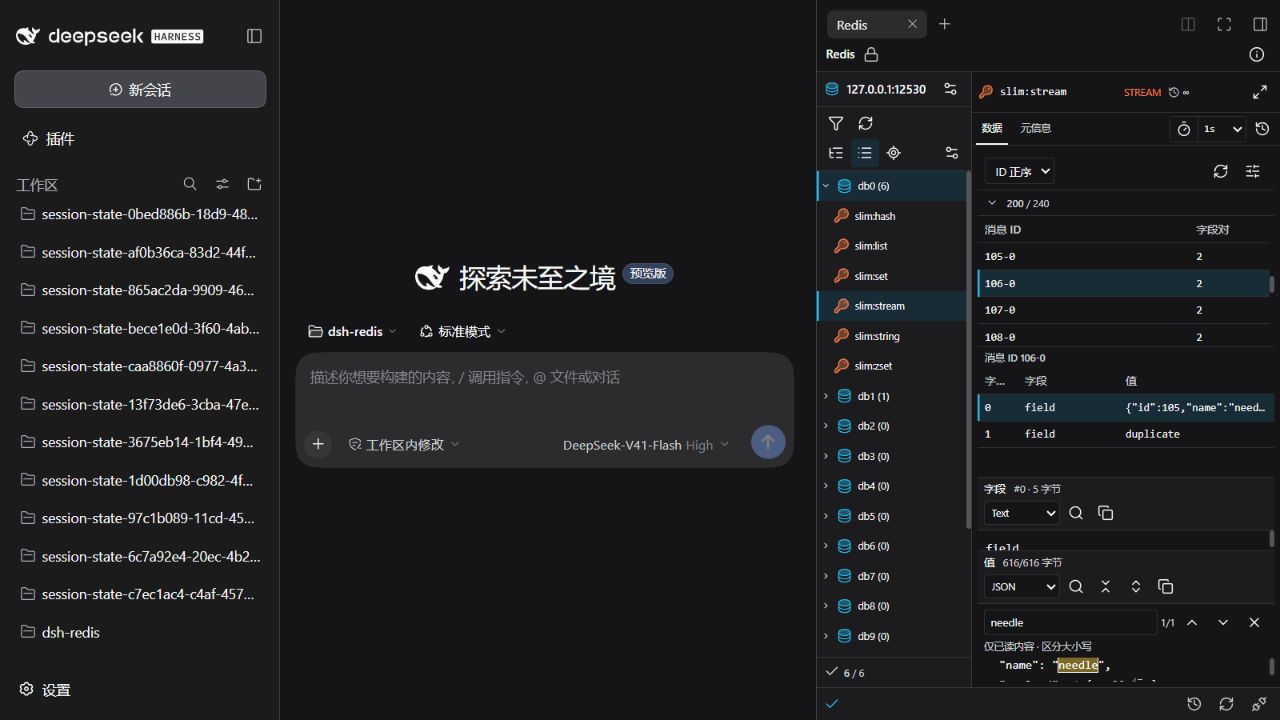
Recorded on 2026-10-19 with isolated fixture data; the Redis sidebar is approximately 464 px wide. The surrounding DSH workspace is part of the native capture.
0.2.2-rc.1, matching the declared peer dependencies.>=24.9.0; verified locally with Node.js 24.22.1 and pnpm 11.22.0.8.2.6 for six types and live Redis 8.10.0 for Hash, rather than an exhaustive version matrix.Desktop, macOS and Linux operation have not been verified. The declared Node.js range is broader than the versions actually tested.
| Tool | Purpose |
|---|---|
redis_viewer_status |
Report this conversation's connection, DB and current selected identity |
redis_viewer_keys |
Search Keys with bounded, independently paged results |
redis_viewer_value |
Read a named Key or, with no Key argument, the current sidebar selection |
redis_viewer_select_db |
Switch this conversation's DB when explicitly requested and synchronize the sidebar |
redis_viewer_prepare_write / redis_viewer_execute_write |
Prepare and execute an enabled, controlled String or Hash-field replacement |
redis_viewer_write_status |
Look up a retained operation result in the same conversation |
The plugin also registers bounded Hash filtering, memory/slow-log/server/client/consumer-group diagnostics, RedisJSON paths, TimeSeries samples, Bitmap ranges and GEO coordinates/distances, plus saved-profile and UI tools. On explicit request it can save a diagnostic sample with restricted fields locally. See the packaged AI read guide for read-tool parameters and limitations. These additions are not part of the historical v0.1.0 Release claim.
An initial Key-name search, Hash filter, or AI request to apply a saved MATCH preset requires DSH's native scope confirmation. The prompt shows the server, DB and actual query conditions. If the host also requires approval, DSH presents both in one prompt. Continuation pages retain the same scope. Direct reads of a known Key do not require this scan confirmation. Denial or cancellation stops the query. SCAN MATCH can still traverse the current DB's entire keyspace and does not produce a consistent snapshot.
Expand a tool call to inspect its Redis read record: returned values, query conditions, timestamps, completeness and raw results come from that call. Model explanations can still contain unsupported claims or mix in historical results; the record does not validate the model's prose. If the cumulative read allowance is exhausted, open Plugin information → Continue reading after pending calls finish. A new message, DB switch or reconnection does not reset that allowance.
These are custom tools registered through DSH's native Tool API, not an MCP server. The Client uses Typert RPC to synchronize selection identifiers; values are read from Redis when a tool is called. UI and AI paging state are separate, while both use the same session-owned network connection.
Example requests, rather than recorded model answers: “Read the status field of order:1001”, “Find Keys matching order:*”, or “Are there recent slow queries?”. A conversation cannot borrow another conversation's connection.
Saved profiles live at <DSH_HOME>/profiles/<profile>/data/dsh-redis/connections.json. They contain names/groups, address, port, username and TLS/CA settings, not passwords. Profiles are shared within that DSH profile; connections and selections belong to individual conversations. A restarted connection does not automatically restore the previous DB or Key.
AI tool output becomes part of DSH conversation history and may be sent to the model provider configured for that conversation. Selecting a Key does not automatically send the whole DB to the model. Uninstalling retains saved profiles and does not erase conversation history; cleanup instructions distinguish those operations.
The Key list caches at most 5,000 Keys or 2 MiB of encoded results. Each automatic scan starts at most 1,000 batches and does not start another batch after 60 seconds; you can continue it manually. If the cache limit causes part of a batch to be dropped, narrow the filter and scan again. A filtered or interrupted scan is not a full DB snapshot, and SCAN is not a consistent snapshot during concurrent changes. AI replies have a 64 KiB result budget; the default String window and some collection value prefixes are 4,096 bytes. Completion and value truncation are reported separately.
The AI write MVP requires Redis 7.4 or later and no TTL on the target Key or Hash field. Key, field, old value and new value are each limited to 4,096 bytes. It replaces one complete value on an existing target; it cannot create or delete targets, perform bulk writes or change TTLs. Proposals expire after at most five minutes, or earlier when the turn ends, connection changes or writes are disabled; the target and old value are checked again before execution. Checks do not establish business intent or prevent later changes by other clients. Operation records are temporarily kept in Host memory. If the result is unknown, do not retry automatically; inspect the current target first.
DSH session history can retain the full proposal in the prepare tool's result and the execute tool's arguments, including the Key, optional field, old value and new value in Base64. Base64 preserves the bytes and can be decoded. The proposal's expiry and the Host's short-lived operation lookup do not erase those session events.
Not included: a free-form command console, direct RDB/AOF loading, snapshots, dedicated special-type views, charts, URI import, profile import/export, Cluster, Sentinel, built-in SSH tunnels or client-certificate authentication. Diagnostics are bounded samples, not a full server snapshot. JSON in a normal String can still be formatted.
DSH Web 0.2.2-rc.1 has been exercised with an isolated Redis instance and a separate DSH profile. See the DSH verification record and operation test record for the tested environment and coverage.
A missing style node and oversized icons were observed once during native testing; reloading restored styling. The root cause remains unresolved.
In DSH, uninstall dsh-redis from Plugins, or stop the target profile as required and run:
dsh plugin --profile web remove dsh-redisReload/restart that same profile when required. Uninstalling retains saved connection profiles and DSH conversation history; settings cleanup is a separate operation.
Why does the Release URL return 404?
Check that the tag and .tgz asset exist, and that the DSH Host can reach GitHub. If direct installation fails, download the archive, verify its checksum and install it from a Host path.
Can I install GitHub's Source code archive instead?
The current Git tree omits lib/, while the package entry points require it. Use the built Release .tgz, or build a local package. A source tag alone does not make a loadable Redis package.
Why does cannot resolve profile bundle "dsh-redis" appear?
Check whether the profile still points to a moved/deleted development directory or archive. In that same profile, remove the old source and add the verified built package, then reload/restart as required. A plain dependency install retains the old source. See troubleshooting.
MIT licensed; see LICENSE. Attributions are retained in THIRD_PARTY_NOTICES.md and the license directory. This is a community plugin, not an official Redis or DeepSeek product.
CLASSIFICATION EVIDENCE
系统优先读取 GitHub Topics,再与站内分类词典和词根规则比对。当前命中: ai-agent。
alchaincyf
你想蒸馏的下一个员工,何必是同事。蒸馏任何人的思维方式——心智模型、决策启发式、表达DNA。Distill how anyone thinks.

freestylefly
Prompt as Code | GPT Image 2 / 2.5 提示词与案例库,530+ 个案例、20+ 套工业级模板与可复用 Skills,新增 2.5 同提示词对比专区,附完整提示词与生成记录,持续更新。

titanwings
Distilly — Distill how they think into reusable Skills for any Agent or Bot. Formerly Colleague Skill(原同事 Skill).