
DSH Codex Subscription
简体中文 · English
把 ChatGPT / Codex 订阅直接接入 DeepSeek Harness
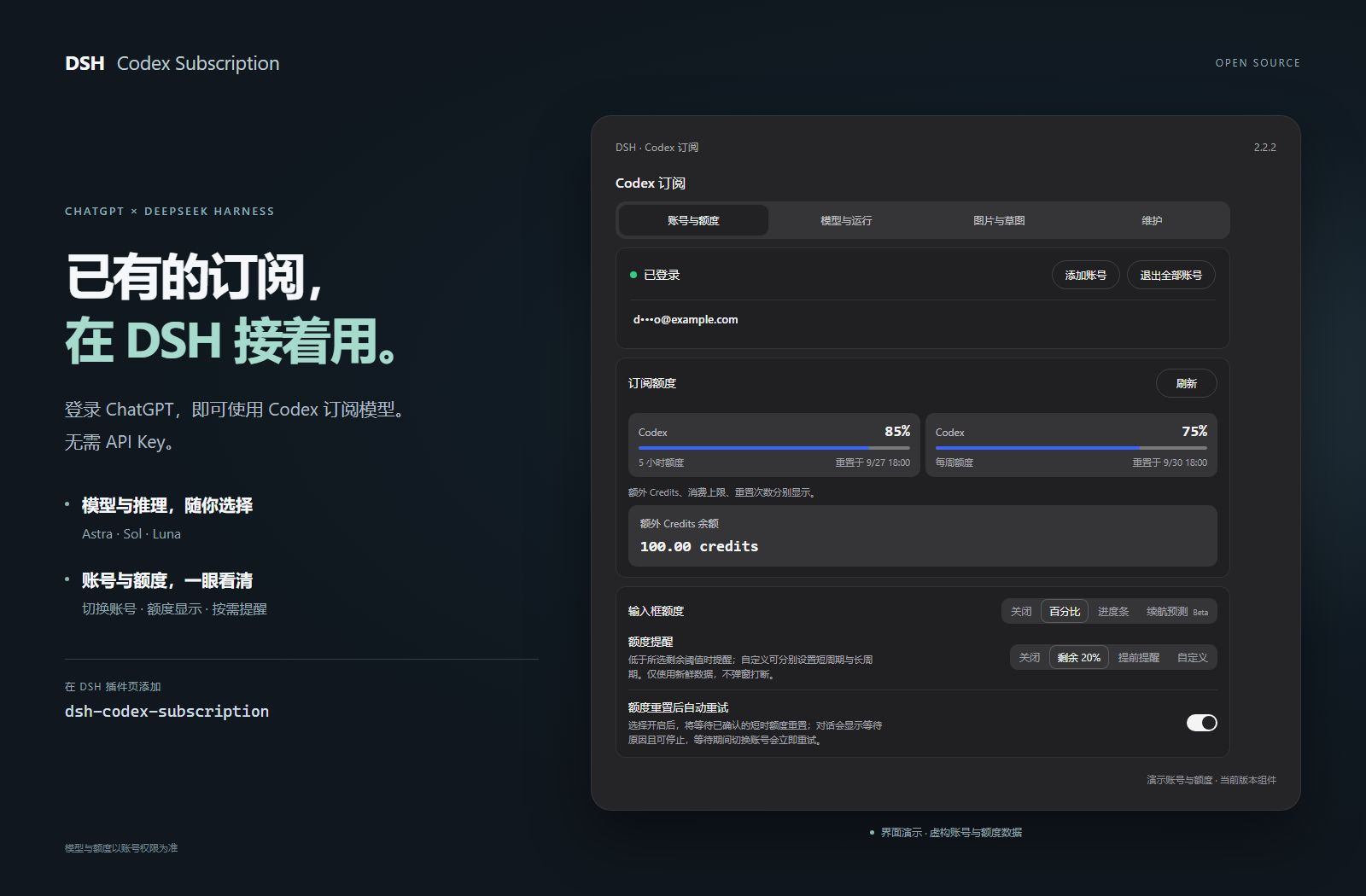
登录已有订阅,即可在 DSH 中选模型、查额度、搜索和生图。无需 API Key,也不依赖 Codex CLI。





功能 · 安装 · 日常使用 · 作品案例 · 使用指南 · 更新与卸载
功能一览
把订阅接入、模型控制、额度管理和图片创作放在同一个 DSH 工作流里。下面逐项列出插件提供的能力;模型权限和额度以账号实际返回为准。
模型与搜索
| 功能 |
你可以做什么 |
使用方式 / 条件 |
| 订阅登录 |
直接登录 ChatGPT,使用 Codex 订阅模型,无需 API Key |
普通聊天无需 Codex CLI |
| 模型目录同步 |
自动读取账号可用模型与推理档位,支持手动刷新;目录标注退役的模型会在模型名称旁显示退役日期,不会自动切换你的选择 |
新型号以账号目录开放情况为准;模型只来自账号目录,未登录或读取失败时不显示任何模型,也不使用内置列表 |
| 模型列表 |
在“模型与运行”中逐个显示或隐藏输入框中的模型 |
仅影响列表显示;已选模型和请求不受影响 |
| 默认模型 |
在“模型与运行 → 模型”里选择每次新建会话默认使用的模型 |
写入 DSH 的默认模型设置,与在对话里切换模型是同一处;未设置时跟随 DSH 默认 |
| 推理等级 |
在输入框选择模型支持的推理档位 |
档位随模型变化 |
| 速度档位 |
在支持的模型上切换标准 / Fast;账号目录提供时还有 Ultrafast(Beta),输入框显示闪电标识 |
默认标准;Fast 和 Ultrafast 会增加用量消耗,Ultrafast 目前仅 Pro 500 |
| 输出详略 |
选择简短、适中或详细的回答偏好 |
默认跟随模型 |
| 输入图片精度 |
为发送给聊天模型的图片选择低、高、原图或自动精度 |
影响输入 token 用量;默认自动 |
| 订阅联网搜索 |
使用 Codex 搜索,或选择 DSH 搜索 |
可选自动、DSH、Codex 路由 |
| 搜索范围 |
选择实时 / 缓存搜索、关闭搜索,或限定域名 |
在模型与运行中设置 |
| 流无响应超时 |
设置连续没有收到流式数据时中断请求的时长 |
默认 10 分钟;不是整体回答时限 |
| 上下文预算 |
按模型使用标准、扩展或自定义上下文预算 |
受模型目录上限约束 |
| GPT-Reserve |
在账号开放时选择备用模型入口 |
实验性;不承诺独立备用额度 |
账号与额度
| 功能 |
你可以做什么 |
使用方式 / 条件 |
| 多账号管理 |
添加、切换、移除账号,或退出全部账号 |
设置 → 账号与额度 |
| 额度详情 |
查看短周期 / 每周额度、重置时间及独立额度分组 |
仅展示服务端返回的窗口与分组 |
| Credits 与重置卡 |
查看额外 Credits、消费上限和可用重置卡 |
账号返回对应数据时显示 |
| 输入框额度 |
不离开会话即可查看百分比或进度条 |
默认关闭,可选显示方式 |
| 续航预测 |
根据最近使用速度估算剩余可用时长 |
Beta;可选,不是保证值 |
| 额度提醒 |
使用固定阈值、提前提醒,或分别设置短 / 长周期阈值 |
默认剩余 20% 提醒,可关闭 |
| 使用重置卡 |
在确认后主动使用服务端提供的重置卡 |
二次确认与等待保护,由服务端判定结果 |
| 重置后重试 |
等待已确认的短时额度重置,再继续请求 |
默认关闭;等待期间可停止 |
图片与草图
| 功能 |
你可以做什么 |
使用方式 / 条件 |
| 图片生成 |
通过订阅生成图片,调整可用的请求型号与质量 |
Beta;默认开启,可关闭 |
| 参考图编辑 |
带上参考图继续修改作品 |
Beta;默认开启,可关闭 |
| 图片查看与下载 |
缩放、拖动、适合窗口,下载校验后的原图 |
内置查看器,无需另装;旧图可能只有预览 |
| 区域标注编辑 |
在图上圈定区域、填写备注,带定位参考继续编辑 |
回填输入框后由你确认发送 |
| 手绘画板 |
选择画布比例,使用钢笔、铅笔、荧光笔及橡皮 |
Beta;画板默认关闭 |
| 形状与文字 |
绘制直线、箭头、形状、原生曲线,选中修改对象和文字 |
在草图画板中使用 |
| 图层与图片导入 |
分层创作,将图片加入草图继续画 |
图片作为图层管理 |
| 笔画平滑与导航 |
抬笔后平滑整条路径;拖动、缩放、撤销重做 |
快捷键可自定义和关闭 |
| 多份草稿 |
保存并重新编辑最多 20 份本地草稿 |
保存在当前浏览器 |
| 导入与导出 |
导出 PNG、分层 PSD,或交换保留原生笔画的草稿文件 |
PSD 导入仅支持有限的普通像素图层 |
| Agent 绘图 |
用 @sketch 让 Agent 绘制,查看进度并随时停止;Agent 可用 SVG 整段作画,导入为可编辑原生笔画 |
Beta;默认关闭,需同时开启画板 |
| 绘图结果回看 |
完成后向模型返回画布预览,帮助后续检查 |
Beta;默认关闭,会增加图片输入用量 |
进阶能力与维护
| 功能 |
你可以做什么 |
使用方式 / 条件 |
| Codex 独立子任务 |
复用订阅登录和工作区权限执行独立任务,可指定允许的模型与推理档位 |
Beta;默认 DSH,Codex 需安装可选组件并配置模型选择 |
| 子任务组件管理 |
在设置里安装、停用或卸载官方 Codex 子任务组件 |
由支持的 DSH 宿主管理,无需额外登录 |
| 云端上下文压缩 |
使用 Codex 云端压缩继续长对话,同时保留 DSH 历史与原生压缩 |
Beta / 实验性;默认关闭,开启的请求使用 SSE |
| WebSocket 连接 |
实验性复用连接和上下文传输,连接失败可回退 SSE |
Beta / 实验性;默认 SSE,不保证更快 |
| 支持诊断 |
查看功能前置条件和近期操作结果,一键复制约 1 KB 的精简报告(完整报告可另行复制);不含凭据和会话正文 |
设置 → 维护;未验证不代表故障 |
| 预测缓存清理 |
查看并清理本地额度预测历史 |
保留登录、草稿、原图和共享依赖 |
详细用法、限制与可选组件 →
准备 DSH
已验证兼容 DSH 0.2.0-rc.2(next 通道)和 0.1.7-rc.2(latest 通道),并继续支持更早的已验收版本。
本插件支持软件包元数据中记录的最新版 DeepSeek Harness,并需要一个当前具有 Codex 使用资格的 ChatGPT 账户。
安装
在插件页面安装(推荐)
-
打开 DSH 的 插件 → 添加插件。
-
在 包名或地址 输入框中粘贴下面的包名(已带版本号):
dsh-codex-subscription@2.5.3
-
点击 安装,等待安装完成;按页面提示操作,需要重启时先保存工作。
-
打开 设置 → Codex 订阅,登录 ChatGPT,然后在会话中选择 Codex 模型。
为什么要带版本号:DSH 的插件页只会安装发布满 24 小时的版本,只填包名时,新版本发布后的第一天可能装到更早的旧版,而旧版不一定兼容你的 DSH。带上版本号可以直接装到这一版;发布一天后只填 dsh-codex-subscription 也会装到最新正式版。其他版本号见发布页。
终端安装(已能运行 dsh 命令)
dsh plugin --profile web add dsh-codex-subscription
安装完成后按提示重启 DSH,再到 设置 → Codex 订阅 登录。插件页面和终端均由 DSH 管理安装。
Headless 任务
先在 Web 中完成登录并选择一次 Codex 模型,再把同一个插件安装到 Headless profile:
dsh plugin --profile headless add dsh-codex-subscription
dsh --profile headless "只回复:ok"
界面一览
日常操作,留在输入框
选模型、调推理档位、切换速度档位,同时查看剩余额度。无需为每次请求打开设置。

账号与偏好,集中管理
在 设置 → Codex 订阅 中管理账号和额度;其余功能按任务需要开启。
四个设置页分别做什么?
| 设置页 |
在这里做什么 |
| 账号与额度 |
登录与切换账号、查看重置时间、设置额度显示和提醒 |
| 模型与运行 |
订阅搜索、上下文预算、连接方式与独立子任务 |
| 图片与草图 |
分别开启图片生成、画板和 Agent 绘图 |
| 维护 |
生成支持诊断、管理本地额度预测缓存 |
模型感知上下文跟随账号模型目录,刷新不会覆盖未保存的草稿。额度分组以服务端实际返回为准,包括 Spark 等独立额度。
订阅请求失败时会明确报错,不会静默切换到其他付费路由。
查看完整使用指南 →
从草图到作品
图片生成与编辑、草图画板均为 Beta。画板和 Agent 绘图默认关闭,在“图片与草图”中按需开启。
画草图 → 附加到输入框 → 描述效果 → 生成成图。
手动画图时点击画板按钮;让 Agent 绘图时发送 @sketch 加绘图要求。
| Agent 绘制的原生草图 | 以草图为唯一参考的生图结果 |
|---|
 |  |
GPT-6.1-Sol · Xhigh,官方桌面版 0.2.0-rc.2 实测:一条 @sketch 消息完成 6 个图层、229 笔可编辑原生笔画,再以这张草图为唯一参考调用一次 GPT Image 2(质量:高),全程约 13 分钟。
@sketch 用 4:3 横版画板绘制《灯塔与归航》:左侧礁石岬角上立一座红白条纹灯塔,塔顶灯室射出扇形光束;右侧海面上一艘挂橙色小帆的渔船正驶回港湾,船后拖出 V 形水痕;地平线上是半个初升的太阳,天空有三条横向云带和三只海鸥,前景礁石间有一圈白色浪花。按天空、太阳与云、海面、礁石与灯塔、渔船、海鸥与浪花分层绘制,保留原生可编辑笔画。画完后,把这张草图作为唯一参考图,调用订阅图片工具一次生成成品:保持构图不变,做成温暖的水彩旅行海报,晨光金橙配靛青海面,有纸纹和柔和晕染,不添加文字。
进阶展示 · 机械剖面、青绿山水与 DeepSeek 娘临摹
前两道题都选了容易暴露差距的题材:机械剖面考结构与细节(齿轮咬合、摆锤、链条、楼梯上的人物),青绿山水考构图与审美(三远法、留白、皴法与设色)。同一条提示词分别交给 GPT-6.1-Sol · Xhigh 和 GPT-6-Astra · Low,各跑一次,均在官方桌面版上完成,生图统一为 GPT Image 2(质量:高)。
《钟塔剖面图》
| 原生草图 | 生图结果 |
|---|
Sol
Xhigh | 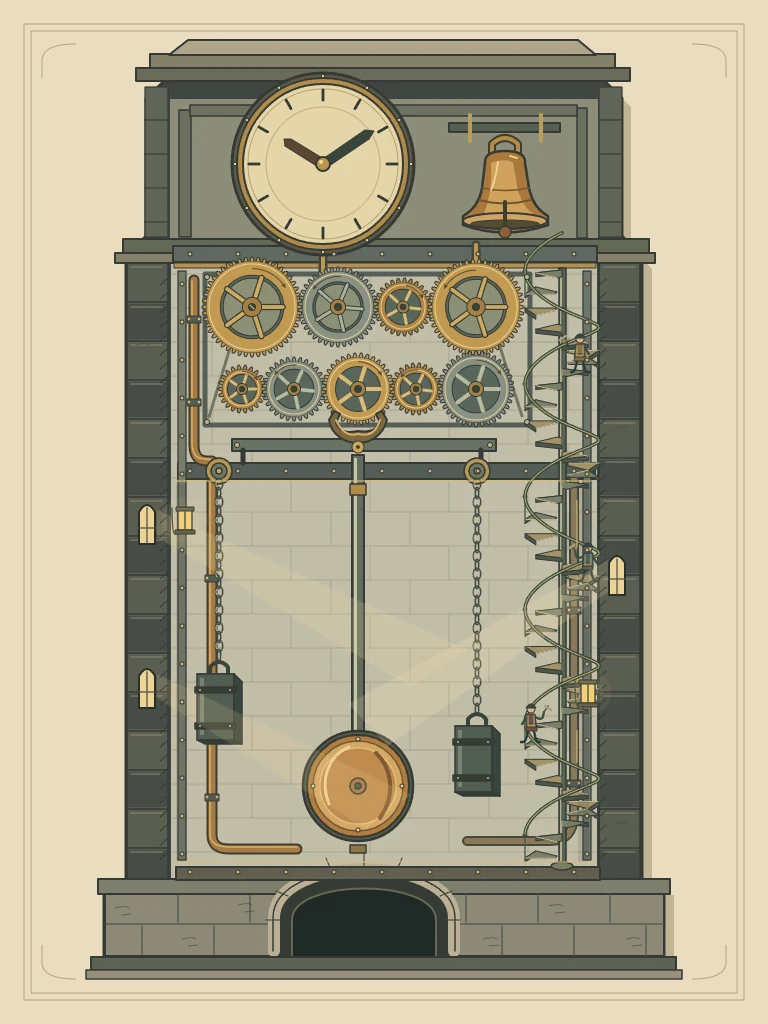 | 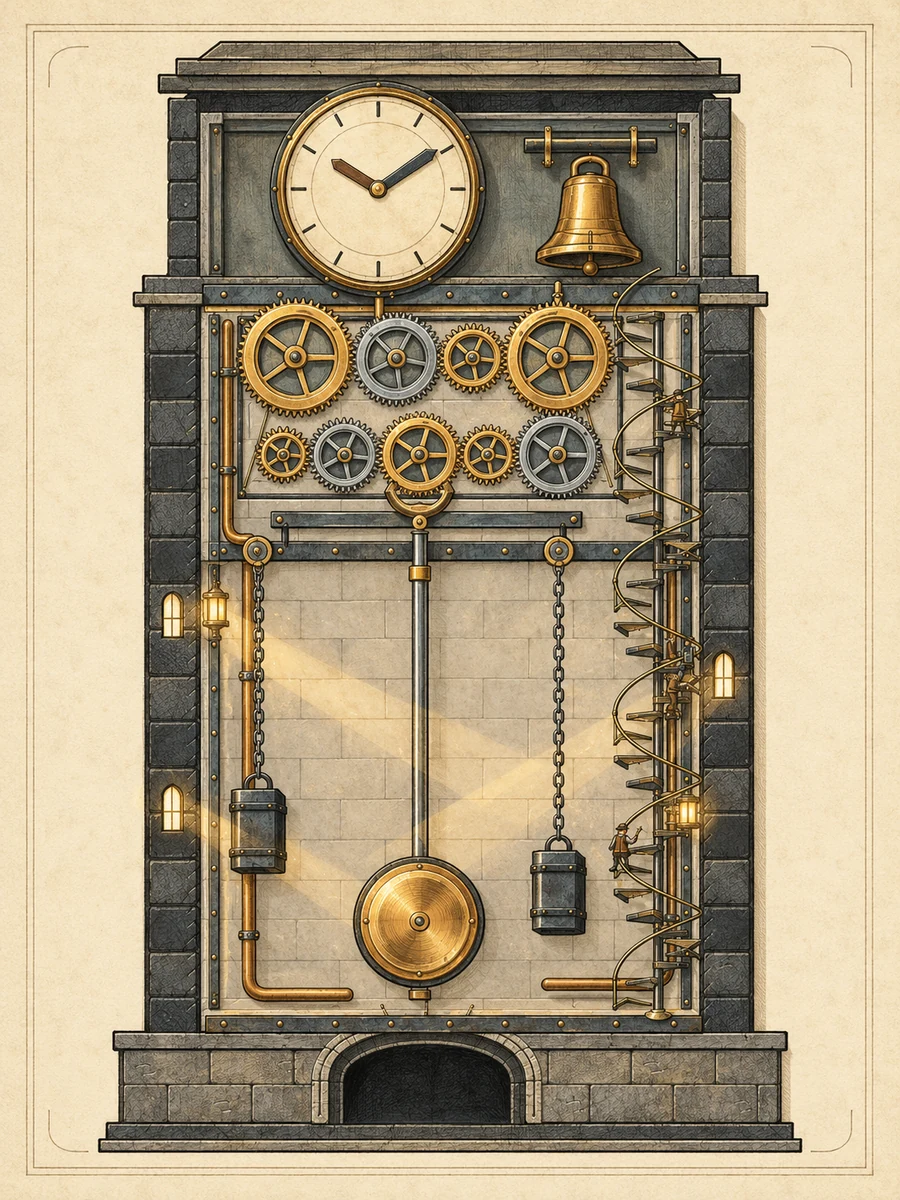 |
Astra
Low | 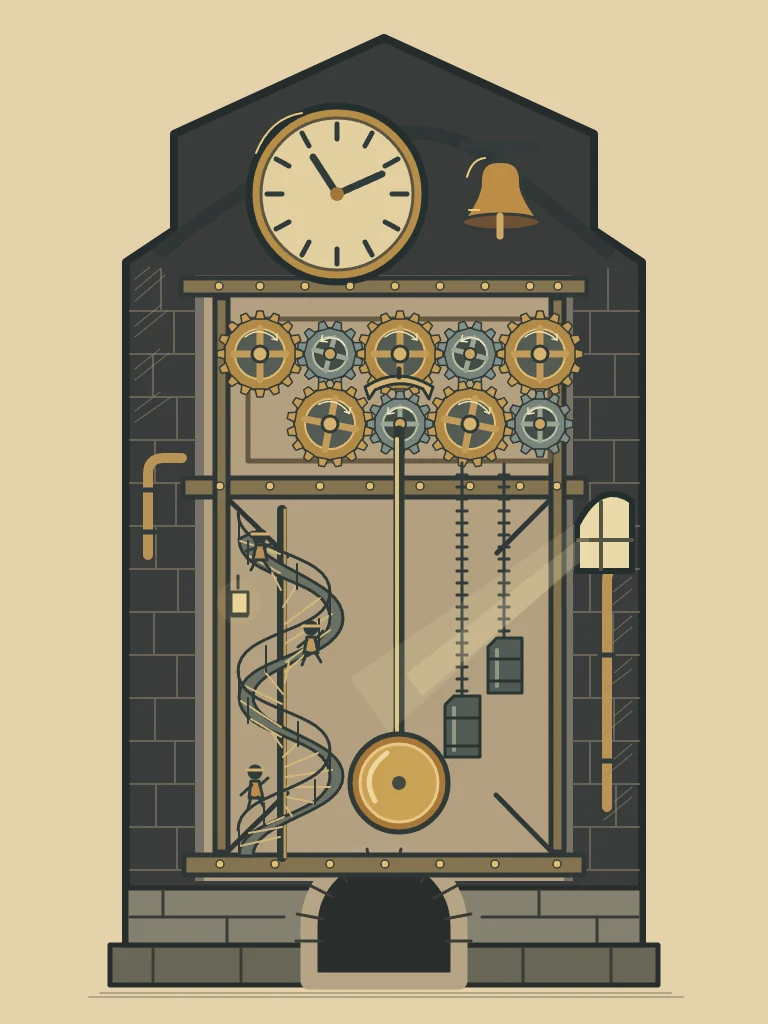 | 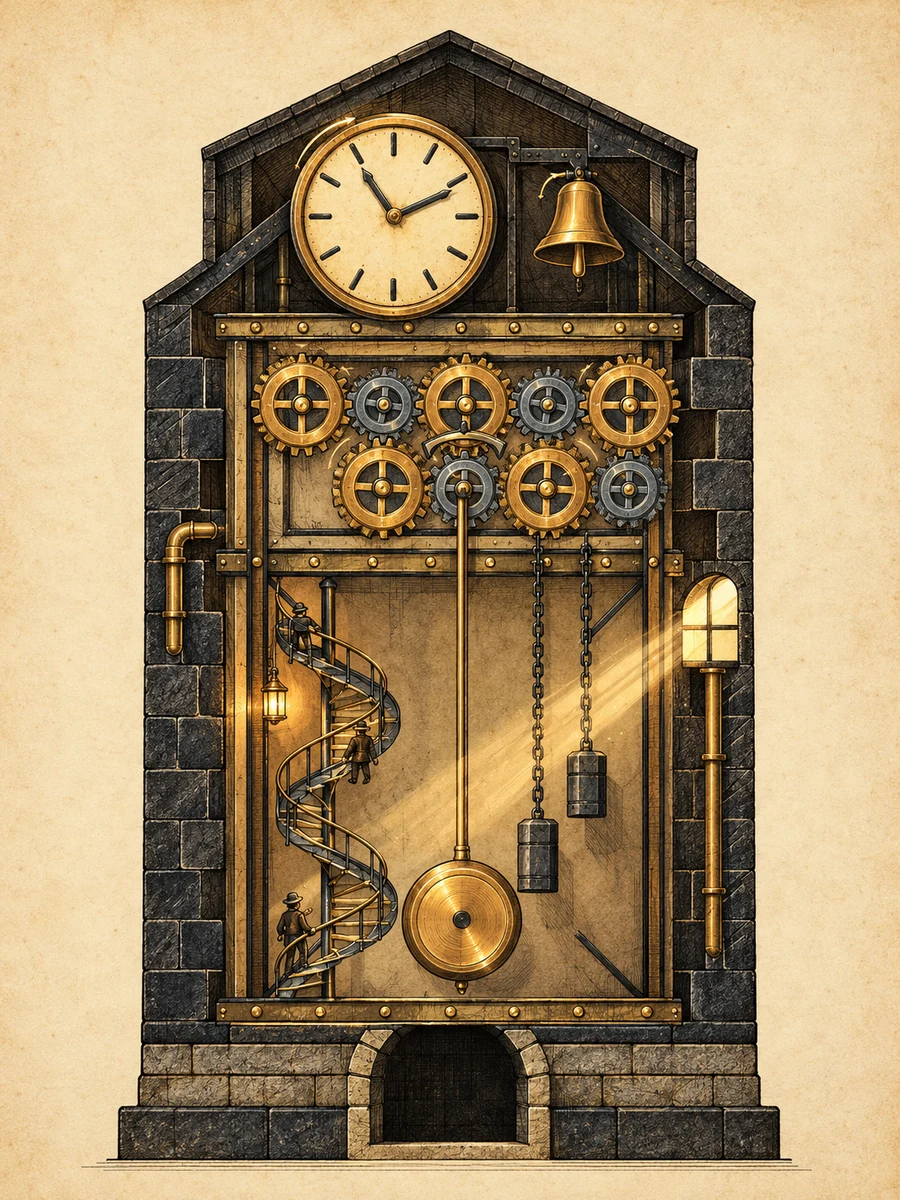 |
Sol 先用脚本算出 9 个齿轮的齿数(48、38、27、46、36、24、34、30、22)与节圆,再按咬合位置排布,绘图约 1 小时;第一次生图请求失败,按它的询问同意重试一次后成功。Astra Low 约 5 分钟完成全部草图与生图,结构更简化,齿轮没有逐一校准。
《千峰翠色》
| 原生草图 | 生图结果 |
|---|
Sol
Xhigh | 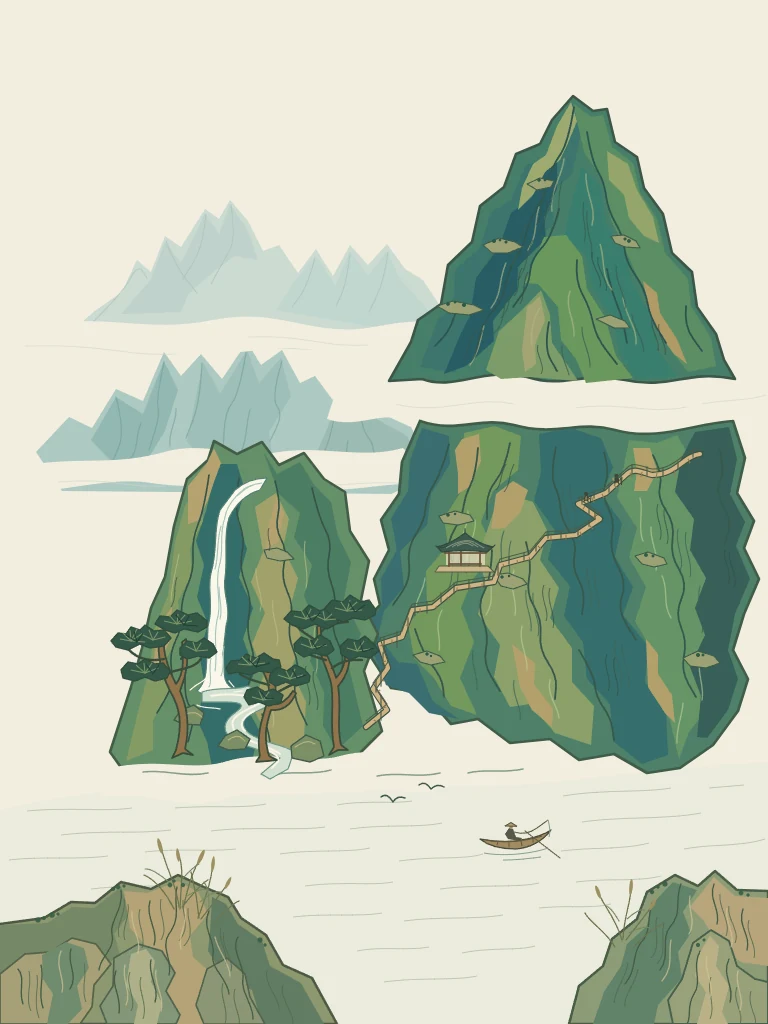 | 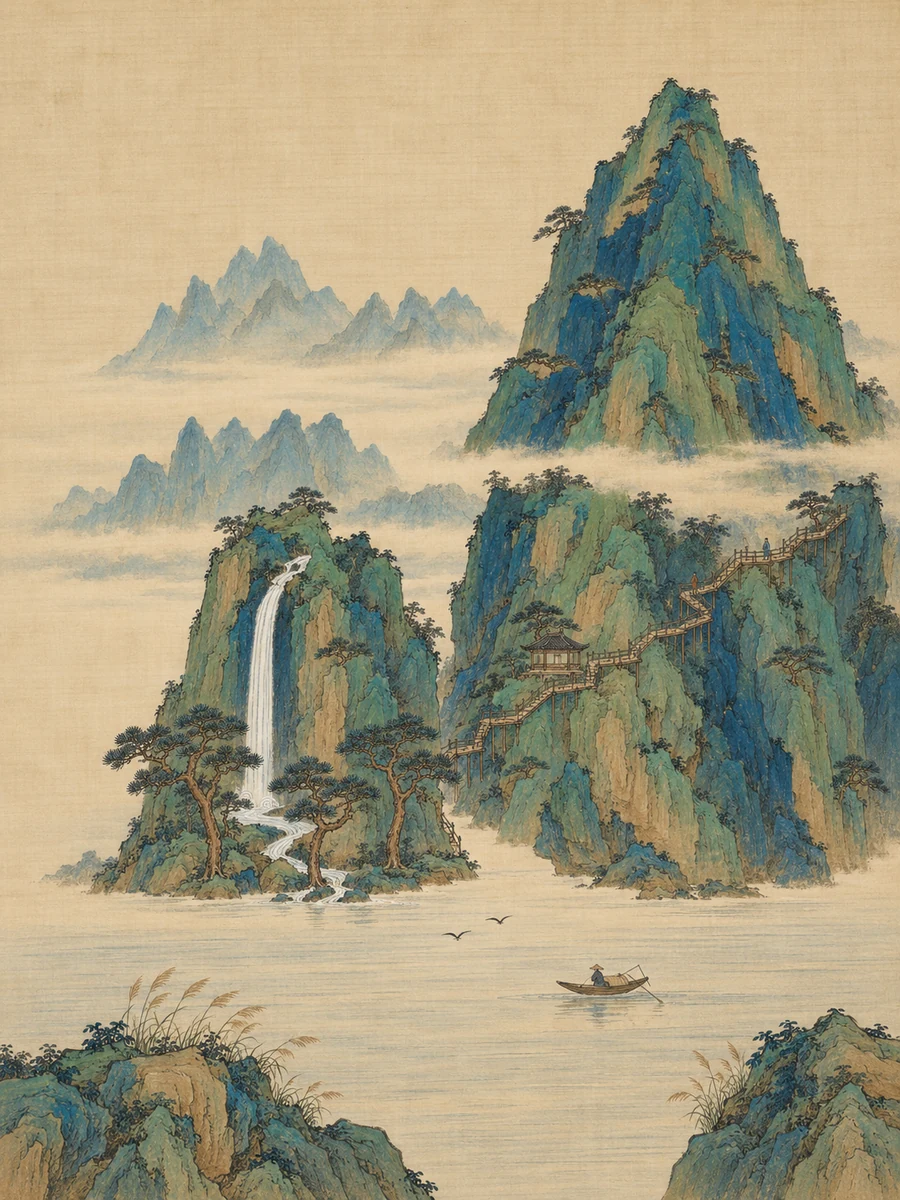 |
Astra
Low | 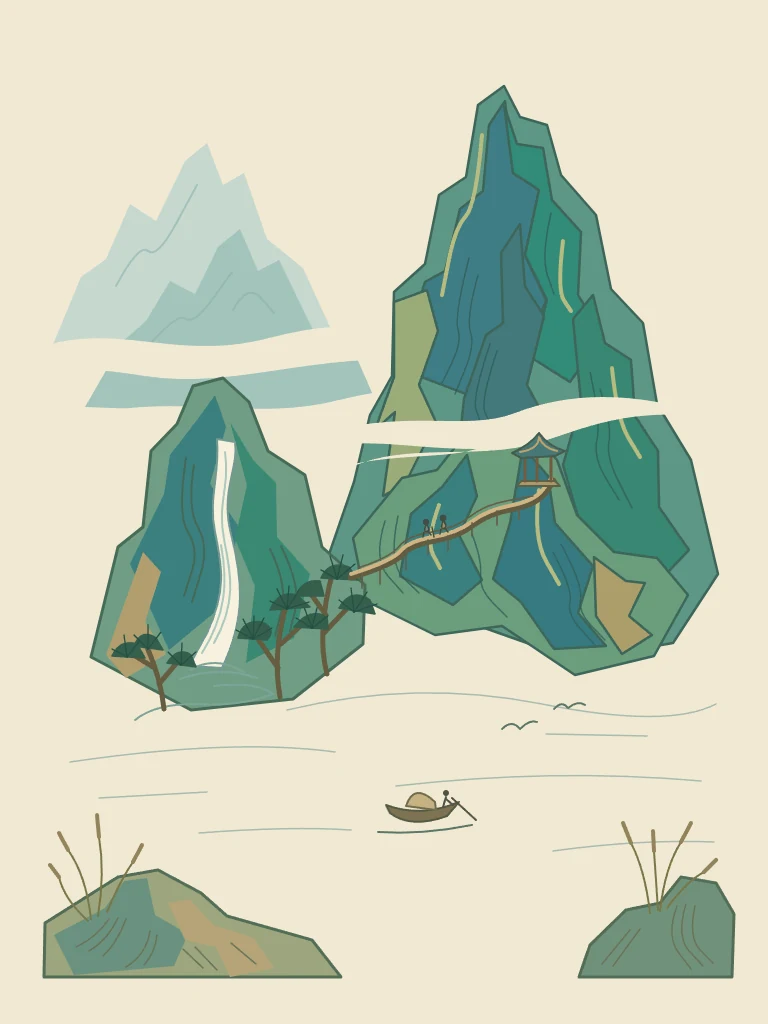 | 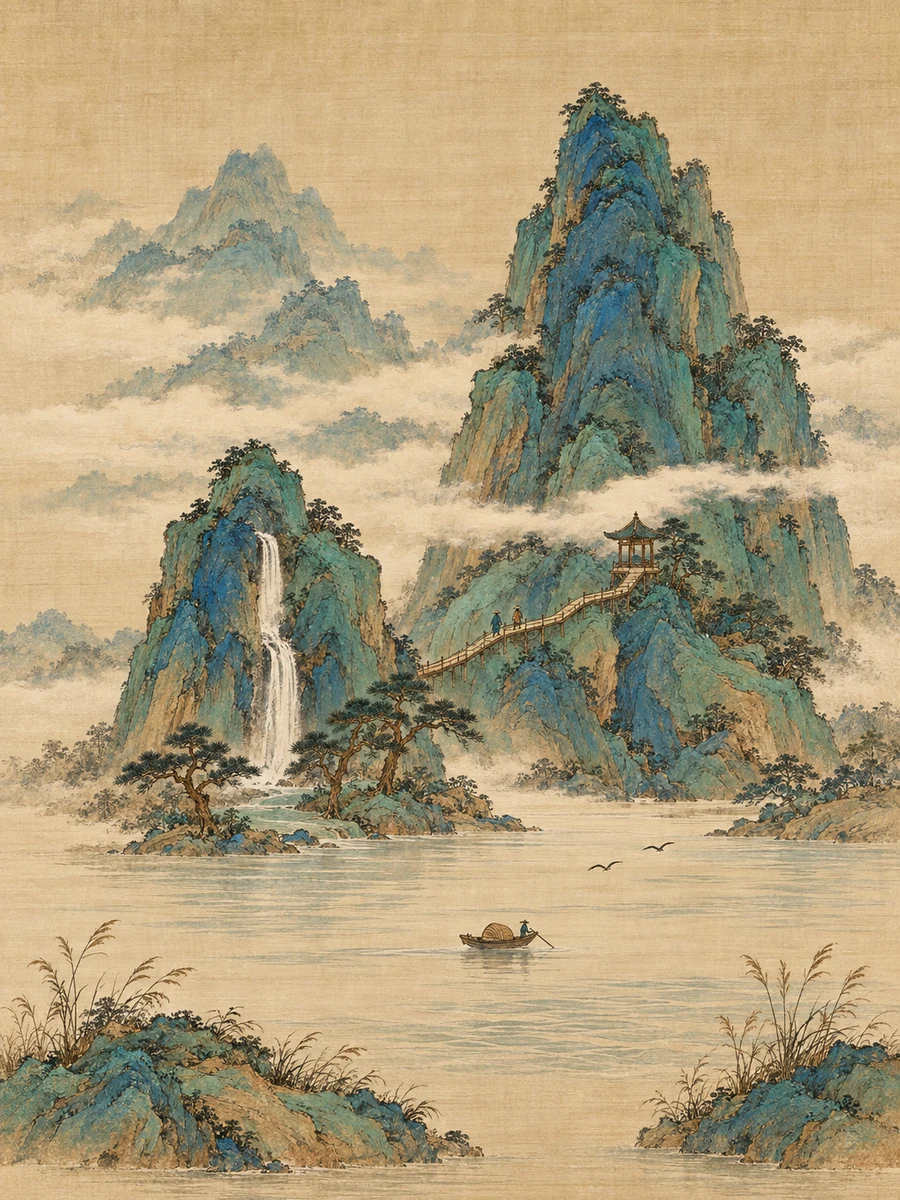 |
Sol Xhigh 约 28 分钟,Astra Low 约 5 分钟。两者都保留了主峰、瀑布、栈道与江面的位置;Sol 的远山层次和雾带留白更完整。
《DeepSeek 娘》· 照着参考图临摹(只画不生图)
这道题把一张参考图作为附件发给模型,让它在画板上临摹,考的是比例、渐变长发、蕾丝褶边、手写字和小图案能不能对得上。参考图是社区流传的 DeepSeek 娘表情包。每格都在官方桌面版上跑一次,没有调用生图;原生笔画版开启了“完成后返回预览”,SVG 版在同一条提示词后加了一句“每层用 svg 命令”。
| 参考图 | 原生笔画 | SVG |
|---|
 | 
Sol Xhigh · 40 分 50 秒 · 526 笔 | 
Sol Xhigh · 31 分 48 秒 · 463 笔 |

Astra Medium · 约 7 分钟 · 332 笔 | 
Astra Medium · 10 分 5 秒 |
SVG 版的发丝高光、蕾丝褶边和手写字更精细,Sol 用 SVG 还比逐笔绘制快了近 9 分钟;Astra 用 SVG 多花约 3 分钟,换来明显更丰富的细节。两个模型都没能画准脸型(偏长偏平)和围裙上的小鲸鱼图案,Sol 的鲸鱼更像鲸。
同一题再跑一次:让模型自己叠图对照
这一次提示词和附件方式都和上面一样,只是插件多了两样东西:模型可以用 reference 把聊天里附的参考图放进画板(作为隐藏的图片图层),并且在预览时打开 compare(把画作和参考图各占 50% 叠在一起,位置偏差会显示成重影)和 grid(每 100 像素一条带数字的网格)。同一题、同一个 Astra Medium,在官方桌面版上跑了一次,没有调用生图,共 20 分 57 秒、7 个绘画图层、686 条原生笔画;模型还用脚本批量生成了发丝和花边,并在画的过程中多次叠图检查、修正文字和蕾丝遮挡。

Astra Medium · 20 分 57 秒 · 686 笔 | 
模型看到的叠图预览:文字和发丝边缘的重影就是偏差 |
脸型、长发走向、蕾丝、手和气泡字都比上面的两个 Astra 版更接近参考图,耗时约是 SVG 版的两倍。这是单次运行,不同提示词和参考图的效果可能不同。
展开三道题的完整提示词
@sketch 用 3:4 竖版画板绘制《钟塔剖面图》:蒸汽朋克风格的钟塔纵向剖面技术插图。最上方是圆形大钟面(十二个刻度、两根指针)和一口铜钟;钟面下一层是齿轮机房:至少 9 个大小不同、齿数正确、彼此咬合的齿轮(相邻齿轮转向相反,齿廓要画出锯齿),另有一个锚形擒纵机构;中段是一根贯穿的长摆杆,末端为铜制圆盘摆锤,旁边两条挂着配重铁块的链条;塔壁一侧是沿墙盘旋而上的螺旋楼梯,梯上有三个微小的工匠人物;底部是石砌地基与拱门。剖面用厚实的暗色砖石墙体框出,内部露出黄铜与铁质结构,加入铆钉、管道,以及从小窗透进来的光柱。按背景砖墙、结构框架、齿轮组、摆锤与链条、楼梯与人物、光影与细节分层绘制。画完后,把这张草图作为唯一参考图,调用订阅图片工具一次生成成品:保持每个部件的位置、比例与咬合关系不变,做成精密的蒸汽朋克剖面图插画——黄铜与旧钢的金属质感、细致的机械倒影和铆钉、羊皮纸底色配墨线渲染、暖色灯光,不添加文字。
@sketch 用 3:4 竖版画板绘制《千峰翠色》:宋代青绿山水的构图,严格运用「三远法」。高远:右侧一座主峰拔地而起,占画面上半部,山体用层叠的块面表现,山腰有横向的云雾留白;深远:主峰后方还有两重淡青色远山,越远越淡,之间隔着大片留白的雾带;平远:下方是舒展的江面,一叶渔舟和两只飞鸟。左侧一挂瀑布从中段峭壁倾泻而下,落入山涧,涧边有三株松树,松针成簇;山腰有一座小亭和一条曲折栈道,栈道上有两个极小的行者;前景是坡石与芦苇,用勾勒加披麻皴式的笔触表现。色彩层次为石青、石绿、赭石,远山用淡青。按远山与天空、雾带留白、主峰、瀑布与松树、亭台栈道与行者、江面舟鸟与前景分层绘制。画完后,把这张草图作为唯一参考图,调用订阅图片工具一次生成成品:保持山体、瀑布、栈道、江面的位置和三远法的层次不变,做成宋代青绿山水绢本设色——石青石绿矿物颜料的沉着厚重、细腻的皴擦与勾勒、绢面纹理与微微泛黄的古意、云雾留白,不添加文字或印章。
@sketch 用 1:1 方形画板,尽可能忠实地临摹我附上的这张参考图(一张 Q 版二次元表情包)。画面:白色底;Q 版二头身的蓝发鲸鱼娘跪坐在画面右侧偏中,蓝色渐变长发披肩(发根深蓝、发梢浅蓝),头顶一根呆毛,戴白色蕾丝女仆头饰和蓝色蝴蝶结,头两侧是深蓝色带白色内里的鲸鱼耳鳍,蓝色大眼睛带高光,猫嘴嘟嘴的“ω”表情,脸颊泛红,双手叉腰;穿深蓝色女仆装,白色蕾丝围裙(围裙上有一只蓝色小鲸鱼图案),黑色领结,袖口和裙摆有白色蕾丝褶边;身后露出一条深蓝色的鲸鱼尾巴。左上方是白色对话气泡(黑色描边,尖角指向她),气泡里用黑色粗体写“你这吃白饭的蓝色大肥鱼。”;左侧从画面外伸进来一只黑袖子的手,食指指向她;她的左下方用蓝色描边字写“没吃饱喵!”;她脚边的地上放着一只空的白瓷饭碗,碗内壁印着一只蓝色小鲸鱼。请分层绘制:白色背景、头发与鲸鱼耳鳍与尾巴、身体与服装、脸部五官、饭碗、手臂与对话气泡文字,保留原生可编辑笔画,并特别注意角色比例、头发的渐变与发丝走向、蕾丝褶边和脸部表情的细节。这次只在草图画布上画,不要调用任何生图或图片编辑工具;画完后检查一遍与参考图的差异并修正,最后保存并完成。
SVG 版在“这次只在草图画布上画”之前多加了一句:
作画方式:每个图层都用 svg 命令整层写成 SVG(路径用贝塞尔曲线,配色手动分层做出渐变感),不要逐点使用原生笔画命令。
每个例子只跑一次,不代表稳定水平;Sol Xhigh 耗时明显更长,日常草图用 Astra 或较低推理档即可。
查看图片与草图设置
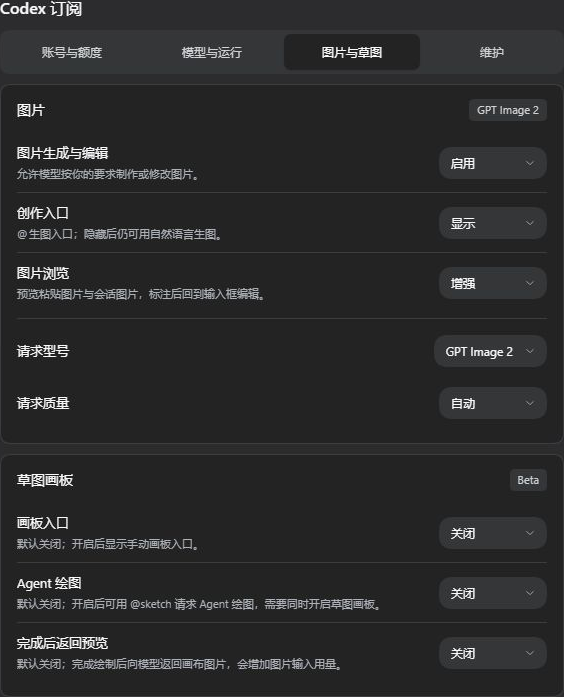
DSH 实机设置截图。
支持图层、原生曲线、笔刷、撤销重做和快捷键;可保存多份草稿,导出 PNG 或分层 PSD。生成图可标注区域后继续编辑。
图片编辑、草稿保存与 PSD 限制 →
按需扩展
普通订阅聊天无需 Codex CLI。需要 Codex 独立子任务 时,可在“模型与运行”中点击“安装组件”,停用和卸载也在同一处完成。其余实验选项按需开启。
可选组件、存储清理与完整使用指南 →
更新与卸载
在 DSH 插件 页面找到本插件,使用更新或卸载操作,完成后按页面提示重启。卸载插件不会删除其他插件。
终端方式
dsh plugin --profile web update dsh-codex-subscription
仅在需要卸载时运行:
dsh plugin --profile web remove dsh-codex-subscription
常见问题
DSH 0.2.0-rc.2 提示插件不兼容?
2.2.10 之前的所有版本发布时 DSH 0.2.0-rc.2 还不存在,其兼容声明无法事后修改。请安装 2.2.10 或更高版本(只填包名时,发布满 24 小时前可能装到旧版,请直接填 dsh-codex-subscription@2.2.10):在 插件 页面更新,或运行 dsh plugin --profile web update dsh-codex-subscription,然后重启 DSH。
电脑没有 dsh 命令,怎么安装?
直接使用 DSH 的 插件 → 添加插件,粘贴包名即可,无需配置终端命令。
有多个 DSH,或安装后找不到插件?
在你实际使用的 DSH 中安装。使用终端时,请从目标 DSH 环境运行命令,并确认对应的 profile;不要删除 profile 或修改系统 PATH 来强行安装。
如何反馈问题?
在 设置 → Codex 订阅 → 维护 生成“支持诊断”,粘贴到使用问题表单的诊断栏,并补充触发步骤。
诊断不含凭据、账号标识、原始响应或完整日志。请勿附上登录链接、授权码或浏览器回调地址。
当前图标
这是当前使用的插件图标,以及它在 DSH「已安装」列表中的实际显示效果。

DSH 0.1.7-alpha.2 实机界面。
定位与边界
- 只做 ChatGPT / Codex 订阅,并把这一件事做深:额度与预测、图片与草图、子任务、诊断;不接入 Claude、Grok 等其他订阅。
- 失败就明确报错:不会静默切换到其他付费路由,也不会虚构账号没有返回的额度窗口。
- 跟随官方 DSH 发布:每次发版都用官方 DSH 的 latest、next 等通道做安装、启动、卸载、重装的端到端验收;已验证的版本见 兼容性记录。
- 模型、额度和功能开放情况以你的账号实际返回为准;ChatGPT 后端与 DSH 可能独立变化。
边界与支持
ChatGPT Codex 后端和 DSH 可能独立变化;本项目为社区项目,与 DeepSeek、OpenAI 无隶属或背书关系。
本项目的问题反馈请使用使用问题表单;
明确的产品建议请使用功能建议表单;
欢迎提交聚焦的修复和兼容性改进,具体要求见 CONTRIBUTING.md;
DSH 插件交流可前往 DeepSeek Harness Discussions。
敏感问题请先阅读 SECURITY.md。
如果这个项目对你有帮助,点一下 Star 可以让更多 DSH 用户发现它。
MIT


