

模型与 MCP
待识别

rea
morluto
Reverse engineer anything with agents, from app behavior down to native binaries.
PROJECT TOPICS
INSTALL REFERENCE
dsh plugin --profile web add github:WJDdidi-1/dsh-plugin-toolkit
该命令指向仓库当前默认分支;尚无绑定当前 commit 的完整验证结果。
PROJECT README



English · 中文
Everything a DeepSeek Harness plugin needs between init and a version the market index accepts: scaffolding, a test harness for the client bundle, a way to see a change without restarting the app, and a release that does not depend on remembering fourteen steps.
npx dsh-plugin-toolkit@latest init ./my-panel --name my-panel   # a plugin that already passes the checks
npx dsh-plugin-toolkit@latest verify .                          # pack it, install the tarball, mount the panel
npx dsh-plugin-toolkit@latest release --pr --merge              # tag, wait for npm, update the index, open and merge the PR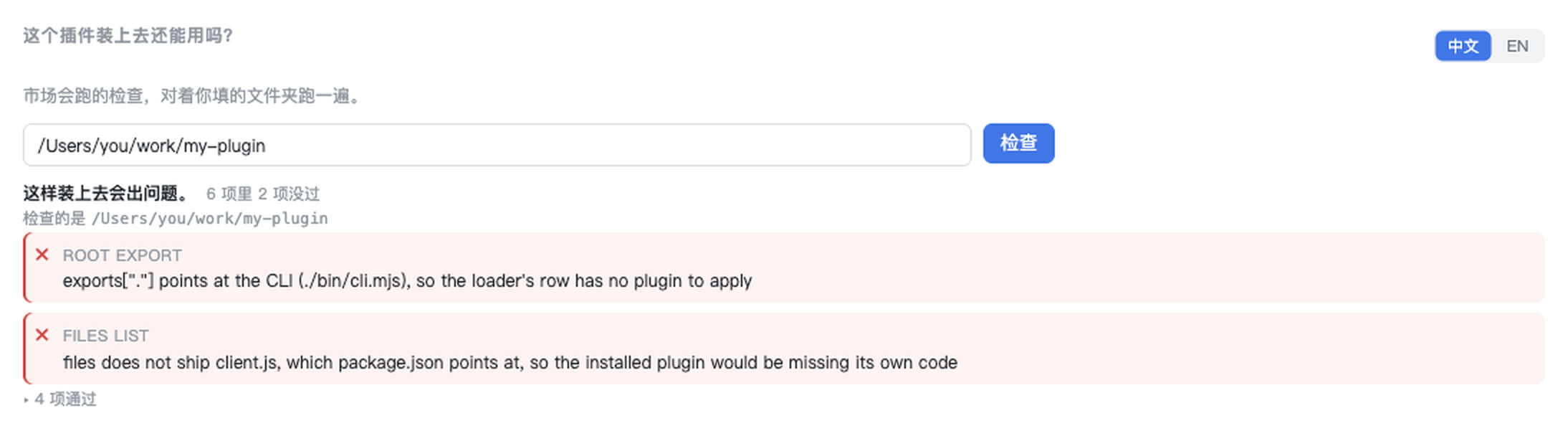
The same checks, in the right sidebar: type a folder, an owner/repo, or a GitHub link, and it says which one would fail and why. Nothing is installed and nothing is written.
| You are… | Start with | Then |
|---|---|---|
| writing your first plugin | init |
doctor, fix, verify |
| changing a panel that is already installed | dev |
mount, the testkit, audit |
| shipping a version | verify |
release, index |
It also installs as a plugin. dsh plugin add dsh-plugin-toolkit puts a
插件体检 / Plugin doctor panel under the conversation and a tab in the right
sidebar. Give it a folder that holds a plugin's package.json, or just
owner/repo — or a repository name, which it searches GitHub for and lists the
candidates to pick from. It then runs the same checks verify runs and says
which one would break the install, with the reason on the line — the same
answers as the CLI, without leaving the app.
$ dsh plugin add dsh-plugin-toolkitinit writes the files whose absence shows up as a failed first publish — engines.dsh, the patch file, a files list that ships the code, a client bundle, a test for it, and the CI that runs both. doctor then checks the same things without writing anything, and verify checks the tarball instead of the working copy.
If a plugin already exists, doctor --fix turns the failing checks into a
repair plan. It names the file and the edit for every problem, writes nothing
until you add --write, and then runs the checks again. fix --engines is
still there when the host range is the only thing you need to change.
npx dsh-plugin-toolkit@latest init ./my-panel --name my-panel
cd my-panel && npm install && npm test && npx dsh-plugin-toolkit@latest doctor .A plugin's client code is one file that calls window.__ModuleLoader__.load({factory}) — there is no module to import, so the usual React test setup does not apply. testkit supplies the missing half, and dev pushes a rebuilt bundle into the running app.
npx dsh-plugin-toolkit@latest mount ./client.js     # what a user would see, without the app
npx dsh-plugin-toolkit@latest dev . --host http://127.0.0.1:54133verify first (it is the only check that reads the tarball), then release, which tags, waits for the registry, writes the index entry with the publish time the registry reports, and — with --pr --merge — opens and merges the pull request.
npx dsh-plugin-toolkit@latest verify .
npx dsh-plugin-toolkit@latest release . --pr --mergeverify actually does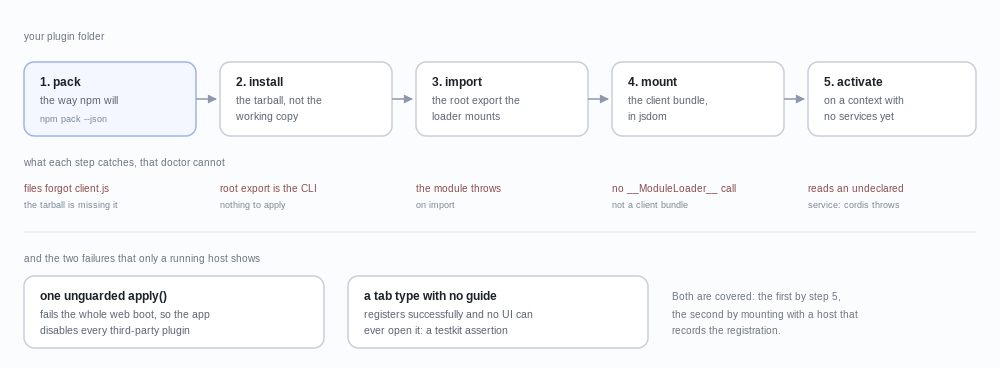
The order matters. Packing first means the check reads the file list npm will publish, not the folder you have. Installing the tarball means the root is imported by its bare specifier — the package name the loader uses — not by a file path taken from main or exports["."]. Node ignores main once exports exists, so a package whose exports map has no "." entry fails with ERR_PACKAGE_PATH_NOT_EXPORTED at that step even though the file is present. Mounting means the client bundle is actually executed, in jsdom, with a host that records what it registered. Packing first also means a panel built by a prepack hook exists when the source checks run: the hook has written it into the folder before doctor's file checks are asked again.
Each step exists because a plugin once got past the step before it and still installed into nothing.
Releasing one plugin fifteen times taught me three things the ecosystem's tooling does not cover:
npm view answered from a stale local cache, so I repeatedly believed a release had failed when it had not — and once believed it had succeeded when the market still could not see it.publishTimestamp from the registry and engines.dsh from the manifest. Forget the range and the index validator rejects the PR with Engines mismatch — after the tag is already public.package.json and still be uninstallable: files that omit the entry the manifest points at, a bundle patch that does not exist, a README that never states the host range it declares.The five failures behind these checks — a red dot with no panel, a row the host drops, an app that disables every plugin after one unguarded apply(), a tab nothing can open, and a checker that was wrong — are written up with their exact error text and how to reproduce each one: Five plugins that installed and did nothing.
Each of these shipped in a real version of this toolkit before the check below existed. A manifest check passes on all four.
| What you see | What it was | Caught by |
|---|---|---|
| The tab is a red dot and the panel never opens | exports["."] pointed at the CLI, so the loader's row had no plugin to apply |
root export |
| The plugin is installed, the app never serves it | dsh.client declared, exports["./client"] missing — the host drops the row |
client declaration |
| The app says the third-party plugin is unsupported and disables all of them | apply() read ctx.webServer without declaring it; cordis throws instead of returning undefined |
verify (calls apply on a context that has no services) |
| The tab registers, and nothing in the UI opens it | sidebarRightTabs.register() registers a type; the sidebar lists what tabs.guide() returns |
a testkit test, not doctor |
The first three are static: doctor and verify catch them without the app running. The fourth is a UI contract, so it needs the panel mounted and the registration inspected — that is what testkit is for.
fetch; no runtime dependencies)gh on PATH for the steps that touch GitHub>=0.2.0 — the version whose market index carries engines.dsh, which is what makes the range check meaningfultestkit: jsdom, react and react-dom as dev dependencies (npm install --save-dev jsdom react react-dom)$ npx dsh-plugin-toolkit@latest init ./my-panel --name my-panel --title "My panel"
created 8 file(s) in /Users/you/my-panel
.github/workflows/ci.yml
.gitignore
README.md
client.js
cordis.patch.yml
index.js
package.json
test/panel.test.mjs
next: npm install && npm test && npm run doctorWhat you get is not a snippet: it is a plugin whose doctor already passes (engines.dsh, the patch file, the files list), with a client bundle that registers a sidebar tab, a testkit test for it, and a CI workflow that runs both. init refuses a directory that is not empty unless you pass --force, a name npm would refuse, and a blank --title (pass one, such as --title "My panel") — mistakes that cost the most time later.
Every command that takes a path expands a leading ~ before touching the filesystem. The tool, not the shell, expands ~ for these arguments: cmd and PowerShell pass "~/my-panel" through literally, while a POSIX shell usually expands it first. init '~/my-panel' --name my-panel writes into your home directory (the same files init ~/my-panel writes on a POSIX shell), and doctor '~/my-panel' reads it back. The Windows spelling ~\my-panel works too; a directory literally named ~ is never created.
The checker is docked under the conversation, above the input bar: a single row, collapsed by default. Open it and it carries the whole guide — who it is for, how to use it, what each check means, and what it cannot tell you — plus the folder field and the results. The same panel is also a Plugin doctor tab in the right sidebar, for when the conversation is busy.
The panel speaks both languages and opens in Chinese; the 中文 / EN switch sits in the dock's header row (and in the sidebar tab) and the choice is remembered.
Look at it without the app. The preview mounts the panel with the testkit, so it
needs the optional peers; install them once with
npm install --save-dev jsdom react react-dom:
node scripts/preview.mjs /tmp/panel.html # collapsed, open, with a result, and the tabA plugin's client code is one file that calls window.__ModuleLoader__.load({factory}) — there is no module to import, so the usual React test setup does not apply. testkit supplies the missing half: a DOM, the real React, and a host context that records what the panel registers.
npm install --save-dev jsdom react react-domimport { mountClient, createFetch } from 'dsh-plugin-toolkit/testkit';
const panel = await mountClient({
file: 'client.js',
copy: { 'my-plugin': { title: 'My panel' } },
fetch: createFetch({
'/my-plugin/report': { body: { score: 71, noise: 3 } },
'/my-plugin/apply': () => ({ status: 201, body: { score: 92 } }),
}),
});
await panel.click('[data-testid="optimize"]');
console.assert(panel.text().includes('92'), 'the score on screen did not move');
console.assert(panel.must('[role="status"]').textContent.includes('92'));
await panel.unmount();unmount() is async: it lets React finish the work its own unmount schedules before the DOM goes away. Skipping the await surfaces as ReferenceError: window is not defined after the test has already passed, which is a confusing way to learn it.
What you get back: text(), html(), query(selector), must(selector) (throws with the rendered HTML when it misses), click(selector), type(selector, value), press(selector, key), focus, attributes(selector), snapshot(dir, name) for a normalised DOM baseline, and host for assertions about what the bundle registered.
The DOM is the baseline: normalising class order and whitespace gives a file that fails for the reasons a screenshot would — a lost label, a control that stopped rendering — and can be reviewed in a diff instead of by eye.
import { expectSnapshot } from 'dsh-plugin-toolkit/testkit';

const panel = await mountClient({ file: 'client.js' });
expectSnapshot(panel.html(), '__snapshots__', 'panel');   // throws with the element that moved
await panel.unmount();
First run writes nothing: it tells you to re-run with UPDATE_SNAPSHOTS=1, so a baseline is always a decision, never a side effect. That rerun writes the normalised HTML and returns { status: 'written' }; later runs return same or fail with the element that moved.
panel.expectAria('[role="tab"][aria-selected="true"]', { label: 'Protection', selected: 'true' });
assert.match(panel.must('[role="status"]').textContent, /Score moved 71 → 77/);
expectAria() compares the attributes a screen reader actually reads — role,
label, live, selected, expanded, checked, pressed, disabled — and
names the one that differs:
[aria-live="polite"]: expected aria text to be "9", but it is "0"A missing attribute is reported as nothing, not as an empty string, because
those are different bugs. panel.aria(selector) returns the same object when you
want to assert on it yourself.
must() throws with the rendered markup when the selector misses, which is the difference between "the assertion failed" and "here is what the user actually got".
Every example below is shipped in the package, run by CI, and the output shown is the output it prints:
| Example | What it shows |
|---|---|
node examples/mount-a-bundle.mjs |
mount a real bundle, read the text, click, read it again |
node examples/route-stubs.mjs |
answer the routes a panel asks for, and assert on the requests |
node examples/baseline.mjs |
a DOM baseline compared on every run |
node examples/aria.mjs |
what assistive tech sees |
$ node examples/mount-a-bundle.mjs
Demo panel Count 0 0
Demo panel Count 1 1
$ node examples/route-stubs.mjs
Score 71
asked for: 1 route(s), undeclared route answers 404To look at a bundle by hand:
npx dsh-plugin mount ./client.js            # print the text a user would see
npx dsh-plugin mount ./client.js --html     # print the markup
That is how the AIignore panel was checked before release: the real bundle, mounted in Node, against a stubbed /aiignore/*:
$ npx dsh-plugin mount ../ai-context-doctor/plugin/client.js
AIignore No workspace yet Could not read the report …If verify passes on your plugin, this badge says so and links back here:
[](https://github.com/WJDdidi-1/dsh-plugin-toolkit)It is a claim, not a decoration: add it only when dsh-plugin verify . exits 0.
dsh-plugin-example is a ~70-line plugin: one sidebar tab, two languages, one behaviour test, CI that runs verify through the composite action. It is the shape this toolkit expects, so it is also the fastest way to see whether the toolkit fits your plugin. It is a GitHub template too: Use this template starts you on a plugin whose first publish already passes.
dsh plugin add dsh-plugin-exampledoctor checks one folder you name. The question that actually gets asked is
"why is my plugin not in the sidebar?", and the answer needs three things at once:
what is installed, whether each installed copy is valid, and which of them the
running app actually loaded.
$ dsh-plugin audit --host http://127.0.0.1:54133
dsh-aiignore           0.37.1    loaded       ok
demo-panel             0.3.0     not loaded   ok  — dsh.profile.bundles in /Users/me/.dsh/profiles/desktop/package.json does not list it, and the loader mounts only listed bundles
                                            fix: add "demo-panel" to dsh.profile.bundles in /Users/me/.dsh/profiles/desktop/package.json (or run `dsh plugin add demo-panel`), then restart the app

1 installed plugin(s) are not in the running app:
"Not loaded" has three different causes, and audit names the one that applies
instead of offering a blanket restart:
dsh.profile.bundles. pnpm add (or npm install) installs the
package but does not tell the loader to mount it. Add the package name to
dsh.profile.bundles in ~/.dsh/profiles/<profile>/package.json, or run
dsh plugin add <name>, then restart the app.dsh.bundle. The package declares dsh but no patch file to mount.
Add dsh.bundle.patch to its package.json and ship the patch file, then
reinstall.Advisories (engines.dsh, README Requirements) are counted apart from problems:
the market index needs them, the loader does not, so they should not bury a plugin
that is actually broken.
audit exits 1 when an installed plugin has a hard failure or when the
running app did not load at least one installed plugin, so CI can gate on a
profile where the app silently skipped a plugin. It exits 0 when every
installed plugin is loaded and valid. When --host is given but the app cannot
be reached, the command has not observed the graph it was asked for: it prints
the /plugins/events URL it could not read, prints no plugin rows or clean
summary, and exits 2 so a CI gate cannot pass against an unreachable app.
Without --host, the loaded column is ? and only hard failures change the
exit code.
audit --home <dir> scans a different profile home; both ~/.dsh and
~\.dsh expand. A bare --home, or one followed by another flag such as
--timeout 50 or --json, is a missing value rather than a request to scan
$HOME/.dsh or a folder literally named after the flag: the command exits 2,
names --home, and prints no profile report. An explicit --home must be an
existing directory: a missing path, a regular file and a dangling symlink each
exit 2 naming --home and the resolved path, instead of printing "no plugins
installed in any profile" for a home the audit never read. An existing empty
directory still exits 0 with that line, and omitting --home still scans the
default ~/.dsh.
Without --host the loaded column is ?, because guessing would be worse than
saying nothing. Only packages that declare a dsh field are audited — the rest of
node_modules is ordinary dependencies, and auditing those is noise.
An installed package whose package.json cannot be read is the exception: the
dsh field that would mark it as a plugin is in the file that failed to parse.
If its name is still in dsh.profile.bundles, audit reports a manifest
failure naming the unreadable package.json and exits 1 instead of treating
the folder as an ordinary dependency. A truncated manifest from an interrupted
install therefore cannot make the plugin disappear from the report, and a valid
sibling plugin is still listed on the same run. The exception stays narrow: a
damaged package.json in a package that is neither in dsh.profile.bundles nor
readable enough to expose a dsh field is still an ordinary dependency and is
skipped, so one broken transitive install does not fail every audit.
A declared bundle can also be missing entirely. If a name stays in
dsh.profile.bundles after its node_modules/<name> folder is removed (an
interrupted install, or a package deleted by hand), audit prints a missing
row with an install failure naming the absent folder and exits 1, while
still listing the healthy plugins on the same run. An absent package that the
profile never declared is not an install record, so it is not invented in the
report; a regression test removes the name from the profile and requires the
shipped CLI to exit 0 without printing it.
The host already swaps a rebuilt bundle without a page reload: it watches each plugin's entry artifact and reports a rebuilt frame on /plugins/events. dev puts the new file where the host is looking, then proves the frame arrived instead of asking you to check by eye.
npx dsh-plugin dev . --host http://127.0.0.1:54133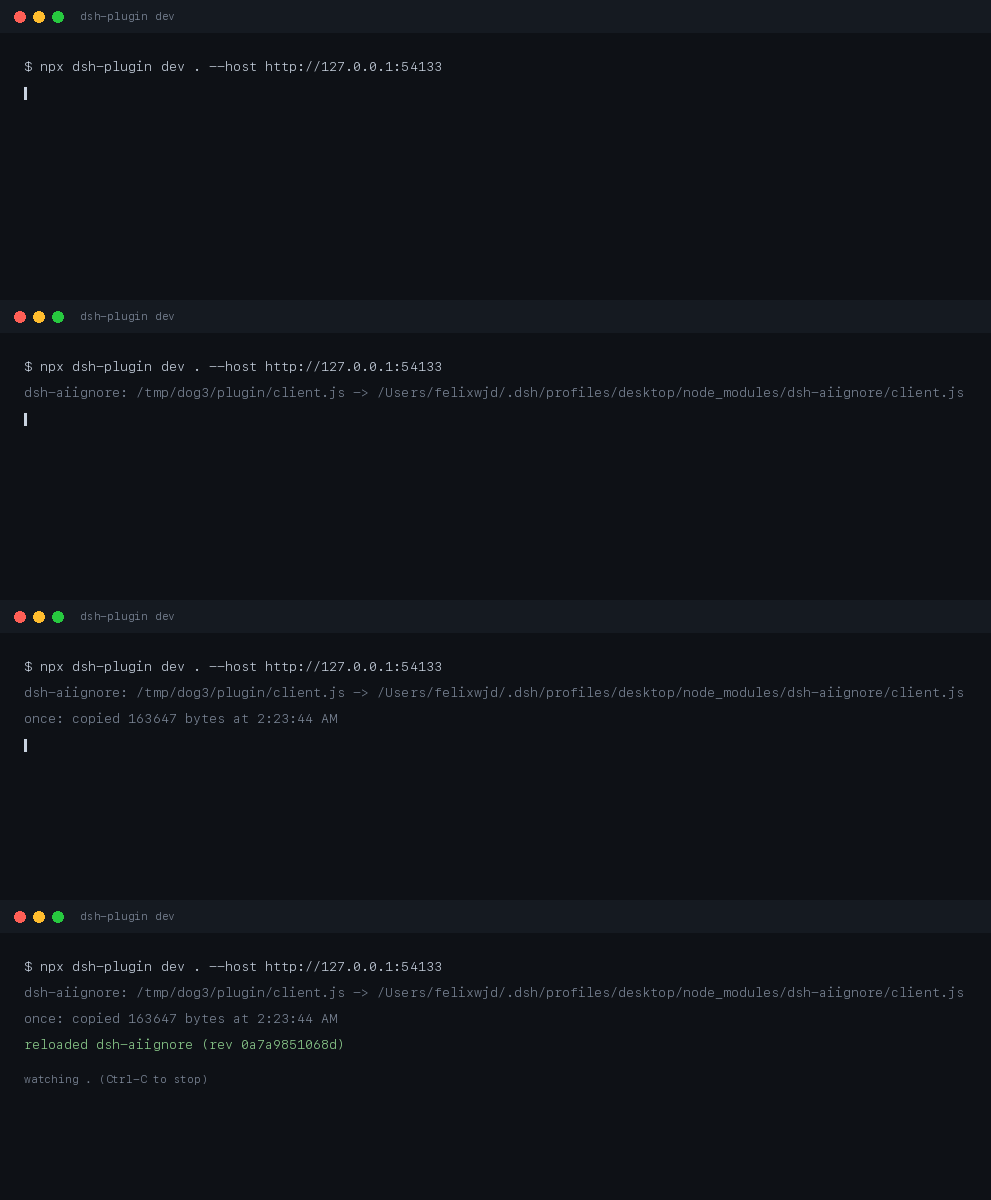
Recorded from a real run against the running app: the last line is the revision the app sent back on /plugins/events, not a message the tool printed on faith.
demo-aiignore: /work/plugin/client.js -> ~/.dsh/profiles/desktop/node_modules/dsh-aiignore/client.js
initial: copied 163647 bytes at 1:18:43 AM
reloaded dsh-aiignore (rev e0c0230c4fc9)
watching /work/plugin
That last line is the whole point: the revision came back from the app's own event stream, so "it reloaded" is a fact, not a hope.
A plugin the running app never loaded cannot be reloaded, and the app says so by leaving it out of the graph it sends first. dev reads that graph, so a freshly installed plugin gets the sentence that fixes it instead of a timeout:
copied, but not confirmed: the running app has not loaded demo-panel, so it will not report a reload; restart the app once after installing it| Flag | Meaning |
|---|---|
--dest <dir> |
write into this installed copy instead of searching ~/.dsh/profiles/*/node_modules/<name> |
--entry <file> |
copy this file instead of dsh.client.entry, client.js, lib/client.js |
--build <command> |
run this before each copy (a failed build copies nothing) |
--host <url> |
confirm the reload against the app at this URL; without it the copy still happens and the tool says it is unconfirmed |
--once |
copy once and exit, for scripts |
Two things it does not do, because the host does not: React state inside the reloaded plugin is lost, and a failed swap does not roll back to the previous bundle.
The same checks run as a GitHub Action, so a tag cannot go out on a plugin that would not install:
- uses: actions/checkout@v4
- uses: WJDdidi-1/dsh-plugin-toolkit@v1
  with:
    dir: plugin        # the folder holding the plugin's package.json
    command: verify    # pack it, install the tarball, mount the panel
verify is the default because it is the only check that reads what a user
actually installs: doctor reads the working copy, so a files list that
forgets client.js passes it and fails only after npm i.
command: doctor stops at the manifest checks (fast, no install), and
command: index audits market/index.json instead, failing on any version whose
engines.dsh is missing or is not a semver range (a malformed value such as
>=banana, or a single pinned version such as 0.2.0, both fail). It also
rejects an index it cannot audit: a missing plugins or versions array, a
plugin entry without a name, a version entry without version, and a
non-SemVer version. Each failure names the file and the plugin or entry.
Pin version: if you would rather not track the latest release.
The panel takes three kinds of input: a folder, owner/repo, or a GitHub URL.
A bare name is a search, not a guess — it asks GitHub, lists the matches with
their stars, and checks the one you pick. A repository is downloaded once as a
tarball into a temp folder, so nothing is cloned into your workspace and
nothing is installed.
The CLI reads a repository straight from the GitHub API:
dsh-plugin doctor --remote V1ki/dsh-plugin-subscriptionsdsh-plugin doctor: 1 problem(s) in V1ki/dsh-plugin-subscriptions
⨯ engines.dsh: engines.dsh is missing, so a host that enforces the range rejects the install as "incompatible with dsh"; declare the range you support, e.g. "engines": { "dsh": ">=0.2.0" }That is the whole reason this mode exists: the plugin hub files failed installs
back into plugin repositories, and the report is a sentence — plugin install failed, plugin does not support the DSH version in use — that never names a
file. Reading package.json over the API is enough to name it.
What it can see, and what it cannot:
engines.dsh, dsh field, files, dsh.client,
exports) run on the real package.json.readme) run on the text GitHub serves: the README must have
a Requirements heading and must state the host range package.json
declares. A repository whose checkout fails readme fails the remote check
too, with the same sentence.exports["./client"] point at a file that exists, does the
root export apply) need the tree. npm runs prepack and prepare before
npm pack creates the tarball, and prepublishOnly before npm publish
does, so a package whose lifecycle hook builds those files publishes files it
does not commit: those checks are skipped with a note instead of calling a
working plugin broken. A plain build script is not a lifecycle hook and is
not evidence by itself, because npm never runs it unless prepack or
prepare calls it; put the build there if it produces shipped files.GH_TOKEN (or GITHUB_TOKEN) to audit more than one or two.To check a whole list in one pass, put one owner/repo per line in a file and
pass it with --from (- reads standard input):
$ dsh-plugin audit --remote --from repos.txtRepositories are read four at a time by default. --jobs N changes that width;
values above 8 are capped at 8, and --jobs 1 walks the list one repository
at a time, the timing the command had before batching. The output — and the
--json array — still follows the input list, and every verdict is the one the
sequential run produced, so a diff between two runs compares repositories rather
than scheduling.
When GitHub answers 403 or 429, the shared quota is gone, so the batch stops
starting new repositories and marks every entry it could not read as
rate-limited instead of clean or unreadable. If the response carries
x-ratelimit-reset (or retry-after), the reset time is printed with the
verdict, and the remaining entries are reported without another request.
The fifteen compatibility reports, from four repositories, all end with the same
question. Add --host <version> to a remote audit and it answers that question
for one repository. This is the output for L3n3L/dsh-resume, a real plugin
whose declared range stops before DSH 0.2.0, checked against the
0.2.2-alpha.3 canary from the reports. The checked-in sample is a frozen 0.1.3
snapshot, so the line stays true as the upstream repository changes:
$ dsh-plugin audit --remote L3n3L/dsh-resume --host 0.2.2-alpha.3
incompatible  L3n3L/dsh-resume  0.1.3 (host >=0.1.0-rc.6 <0.2.0-0) [incompatible with dsh 0.2.2-alpha.3; declares ">=0.1.0-rc.6 <0.2.0-0"]

summary: 1 repository — 0 clean, 1 failing (1 problem), 0 unreadable, 0 rate-limited
The verdict comes first: incompatible means the range in package.json does
not accept the host, so the installer rejects the plugin before it unpacks it.
This run exits 1. The same answer is reproducible without a GitHub request:
the checked-in snapshot under examples/compatibility-sample/ keeps the 0.1.3
manifest fields that decide compatibility, and its ## Requirements heading
isolates the host-range answer. This command feeds that snapshot through the
real CLI path:
$ node scripts/compatibility-sample.mjs(npm run compatibility runs the same script.) The script starts the shipped
bin/dsh-plugin.mjs as a child process and answers its GitHub reads from the
checked-in folder, so the block above is that executable's stdout rather than a
library shortcut; it exits 0 only after the replayed command exited 1. The
test suite runs the script and compares its output with the block above, so the
sample cannot drift from the flag parser, the formatter, or the README. Running
dsh-plugin audit --remote L3n3L/dsh-resume --host 0.2.2-alpha.3 without the
sample audits the repository's current default branch instead; a README or
manifest change since 0.1.3 can add another readme or manifest failure to the
same row.
CI should read the same answer as data. This is the reproducible sample again, with the flag that changes the form rather than the verdict:
$ node scripts/compatibility-sample.mjs --json
[
  {
    "target": "L3n3L/dsh-resume",
    "version": "0.1.3",
    "hostRange": ">=0.1.0-rc.6 <0.2.0-0",
    "failures": [],
    "notes": [],
    "host": "0.2.2-alpha.3",
    "compatibility": "incompatible"
  }
]
compatibility is the finding for an incompatible range; the object does not
invent a second entry in failures for the same fact. Gate on compatibility
or the process exit code, not on failures.length alone, or a host mismatch
will look clean. The command still exits 1, and the test suite compares this
block with the JSON the executable prints, so the documented shape cannot drift
from the code that emits it.
The line carries the range package.json declares and one of compatible,
incompatible, or unknown against that host version. unknown is the honest
answer for a missing or malformed range — there is nothing to compare — while a
range that excludes the host is incompatible, counted as failing, and exits
1. npm's pre-release rule is part of the answer: >=0.2.0 does not accept
0.2.2-alpha.3, because a range only opts into a pre-release when it names one
of the same major.minor.patch. A canary host can therefore be incompatible
with a range that will accept the final release. The same flag works in the
batch mode, so one --from run answers the whole list:
$ dsh-plugin audit --remote --from repos.txt --host 0.2.2-alpha.3The compatibility flags are --remote <owner/repo> for one repository,
--from <file> for a list (- reads standard input), --host <version> for
the DSH version to compare against, and --json for the machine-readable
finding. --jobs <n> sets the batch width, and --patch-dir <dir> writes the
host-targeted repair for each repository that needs one. The help text lists
the same flags; a test fails if this section names a flag the CLI does not have.
A bare --host is a usage error, not an audit without the comparison: the
command exits 2 before it reads GitHub, and --host --json does not consume
the --json flag as a version. The value itself must be a complete version
(0.2.2, v0.2.2, or 0.2.2-alpha.3): a range (>=0.2.0), a partial version
(0.2), a tag name, or a blank value is rejected with exit 2 before any
repository is read or the --from list is opened, so a typo cannot turn into a
clean-looking unknown row. The single-target and batch forms use the same
check and the same message.
--host still names the running app URL for a local audit; on --remote it
is the DSH version to compare against. With --json, each finding whose
manifest was read gains host and compatibility beside hostRange; an
unreadable or rate-limited repository has no manifest to compare, so it keeps
its own verdict and does not invent a range or an unknown answer.
Each repository gets one line with its verdict — clean, failing,
unreadable, or rate-limited — and the run ends with a counted summary:
clean         demo/plugin  1.2.3 (host >=0.2.0)
failing       demo/broken  — engines.dsh: engines.dsh is missing, so a host that enforces the range rejects the install as "incompatible with dsh"
rate-limited  demo/blocked — GitHub rate-limited this request (403) for package.json; set GH_TOKEN or GITHUB_TOKEN to raise the limit; the limit resets at 2026-11-04T20:00:00.000Z
rate-limited  demo/next    — GitHub rate-limited the batch before this repository was read, so it was not requested; the limit resets at 2026-11-04T20:00:00.000Z

summary: 4 repositories — 1 clean, 1 failing (1 problem), 0 unreadable, 2 rate-limited
The parenthesised count is the number of failed checks, not the number of failing
repositories: one repository that fails both engines.dsh and its client
declaration prints 1 failing (2 problems). A repository whose package.json
has an empty dsh field and no dsh.bundle.patch is failing here too: the
batch runs the same dsh field check as doctor, and the --json finding
carries that failure even though no patch path was declared to check. A README
with no Requirements heading is treated the same way: the batch asks the same
readme question as a checkout, so the row is failing, the --json finding
names readme, and the run exits 1 instead of reporting the repository clean.
The command exits 1 when any repository is failing, unreadable, or
rate-limited, and 0 only when every repository in the list is clean. --from
also accepts the JSON evidence shape (an array, or an object with rows) that
the old shell loop printed, so an existing audit file can be replayed without
rewriting it.
The measurement uses the first eight repositories from the 3 November
install-failure list — 610la/dsh-notification-center,
Anionex/dsh-vision-toolkit, ChongCyrus/Vibe-Mathematics,
CrazyShout/dsh-ssh-remote, Ebony-Vinyl/dsh-our-free-model,
FSMargoo/dsh-at-file, FylarOpen/dsh-fylar-office-editor and
GraySilver/dsh-evolve-modes — served from memory with a fixed 500 ms delay on
every API request. That makes the number reproducible on any host: it measures
the batch's scheduling, not GitHub's mood. Reproduce it with:
$ npm run benchmark(node scripts/benchmark-audit.mjs runs the same harness without npm's banner.)
The tarball ships both that script and the list it reads, so the command runs in
a checkout and in an installed copy. The test suite packs the package, installs
the tarball into a temp directory and runs the documented command there;
docs/benchmark-tarball.md
records the packaging gap this closes.
It runs the same list twice: --jobs 1, which is the loop the command used
before batching, and the default --jobs 4. Measured on this host:
| run | wall clock | seconds per repository |
|---|---|---|
before (--jobs 1) |
8.03 s | 1.003 s |
after (default --jobs 4) |
2.01 s | 0.251 s |
The after run keeps four reads in flight, so eight repositories finish in two
waves and the per-repository cost falls from about 1.00 s to about 0.25 s. The
test suite reads this table and fails if the after number no longer matches the
default --jobs value, so changing the default cannot leave the claim behind.
For a CI job or a repair sweep, add --json:
$ dsh-plugin audit --remote --from repos.txt --json[
{
"target": "V1ki/dsh-plugin-subscriptions",
"version": "0.3.0",
"hostRange": ">=0.2.0",
"failures": [],
"notes": []
},
{
"target": "demo/plugin",
"version": "1.2.3",
"hostRange": null,
"failures": [
{
"check": "engines.dsh",
"message": "engines.dsh is missing, so a host that enforces the range rejects the install as \"incompatible with dsh\"; declare the range you support, e.g. \"engines\": { \"dsh\": \">=0.2.0\" }"
}
],
"notes": []
}
]Every repository produces one object with target, version, hostRange,
failures ({ check, message }) and notes, and the command exits 1 when any
repository has a problem. With --host <version> each object also carries
host and compatibility once its manifest was read. A rate-limited
repository adds rateLimited: true and a rateLimit object with the HTTP
status and, when GitHub sent one, resetAt; it is not marked unreadable. A
network error is printed in notes and still exits 1: a repository the tool
could not read is never reported as clean. Packages that build before they pack
keep their file-level checks in notes as before.
When the list is a repair queue rather than a report, add --patch-dir:
$ dsh-plugin audit --remote --from repos.txt --patch-dir repairs/It creates the directory and writes one owner__repo.patch for every
repository whose engines.dsh check fails, with the same diff fix --remote --patch produces. With --host <version>, the repair is aimed at that host, so
a repository whose valid range merely excludes the host is repaired too; a
repository that already accepts the host is skipped even when it is in the same
batch. Repositories that are clean, unreadable, or need a repair the tool cannot
make automatically are skipped. The repository itself is still only read, and
--force replaces a patch that is already there.
The install-failure audit that started this tool covers 67 repositories. Its
list is checked in as
docs/ecosystem-audit-2026-11-03.txt,
one owner/repo per line. One command audits all of it and leaves the repairs
in /tmp/repairs:
$ dsh-plugin audit --remote --from docs/ecosystem-audit-2026-11-03.txt --patch-dir /tmp/repairsA real run. The rows in the middle are elided; the summary is exactly what the command printed:
failing     610la/dsh-notification-center  — engines.dsh: engines.dsh is missing, so a host that enforces the range rejects the install as "incompatible with dsh"; declare the range you support, e.g. "engines": { "dsh": ">=0.2.0" }
failing     Anionex/dsh-vision-toolkit  — engines.dsh: engines.dsh is missing, so a host that enforces the range rejects the install as "incompatible with dsh"; declare the range you support, e.g. "engines": { "dsh": ">=0.2.0" }
...
clean       HERO476/dsh-sidecard-ask  2.1.11 (host >=0.1.2-rc.1 <0.3.0)
...
summary: 67 repositories — 7 clean, 60 failing (60 problems), 0 unreadable
58 patches written to /tmp/repairs
The exit code is 1 because 60 of the 67 still need an edit. The evidence file
the list came from was written on 3 November with 6 clean and 59 missing
engines.dsh; one repository has since added the field, which is why this run
shows 7 clean and 58 missing. Two repositories no longer have a root
package.json, so the tool reports that instead of guessing at a repair.
Each patch file is named after the repository, so the one for
PrismLean/dsh-run-guard is
/tmp/repairs/PrismLean__dsh-run-guard.patch. To apply it, clone the
repository and apply the file in the checkout:
$ git clone https://github.com/PrismLean/dsh-run-guard /tmp/dsh-run-guard
$ cd /tmp/dsh-run-guard
$ git apply --check /tmp/repairs/PrismLean__dsh-run-guard.patch
$ git apply /tmp/repairs/PrismLean__dsh-run-guard.patch
$ npx dsh-plugin-toolkit@latest doctor .
git apply --check is the dry run; it changes nothing and exits non-zero before
writing if package.json moved since the audit. If that happens, run `fix
doctor checks| Check | Why it matters |
|---|---|
name |
npm publishes and installs by this field; a missing, empty or non-npm name would otherwise pass doctor and fail later at publish or npm pack |
version |
The tag is built from it; a malformed version produces a tag nobody can install |
engines.dsh |
The market index copies this into every version entry. Missing it, or a value that is not a semver range (including a pinned version such as 0.2.0), fails the index PR |
readme |
A Requirements section that states the declared range, so an install failure is predictable |
dsh field |
dsh.bundle.patch must exist for the host to load the plugin |
patch file |
The path declared above must be a real file |
client entry |
If dsh.client is declared, the bundle has to be there |
files list |
Every path package.json points at (exports, patch, client) must be covered by files and not removed by a .npmignore/.gitignore in a subdirectory it passes through; a leading ! excludes what the positive entries would ship |
root export |
The loader imports the bare package name; if that module is missing, is a directory, is the CLI, exports no apply, or the exports map has no . entry, the row mounts nothing while the install reports success |
The root export check is a source check, not an install. doctor resolves the module the loader imports — exports["."] when it is a string or a conditions object (default, import, require, node, module-sync), otherwise main — then checks that the path is a readable regular file, removes comments and the contents of string, template and regex literals, and looks for a real export. A missing file, a directory and an unreadable file are reported as root export failures naming the target instead of being skipped or raising a raw EISDIR; on a directory the install would have failed at import too. It accepts export function apply, export async function apply, export const apply = ... (also let and var), export { apply } (including export { helper as apply }), exports.apply = ..., and an apply property in module.exports = { ... }. A comment such as // TODO: export function apply() {} is not an export, and doctor never imports or runs the plugin to decide.
verify --no-mount does not reopen the path doctor read. It imports the installed package by its bare name, the way the loader does, so Node's exports resolution decides. An exports map with no . entry therefore fails with ERR_PACKAGE_PATH_NOT_EXPORTED even when main names a working file, and verify reports a root export failure naming the missing . export instead of passing. verify --no-mount still runs the manifest and root-export checks before packing, so a root the source check already rejects stops at that same check instead of packing. The checks for files a prepack hook can generate — patch file, client entry, client declaration, and a files list that names a path not yet on disk — wait until after npm pack has run, because the tarball contains what that hook wrote even though the folder did not. If those files are still missing after the pack, verify reports the same doctor checks. It runs that post-pack pass even when the first was clean, so a hook that writes a client.js nothing declares is rejected instead of shipping a panel the host never serves. npm test spawns the shipped CLI for both commands on the comment-only fixtures and the missing-file, missing-conditions-file, string-root missing-file and directory fixtures, requires every one to exit 1 with a root export: line and no raw EISDIR, and requires verify to report stopped at doctor rather than a pack: failure. The unmodified scaffold still passes both commands.
Exit code is 0 when the plugin can be installed and 1 when it cannot, so it drops into CI unchanged. doctor --remote and audit --remote run the same manifest and README checks (name, version, engines.dsh, dsh field, files list, readme) against the package.json and README GitHub serves, then check the files the manifest points at, so a bad package name or a README with no Requirements heading is reported before a clone or install. The name check is pinned at the process boundary: npm test expects the shipped CLI to reject a missing, empty and malformed name (accepted=0/3) and to accept a valid plain or scoped control.
doctor findsdoctor --fix reads the same checks and prints one line per failed check: the
file, and the edit it would make. It is a preview by default and writes nothing
until you pass --write:
$ npx dsh-plugin-toolkit@latest doctor --fix ./my-panel
dsh-plugin doctor --fix: 1 failed check(s) in /Users/you/my-panel
  ✗ engines.dsh: package.json — would write engines.dsh ">=0.2.0" (was missing)
nothing written; pass --write to apply
dsh-plugin doctor --fix: 1 problem(s) remain in /Users/you/my-panel
  ✗ engines.dsh: engines.dsh is missing, so the market index cannot state the host requirement

$ npx dsh-plugin-toolkit@latest doctor --fix ./my-panel --write
dsh-plugin doctor --fix: 1 failed check(s) in /Users/you/my-panel
  ✗ engines.dsh: package.json — would write engines.dsh ">=0.2.0" (was missing)
dsh-plugin doctor --fix: wrote engines.dsh ">=0.2.0" in package.json
ok  my-panel@1.0.0 (host >=0.2.0)
The write is limited to the edits in the plan: a missing or non-range
engines.dsh becomes >=0.2.0, the other engines entries are left in place,
and a range that already passes is not touched. --range <range> chooses the
value used when engines.dsh needs repair, and --dry-run wins if it is passed
alongside --write.
When the failed install names the host version, --host aims that repair at
the DSH that rejected it instead of falling back to the default. It is the same
decision as fix --engines --host, so the preview shows the range and why the
next major is excluded, and --write applies exactly that edit:
$ npx dsh-plugin-toolkit@latest doctor --fix ./my-panel --host 0.3.0
dsh-plugin doctor --fix: 1 failed check(s) in /Users/you/my-panel
  ✗ engines.dsh: package.json — would write engines.dsh ">=0.3.0 <1.0.0" (was missing)
    host 0.3.0 is inside ">=0.3.0 <1.0.0"; 1.0.0 is excluded, so the range includes the host you run and stops before the next major
nothing written; pass --write to apply
An incomplete version such as --host 0.3 is refused before the manifest is
read. Passing --range beside --host is allowed only when that range accepts
the host; a contradictory pair is refused before the manifest is read, the same
as in fix.
Checks that cannot be repaired without guessing — a missing patch file, a root
export that points at the CLI, a README with no Requirements section — still
appear in the plan with manual:, so the command never invents file contents.
After writing, doctor runs again: the exit code is 0 only when no problem
remains, and the remaining failures are printed with their usual messages. Run
it per repository; a checkout is the only thing it edits, never a published
package or the market index.
doctor on its own names a missing engines.dsh but never edits the manifest.
fix --engines prints the range it would write, and writes it only when you
also pass --write:
$ npx dsh-plugin-toolkit@latest fix ./my-panel --engines
dsh-plugin fix: would write engines.dsh ">=0.2.0" (was missing)
    /Users/you/my-panel/package.json
    nothing written; pass --write to apply

$ npx dsh-plugin-toolkit@latest fix ./my-panel --engines --write
dsh-plugin fix: wrote engines.dsh ">=0.2.0" (was missing)
    /Users/you/my-panel/package.json
A missing value, or one doctor calls "not a semver range", becomes >=0.2.0 — the
same range init writes. A range that already passes the check is left alone,
because >=0.3.0 can be a deliberate statement about the host APIs the plugin
uses; --range <range> asks for a different one explicitly. fix changes only
engines.dsh and leaves the other engines entries in place. doctor on its
own still runs read-only, and its checks are unchanged; fix and doctor --fix
change the manifest only when you pass --write.
When the failed install names the host version, --host aims the range at that
host instead of using the default. The written range accepts the host and stops
before the next major, and the command prints that reasoning:
$ npx dsh-plugin-toolkit@latest fix ./my-panel --engines --host 0.3.0 --write
dsh-plugin fix: wrote engines.dsh ">=0.3.0 <1.0.0" (was missing)
    host 0.3.0 is inside ">=0.3.0 <1.0.0"; 1.0.0 is excluded, so the range includes the host you run and stops before the next major
    /Users/you/my-panel/package.json
A host version that is not complete semver is refused. --range wins when it
is passed beside --host, but only when that range accepts the host: a pair
that disagrees is refused instead of written, because a range that excludes the
host would leave the install failing. Drop --range to let --host aim the
range automatically, or pass a range that includes the host version.
For a repository you have not cloned, see
Repair a repository you have not cloned:
fix <owner>/<repo> --remote fetches package.json through the GitHub API and
prints the same engines.dsh diff, and --patch <file> saves it for a
checkout.
Start from the repository name in the hub issue: PrismLean/dsh-run-guard, one
of the repositories in the 3 November install-failure audit. You do not need a
checkout to learn what is wrong. doctor --remote reads package.json, the
README and the files the manifest points at through the GitHub API and prints
the same verdict it would give a folder:
$ npx dsh-plugin-toolkit@latest doctor --remote PrismLean/dsh-run-guard
dsh-plugin doctor: 1 problem(s) in PrismLean/dsh-run-guard
  ✗ engines.dsh: engines.dsh is missing, so a host that enforces the range rejects the install as "incompatible with dsh"; declare the range you support, e.g. "engines": { "dsh": ">=0.2.0" }
That is still only a verdict. fix <owner>/<repo> --remote reads the same
manifest and prints the edit as a unified diff against package.json; it sends
only a GET to GitHub and writes nothing. Add --host <version> to aim the
proposed range at the DSH that rejected the install; the plan prints the range
and why it includes that host and excludes the next major:
$ npx dsh-plugin-toolkit@latest fix PrismLean/dsh-run-guard --remote
dsh-plugin fix: would write engines.dsh ">=0.2.0" (was missing) in PrismLean/dsh-run-guard
--- a/package.json
+++ b/package.json
@@ -53,5 +53,8 @@
     "@deepseek-ai/schemastery": "~3.18.4",
     "react": "^18.3.1",
     "react-dom": "^18.3.1"
+  },
+  "engines": {
+    "dsh": ">=0.2.0"
   }
 }
    remote repositories are read-only; nothing written; apply this diff in your checkout
When package.json already declares a range that clears the check, there is
nothing to apply: the command prints ok engines.dsh is already "<range>"; nothing to apply, exits 1, and writes no diff or patch file. Exit 0 means a
repair was printed for the author; 1 means there was no repair to print.
To apply it, clone the repository, save that diff with --patch, and apply it
in the checkout:
$ git clone https://github.com/PrismLean/dsh-run-guard
$ cd dsh-run-guard
$ npx dsh-plugin-toolkit@latest fix PrismLean/dsh-run-guard --remote --patch /tmp/dsh-run-guard-engines.patch
$ git apply --check /tmp/dsh-run-guard-engines.patch
$ git apply /tmp/dsh-run-guard-engines.patch
--patch creates parent directories and refuses to replace an existing file
unless you pass --force; its output names the file, and the repository it read
is still untouched. The same host-aware plan works with --patch:
fix <owner>/<repo> --remote --engines --host 0.3.0 --patch repair.patch plans
>=0.3.0 <1.0.0 and prints why. After cloning, fix . --engines --host 0.3.0 --write applies that same range; either path writes one that accepts the host
and rejects the next major. The remote reader strips a UTF-8 BOM, so a manifest
saved on Windows gives the same plan and the patch removes the BOM too. A
--host or --range the planner cannot parse is refused before the GitHub
read, so a typo names the flag instead of looking like a network failure or
spending the unauthenticated request quota. audit --remote --host <version> --patch-dir <dir>
writes host-targeted repairs for a whole list. git apply --check is the dry
run: it fails before changing anything if the manifest moved since the diff was
printed. Commit the applied change as you would any other edit.
Then run npx dsh-plugin-toolkit@latest doctor . in the checkout. Both the
remote and checkout commands now read the README text, so a readme line names
the same follow-up in either place — for PrismLean/dsh-run-guard, the README
still has no Requirements section. Repair a failed
install
has the smallest edit for each remaining line. Once the branch with that README
edit is pushed, doctor --remote PrismLean/dsh-run-guard no longer reports
engines.dsh or readme. If the diff does not apply because the file changed,
run the remote fixer again — it always starts from the current package.json.
A plugin hub files failed installs back into the plugin's repository, and the
report always opens with the same sentence — plugin install failed,
plugin distribution incomplete, plugin does not support the DSH version in use, failed to apply loader entry. None of them names a file, so the author
is left reading a symptom. Repair a failed install has one
section per doctor check, with the exact line it prints and the smallest edit
that clears it; doctor --fix . --write applies the engines.dsh edit for you
and re-runs the checks. Paste the sentence and get the cause:
$ npx dsh-plugin-toolkit explain "dsh: installation rejected: Plugin my-panel@1.0.0 is incompatible with dsh 0.2.1-rc.5"
dsh-plugin explain: 1 known cause(s)
  cause: engines.dsh is missing, or the range it declares excludes the host doing the install
  symptom: the installer rejects the plugin before unpacking it
  check: engines.dsh
  fix: declare the range you actually support: "engines": { "dsh": ">=0.2.0" }
Once you know the missing range is the problem, dsh-plugin fix <dir> --engines --write writes it for you. Without --write the same command only prints the
range it would add.
When the report gives you a log path such as logs: ~/.dsh/logs/… instead of
a sentence, point --log at the file. It reads the log and explains the last
line that matches a known cause, so the installer's generic first line does not
hide the specific one underneath it:
$ npx dsh-plugin-toolkit explain --log ~/.dsh/logs/install.log
dsh-plugin explain: 1 known cause(s)
  cause: two plugins register the same id or slot, so the second one cannot apply
  symptom: the plugin is installed but the loader refuses its entry
  check: patch file
  fix: give the row in cordis.patch.yml a unique id, and do not re-register a slot another plugin owns
Add the checkout and it also tells you whether that check actually fails there:
$ npx dsh-plugin-toolkit explain "plugin install failed" ./my-panel
...
  in ./my-panel: ✗ engines.dsh: engines.dsh is missing, so the market index cannot state the host requirement
The same checkout argument works after the log:
dsh-plugin explain --log ~/.dsh/logs/install.log ./my-panel.
On Windows, cmd and PowerShell leave the tilde alone. Every user-named path
expands it: the directory argument of init, doctor, fix, verify, dev
and release, and the --home, --market, --dest, --from, --patch-dir,
--patch, --log and --index flags. --log ~\.dsh\logs\install.log
expands exactly like --log ~/.dsh/logs/install.log. A log that cannot be read
exits 2 and names the resolved absolute path it tried, never a directory
literally named ~.
Text it does not recognise exits 2 instead of guessing: a wrong diagnosis
sends you editing the wrong file. A log with no known cause also exits 2 and
lists the causes it looked for.
doctor reads your working copy. Users install the tarball, and a files list can ship everything except the panel — doctor will not notice.
$ npx dsh-plugin-toolkit verify .
ok  packed 5 file(s), installed the tarball, mounted the panel
    My panel This panel came from dsh-plugin init. Clicks: 0
It packs, installs that tarball into a throwaway directory, then mounts the bundle from the installed copy. The host half is imported by the package's bare name, exactly as the loader imports it, so an exports map with no . entry fails with ERR_PACKAGE_PATH_NOT_EXPORTED even when main names a working file; verify --no-mount reports that as a root export failure naming the missing . export. The host half is also called and awaited, so an async apply() that rejects is reported as a host apply failure instead of printing the success line and then crashing with an unhandled rejection; the client half's boot probe is awaited the same way, so an async apply() that rejects on the bare context is a boot failure. A package that declares neither exports nor main has no root module at all; there is nothing to import, and the success line says it skipped the host import instead of claiming one ran. When the files list drops the panel:
$ npx dsh-plugin-toolkit verify .
dsh-plugin verify: stopped at pack
✗ pack: the tarball does not contain client.js, so the installed plugin has no panelThe first question is whether the host ever served your bundle. A package that
ships client.js but declares no dsh.client loads its host half and shows no
panel — doctor now fails that, because the host serves client bundles only for
packages that declare one:
The install reports success and nothing shows up. In this order:
dsh plugin add
writes the profile; the running window still has the old bundle.node -e "import('my-plugin').then((m) => console.log(typeof m.apply))"function is what the loader needs. undefined means exports["."] points
at the CLI — 0.8.0 of this tool shipped exactly that. A root written as a
conditions object ({ "import": "./index.js" }) is resolved before the
check, and main is only the fallback when no root export exists.
dsh-plugin verify . installs what users
get and mounts it. doctor cannot see this.cordis.patch.yml needs one - insert:
entry with id and name:- insert:
- id: 'my-plugin'
name: 'my-plugin'
config: {}release doesrelease runs the sequence in the order that fails cheapest first:
doctor) — stop before tagging anything.git tag -d / git push --delete recovery.git push still reaches origin.time[version] specifically: the abbreviated registry document has no time field, and an entry with a null timestamp is rejected by the market checker.--pr: commit that entry on market/<version>, push it, and open the pull request. With --merge as well: wait for gh pr checks to settle, then squash-merge. When the committed index already carries this version with the same publish time there is nothing to commit, so the branch and PR steps are skipped instead of failing at git commit. An entry written by an earlier run without --pr is still uncommitted, so a later --pr run commits it and opens the PR.npx dsh-plugin release . --pr --mergetagged plugin-v0.4.0, npm served my-plugin@0.4.0 after 82s
updated market/index.json on market/0.4.0
opened https://github.com/me/my-plugin/pull/3
checks settled after 1s (1 look(s))
mergedWithout --pr it prints the git add / gh pr create commands instead of running them; --dry-run prints the whole sequence before anything happens. A re-run after a failure is safe: when the tag already points at HEAD it is reused rather than recreated, it is pushed again so a local-only tag left by a failed push reaches origin, the release continues with the registry wait, and the same version with the same publish time is a no-op once the index entry is committed. A no-op release prints <index> already carried <version>; nothing to commit, exits 0, leaves git log -1 unchanged, and creates no market/<version> branch, even when --pr or --merge is passed. A different publish time is not a no-op: the release stops at index, names the indexed and registry timestamps in the error, exits 1, and creates no market/<version> branch.
If that tag points at another commit, the release does not move it. It exits 1
and names the tag, the commit it points at, HEAD, and the recovery:
dsh-plugin release stopped at tag
  ✗ tag: plugin-v0.4.0 already exists and does not point at HEAD: tag plugin-v0.4.0 is at <tag-sha>, HEAD is <head-sha>. Delete the stale tag with `git tag -d plugin-v0.4.0` and `git push --delete origin plugin-v0.4.0`, then re-run release.
Run those two commands when the old tag really was a mistake, then release
again. A tag at HEAD needs no separate --resume: it takes the resume path
automatically.
A tag that cannot be pushed is also its own stage, not a raw git crash. The
release names the tag and git's reason, exits 1, and leaves the local tag in
place:
dsh-plugin release stopped at git
  ✗ git: could not run `git push origin plugin-v0.4.0`: fatal: '/tmp/missing.git' does not appear to be a git repository; fatal: Could not read from remote repository. The tag is still local; fix the remote and re-run release to push it.
Fix the remote (for example git remote set-url origin <url>) and run the same
command again. The local tag already points at HEAD, so the re-run resumes and
pushes it instead of creating it again. A push that exits non-zero is checked
against origin before it is reported: if the remote already has the same tag
object, the release continues (the ref landed despite the error); if origin has
that tag at a different commit, the error names both objects and says neither
tag was moved, because re-running cannot resolve a published-tag conflict. With
--pr, a rejected push of the market/<version> branch is reported the same
way: the branch is named and git's own reason is quoted instead of the exec
wrapper's Command failed: line.
release assumes a tag starts a workflow that publishes. Repositories without
one use --publish, which runs npm publish in the same step:
$ dsh-plugin release . --publishMost plugins are listed in a central market repository, not their own. Point
--market at a checkout of that repository and the entry — and the pull
request — land there:
$ dsh-plugin release . --market ../market-repo --pr --merge
tagged plugin-v0.4.0, npm served my-plugin@0.4.0 after 92s
updated /Users/me/market-repo/market/index.json on market/0.4.0
merged| Code | Meaning |
|---|---|
| 0 | Done, or nothing to complain about |
| 1 | A check failed, a remote fix found nothing to apply, an installed plugin was not loaded by the running app, or the release stopped (the failing stage is named) |
| 2 | Unknown command, invalid usage, or a remote request that could not be completed |
A flag that takes a value must be given one. When --range, --log,
--tag-prefix, --base, --market, --timeout, --debounce, --slot,
--surface, --dest, --entry, --build, --title, --name, --index,
--host, --home, --budget, --patch, --from, --jobs or --patch-dir
is the last token, or is followed by another flag, the command exits 2 and
names the flag instead of falling back to a default or consuming the next
option as the value.
fix <owner>/<repo> --remote exits 0 when it prints a diff for a missing
engines.dsh; when the manifest already declares a range that clears the check,
the second case prints ok ... nothing to apply, writes no diff and exits 1.
Honest list, so nobody plans around a feature that does not exist:
npm publish. release pushes the tag and waits for the registry, so publishing stays in the workflow where your token and provenance live. It never holds your npm credentials.verify mounts the installed bundle in Node with a stubbed host. It cannot prove the panel appears in a real sidebar — only that the code the tarball ships renders.dev --host is not covered by CI. The unit tests use a synthetic event stream; the live path is exercised by hand against a running app, on macOS only.dev file watcher. The Windows CI job runs the whole suite, but the watcher is only asserted against a temp directory, not a real profile.Do I need the app running to check a plugin?
No. doctor reads a folder and writes nothing, mount renders a client bundle
in Node, and verify packs the plugin and installs that tarball into a
temporary directory. None of them needs the running app.
npx dsh-plugin-toolkit@latest verify .Will doctor --fix rewrite my package.json?
Only with --write. Without it the command prints the plan and stops; with it,
it applies the edits in the plan and runs the checks again. A manifest saved
with a UTF-8 BOM is read and repaired through the same path, and the rewritten
file no longer starts with the BOM; fix --engines --write uses that path too.
doctor passes, but the panel still does not appear. What next?
doctor checks the manifest and source without executing the plugin. verify
packs the plugin, installs the tarball and mounts the bundle, so it catches a
root module or client bundle that throws when the loader loads it. If verify
passes too, work through When the panel does not
appear.
Can I check a plugin before cloning it?
Yes. doctor --remote owner/repo reads the repository's package.json, README
and the files it declares over the GitHub API, and writes nothing:
npx dsh-plugin-toolkit@latest doctor --remote V1ki/dsh-plugin-subscriptionsWill a plugin install on the DSH version I run?
Add --host <version> to a remote audit. It prints compatible,
incompatible or unknown against that host, and an incompatible result is
counted as failing and exits 1:
npx dsh-plugin-toolkit@latest audit --remote L3n3L/dsh-resume --host 0.2.2-alpha.3What should CI run?
The composite action's default command is verify, the only check that reads
the tarball. Use command: doctor for a fast manifest-only gate, or
command: index to audit the market index:
- uses: WJDdidi-1/dsh-plugin-toolkit@v1
  with:
dir: pluginCHANGELOG.md lists what changed in each release, including
the 0.20.10 fix: expectSnapshot() and panel.snapshot() honor the
documented UPDATE_SNAPSHOTS=1 rerun by writing the normalised HTML and
returning { status: "written" }, while an ordinary run still fails a missing
or changed baseline rather than writing one as a side effect. The 0.20.9 fix
is recorded too: explain --log expands the Windows spelling
~\.dsh\logs\install.log exactly like ~/.dsh/logs/install.log, so the
documented command works in PowerShell and cmd, and a log that cannot be read
exits 2 naming the resolved absolute path it tried instead of a directory
literally named ~. The 0.20.8 fixes are recorded too: release resumes when
plugin-v<version> already points at
HEAD — reusing the tag and continuing to the registry wait instead of failing —
and refuses a tag at another commit, printing the tag, the commit it points at,
HEAD and the exact git tag -d / git push --delete recovery commands. A
resume does not recreate the tag, so an index entry left by the aborted run does
not block it. The 0.20.7 fix is recorded too: release --budget rejects a
value that is not a positive number of seconds — 8m, 0, -1 or a missing
value — with exit 2 before
any local or remote tag is created, instead of pushing the tag and then waiting.
The 0.20.6 fixes are recorded too: doctor reads a files glob the way
npm pack does, so a "files": ["*.js"] entry no longer hides a nested
exports["./client"], and
doctor --remote/audit --remote apply the same files-list check instead of
printing clean. The 0.20.5 fixes are recorded too: doctor reads a
package.json saved with a UTF-8 BOM instead of failing with a bare
Unexpected token, and init --title escapes a / in the generated
test/panel.test.mjs, so a title like Input/Output panel leaves a scaffold
that parses and passes its own npm test. The 0.20.4 fix
is recorded too: verify deletes its scratch install directory in a
finally, so a passing run and one that stops at install or mount no longer
leave a dsh-plugin-verify-* tree under TMPDIR. The 0.20.3 host-range
check is recorded too: doctor now uses the package's own semver
parser, so an engines.dsh value such as >=banana or a complete pin such as
0.2.0 fails with a clear "not a semver range" message while partial, wildcard
and multi-comparator ranges still pass; index, fix --engines and
audit --remote apply the same rule, so a bad range is caught before the tag.
The 0.20.2 packaging fixes are recorded too: init quotes the package name
in cordis.patch.yml, so a scoped name like @me/my-panel parses instead of
failing on id: @me/my-panel, and verify recognizes the patch whether it is
written with or without a leading ./, so a tarball that omits it stops at
pack and names cordis.patch.yml before installing a plugin that cannot
load. The 0.20.1 scaffold fix is there too: init --title escapes the title
in every generated JavaScript file, so an apostrophe or regular-expression
character no longer leaves a scaffold that fails node --check or its own
npm test. The 0.20.0 compatibility answer is also recorded:
audit --remote --host says whether a plugin installs on the DSH you run,
fix --host aims the repair at that host, and npm run benchmark works from
the published tarball as well as from a checkout.
Apache-2.0. See LICENSE.
CLASSIFICATION EVIDENCE
系统优先读取 GitHub Topics,再与站内分类词典和词根规则比对。当前命中: deepseek、deepseek-harness。
morluto
Reverse engineer anything with agents, from app behavior down to native binaries.

deepseek-ai
DeepSeek Harness: Everything is a Plugin.

nexu-io
The 1st Collaborative AI Design Agent Workspace. Local-first and open source. Create motion, prototypes, websites, apps, dashboards, presentations, images, and videos with your team and AI agents. Share work, exchange feedback, and iterate together in one workspace.