

开发工具
待识别

treg
superdesigndev
OpenRouter for agent tools. Join community here: https://discord.gg/6mQYYfFMAn
PROJECT TOPICS
INSTALL REFERENCE
dsh plugin --profile web add github:WJDdidi-1/ai-context-doctor
该命令指向仓库当前默认分支;尚无绑定当前 commit 的完整验证结果。
PROJECT README


AI coding agents read your repository file by file. Some of those files are garbage — build output, logs, lockfiles, a 40 MB data dump. This tool finds them in a few seconds and tells you what to keep away from the agent.
npx ai-context-doctorNo install, no login, no API key, nothing uploaded. It only reads file names, sizes, and your ignore/policy files.
Real output of node bin/ai-context-doctor.js ./demo-ai-context-noise-repo, run from a clean checkout of this repository:
AI Context Doctor

Repo: demo-ai-context-noise-repo
Scanned: 8 files, 1.50 MB

AI Context Health: 43/100
Status: Too much noise for an AI coding agent

What reaches the model: 78/100
  strength 3 (Balanced) · 335.0 KB of 1.50 MB let through

Blocked from the model:
- coverage/lcov.info           16.7 KB   build · category rule at strength 3 (Balanced)
- data/export.json             1.00 MB   large · file > 1.00 MB at strength 3 (Balanced)
- dist/app.bundle.js          106.9 KB   build · category rule at strength 3 (Balanced)
- logs/dev.log                 18.4 KB   log · category rule at strength 3 (Balanced)
- package-lock.json            35.2 KB   lockfile · category rule at strength 3 (Balanced)

Where the points go:
  context noise          - 21.3 / 30
  context volume         - 16.2 / 25
  one file dominating    -   20 / 20
  file sprawl            -    0 / 15
  binary payloads        -    0 / 10

Context noise estimate:
78% likely noise
22% likely useful source context

Top context waste:
1. data/export.json            1.00 MB   large file
2. dist/                      106.9 KB   generated build output
3. package-lock.json           35.2 KB   lockfile
4. logs/dev.log                18.4 KB   local log file
5. coverage/                   16.7 KB   test coverage output

Review before sharing:
- .env.example             environment template (usually safe to share)
- scripts/deploy.sh        deployment script

Suggested .aiignore:
coverage/
dist/
*.log
package-lock.json

At strength 3 the strength already blocks these, so they change nothing that reaches the model. They bite at a lower strength.

Next step:
Run this before asking your coding agent to inspect a larger repo.| Line | What it means |
|---|---|
Scanned: 8 files, 1.50 MB |
What was actually walked. .git/ and node_modules/ are skipped. |
AI Context Health: 43/100 |
Five separate losses, subtracted from 100: noise (30), sheer size (25), one file dominating (20), file count (15), binaries (10). The first is what rules can move; the other four describe the folder itself, so a clean but enormous repository no longer scores 100. |
What reaches the model |
The same score after .aiignore rules and the chosen strength are applied, plus how many bytes they let through. |
Blocked from the model |
Up to five blocked files, each with its category and the rule or strength cutoff that decided it. |
Where the points go |
The five losses behind the health score, so a low number is explainable instead of mysterious. |
Status: |
Just the score in words: 85+ clean, 60–84 some noise, below 60 too much. |
Top context waste |
The five biggest offenders with the reason each was flagged. |
Review before sharing |
Files that look like credentials or deploy scripts. The tool does not claim they are secret — it says look before you paste the repo into a chat. |
Suggested .aiignore |
Lines you can paste into an ignore file. Nothing is written for you. |
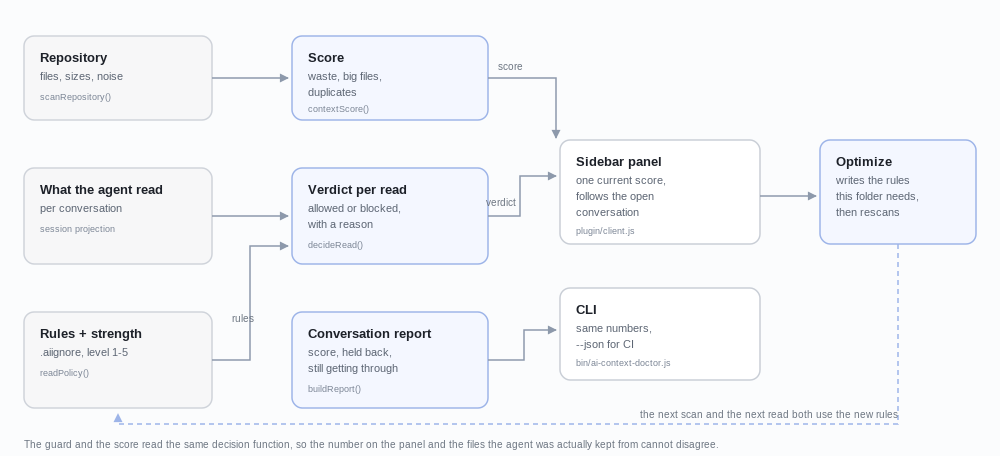
Two paths read the same decision function, which is why the number on the panel and the files the agent was actually kept from cannot disagree: the scan turns a folder into files, bytes and noise and scores it, and every read the agent makes is checked against the same .aiignore rules at the chosen strength. Optimize writes those rules, and the next scan and the next read both pick them up.
--write the suggested lines into .aiignore instead of copying them by hand.--json gives a stable object, so you can fail a build when context health drops.require('ai-context-doctor') exposes the same scan as a function.dsh-aiignore and the agent is told automatically when a session opens a noisy workspace, so you do not have to remember to run anything.Run it without installing anything:
npx ai-context-doctorOr install it once:
npm install -g ai-context-doctorRequires Node.js 18 or newer.
ai-context-doctor              # scan the current directory
ai-context-doctor ../some-repo # scan another repository
ai-context-doctor --json       # machine-readable output
ai-context-doctor --explain src/index.js   # explain one file's verdict
ai-context-doctor --write      # add the suggested rules to .aiignore
ai-context-doctor --write --dry-run   # show what --write would add
ai-context-doctor --help
ai-context-doctor --versionFrom the shipped demo repository:
node bin/ai-context-doctor.js ./demo-ai-context-noise-repo --explain package-lock.jsonPrints the verdict for one path, the rule that decided it, the category it belongs to, and what letting it through would cost:
AI Context Doctor — explain

Path: package-lock.json
Verdict: blocked
Rule: strength 3 (Balanced) skips lockfiles
Category: lockfile
Size: 35.2 KB (~8342–11700 tokens)
Why: lockfile
Score impact: allowing it would cost 4 points (78/100 -> 74/100).
If a line in .aiignore decided it, the Rule: line prints that exact line
instead of a strength. An unblocked path says Verdict: not blocked. An unknown
path is an error with exit code 2, not a silent "not blocked". Add --json to
get the same explanation as an object.
examples/
has a self-contained walkthrough of --explain. It builds a throwaway
repository, runs the real CLI twice — once with no .aiignore, then once after
adding a rule — prints both verdicts, and deletes the fixture:
node examples/explain-blocked-path.js
# or
npm run example
No install or network access; it uses Node.js built-ins and the code in this
checkout. The first verdict is a lockfile blocked by strength 3, the second
names the exact .aiignore line.
.aiignorenpx ai-context-doctor --write--write appends the rules the report suggests to .aiignore in the scanned
directory. It only appends: comments and rules you already have stay exactly as
they are, and running it twice adds nothing the second time. If the file does
not exist it is created with a two-line header.
--write --dry-run prints what would be added and writes nothing.
It will not follow a symbolic link, and it refuses to replace a directory that
happens to be called .aiignore.
The raw health score is a heuristic over file names and sizes and does not change
when you write rules. The What reaches the model score applies the .aiignore
rules in the scanned directory and the chosen strength, so writing rules can
move what the agent actually sees. The file is also for your agent, your editor,
and your teammates.
npx ai-context-doctor ./some-repo --jsonReturns repo, healthScore, effectiveScore, status, noisePercent, usefulPercent, scannedBytes, scannedFiles, allowedBytes, allowedFiles, topNoise, review, suggestedAiignore, scoreBreakdown (the five-dimension arithmetic behind each score) and scoreLost, blockedFiles / blockedBytes (what the rules held back), blockedDetails (alias blockedReasons: one entry per blocked path with its rule, category, level, levelLabel, blockedBy, and levelReason / limitBytes when a size limit did it), and strength / strengthLabel — the strength the score was computed at, so two runs stay comparable. The text output lists up to five blocked files and points at --json for the rest. suggestedRulesChangeTheScore answers the question the suggestion list raises: would writing these rules move the number at this strength? At the default strength 3 they usually do not — the strength already blocks those categories — and the text output says so instead of implying the file will help. truncated: true appears when a scan cap was hit.
With --write it also carries a write object: path, created, added, written, dryRun.
If the path is not a readable directory, --json still prints a single JSON object — never a banner — and exits with code 1, so a CI step can parse the failure:
{
  "error": "not-a-readable-directory",
  "message": "/path/you/passed is not a readable directory.",
  "target": "/path/you/passed"
}const { scanRepository } = require('ai-context-doctor');
const report = scanRepository(process.cwd());
console.log(report.healthScore, report.topNoise);The package ships TypeScript declarations for every export, so the same import type-checks under node16, nodenext and bundler resolution.
writeAiignore(aiignorePath, suggested, { dryRun }) is the writer behind --write, if you want the same behaviour from code.
explainPath(root, relativePath, { rules, level }) is the decision behind --explain; it returns the verdict, the deciding rule, the category and the score impact without printing anything.
scanRepository(root, { maxFiles, maxBytes }) is synchronous and has no dependencies. Pass a cap for huge trees; the report then carries truncated: true.

dsh-aiignore packages the same scan as a Host plugin. When a session opens a workspace, the agent gets one short note naming the files that would waste its context — and nothing at all when the workspace is clean.
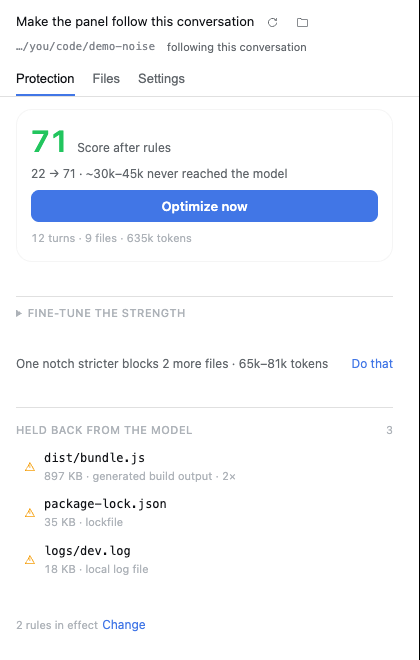
dsh plugin --profile web add dsh-aiignoreThe plugin also adds an AIignore tab to the right sidebar, opened from a
folder button in the composer. It opens on Protection: how many reads in
this conversation are junk and that your rules now hold back, and roughly how
many tokens never reached the model. Before you optimize it says the honest
version — "2 reads are junk and still reach the model" — so the button has
something to be measured against. One primary button, Optimize now, rescans,
writes what is missing, re-reads the conversation and reports the score before
and after; when nothing is missing it says so. A second line offers one notch stricter with
the number attached, so "raise the strength" is a decision instead of advice.
Directly under the counters is the strength ladder: five notches, each
labelled with the score this folder would have at that notch, so the trade is
visible before you take it — and picking one applies it and rescores the page.
Files browses the workspace a directory at a time and spells out what its
three verdicts mean — noise is regenerated by a build, a lockfile or a log,
review is worth a look first, ignored already has a rule — then offers the
rules the scanner would still add, one click each; Settings holds the
.aiignore lines with an × each, the note for the agent, and the
five-dimension arithmetic. It follows the Harness light and dark themes.
It declares engines.dsh: ">=0.2.0" — the Harness checks that range before installing, and refuses the plugin rather than half-loading it — and needs Node.js 18 or newer. In the plugin market index it is filed under Context quality with three labels: No network calls, Works with no setup, Lives in the sidebar. Without a sidebar service the same button opens the panel as a floating card. The source, its configuration and its limits are in plugin/README.md.
The checks that decide whether a Harness plugin installs — the host range, the
root export the loader mounts, dsh.client agreeing with exports["./client"],
and whether npm pack actually ships the panel — are the ones
dsh-plugin-toolkit runs
before you publish:
npx dsh-plugin-toolkit@latest verify .It also has a panel of the same checks inside the Harness, and it is what this repository's own plugin is released with.
dist/, build/, coverage/, .next/, .turbo/package-lock.json, pnpm-lock.yaml, yarn.lock*.log.env*, secrets.env, credentials.json, *.pem, *.key) and paths containing deploy. .env.example is recognised as a template and marked usually safe..git/, node_modules/, .venv/, venv/, __pycache__/, vendor/Found a repo noise pattern AI Context Doctor should understand? Open a context noise example issue.
--write, which appends the suggested rules to .aiignore; a plain scan writes nothing.gitignore linter: it looks at what an agent would read, not what git tracks, so ignored files still show up.id_rsa without an extension and a key pasted into config.js both slip through..aiignore.policy.json in the scanned directory; scan caps are available through the API and the Harness plugin only.Is anything uploaded, and do I need an API key?
No account and no API key. A scan reads directory entries, file sizes, and .aiignore / .aiignore.policy.json; it does not read other file contents, open a network connection, or store anything.
npx ai-context-doctor .Why is this one file blocked — or not?
--explain prints the verdict, the rule that decided it, the category, the size, and what letting it through would cost:
npx ai-context-doctor --explain package-lock.jsonAn unknown path is an error with exit code 2, not a silent "not blocked". More in Why is this file blocked?.
Will it change my repository?
Only when you pass --write. A plain scan writes nothing. To see the lines first:
npx ai-context-doctor --write --dry-run--dry-run only applies to --write, and it is rejected on its own.
Can a bad score fail my CI build?
Not by itself. A completed scan exits 0 even at 43/100; exit code 1 means the CLI could not run the scan (bad option or unreadable directory), and 2 means the path passed to --explain is not in the scanned directory. Use --json and fail on the fields you care about:
npx ai-context-doctor --json > context-report.jsonThen check healthScore, status, or blockedBytes in your own CI step.
I wrote the suggested rules and the score did not move. Is that a bug?
No. healthScore is a size heuristic over file names and sizes, so writing .aiignore rules does not change it. At the default strength 3 the strength already blocks most of those categories, so suggestedRulesChangeTheScore is often false. --json answers whether writing the suggestions would move the effective score at the current strength:
npx ai-context-doctor --jsonDoes the CLI stop my agent from reading these files?
No. The CLI reports and suggests, and --write edits .aiignore; it does not intercept reads. Inside DeepSeek Harness, dsh-aiignore is what applies the rules to reads — see DeepSeek Harness plugin.
.aiignore and not .gitignoreBecause the two questions are different. dist/ is gitignored in most projects and still gets read by an agent that ignores git. The tool reports on bytes the agent would ingest, whatever git thinks of them.
Everything runs locally. The tool reads directory entries, file sizes, and the rule/policy files (.aiignore, .aiignore.policy.json); it does not read other file contents, does not open a network connection, and stores nothing. The only thing it sends anywhere is what npm sends when you install it.
git clone https://github.com/WJDdidi-1/ai-context-doctor.git
cd ai-context-doctor
npm test                       # unit and CLI tests
node bin/ai-context-doctor.js ./demo-ai-context-noise-repo
The demo-ai-context-noise-repo/ directory is a deliberately messy repository, shipped with the source (not with the npm package) to make the output easy to try.
Maintainers: see the release checklist. Publishing happens in CI on a v* tag via npm trusted publishing, and prepublishOnly runs the tests first, so a broken package cannot go out.
--fix that writes the suggested ignore entries, with a diff you approve first.See CHANGELOG.md for what changed in each release.
Apache-2.0 — see LICENSE and NOTICE. The earlier releases were MIT; the licence change applies from 0.22.0 on.
CLASSIFICATION EVIDENCE
系统优先读取 GitHub Topics,再与站内分类词典和词根规则比对。当前命中: developer-tools、cli。
superdesigndev
OpenRouter for agent tools. Join community here: https://discord.gg/6mQYYfFMAn

T-Auto
A toolkit for low-level operations in DSH, designed to reduce token usage and task execution time / DSH 底层操作工具插件,旨在减少 Token 消耗与任务耗时

crafter-station
A public gallery of animated pets for Codex, Claude Code, DeepSeek Harness, Hermes, OpenCode, Gemini CLI, and more.