


Agent 与会话
插件

nuwa-skill
alchaincyf
你想蒸馏的下一个员工,何必是同事。蒸馏任何人的思维方式——心智模型、决策启发式、表达DNA。Distill how anyone thinks.
PROJECT TOPICS
INSTALL REFERENCE
dsh plugin --profile web add github:VictorKozachek/dsh-kanban
该命令指向仓库当前默认分支;尚无绑定当前 commit 的完整验证结果。
PROJECT README
A Kanban board for agent teams inside DeepSeek Harness (DSH).
Русская версия · Features · Full manual · Agent protocol · MIT licensed
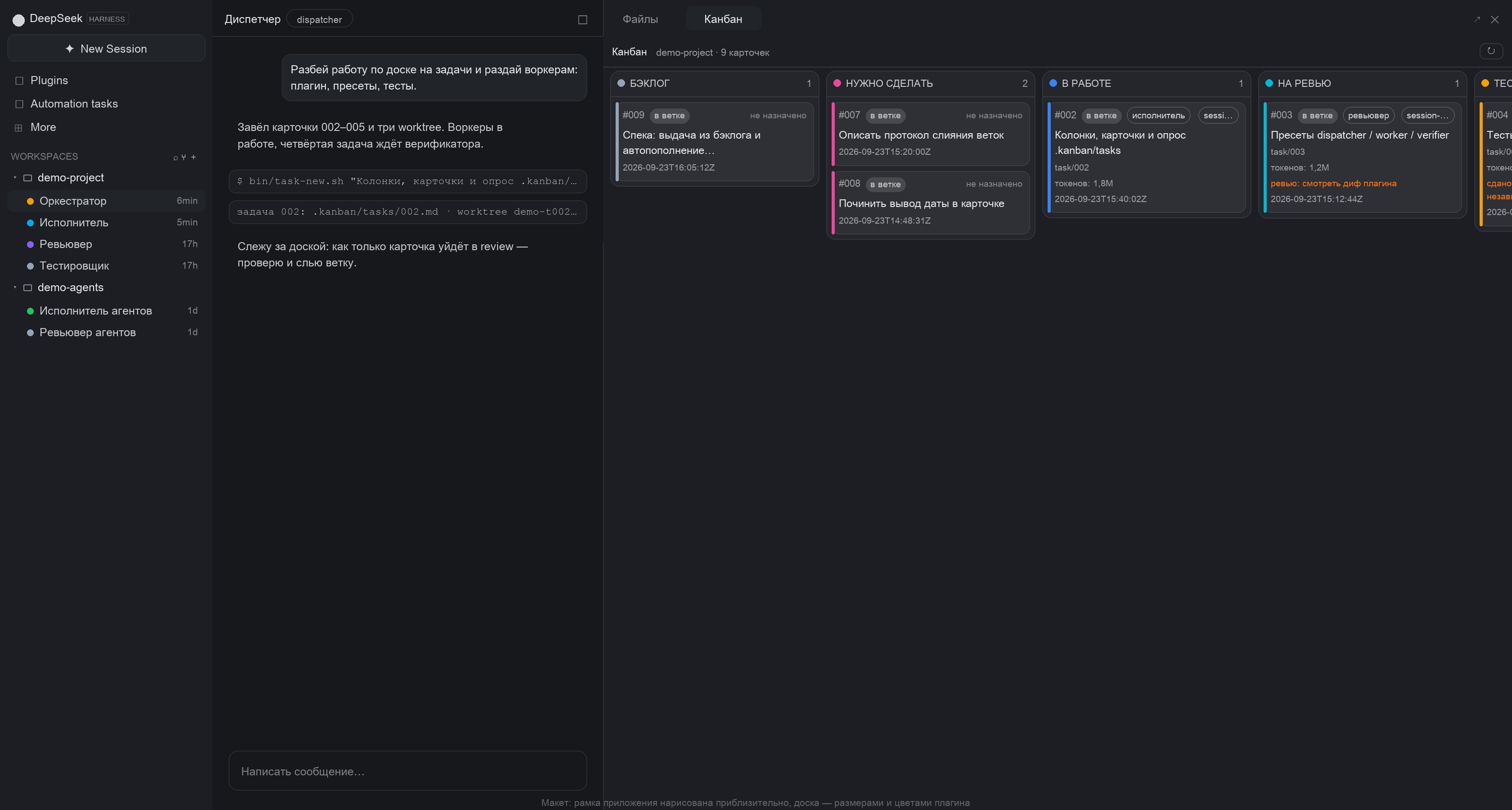
One workspace, four role sessions and the board in the right sidebar. Most screenshots are rendered by the plugin's own mockup generator from its real style table (so layout and colors match the app); images marked "real screenshot" are actual UI captures.
A chat with one agent is a single conversation: tasks are done one after another, and the plan lives in the model's context. As soon as the work grows you want roles — someone who plans and assigns, someone who implements, someone who reviews and someone who tests — and you want them working in parallel without stepping on each other.
dsh-kanban turns that into a file-backed board:
.kanban/tasks/<ID>.md inside your git repository — with its status, owner, role, branch,
token spend and notes. Nothing is locked inside a chat.flowchart LR
subgraph Repo["Your project repository"]
Cards[".kanban/tasks/*.md"]
Worktrees["worktrees/<id> — branch task/<id>"]
end
subgraph DSH["DSH host process"]
Watcher["dsh-kanban host half:<br/>watcher + dispatcher"]
Sessions["agent sessions:<br/>dispatcher · worker · reviewer · verifier"]
end
UI["Kanban tab in the sidebar"]
Cards -- "fs.watch: cards and worktrees" --> Watcher
Watcher -- "notices via sessionController.prompt" --> Sessions
Sessions -- "edit the card, commit to the branch" --> Cards
UI -- "read board snapshots" --> Watcher
UI -- "assign / unassign from the board" --> Watcher
Watcher -- "runs bin/task-assign.sh" --> Cardsupdated.dispatcher, worker, reviewer, verifier (plus analyst for business
analysis — not a board role). The presets ship with the
plugin and are registered on startup, so plugin updates cannot lose them. The watcher
recognises a session's role automatically (from the preset selection event) and stores the
role map in .kanban/.watcher-roles.json.Create one workspace for your project — the repository root is fine — and four sessions inside it:
| Session title | Preset | What it does |
|---|---|---|
| Dispatcher | dispatcher |
slices the spec into backlog cards, assigns them, merges finished branches, keeps at most three tasks in flight |
| Executor | worker |
takes an assigned card, works in its task worktree, commits to the branch, hands the card to review |
| Reviewer | reviewer |
reads the diff: approves to testing, or returns the card with comments |
| Tester | verifier |
runs tests and the manual scenario: approves to ready, or returns the card with a reproduction |
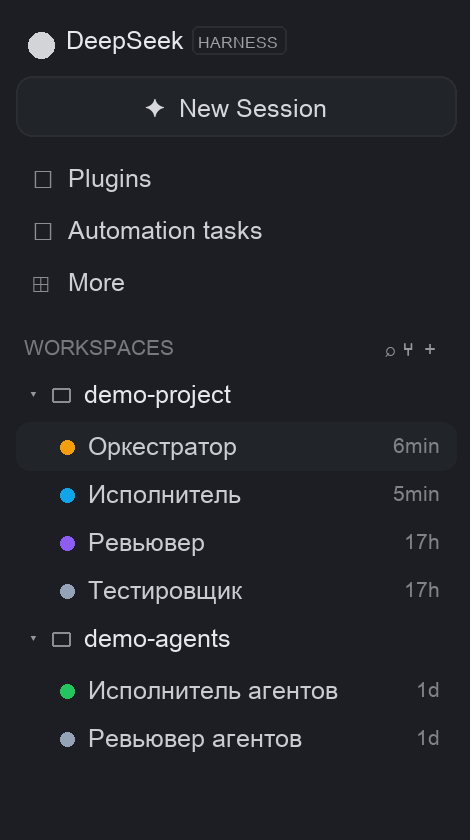
Light theme: workspace and sessions.
The sidebar can group workspaces as a tree (the layout in the screenshot above): sessions live under their workspace, and workspaces may be nested as sub-projects. Role presets are not shown in the sidebar rows — the preset is visible in the session header and is listed in the table above.
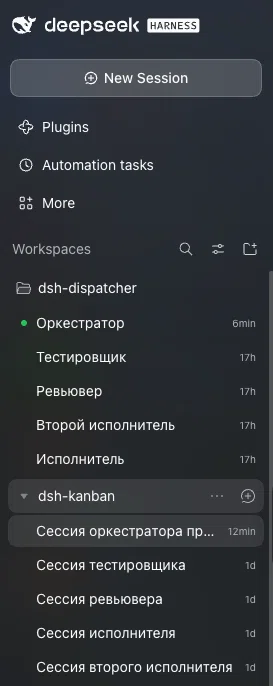
A real screenshot of the sidebar (no mockup): Workspaces tree with sessions of different roles.
The flow of one task:
stateDiagram-v2
  backlog --> todo: assign (owner + role)
  todo --> in_progress: worker starts
  in_progress --> in_review: worker finished
  in_review --> testing: reviewer approved
  in_review --> in_progress: reviewer returned comments
  testing --> ready: verifier approved
  testing --> in_progress: verifier returned a repro
  ready --> merged: dispatcher merges
  in_progress --> blocked: blocked
  blocked --> in_progress: unblocked
A concrete run (all commands are run in the dispatcher session, in the project root):
# 1. Slice a task: creates worktrees/007, branch task/007 and the card inside that branch
bin/task-new.sh "Fix the QR export"

# 2. Hand it to a free executor; the watcher wakes that session with a notice
bin/task-assign.sh 007

# ... the executor works:            todo -> in-progress -> in-review
# ... the reviewer checks the diff:  in-review -> testing
# ... the tester verifies:           testing -> ready
# ... then the dispatcher merges:
bin/task-commit.sh 007      # merge --no-ff, card -> merged, worktree removed
While this happens the board shows every transition; the card carries the branch, the owner, the role and the token spend:

A light theme is available too: panel · full board.
New to dsh-kanban? Start with the onboarding guide — install, connect your own project, build the four-role team and move the first card. По-русски: онбординг.
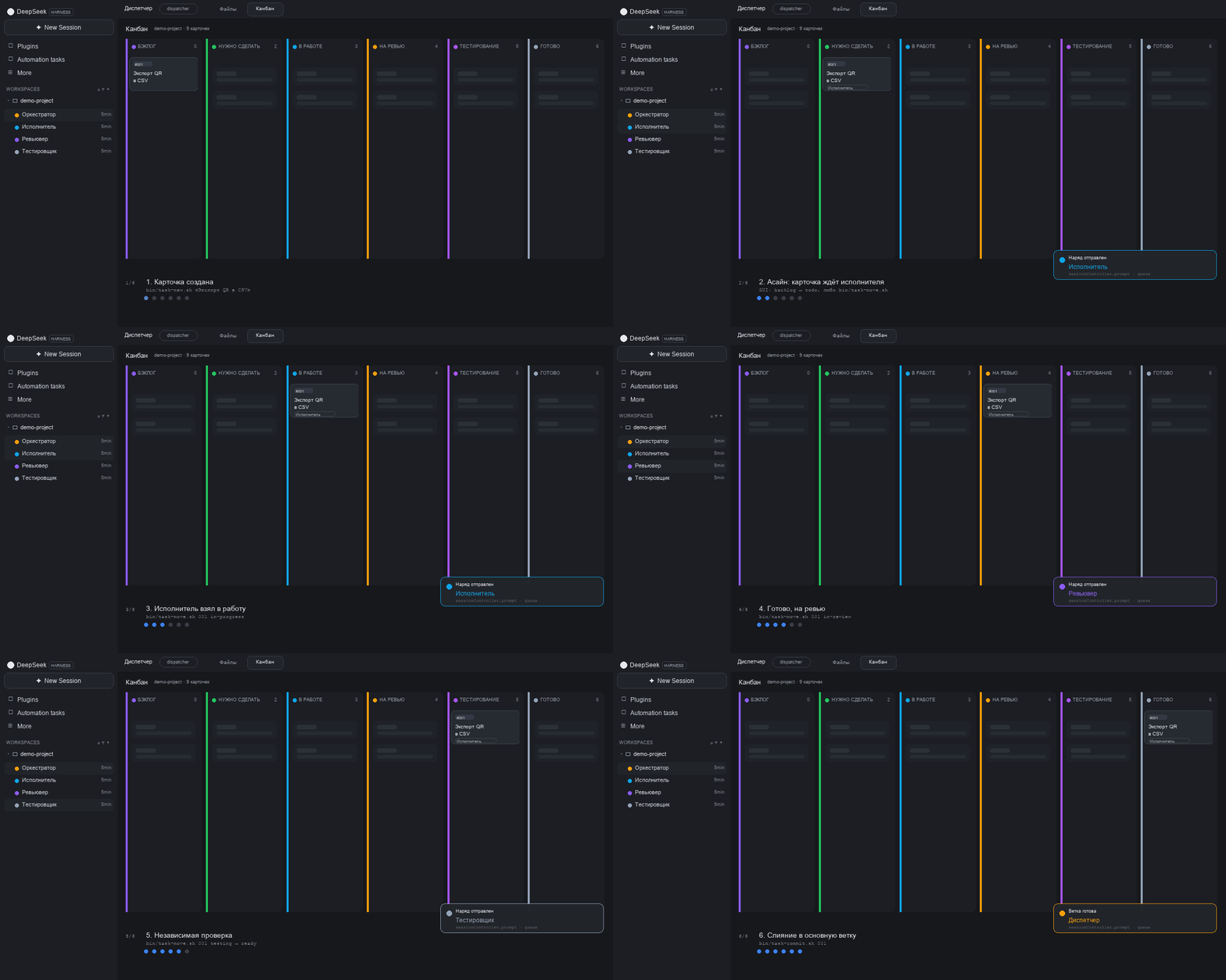
The loop in one picture: a card is created, gets an owner, moves through the columns, and each transition sends a watcher assignment to the role session.
bin/install-kanban.sh desktop (or web) and restart DSH.boards in ~/.dsh/cordis.patch.yml (the profile patch,
not the tracked file in the clone); restart and check /tmp/dsh-kanban-watch.diag.json.bin/kanban-init.sh <project>; commit
and run bin/doctor.sh.dispatcher, worker,
reviewer, verifier (optional fifth: analyst); open the Kanban tab in the right
sidebar.bin/task-new.sh "Fix the QR export", assign it to the worker
(GUI or bin/task-move.sh 001 todo --owner <session-id>) and watch it move.Full walkthrough with commands and troubleshooting: onboarding guide (по-русски: онбординг).
Requirements: DeepSeek Harness 0.2.1-rc.3 (desktop app or dsh web) on macOS, git in
the project you want to manage, and node for the scripts (bin/node.sh finds it).
git clone https://github.com/VictorKozachek/dsh-kanban.git
cd dsh-kanban

# 1. Install the plugin into a DSH profile
bin/install-kanban.sh            # profile "web" (dsh web)
bin/install-kanban.sh desktop    # the Electron desktop app

# 2. Restart DSH: profiles read their bundle list on startup
The role presets are part of the plugin and are registered every time the plugin starts, so there is no separate preset installation step and an update cannot lose them. If you are upgrading from an older version that installed presets into the profile by hand, clean the legacy block once:
bin/install-presets.sh --takeoverWhere the plugin watches. dsh-kanban/cordis.patch.yml is the plugin's bundle patch. Set
the projects you want to manage:
config:
  boards:                       # projects whose .kanban/tasks should be served
    - !!js process.env.HOME + '/projects/dsh-kanban'
  roots:                        # trees to scan for boards of nested workspaces
    - !!js process.env.HOME + '/projects/ai-fabric/aif-project'
  # ignore:                     # do not scan copies/experiments (globs: *, **)
  #   - !!js process.env.HOME + '/projects/ai-fabric/aif-project/**/tmp'
By default the paths are computed from $HOME; set them to your own project. Prefer a
profile override instead of editing the file in the clone (it is tracked by git) —
~/.dsh/cordis.patch.yml:
- id: ui-kanban
  config:
    boards:
      - /absolute/path/to/your/project
    roots: []
After a restart, open a conversation, click + in the sidebar tab strip and add Kanban.
worktrees/ and git worktrees are never scanned as separate boards; ignore is for other
copies (e.g. tmp/ clones) that would otherwise duplicate the same cards.
Verify the installation:
bin/test.sh                              # full suite (539 checks), no network needed
bin/node.sh bin/host-shutdown-check.mjs # real Host graceful-shutdown harness (4 scenarios)dispatcher preset in the
preset picker. This session runs the orchestrator role.worker, reviewer and verifier as presets. Titles are free; naming them
after their roles keeps the sidebar readable. Optional fifth preset — analyst
(business analyst): it talks to business people, maps processes and prepares specs; it is
not a board role and receives no notices..kanban/tasks/ directory..kanban/.watcher-roles.json (gitignored).
With a single worker bin/task-assign.sh <id> finds it automatically. For several
executors, list their session IDs in .kanban/.workers.json — the order is the priority.The preset is chosen at session creation. DSH does not allow changing the preset of a session that has already started a turn. The plugin guards against the practical consequence — a lost preset definition — by registering the role presets itself, and there is an escape hatch for already-damaged logs:
bin/session-preset.sh(offline, DSH must be closed). See KANBAN.md.
Isolation note. With one workspace all role sessions share the same working directory:
the protocol keeps them apart, and every task still gets its own git worktree and branch, so
code changes do not overlap. If you also want filesystem isolation between roles, give each
executor its own workspace pointing at its worktrees/<id> directory — that is the strict
mode described in KANBAN.md.
backlog → todo → in-progress → in-review → testing → ready → merged,
plus blocked. backlog is the neutral first column: sliced tasks that are not assigned
yet — no owner, no role.backlog and todo — by drag and drop or
with the duplicate buttons on the card. Forward is assignment: the card gets an owner and
the executor gets a notice. Back to backlog clears the owner and role and is only allowed
from todo. Every other transition is made by agents through bin/task-move.sh.bin/board-children.sh writes .kanban/children.json); the "Child boards" tab shows
per-board counters and opens a child board read-only. The parent can look, not manage.bin/render-mockup.sh).| Command | What it does |
|---|---|
bin/task-new.sh "Title" |
create worktrees/<id>, branch task/<id> and the card in that branch |
bin/task-new.sh "Title" --backlog |
slice a task into the backlog (no worktree) |
bin/task-assign.sh <id> |
assign a backlog card to the least loaded executor |
bin/backlog-fill.sh |
top up todo to minTodo (.kanban/board.json) from the backlog |
bin/task-move.sh <id> <status> --note "..." |
move a card; the card is committed to the current branch |
bin/task-commit.sh <id> |
merge the task branch (--no-ff), card → merged, remove the worktree |
bin/board-status.sh |
text dump of the board (--json for machines) |
bin/spec-new.sh "Title" |
create .kanban/specs/<NNN>.md for a feature spec |
Rules the protocol enforces: one in-progress per executor, at most three tasks in flight
(in-progress + in-review + testing), only the dispatcher assigns and merges, and git push is
a human step. The full agent protocol is in AGENTS.md; the complete user manual
with architecture, isolation details and troubleshooting is in KANBAN.md.
| Path | What it is |
|---|---|
dsh-kanban/ |
the DSH plugin: lib/client.js (board tab), lib/index.js (host watcher/dispatcher), lib/watcher-core.js, lib/card-actions.js, lib/children.js, lib/presets.js |
bin/ |
21 protocol and installation scripts (task-*, board-*, spec-new, install-*, session-preset, test.sh, host-shutdown-check.mjs …) |
.kanban/ |
board.json (minTodo), tasks/README.md (card format); task cards and specs are local working history and are not published |
agent-presets/, presets/ |
role preset sources and the generated preset artifact |
.agents/skills/ |
the DSH skills kanban and commit |
FEATURES.md, FEATURES.ru.md |
the long feature list (English / Russian) |
KANBAN.md, AGENTS.md |
user manual and agent protocol |
0.2.1-rc.3, macOS (bash 3.2), git; node comes from DSH via bin/node.sh.bin/test.sh — 539 checks, no network: card parsing, worktree merging, notice planning,
client rendering without a browser, the assign channel, child boards, presets
self-healing, graceful shutdown, scripts and locales.bin/node.sh bin/host-shutdown-check.mjs — boots a real Host process and checks that the
plugin releases everything in time (the same path DSH uses when updating the app).bin/render-mockup.sh --html).MIT.
CLASSIFICATION EVIDENCE
系统优先读取 GitHub Topics,再与站内分类词典和词根规则比对。当前命中: agents。
alchaincyf
你想蒸馏的下一个员工,何必是同事。蒸馏任何人的思维方式——心智模型、决策启发式、表达DNA。Distill how anyone thinks.

freestylefly
Prompt as Code | GPT Image 2 / 2.5 提示词与案例库,530+ 个案例、20+ 套工业级模板与可复用 Skills,新增 2.5 同提示词对比专区,附完整提示词与生成记录,持续更新。

titanwings
Distilly — Distill how they think into reusable Skills for any Agent or Bot. Formerly Colleague Skill(原同事 Skill).