
模型与 MCP
待识别

rea
morluto
Reverse engineer anything with agents, from app behavior down to native binaries.
PROJECT TOPICS
INSTALL REFERENCE
dsh plugin --profile web add github:Velestia-star/dsh-docdesk
该命令指向仓库当前默认分支;尚无绑定当前 commit 的完整验证结果。
PROJECT README
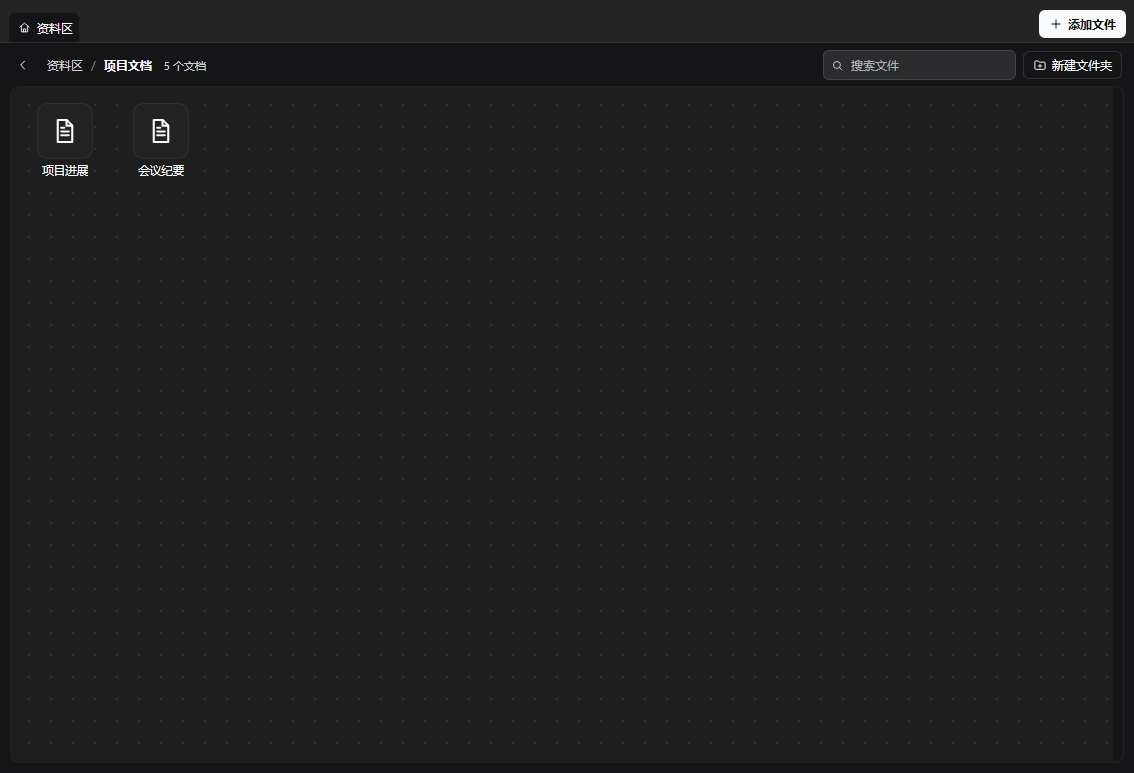
An add-only multi-format materials library for DeepSeek Harness. The library starts empty: you pick the files that matter from your workspaces — Markdown notes and reports, text and code, HTML exports, chart images and screenshots, PDFs, audio and video — place their icons on a fixed non-overlapping desktop grid, marquee-select several at once, and open them full-screen with browser-style tabs. Markdown renders GFM tables, chart blocks and Mermaid diagrams inline; every other format gets its own viewer.
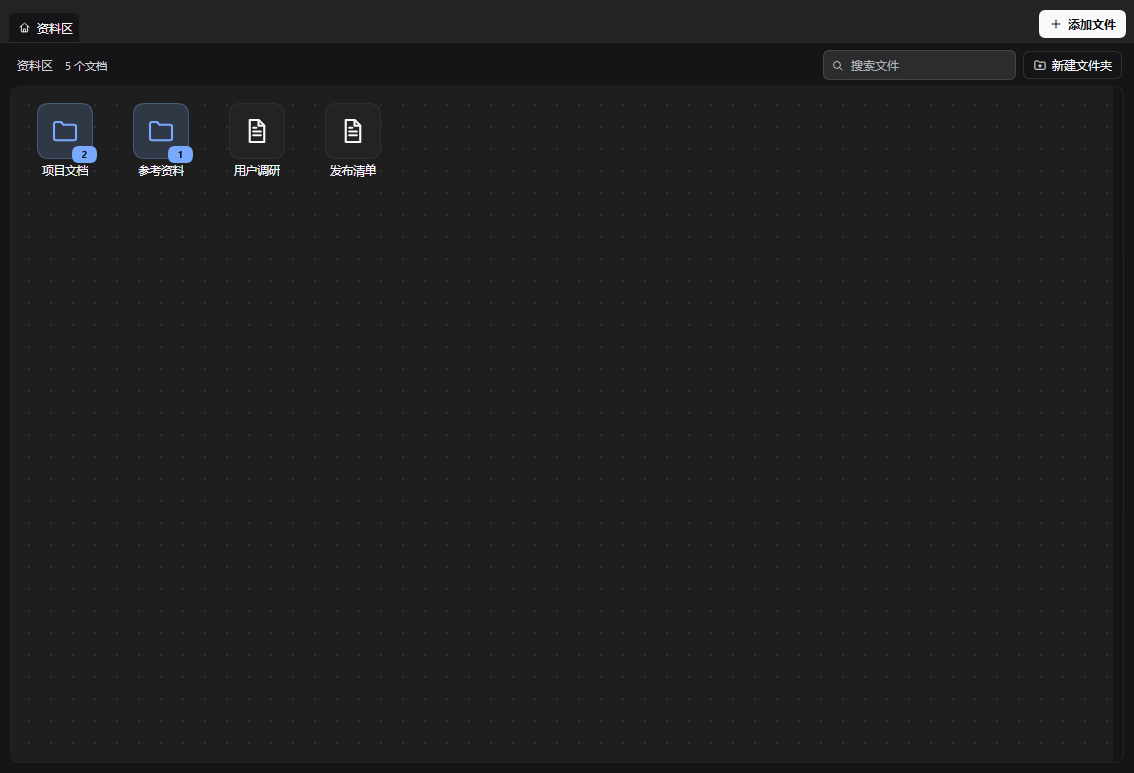
DSH agents write notes, plans, research and reports as .md files, and their work often leaves other artefacts beside them: exported HTML reports, chart images and screenshots, PDFs, audio and video. The files stay in the workspace, but the conversation that produced them scrolls away. 资料区 keeps the files you choose in one place without turning your whole workspace into a list:
The plugin never moves, renames or deletes anything on disk.
chart blocks are rendered into SVG bar, line, area, pie and donut charts. Data can be JSON or simple label,value lines. Rendering is local and does not execute arbitrary code.mermaid blocks render through a bundled Mermaid 12.2.0 runtime: Gantt timelines, xychart-beta charts, flowcharts, sequence/class/state/ER diagrams and more. GitHub-style pipe tables render as real tables. Mermaid is lazy-loaded from the plugin host, not a CDN, and runs with its strict security level.layout.toggleSidebar() and native Fullscreen is requested when available; a native fullscreen exit is synchronized with the plugin state. Press Esc or the floating Exit immersive button to leave; the sidebar state, scroll locks and panel geometry are restored. Switching to the Home tab while immersive keeps the mode active. Immersive mode keeps the same number of icons per row as the normal desktop while spreading the columns wider; leaving it restores the exact normal positions.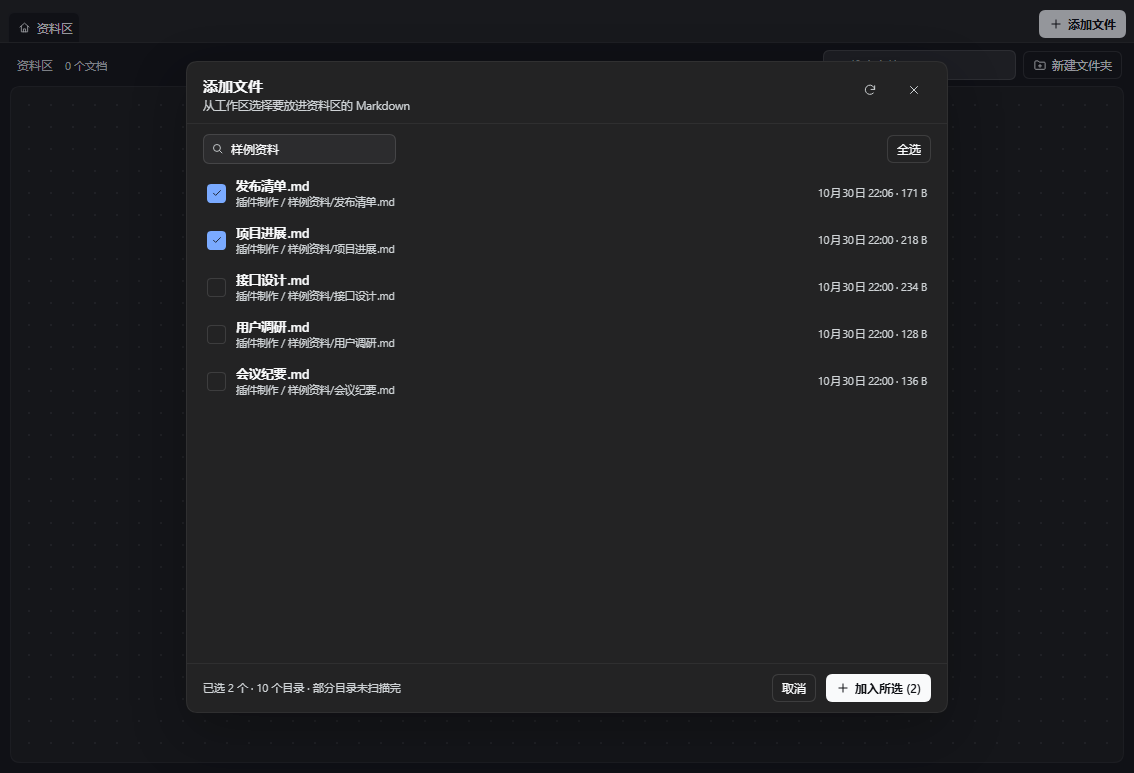
Only formats a browser can render are offered. Office documents, archives, fonts and unknown binaries are not listed by the picker, and the file card's Add to library action reports them as unsupported. Text previews (Markdown and text/code) are capped at 2 MB.
| Kind | Formats | Reader |
|---|---|---|
| Markdown | .md .markdown .mdx .mdown .mkd |
The full Markdown renderer: GFM tables, chart blocks, Mermaid diagrams, bookmarks and the last-read bar. |
| Text and code | .txt .log .csv .tsv .json .jsonc .jsonl .ndjson .yaml .yml .toml .ini .cfg .conf .properties .xml .sql .graphql .gql .rst .tex .srt .vtt |
A monospace scrolling reader. |
| HTML | .html .htm .xhtml |
A sandboxed iframe in the reading pane. Inline CSS/JS runs; fetch/XHR requests, form submits and top-level navigation are blocked. |
| Images | .png .jpg .jpeg .jfif .gif .webp .bmp .svg .ico .avif .apng |
Fit to the window; click for full screen; Shift+wheel zooms. |
.pdf |
The browser's built-in PDF viewer. | |
| Audio | .mp3 .wav .ogg .oga .m4a .aac .flac .opus .weba |
A native player. |
| Video | .mp4 .webm .ogv .mov .m4v |
A native player. |
| Extensionless | README LICENSE NOTICE Makefile Dockerfile Gemfile Procfile Rakefile Justfile |
Treated as text. |
Common source files are accepted as text too: .js .mjs .cjs .jsx .ts .tsx .css .scss .sass .less .vue .svelte .astro .py .pyi .rb .php .java .kt .kts .c .h .cc .cpp .cxx .hpp .hh .cs .go .rs .swift .m .mm .scala .clj .cljs .lua .pl .pm .r .jl .dart .ex .exs .erl .hrl .fs .fsx .vb .pas .asm .s .sh .bash .zsh .fish .ps1 .psm1 .bat .cmd .ipynb.
An HTML file with an assets/ folder works: the reading pane requests sibling CSS, JS and images from the same workspace folder through a workspace-confined site route, so an exported report renders as it was written. Access stays inside that workspace root; fetch/XHR requests, form submits and top-level navigation are still blocked.
Reading state follows the format. Markdown keeps bookmarks, line highlights and the last-read bar; plain text records the last-read position and shows the bar but has no line bookmarks. Images, HTML, PDF, audio and video open as plain viewers.
Requires DSH 0.2.2-rc.1 or newer.
Once the entry is merged into awesome-dsh-plugin, open Plugins → Discover, search for 资料区 or Materials, and install it. The market installs from this repository; npm publication is optional.
dsh plugin --profile <your-profile> add https://github.com/Velestia-star/dsh-docdeskIn DSH Desktop you can also open Plugins → Add and paste the repository URL. The bundle is a source package: the root package.json declares dsh.bundle and cordis.patch.yml.
Warnings such as GET https://mirrors.cloud.tencent.com/npm/... error (UND_ERR_DESTROYED) come from pnpm resolving other plugins already in the profile, not from this package: dsh-docdesk has no npm dependencies. The retries can succeed; if they do not, point the profile at a reachable registry and retry.
# either set it for this shell/profile...
dsh plugin --profile <your-profile> add https://github.com/Velestia-star/dsh-docdesk --registry=https://registry.npmmirror.com
# ...or set the default used by the desktop plugin manager:
npm config set registry https://registry.npmmirror.com
https://registry.npmjs.org works as a fallback. If an earlier attempt was interrupted, remove the half-installed entry first:
dsh plugin --profile <your-profile> remove dsh-docdesk
dsh plugin --profile <your-profile> add https://github.com/Velestia-star/dsh-docdesk --registry=https://registry.npmmirror.com
If npm is unavailable, put registry=https://registry.npmmirror.com in %USERPROFILE%\.npmrc (Windows) or ~/.npmrc. The same mirror choice is available in the DSH Plugin Hub settings.
After installation, refresh the browser tab once so the client plugin loads.
When upgrading from an older version (for example to 0.4), if images, HTML, PDF or media do not appear in the picker, fully quit and reopen DSH Desktop: a page refresh only reloads the client half, while the Host half changes only when the host process restarts. After the restart, use Retry on a document's error card instead of closing and reopening its tab.
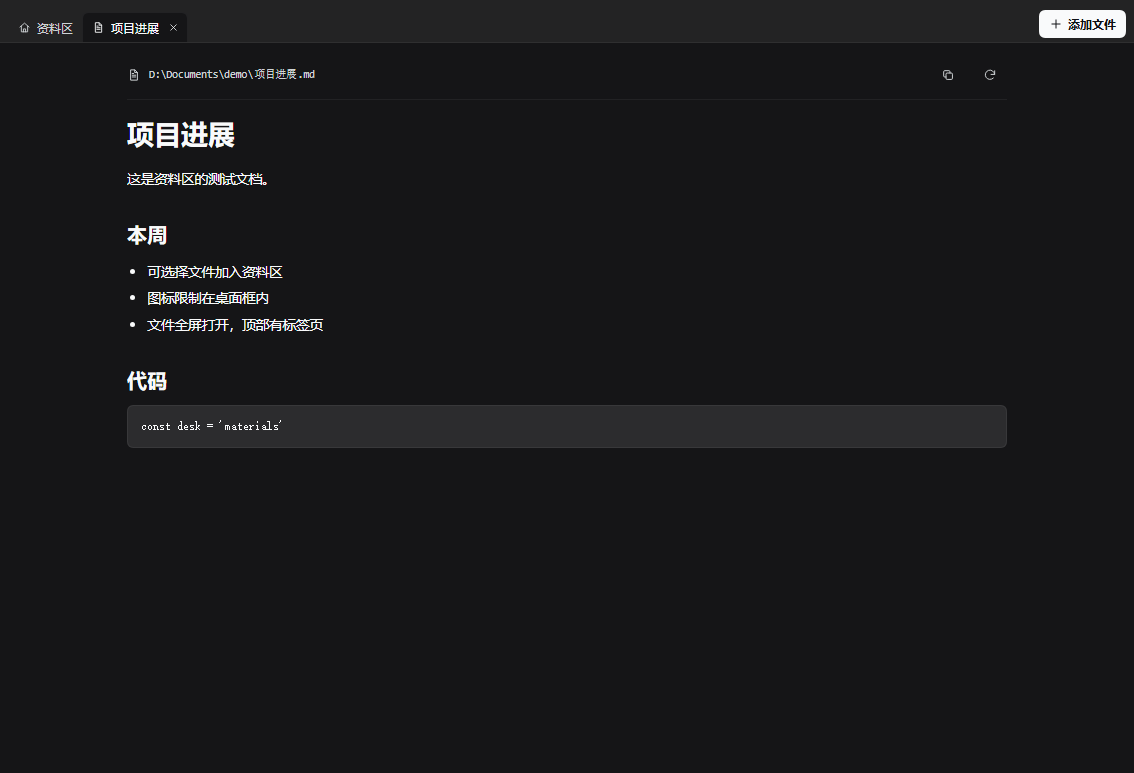
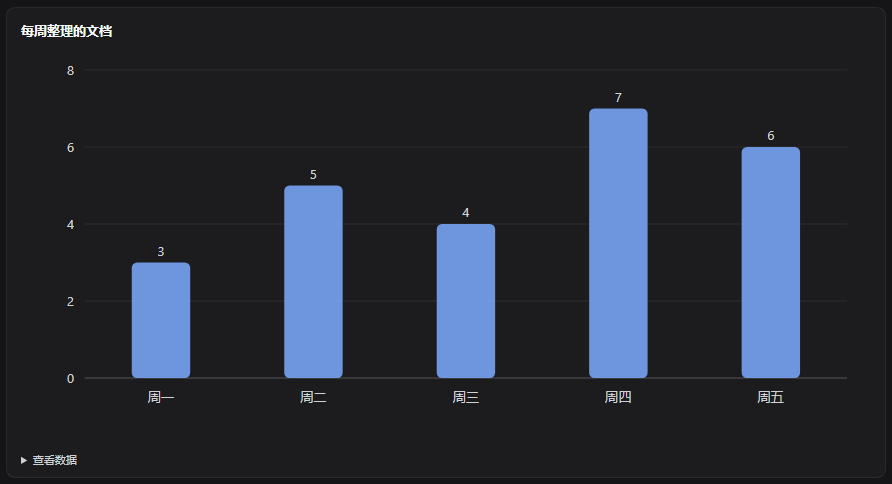
Fence a code block with chart (or chart:bar, chart:line, chart:area, chart:pie, chart:donut) and the reader renders it as an SVG chart. JSON is the most explicit form:
```chart
{
  "type": "bar",
  "title": "Weekly documents",
  "unit": "docs",
  "data": [
    { "label": "Mon", "value": 3 },
    { "label": "Tue", "value": 5 },
    { "label": "Wed", "value": 4 }
  ]
}
```
Simple label,value lines work too:
```chart:line
W1,2
W2,4
W3,3
```
The chart is drawn by the client from the block's data; no external script, network request, or user code is executed. An unparsable chart block shows the raw code with a short note.
Fence a block with mermaid and the reader renders it with the bundled Mermaid runtime. Gantt timelines, xychart-beta, flowcharts, sequence diagrams, class/state/ER diagrams and the other Mermaid kinds are supported by Mermaid 12.2.0.
```mermaid
gantt
    title Four-year plan
    dateFormat YYYY-MM-DD
    section Study
    Semester 1 :a1, 2026-09-01, 2027-02-28
    Semester 2 :a2, 2027-03-01, 2027-08-31
```
The Mermaid bundle is vendored in vendor/mermaid.min.js (MIT) and served from the plugin host at /api/dsh-docdesk/mermaid.js; it is loaded only when a Markdown document contains a Mermaid block, and no CDN or external network request is involved. Mermaid runs with securityLevel: 'strict'. Wide Gantt timelines scroll horizontally inside their figure; xycharts size to their content so axis labels stay visible.
GFM pipe tables in the Markdown are rendered as real tables too, with optional :---, :---: and ---: alignment.
The bundle has two halves:
index.js) scans registered workspaces, the profile's default working directory and live agent working directories for previewable files — Markdown, text/code, HTML, images, PDF, audio and video. It serves them through read-only routes:GET /api/dsh-docdesk/list — candidate files for the picker, each with its kindGET /api/dsh-docdesk/read?path=<absolute path> — text content (2 MB cap), or the preview URL and metadata for HTML, images, PDF and mediaGET /api/dsh-docdesk/file?path=<absolute path> — raw bytes for a whitelisted file; supports HTTP Range for audio/video seeking, and download=1 for an attachment responseGET /api/dsh-docdesk/site/<rootToken>/<relative path> — an HTML file's sibling assets (CSS, JS, images) from the same workspace root; <rootToken> is the base64url-encoded workspace root idGET /api/dsh-docdesk/resolve?sessionId=…&seq=…&index=… — resolve a delivered file card's durable coordinates to a pathGET /api/dsh-docdesk/mermaid.js — the bundled Mermaid runtimeclient.js) registers the 资料区 sidebar entry, the panel, the middle-edge sidebar handle and the delivered-file action. It renders the desktop, the picker, folders, the tabbed reader and the per-type viewers: Markdown renderer, monospace text reader, sandboxed HTML frame, image, PDF, audio and video.Data and limits:
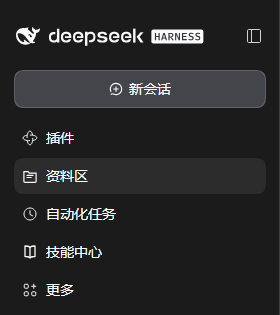
dsh-docdesk.library.v2; it is per browser profile and is not synced between devices.chart code blocks are parsed and drawn locally as SVG. Only the block's data is used; no arbitrary JavaScript, external chart library or network request is involved./api/dsh-docdesk/mermaid.js and lazy-loaded only when a mermaid block is opened. The runtime uses Mermaid's strict security level; diagram code is not executed as JavaScript.Content-Security-Policy: sandbox, connect-src 'none' and form-action 'none', so inline styles and scripts work while fetch/XHR requests, form submits and top-level navigation do not. Relative assets are reachable only inside the HTML file's own workspace root through /api/dsh-docdesk/site/....node_modules, .git, build output and virtual environments. Current caps are 3,000 files per scan, 4,000 directories per workspace, 16,000 directories in total and 6 levels of depth. Image, audio, video and PDF candidates are additionally capped at 1,200 items so media cannot crowd documents out of the picker./api/file channel: Markdown and text render normally, images/PDF/audio/video use it as the preview source, and HTML falls back to a file card because sibling assets cannot load through that channel. Files inside the workspaces keep using the plugin's confined routes.layout.toggleSidebar(). The collapsed state is the host's rail, not a custom zero-width column.| Panel | Add files | Full-screen document |
|---|---|---|
|
|
|
| Folder | Sidebar entry |
|---|---|
 |
 |
| Charts |
|---|
|
dsh-docdesk/
├── index.js              # Host half: scan, read, raw files, HTML site assets, resolve
├── client.js             # Browser module: sidebar entry, panel, tabs, picker, per-type viewers, file action
├── cordis.patch.yml      # Bundle patch that mounts the plugin row
├── package.json          # Manifest: dsh.bundle, dsh.client, exports, files
├── locale/
│   ├── en.json           # Plugin manager metadata (English)
│   └── zh.json           # Plugin manager metadata (Chinese)
├── icon.svg              # Bundle icon (used by the plugin manager)
├── vendor/               # Vendored Mermaid runtime and its MIT license
├── screenshots.json      # Market screenshot list
├── docs/
│   ├── icon.png          # Raster icon used by the market listing
│   ├── market-entry.yml  # Registry entry submitted to awesome-dsh-plugin
│   └── screenshots/      # README and market screenshots
├── CHANGELOG.md
├── LICENSE
├── README.md
└── README.zh.mdThere is no build step. index.js is a plain ESM Cordis plugin; client.js is a browser module registered through window.__ModuleLoader__.load with the package name as its id. Edit either file, then refresh the browser tab. For a host-half change, reinstall the bundle (or restart the host) so the new module generation is loaded.
dsh plugin --profile <your-profile> add /absolute/path/to/dsh-docdeskThe only runtime imports are Node built-ins (node:fs, node:path) on the host and react from the host module table on the client. There are no npm dependencies to install.
MIT. See LICENSE.
CLASSIFICATION EVIDENCE
系统优先读取 GitHub Topics,再与站内分类词典和词根规则比对。当前命中: deepseek-harness。
morluto
Reverse engineer anything with agents, from app behavior down to native binaries.

deepseek-ai
DeepSeek Harness: Everything is a Plugin.

nexu-io
The 1st Collaborative AI Design Agent Workspace. Local-first and open source. Create motion, prototypes, websites, apps, dashboards, presentations, images, and videos with your team and AI agents. Share work, exchange feedback, and iterate together in one workspace.