
模型与 MCP
待识别

rea
morluto
Reverse engineer anything with agents, from app behavior down to native binaries.
PROJECT TOPICS
INSTALL REFERENCE
dsh plugin --profile web add github:Uzumaku13/DSH-side-chat-advisor
该命令指向仓库当前默认分支;尚无绑定当前 commit 的完整验证结果。
PROJECT README
A chat tab in the DeepSeek Harness right sidebar: a separate conversation that sits next to your working session, can read and search, and cannot change anything.
Think of it as the AI chat you keep open in a browser tab — except it lives inside DSH, already knows which project you are in, and never touches your files.
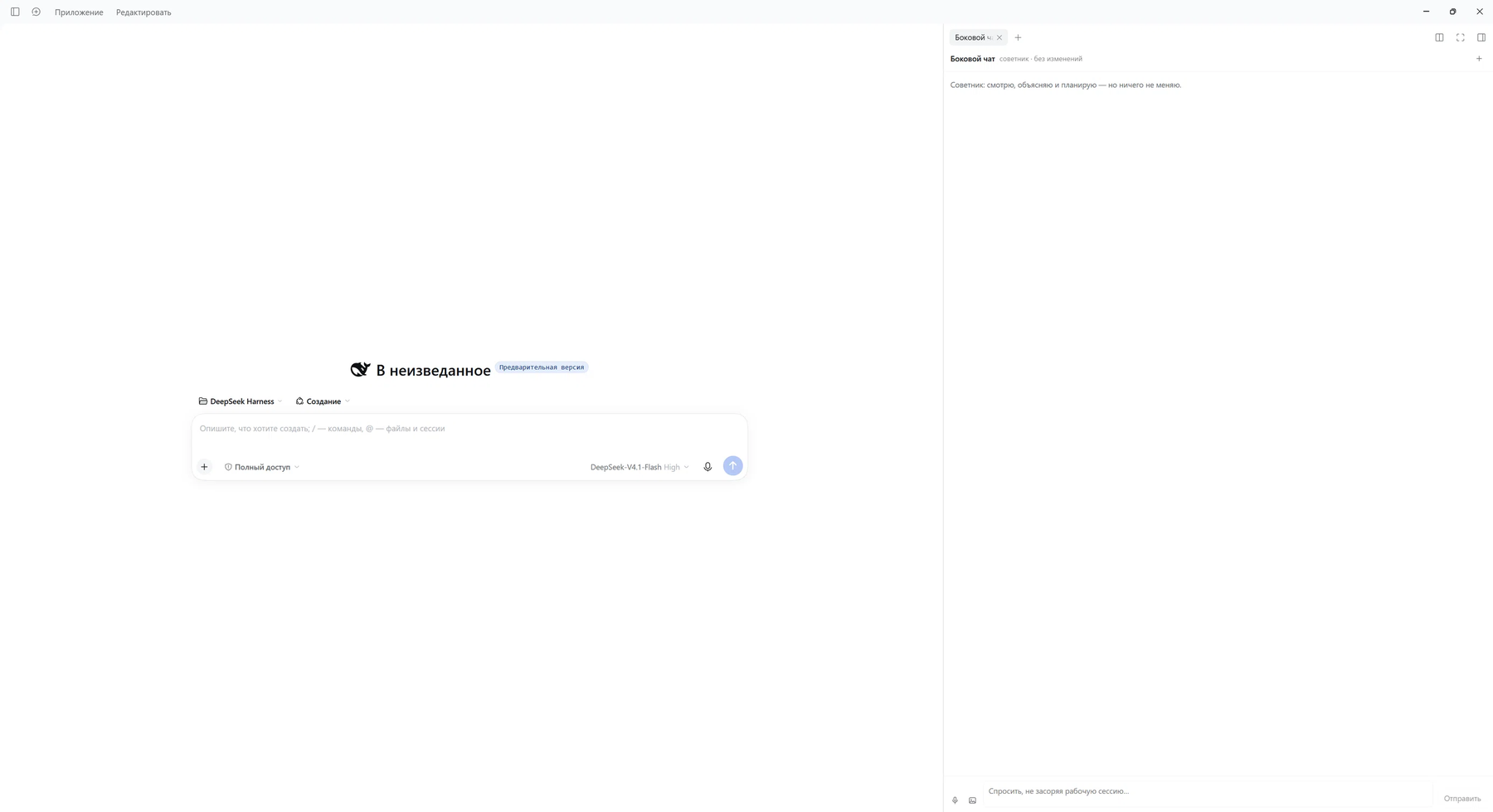
A DSH session is a chat, so why another one? Because the working session is a poor place to ask "help me think". Its transcript fills with tool calls, its context is spent on the task, and every question costs a turn in the middle of the work.
This plugin gives you a second thread that:
| Separate thread | Its own agent session, persisted across reloads and restarts |
| Right-panel tab | Opens next to your session, not instead of it |
| Read-only | read, glob, grep, read_image, web_search, web_fetch — no write, no edit, no shell |
| Streaming | Answers appear token by token, with a Stop button |
| Reasoning level | off / low / high / max, chosen in Settings, applied per thread |
| Voice input | Records the microphone, transcribes through the host speech provider |
| Images | Attach screenshots; they are sent as prompt content parts |
| Clean transcript | Shows what was said, not the agent's internal monologue |
@deepseek-ai/dsh-web-app).git clone https://github.com/Uzumaku13/DSH-side-chat-advisor.gitThen, from a DSH session, install the directory as a bundle (the tool performs package installation and bundle selection itself):
plugin_manager
  action: install_bundle
  target: /absolute/path/to/dsh-side-chat
From the CLI the equivalent is:
dsh plugin --profile <profile> add /absolute/path/to/dsh-side-chatOne bundle installs two rows: the plugin and the agent preset it runs on (see Why a preset ships with it). There is no second step.
Then:
F5) — the client half is a browser module.To remove everything:
plugin_manager
  action: remove_bundle
target: dsh-side-chatOpen the panel with the speech-bubble button in the conversation header, on the right next to the session utilities. The tab also appears in the right sidebar's tab guide.
Inside the panel:
Settings → Plugins → Side chat (and the plugin's own card in the plugins list).
How much the model thinks before answering: Off, Low, High, Max. The list comes
from the model catalog, so it follows whichever model you run.
Default is Off: for a chat, reasoning tokens are the main cost and the main latency.
Switch to Low or High if planning starts to feel shallow.
A note on the implementation: DSH's selectModel installs the choice on the session and
saves it as the deployment default in the background. The plugin restores the previous
default immediately after, so your coding sessions keep their own level. The plugin reads
the value back from GET /x-side-chat/models.json — if default.reasoningEffort ever
changes, that restore step failed.
Optional and off by default. dsh-claude-move injects a floating launcher as raw DOM,
not through a slot, so there is no registration to remove. The toggle adds one CSS rule
that hides it; the plugin itself and its tools keep working. The preference lives in this
browser's localStorage.
The panel asks the host for a thread (POST /x-side-chat/thread). The host creates the
session itself, which means it knows the id before the panel does and can apply the tool
mask in the same breath.
The thread id is kept in the browser (localStorage: dsh.side-chat.thread.v2) and mirrored
in $DSH_HOME/side-chat/threads.json. The registry exists so the mask can be re-applied on
agent/created — a thread resumed after a restart is narrowed before its first turn.
The preset ships only reading tools. On top of that the host applies tools.restrict
with an explicit allow-list whenever the agent is created. Either alone would do; both
together mean a future edit to the preset cannot quietly hand the chat a shell.
Every thread belongs to exactly one place:
+ belongs to no session, is visible in every
session's history, and is never adopted silently;+ does not delete anything. It creates a free thread and starts using it. The previous
one stays in the history list, titled by its first message.
The clock button in the panel header opens the history: Bound to this session and Free.
Click a row to switch, use the pin to bind the thread to this session or unpin it, and × to
remove it from the list. Removing the entry does not delete the conversation — it is an
ordinary DSH session, and its log stays on disk until you delete it
($DSH_HOME/sessions/<id>). Entries whose session has already been deleted are pruned
automatically the next time the history opens.
Titles are read from the first human message of each thread and cached in the registry, so opening the history costs a page read per untitled thread and nothing afterwards.
Agent presets decide what reaches the model. Created on a coding preset, the thread would
inherit the workspace AGENTS.md, the project rules and the entire skill catalog: it would
answer with reports, task lists and tool talk, and cost several times more per turn.
The bundled sidechat preset mounts a persona, reading tools, web access and compaction —
and not agent-instructions, tool-skill or any MCP server.
Everything the panel needs is a plain JSON route on the host, so the same actions can be driven without a browser:
| Route | Purpose |
|---|---|
POST /x-side-chat/thread |
Create a thread (preset, tool mask, model) |
POST /x-side-chat/adviser |
Re-apply the mask (idempotent, called on every mount) |
POST /x-side-chat/model |
Re-apply the configured reasoning level to one thread |
POST /x-side-chat/say |
Send text into a thread (handy for testing) |
POST /x-side-chat/voice |
Transcribe a canonical 16 kHz mono WAV (base64) |
GET /x-side-chat/voice.json |
Speech providers, selection, warm-up |
GET /x-side-chat/settings.json |
Current reasoning level, allowed values, model |
POST /x-side-chat/settings |
Save the level and apply it to every known thread |
GET /x-side-chat/models.json |
Raw model catalog |
GET /x-side-chat/tools.json |
Tool names the thread can see (debugging the mask) |
GET /x-side-chat/status.json |
Known threads |
GET /x-side-chat/threads.json?owner= |
History: threads bound to a session plus the free ones |
POST /x-side-chat/threads |
bind / unbind / forget one thread |
GET /x-side-chat/eventpage.json |
Support probe: what a page read returns for a thread |
| Path | Contents |
|---|---|
$DSH_HOME/side-chat/threads.json |
Thread records: id, owner, title, created (also the mask's list) |
$DSH_HOME/side-chat/settings.json |
Reasoning level |
localStorage: dsh.side-chat.thread.v3.<session> |
The thread the panel shows for that session |
localStorage: dsh.side-chat.hide-claude-launcher |
The launcher toggle |
Transcripts themselves are ordinary DSH session logs — nothing is stored twice.
The tab shows an error, or the plugin's routes return 404.
The host half registered its HTTP surface before the web server existed. This is handled by
waiting for the service (ctx.inject(['webServer'])); if you still see 404 after a restart,
check the host log for [side-chat].
The thread does not appear — the panel sits on "Creating thread…".
Creation is a page-level singleton on purpose: the right column remounts the tab body, and a
per-component flag would abandon the request and mint a new session each remount. If it
hangs, call POST /x-side-chat/thread directly — the error it returns names the cause.
Voice does nothing.
Two hard requirements from the transcriber: a canonical WAV (44-byte header, PCM16) and
language: auto for providers that declare only auto. Both are handled; if you swap the
provider, keep them in mind. Check GET /x-side-chat/voice.json for the provider's phase.
Answers read like a work report.
The thread is running on a coding preset — the preset-sidechat row is missing or was
overridden. Confirm the row is active in Settings → Plugins.
Reasoning level does not stick.
The session may have been resumed before the change. Call POST /x-side-chat/model with
its id, or open a new thread.
$DSH_HOME/sessions/<id> (or use your usual
quarantine) to drop one.cordis.patch.yml if you want another
language; the UI itself follows the DSH locale.Current working directory…) is still sent to the model by a
host plugin; it is filtered out of the transcript but still costs tokens.Plain JavaScript, no build step.
index.js (routes, thread creation, mask, model, voice).client.js (slot registrations, panel, settings card, microphone capture).index.js: toggle the plugin off/on (or restart DSH).client.js: toggle and refresh the page.Before publishing a fork, set author in package.json and add a repository field.
Bug reports, ideas and patches are welcome — see CONTRIBUTING.md for how the two halves fit together, how to reload them, and what a useful report contains.
MIT — see LICENSE.
CLASSIFICATION EVIDENCE
系统优先读取 GitHub Topics,再与站内分类词典和词根规则比对。当前命中: deepseek-harness。
morluto
Reverse engineer anything with agents, from app behavior down to native binaries.

deepseek-ai
DeepSeek Harness: Everything is a Plugin.

nexu-io
The 1st Collaborative AI Design Agent Workspace. Local-first and open source. Create motion, prototypes, websites, apps, dashboards, presentations, images, and videos with your team and AI agents. Share work, exchange feedback, and iterate together in one workspace.