

模型与 MCP
待识别

rea
morluto
Reverse engineer anything with agents, from app behavior down to native binaries.
PROJECT TOPICS
INSTALL REFERENCE
dsh plugin --profile web add github:Thunderunruly/workspace-settings
该命令指向仓库当前默认分支;尚无绑定当前 commit 的完整验证结果。
PROJECT README




English | 简体中文
A plugin for DeepSeek Harness (DSH) that saves session defaults per workspace. Each workspace can carry its own agent mode, permission preset, model, reasoning effort — and, for the Chat transcript, its own work-details level and collapse timing. New sessions in a workspace start from that workspace's values instead of one global setting, while in-session choices keep winning.
Built on the official DSH UI primitives: the Workspace Settings dialog uses the host
Modal / Menu / Button / Input components and the same row geometry as the built-in
General Settings page. Changes apply immediately; there is no Save/Cancel step.
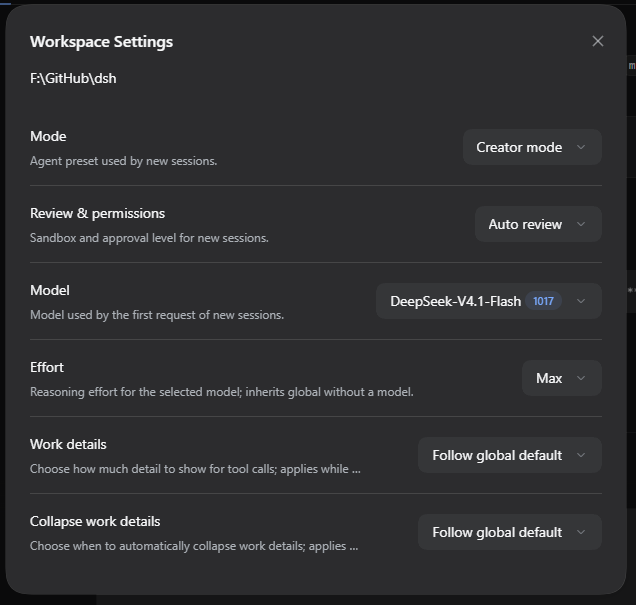
Workspace settings in the English UI, opened from a workspace row's ... menu: mode, permission
preset, model and effort are edited in one native dialog; work details and collapse timing
follow it too.
Agent teamwork default — optionally enable Agent Teams for new root Sessions in a workspace, with the same shared-task coordination and token tradeoff as the built-in switch.
Native context menu — the Workspace settings action is contributed through the host's
shared contextMenus API, so native Rename/Delete and other plugins' menu actions stay
intact instead of being re-rendered by this plugin.
Workspace menu entry — each workspace row's ... menu gains a Workspace settings
item above Rename / Delete. Right-clicking the workspace row opens the same official menu.
Settings page — Settings → Workspace settings lists every workspace with a summary of its overrides and an Edit action.
Seven per-workspace defaults:
| Setting | Values |
|---|---|
| Mode | any installed Agent preset, or the global default |
| Permissions | any configured permission preset, or the global default |
| Model | any routable model, or the global default |
| Effort | reasoning effort of the chosen model |
| Work details | Compact / Standard / Detailed / Verbose, or the global value |
| Collapse timing | On completion / On next message, or the global value |
| Agent teamwork | Enabled / disabled / follow the default (off) |
Automatic inheritance — a new or reused blank session in the workspace receives the stored mode, permission preset, model and reasoning effort. The workspace model plus its effort is recorded as the session's selection immediately, so the composer shows both before the first message instead of keeping the global default. In-session overrides still win: the plugin only replaces values that still look global-default- or workspace-derived.
Official labels — built-in presets and permissions render as Standard mode / PTC mode
/ Minimal mode / Creator mode and Read Only / Workspace Write / Full access / Auto
review, never as machine keys such as standard or workspace-write.
Immediate save — every selector writes on change, exactly like General Settings; closing the dialog keeps what you picked and only failures are surfaced.
Native chrome — the menu, modal, selectors and settings rows reuse the host primitives and theme tokens, so light/dark switching and future theme changes apply automatically.
Native model picker — the model field uses a searchable, provider-grouped menu with a bounded height and sticky provider headings, matching the composer's model picker; long third-party catalogs no longer overflow the viewport.
Local and quiet — settings live in one JSON file under the DSH home; no telemetry and no network requests.
0.2.2-rc.3 (desktop profile).0.2.2-rc.3; supported range: >=0.2.2-rc.3 <0.3.0-0
(declared as engines.dsh in package.json)."type": "module") and loads react plus the host UI primitives from
the running DSH client; no runtime dependencies are bundled.node is only needed for the offline checks.dsh plugin --profile <profile> add dsh-workspace-settingsInstall a pinned version or upgrade later:
dsh plugin --profile <profile> add dsh-workspace-settings@1.1.0
dsh plugin --profile <profile> add dsh-workspace-settings@latest
Reload the DSH window once after installation so the client bundle enters the boot graph. After that, client-only changes hot-reload in place.
git clone https://github.com/Thunderunruly/workspace-settings.gitThen install the folder into your profile:
Desktop app: open Settings → Plugins → Add plugin → local bundle, and select the cloned folder. The desktop profile is managed by the Electron app, so install through the in-app plugin manager.
CLI profile: add the folder as a linked package and let the bundle patch mount it:
dsh plugin --profile web add file:/absolute/path/to/workspace-settings... menu now contains Workspace settings above Rename/Delete.@latest install command above and reload the window.git pull, reinstall/refresh through the plugin manager and
reload the window.$DSH_HOME/storages/workspace-settings/settings.json are kept until you delete the file.... button, choose Workspace
settings; or right-click the row and choose it from the same menu.There is no Save button: each change is persisted immediately. The dialog only reports
failures. Closing it through ×, Escape or the backdrop keeps the last accepted changes.
When a session is created (or a blank session is reused) in that workspace, the Host applies the stored defaults:
Sessions that already started a turn are never rewritten. Subagent and forked sessions are skipped. Explicit user choices in a blank session are respected by comparing the current value with the global default and the last workspace-applied value.
There is no profile configuration field: everything lives in the plugin's own store.
| Item | Location |
|---|---|
| Workspace defaults | $DSH_HOME/storages/workspace-settings/settings.json |
| Chat baseline for work details / collapse timing | browser localStorage key dsh-workspace-settings:chat-baseline:v1 |
| Last-applied per-session cache | same settings.json, sessions section (derived cache, safe to lose) |
Workspaces are keyed by their canonical path, so renaming a workspace keeps its values. Setting every dimension back to Follow global default removes the workspace record.
DSH 0.2.2 stores work details and collapse timing as global Chat preferences
(ui-chat), not per session. The plugin therefore treats its workspace value as a
presentation override:
While a workspace override is active, General Settings shows the workspace value for those two rows. This is expected. No Session events are written for presentation preferences.
Two halves ship in one bundle:
index.js — host half. Owns the JSON store, exposes two authenticated POST routes
(/api/workspace-settings/catalog, /api/workspace-settings/save), and listens to
agent/created to apply workspace defaults to blank ordinary sessions. It uses the public
workspaceRegistry, agentPresets, permissionPresets, sessionController and
agentDefaultModel services and the Session projections for blankness/preset/pending-model
state.client.js — client half. Registers a settings.section page and a shell.overlay
layer. The overlay recognizes the documented data-row-key="workspace:<id>" row,
intercepts its menu trigger (and right-click), and renders the menu with the official
Menu primitive; rename/delete call the public ctx.workspaces service. The settings
dialog uses official Modal / Button / Input and the same row/selector geometry as the
built-in permission settings row. A small watcher follows the active session and applies
the Chat presentation preferences.cordis.patch.yml — bundle patch that inserts the plugin row into the profile.The model override is installed as Agent-scoped system-prompt/assemble and
agent/request listeners on the first request, so it never mutates the global default model
and stops overriding once the session records its own request header.
ui-chat profile values General
Settings would write, and restores your global baseline when leaving.Offline checks, no browser required:
node --check index.js
node --check client.js
node --test test/host.check.mjs
There is no build step: client.js is loaded as a single-file module bundle and obtains
React / the UI primitives from the running host module table. The tests replace Cordis
services with small fakes and cover validation, storage, the catalog/save routes, preset /
permission inheritance and the first-request model override.
To iterate on a linked installation, edit the files in this folder and reload the DSH window; Host-side changes need the plugin row to be re-enabled, client-only changes hot-reload.
client.js           # browser half: Settings page, workspace menu overlay, Chat policy watcher
index.js            # host half: JSON store, web routes, Session inheritance
cordis.patch.yml    # bundle patch inserting the plugin row
package.json        # bundle manifest (dsh.bundle / dsh.client)
locale/             # plugin title/description dictionaries (zh, en)
icon.svg            # plugin artwork
test/host.check.mjs # offline host checks
wiki/               # sources for the GitHub wiki pages (not loaded by DSH)
LICENSE # MITMIT © Thunderunruly
CLASSIFICATION EVIDENCE
系统优先读取 GitHub Topics,再与站内分类词典和词根规则比对。当前命中: deepseek-harness。
morluto
Reverse engineer anything with agents, from app behavior down to native binaries.

deepseek-ai
DeepSeek Harness: Everything is a Plugin.

nexu-io
The 1st Collaborative AI Design Agent Workspace. Local-first and open source. Create motion, prototypes, websites, apps, dashboards, presentations, images, and videos with your team and AI agents. Share work, exchange feedback, and iterate together in one workspace.