
模型与 MCP
待识别

rea
morluto
Reverse engineer anything with agents, from app behavior down to native binaries.
PROJECT TOPICS
INSTALL REFERENCE
dsh plugin --profile web add github:Thomas-zz/dsh-offpeak-queue
该命令指向仓库当前默认分支;尚无绑定当前 commit 的完整验证结果。
PROJECT README




一句话: 在对话里输入
/闲时任务,写下要做的事——这一刻不调用模型、不花一分钱——到了所用模型的闲时时段(DeepSeek 半价、GLM Coding Plan 积分五折),任务会在同一个对话里自动执行。In one line: a DSH plugin that lets you queue a task from any conversation with zero model calls at queue time, then runs it automatically in that same conversation during the off-peak hours of the model you use (DeepSeek half price; GLM Coding Plan at half credits).
插件按「模型家族」内置官方峰谷规则(自动配置,无需手填):
不急的事没必要在高峰付全价。这个插件把「等会儿再做」变成一条队列:
/闲时任务 后提交的任务在 agent/pre-step 被拦截并结束本轮,不产生任何模型请求。| 对话内排队 | 输入框输入 /闲时任务 回车开启,工具条出现「闲时任务 ×」小标签;写下任务回车即入队,不产生模型回复。 |
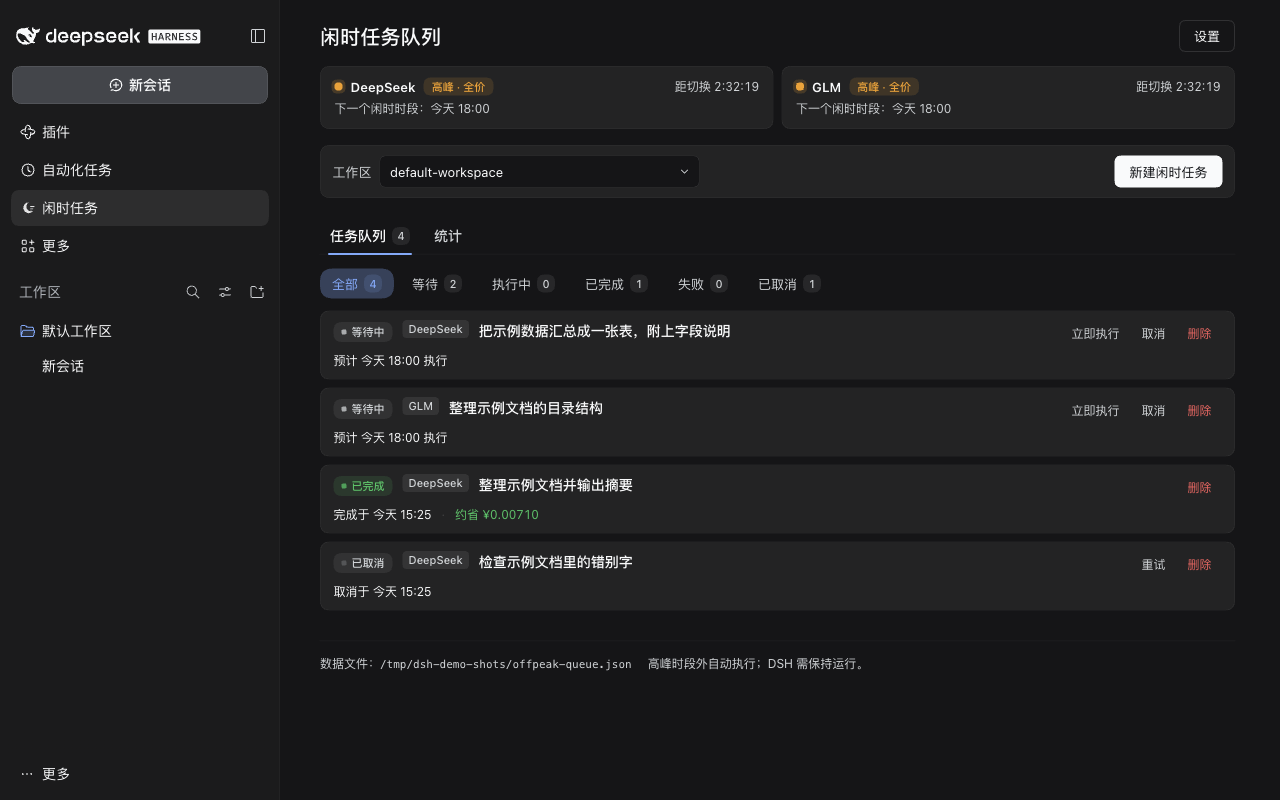
| 面板管理 | 侧栏「闲时任务」面板:任务队列 / 统计两个页签,全部 / 等待 / 执行中 / 已完成 / 失败 / 已取消六个状态筛选。 |
| 多模型峰谷 | 标题下一排等宽状态卡,按已开启的模型分别展示 DeepSeek / GLM 的峰谷徽章、切换倒计时和下一闲时时段;「设置」按钮打开居中弹窗,可开关各模型的闲时任务、调节最大并发。 |
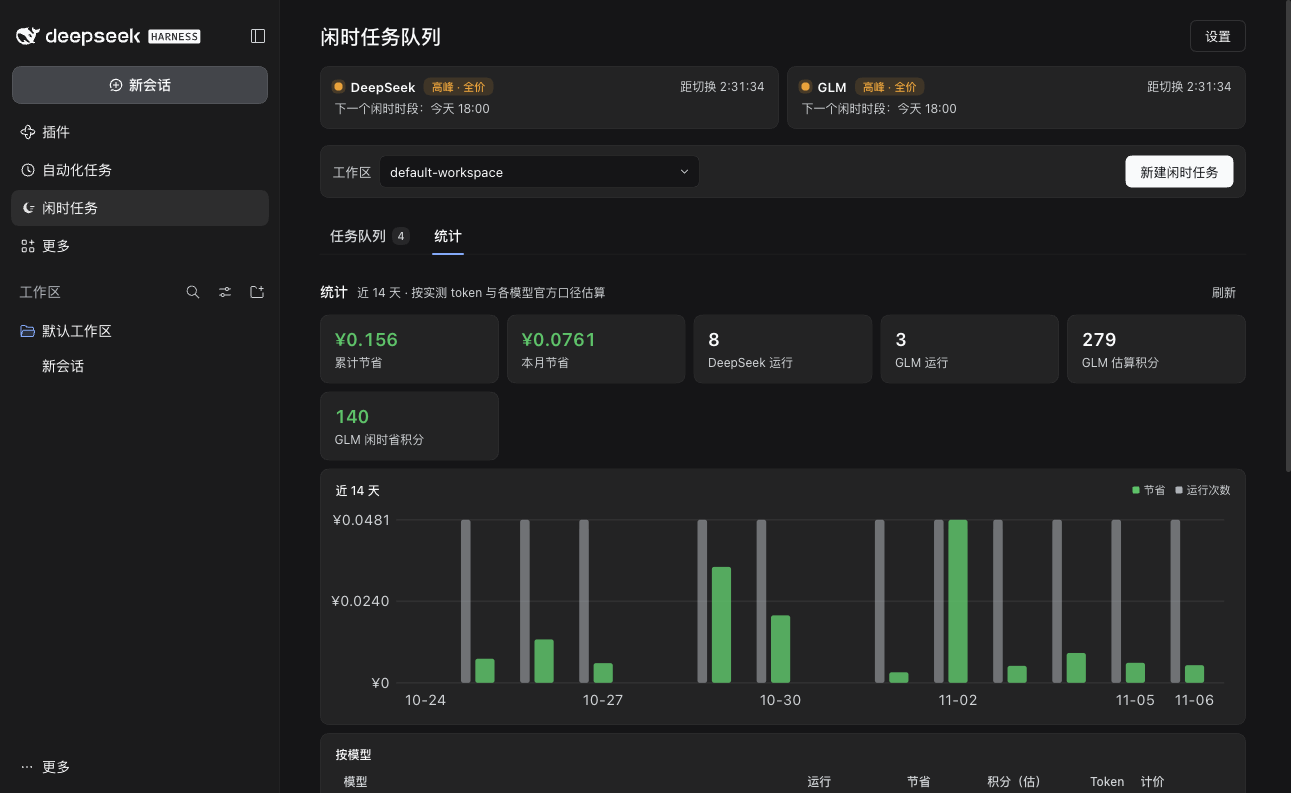
| 分模型统计 | 统计页分模型卡片(DeepSeek 节省金额、GLM 估算积分)、按模型表格(含积分与 Token 列)、图表叠加运行次数、近期执行带模型标识。 |
| 新建即排队 | 面板里选好工作区(下拉可搜索)点「新建闲时任务」,会在该工作区打开新对话并自动开启 /闲时任务。 |
| 对话内状态卡 | 输入框上方一条与对话内容列同宽的状态卡:图标 + 状态 + 标题 + 时间;可展开查看详情、修改、取消、重新入队、删除。 |
| 修改零调用 | 点「修改」把任务内容回填到输入框,像聊天一样改(可贴图),回车保存;执行时用最新版本。 |
| 立即执行 | 任务行的「立即执行」任何时段都能手动跑(高峰会按全价计费并提示)。 |
| 完成提醒 | 任务完成时面板入口出现绿色小点,不弹横幅、不打扰。 |
| 中英双语 · 明暗主题 | 界面语言跟随 DSH,窄到 520px 仍可用。 |
| 日志自愈 | 0.2.1 起不再写会话日志;启动时会自动检测并修复旧版本写坏的会话日志(原文件自动备份)。 |
环境:DeepSeek Harness(DSH)桌面端 / web profile。插件是 Host + Client 两半的 bundle,Host 需要
webServer等平台服务。
方式一:命令行(推荐)
git clone https://github.com/Thomas-zz/dsh-offpeak-queue.git

# macOS 桌面端的 dsh CLI 在 app 内:
DSH="/Applications/DeepSeek Harness.app/Contents/Resources/runtime/cli/bin/dsh"

# 安装到你的 profile(会以 link: 方式链接源码目录,并自动登记 bundle)
"$DSH" plugin --profile desktop add "$PWD/dsh-offpeak-queue"然后重启 DSH 桌面端(Host 部分改动需要重启;Client client.js 改动保存后热更新)。
方式二:插件管理器
在 DSH 的「设置 → 插件」里从本地目录安装 @zayn_/dsh-offpeak-queue,再确认 profile 的 dsh.profile.bundles 里已包含 @zayn_/dsh-offpeak-queue(dsh plugin add 会自动加)。
数据文件
~/.dsh/offpeak-queue.json可用环境变量 DSH_OFFPEAK_DATA_FILE 指定其他路径(便于隔离测试)。卸载:设置 → 插件里禁用/移除,或 "$DSH" plugin --profile <profile> remove @zayn_/dsh-offpeak-queue。
/闲时任务(或从 / 指令菜单选「闲时任务」)回车开启。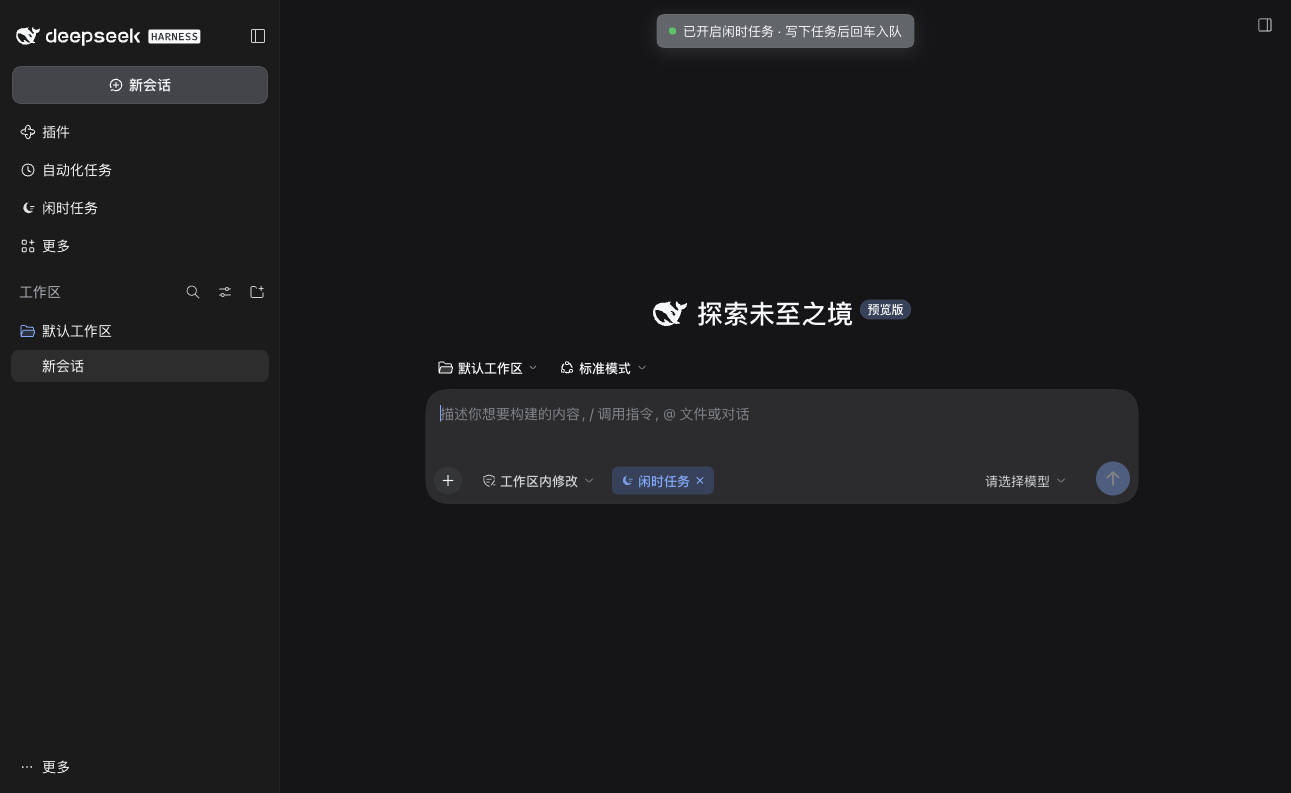
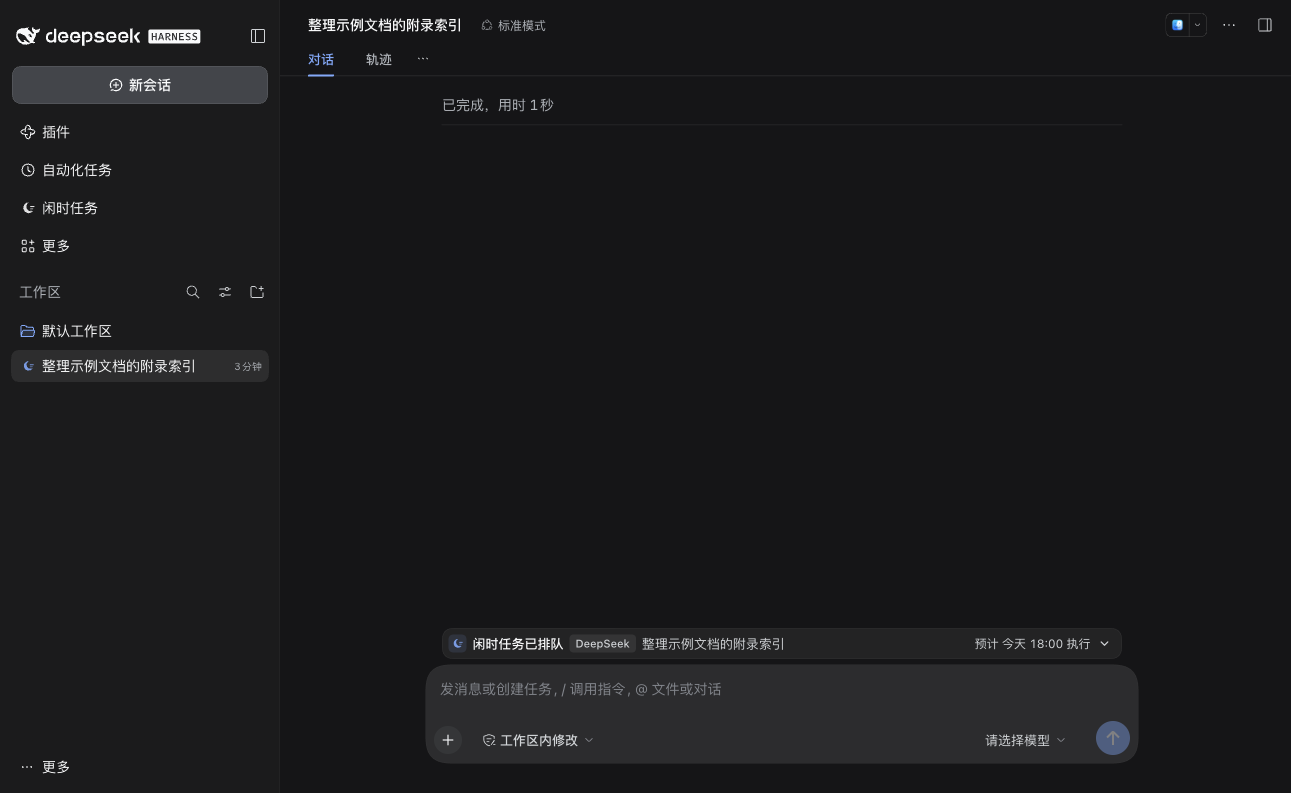
| 统计 | 设置 |
|---|---|
 |
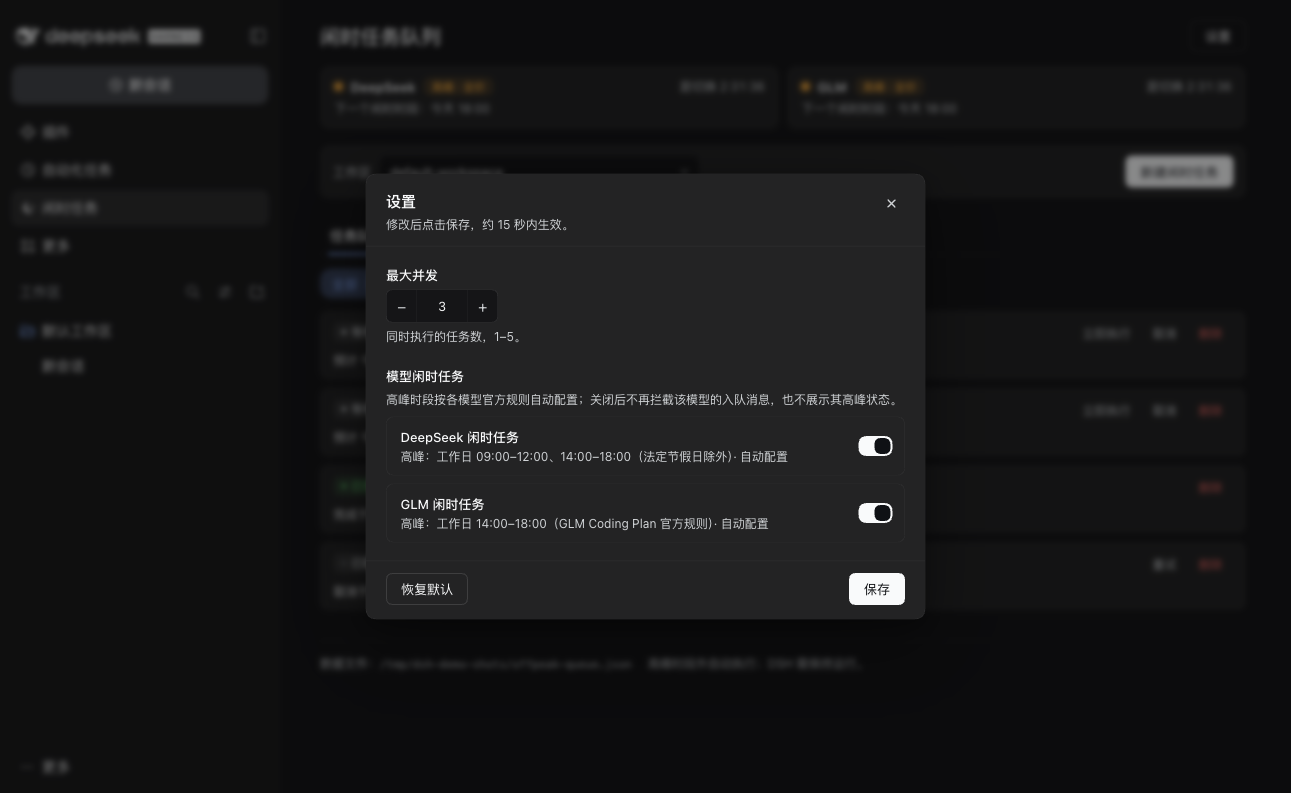 |
对话输入 /闲时任务 → 输入框开启「armed」
        │
        ▼
用户提交任务 ──► agent/pre-step 拦截(Host)──► 登记任务、结束本轮
        │                          │ 零模型调用,不写会话日志
        ▼                          ▼
   任务队列(本机 JSON)◄── 面板 / 修改 / 取消 / 立即执行
        │
        ▼
  调度引擎:只在闲时启动,最大并发默认 3
        │
        ▼
  Runner:向来源会话注入「插件状态更新」触发卡,把任务正文与贴图送回对话
        │
        ▼
正常 agent loop 执行 → 记录 token/费用 → 统计节省/闲时任务 后如果没写任务就继续聊天,那条消息会被当作任务入队,请先取消标签。/闲时任务(界面语言为英文时菜单标题会本地化,输入名不变)。approval: never 的预设,否则可能卡在审批上。# 插件目录内,无需安装依赖(Host 纯 ESM,测试用 node:test)
node --testnode scripts/verify-session-log-safety.mjs --dsh <dsh 目录>node scripts/repair-session-logs.mjs [--dry-run]scripts/dock-width-check.html(无头 Chrome 渲染,见脚本注释)MIT © 2026 Thomas-zz
@zayn_/dsh-offpeak-queue is a DSH (DeepSeek Harness) plugin for people who have work that can wait.
Each model family carries its own built-in off-peak rule: DeepSeek bills half price outside weekday 09:00–12:00 and 14:00–18:00 Beijing time (holidays excluded), and the GLM Coding Plan credits calls at 50% outside weekday 14:00–18:00 (UTC+8). A task is scheduled on the calendar of the model its conversation uses, so this plugin turns "I'll deal with it later" into a queue:
/闲时任务 — this only arms the composer; it makes no model call. Write the task and press Enter: the Host intercepts it in agent/pre-step, stores it, and ends the turn at zero cost.Requirements: DSH desktop/web; install with dsh plugin --profile <profile> add <repo-dir> and restart DSH. Data stays local in ~/.dsh/offpeak-queue.json; the plugin itself makes no network calls. License: MIT.
CLASSIFICATION EVIDENCE
系统优先读取 GitHub Topics,再与站内分类词典和词根规则比对。当前命中: deepseek-harness。
morluto
Reverse engineer anything with agents, from app behavior down to native binaries.

deepseek-ai
DeepSeek Harness: Everything is a Plugin.

nexu-io
The 1st Collaborative AI Design Agent Workspace. Local-first and open source. Create motion, prototypes, websites, apps, dashboards, presentations, images, and videos with your team and AI agents. Share work, exchange feedback, and iterate together in one workspace.