模型与 MCP
待识别

rea
morluto
Reverse engineer anything with agents, from app behavior down to native binaries.

TecFancy/dsh-deeptutor
Learning assistant extension for DeepSeek Harness (dsh): brings DeepTutor tutoring to your agent — deep explanations, self-test questions, learning paths, personal knowledge-base search (RAG), and note archiving. | 面向 DeepSeek Harness 的学习辅助扩展:为 agent 接入 DeepTutor 辅导能力 —— 深度讲解、自测题、学习路径规划、个人知识库检索(RAG)与笔记归档。
PROJECT TOPICS
INSTALL REFERENCE
dsh plugin --profile web add github:TecFancy/dsh-deeptutor
该命令指向仓库当前默认分支;尚无绑定当前 commit 的完整验证结果。
PROJECT README
English | 简体中文
A learning-assistant extension for DeepSeek Harness (dsh) and Claude Code. It connects your agent to a HKUDS/DeepTutor tutoring service, so a session can explain topics in depth, quiz you, plan learning paths, search your personal knowledge bases, and keep a study notebook, all without leaving the agent. In dsh it loads as a bundle; in Claude Code (or any MCP client) the same tools are served by a bundled MCP server, installed as a Claude Code plugin.
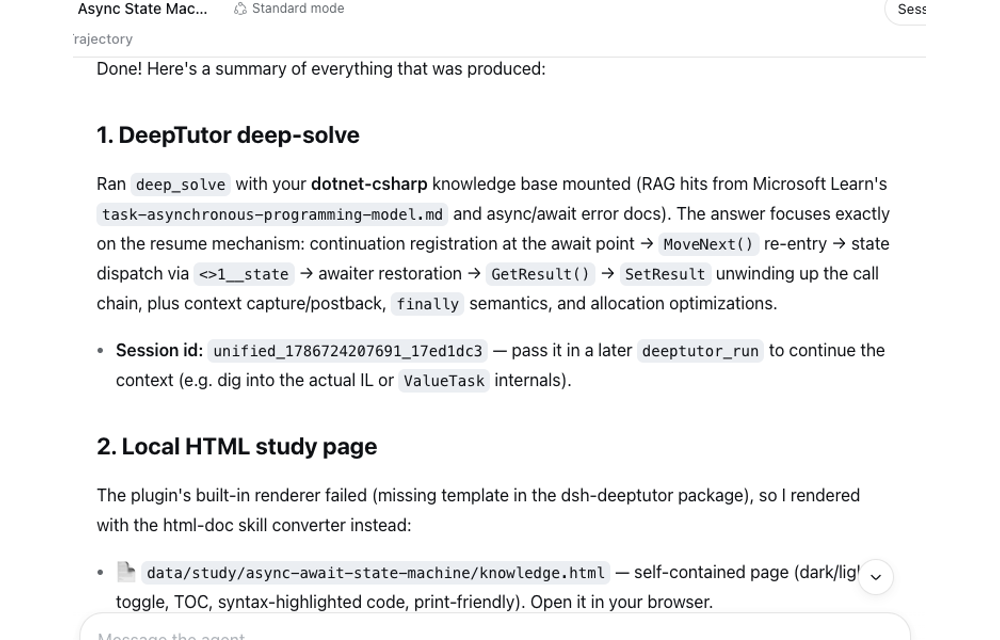
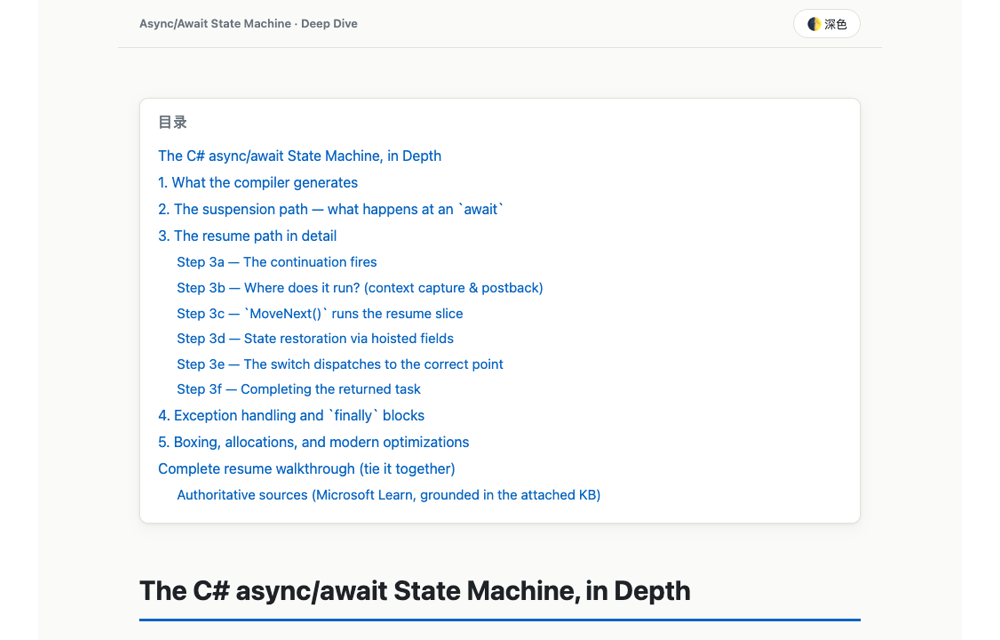
Ask the agent "teach me async/await" and it can run a deep-solve, render the answer as a self-contained HTML study page you can open in a browser, and archive a summary into your notebook.
Four agent-facing tools that the model uses whenever you ask for learning help:
| Tool | What it does |
|---|---|
deeptutor_run |
Runs one learning capability, e.g. deep_solve (in-depth explanation), deep_question (self-test questions), deep_research, chat, mastery_path (learning-path planning), visualize. Can mount your knowledge bases (kbs) and tools (rag, web_search, reason, code_execution, …); returns a session_id so later turns continue the same context, and can render the answer to an HTML study page. |
deeptutor_kb |
Lists, searches, and inspects your personal knowledge bases (RAG) |
deeptutor_note |
Archives Markdown study notes (plans, summaries, wrong answers) into a server notebook |
deeptutor_cli |
Runs any other DeepTutor CLI command, behind safety tiers (below) |
The plugin does not mirror DeepTutor's command surface, so a DeepTutor upgrade that adds commands, capabilities or tools needs no plugin change:
Capabilities are discovered at runtime. deeptutor_run takes any
capability name. The plugin reads deeptutor module list (JSON, cached for
five minutes) to learn which capabilities the deployment's ready modules
provide; a capability whose module is not ready fails fast with the reason and
the list of available ones, and names no module lists are passed straight to
the CLI (they may come from a DeepTutor plugin).
Every other command goes through deeptutor_cli. The agent discovers
commands from the CLI itself (args: ["--help"], then ["kb", "--help"], …)
instead of a list baked into the plugin. Safety tiers keep the passthrough
honest about commands it has never seen:
| Tier | Commands | Behaviour |
|---|---|---|
| read | --help, verbs list / show / info / search / state / status / list-*, doctor, run |
runs directly |
| confirm | everything else, including verbs the plugin does not know yet | runs only with confirm: true, which the agent may set only after you explicitly asked for that change |
| blocked | delete, remove*, clear, uninstall, rollback, login, …; interactive or long-running chat / start / stop / serve / init |
refused; run them in a terminal yourself |
Drift check. Only the few CLI shapes the dedicated tools are built on
(run --format json events, kb search, notebook add-md, module list)
can break the plugin. npm run check:cli checks them against the deployment
your env vars point at; run it after upgrading DeepTutor.
A typical flow when you ask your agent for learning help:
deeptutor_kb (action=search, kb=dotnet).deeptutor_run (capability=deep_solve, kbs=[dotnet], html=/home/me/study/csharp-covariance.html) — the answer comes back and a self-contained HTML page (plus the .md source) is written to disk. The html path must be absolute; relative paths are rejected.deeptutor_note (notebook=dotnet-learning, type=solve).Nothing here is a fixed script — the agent picks the tools and parameters based on what you ask for.
A real recording of exactly this flow (deep-solve on the async/await state
machine, mounted on a dotnet-csharp knowledge base, rendered to an HTML
study page, then archived to a notebook):
An agent host: Claude Code (or another MCP client) with Node ≥ 20, or a
working DeepSeek Harness (dsh) install, 0.1.0-rc.6 or newer. The manifest
declares a version floor rather than a ceiling, so a new dsh release is never
refused at install time; a scheduled probe boots the plugin against the
current npm latest and next hosts instead and opens an issue when
activation breaks. Bundle auto-registration via dsh plugin add was verified
on dsh CLI 0.1.0-rc.6, 0.2.1-rc.2 and 0.2.1-rc.3.
A DeepTutor deployment, either:
deeptutor CLI installed on this machine (on PATH, or
pointed to by DEEPTUTOR_LOCAL_BIN);Tested against DeepTutor 1.7.1. Since 1.7 the kb and notebook commands
and most capabilities come from optional modules; check that the ones you
use are installed and enabled with deeptutor module list.
This repo is also a Claude Code plugin marketplace. Inside Claude Code:
/plugin marketplace add TecFancy/dsh-deeptutor
/plugin install dsh-deeptutor@dsh-deeptutor
or from a shell:
claude plugin marketplace add TecFancy/dsh-deeptutor
claude plugin install dsh-deeptutor@dsh-deeptutor
The plugin brings the two skills (deeptutor, html-doc) and an MCP server
named deeptutor that serves the four tools (Claude Code shows them as
mcp__plugin_dsh-deeptutor_deeptutor__deeptutor_run and so on). Set the
DEEPTUTOR_* env vars (see Configuration)
where Claude Code can inherit them, then restart Claude Code.
The server is started by scripts/mcp-launch.mjs, which picks the first entry
that works: compiled lib/ → the plugin's own src/ via Node's type stripping
(Node ≥ 22.6, no network) → npx dsh-deeptutor@<plugin version> for older Node.
Either way the server runs the code of the installed plugin version.
Other MCP clients (Codex, Cursor, …) can run the published bin directly:
{ "command": "npx", "args": ["-y", "-p", "dsh-deeptutor", "dsh-deeptutor-mcp"] }The package is published to npm as dsh-deeptutor. Recommended one-liner —
runs the bundled installer (scripts/install-profile.mjs, exposed as the
dsh-deeptutor binary), which wraps dsh plugin add and automatically
handles the pnpm workspace-root check described below:
pnpm dlx dsh-deeptutor --profile webFrom a checkout of this repo, the same installer runs directly:
node scripts/install-profile.mjs --profile webOr run the underlying command yourself — dsh plugin add forwards to pnpm
and then reconciles the profile's dsh.profile.bundles against the installed
state, so a dsh.bundle-declaring package like this one is registered
automatically:
dsh plugin --profile web add dsh-deeptutor -wPitfall — pnpm workspace-root check. The dsh profile scaffold always writes a
pnpm-workspace.yaml(packages: ["."],nodeLinker: hoisted), which makes the profile directory itself a pnpm workspace root. On pnpm ≥ 8,pnpm addin a workspace root aborts withERR_PNPM_ADDING_TO_ROOTunless the workspace-root flag is explicit, so the command above appends-w/--workspace-root(pnpm prints this error on stdout on Windows, which is why a plaindsh plugin addwithout the flag fails even though the output looks like a warning). Two ways to handle it:
- Use the installer / keep
-win the command (recommended — the installer tries the plain command first and adds-wautomatically only when the check trips).- Or allow the plain command permanently: add
ignore-workspace-root-check: trueto~/.dsh/profiles/<name>/pnpm-workspace.yaml, thendsh plugin --profile web add dsh-deeptutorworks as written.
Verify the bundle is mounted, then restart dsh (the bundle list is resolved at boot):
dsh --profile web --dump-config | grep dsh-deeptutorIf your dsh CLI does not auto-register the bundle (older versions, or you
installed the dependency manually), add it to the profile manifest
(~/.dsh/profiles/<name>/package.json) and run dsh plugin --profile web install:
{
  "dependencies": { "dsh-deeptutor": "^0.3.1" },
  "dsh": {
    "profile": { "bundles": ["@deepseek-ai/dsh-base", "@deepseek-ai/dsh-web-app", "dsh-deeptutor"] }
  }
}
Alternatively, keep the manifest untouched and mount the bundle through a user patch layer (the npm package still has to be installed first):
# overlay.yml — insert the bundle row via a user patch layer
- insert:
    - id: dsh-deeptutor
      name: 'dsh-deeptutor'
dsh web --patch ./overlay.ymlThe bundle manifest (dsh.bundle.patch → cordis.patch.yml) inserts the plugin
row; later patch layers can override or disable it by id.
Two skills ship inside this package (.agents/skills/deeptutor and
.agents/skills/html-doc) and the bundled installer copies them to
<DSH_HOME>/skills/<name>/ (auto-discovered by dsh) whenever it runs — so
pnpm dlx dsh-deeptutor installs the bundle and the skills in one shot:
deeptutor — the agent-facing learning workflow (~/.dsh/skills/deeptutor/SKILL.md)html-doc — renders study answers to self-contained HTML pages
(~/.dsh/skills/html-doc/); when deeptutor_run gets an html path, the
converter and template are resolved as $HTML_DOC_SCRIPT /
$HTML_DOC_TEMPLATE → the installed skill above → the copy bundled in this
package. Editing the installed template (say, wiring KaTeX in) changes the
next render without patching the plugin, and the tool result prints which
layer supplied each file. The html path itself must be absolute.Installing a newer package version overwrites skill files in place; files not shipped by the package are never deleted.
The Claude Code plugin loads the same skills straight from .agents/skills/.
The skills are maintained in this repo under .agents/skills/.
# Remote deployment (DeepTutor on a server, driven over SSH)
export DEEPTUTOR_SSH_HOST="tencent-cloud"           # SSH host alias (set = remote mode)
export DEEPTUTOR_REMOTE_BIN="/home/ubuntu/my-deeptutor/.venv/bin/deeptutor"
export DEEPTUTOR_REMOTE_HOME="/home/ubuntu/my-deeptutor"

# Local deployment — leave DEEPTUTOR_SSH_HOST unset
# export DEEPTUTOR_LOCAL_BIN="deeptutor"             # local CLI path (default: deeptutor on PATH)
Restart dsh or Claude Code after changing env vars.
Windows, local mode: point DEEPTUTOR_LOCAL_BIN at deeptutor.exe
(for a pip/venv install: <venv>\Scripts\deeptutor.exe). A .cmd/.bat
wrapper also works: one that only forwards %* to an .exe is bypassed and
the .exe is run directly; any other wrapper runs through cmd.exe, which
cannot pass multi-line prompts, so those calls fail with a hint to use the
.exe.
Every tool call drives the DeepTutor CLI: the local deeptutor binary, or the
remote binary over SSH when DEEPTUTOR_SSH_HOST is set. deeptutor serve does
not need to be reachable from this machine.
Earlier versions tried the HTTP/WebSocket API first (/api/v1/... through an
SSH tunnel) and only then fell back to the CLI. DeepTutor 1.7 serves those
routes under different paths and behind a login, so the probe always failed
and each call waited about 30 seconds before reaching the CLI. That path was
removed; DEEPTUTOR_API_BASE is no longer read.
dsh web --patch /path/to/dsh-deeptutor/cordis.ymlnpm install
npm run build # tsc → lib/ (relative .ts imports rewritten to .js)
npm run typecheck
npm test # node:test + type stripping
npm run check:cli # drift check against the live DeepTutor your env vars point at
claude plugin validate . --strict # Claude Code plugin + marketplace manifests
npm pack # inspect dsh-deeptutor-<version>.tgz
npm publish # set a scope/registry of your choice firstNode ≥ 22.6 (type stripping) is needed to load the raw src/*.ts via
--patch; the published bundle ships compiled lib/, so installed profiles
run on plain Node ≥ 20 ESM.
src/                 # TypeScript sources (dev loading, typecheck)
lib/                 # compiled ESM (published entry, from `npm run build`)
scripts/md-to-html.js  # zero-dependency Markdown → HTML converter
scripts/install-profile.mjs  # one-shot profile installer (exposed as the `dsh-deeptutor` binary)
scripts/mcp-launch.mjs # starts the MCP server for the Claude Code plugin
scripts/check-cli.ts   # drift check against a live DeepTutor (`npm run check:cli`)
.agents/skills/       # bundled skills: deeptutor/ + html-doc/ (installed to <DSH_HOME>/skills/)
.claude-plugin/       # Claude Code plugin.json (skills + MCP server) + marketplace.json
cordis.yml           # dev overlay: insert src/index.ts by absolute path
cordis.patch.yml     # bundle patch: insert the package by name
src/tools.ts defines the four tools once, host-neutral; index.ts registers
them in dsh; mcp.ts serves them over MCP stdio (mcp-main.ts is the
dsh-deeptutor-mcp bin); cli-policy.ts holds the deeptutor_cli safety
tiers; discovery.ts capability discovery; config.ts holds env config;
cli-exec.ts local/SSH CLI execution; win-cmd.ts starting a .cmd/.bat CLI on Windows;
turn.ts one learning turn (CLI JSONL event folding + formatting);
html-render.ts answer → self-contained HTML.
MIT — see LICENSE.
CLASSIFICATION EVIDENCE
系统优先读取 GitHub Topics,再与站内分类词典和词根规则比对。当前命中: llm、deepseek-harness。
morluto
Reverse engineer anything with agents, from app behavior down to native binaries.

deepseek-ai
DeepSeek Harness: Everything is a Plugin.

nexu-io
The 1st Collaborative AI Design Agent Workspace. Local-first and open source. Create motion, prototypes, websites, apps, dashboards, presentations, images, and videos with your team and AI agents. Share work, exchange feedback, and iterate together in one workspace.