
模型与 MCP
待识别

rea
morluto
Reverse engineer anything with agents, from app behavior down to native binaries.
PROJECT TOPICS
INSTALL REFERENCE
dsh plugin --profile web add github:Taoidle/dsh-truenas
该命令指向仓库当前默认分支;尚无绑定当前 commit 的完整验证结果。
PROJECT README
A DeepSeek Harness plugin that manages one or more TrueNAS systems over the
versioned JSON-RPC 2.0 WebSocket API (/api/current). Point it at a NAS with a
URL and an API key and it becomes part of the agent's toolkit; no REST, no extra
services, no runtime dependencies.
TrueNAS deprecated the REST API in 25.04 and removed it in 27, so this plugin
speaks the WebSocket API directly: auth.login_ex with the API_KEY_PLAIN
mechanism on current releases, and a fallback to auth.login_with_api_key on
older ones.
git clone https://github.com/Taoidle/dsh-truenas.git
cd dsh-truenas
npm install                                   # one runtime dependency
Then, from a DSH session:
plugin_manager action=install_bundle target=/absolute/path/to/dsh-truenasReload the DSH Web UI. The plugin appears in the sidebar's Plugins panel as TrueNAS manager; its configuration page opens from the row's Configure control inside the package page (Included parts).
Open Settings → TrueNAS (the same page is also reachable from the plugin row: Plugins → TrueNAS manager → Included parts → the row's configure control). It adds one card per TrueNAS system with its address, user, API key and TLS option. The key is verified against the NAS before it is stored in the DSH credential store, so a typo never leaves a half-configured instance behind.
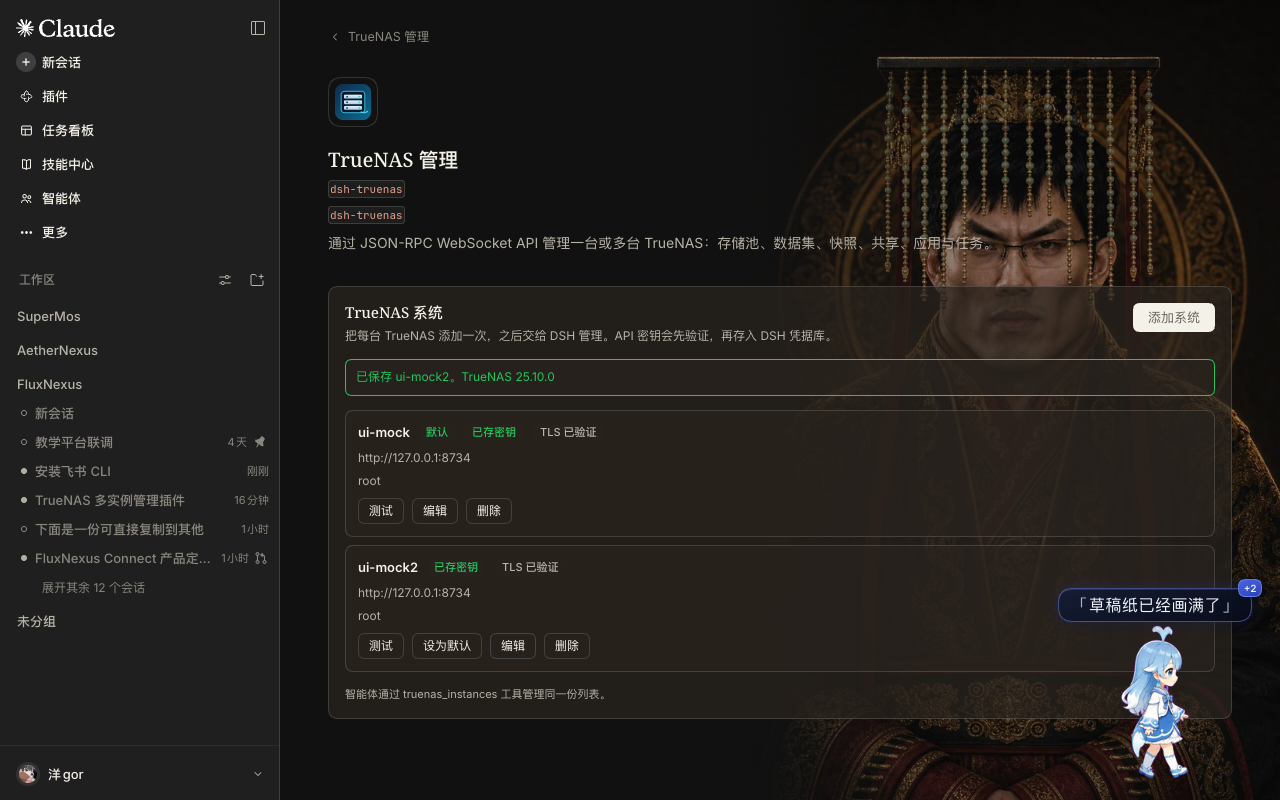
The page manages the same list as the truenas_instances tool, so either surface
works:
truenas_instances action="add" name="lab-nas" url="https://nas.lab.local" apiKey="1-xxxxxxxx" insecureTls=trueSeveral NAS boxes can be managed at the same time. The first entry is the default
when a tool call omits instance; Make default moves a system to the front.
Removing a system takes a second click and deletes its stored key.
The configuration itself is an instance list:
{
  "instances": [
    { "name": "lab-nas", "url": "https://nas.lab.local", "username": "root", "insecureTls": true },
    { "name": "backup-nas", "url": "https://10.0.0.9", "username": "admin" }
  ],
  "timeoutMs": 60000,
  "jobTimeoutMs": 600000
}
API keys are not stored in that configuration. Each instance has a credential
name derived from its name (lab-nas → TRUENAS_APIKEY_LAB_NAS) and the key
lives in the DSH credential store.
insecureTls (the page's Skip TLS certificate verification) disables
certificate verification for that instance only. Prefer installing the NAS
certificate as trusted, or use a CA-signed certificate; the plugin asks Node to
skip verification, so treat the flag as a deliberate trade-off.
The connection still has to be TLS. TrueNAS revokes an API key the moment it
is presented over an unencrypted connection (middlewared's
login_ex_impl.py: on PAM_SUCCESS with not app.origin.secure_transport it
calls api_key.revoke(..., 'Attempt to use over an insecure transport') and
answers EXPIRED). The plugin therefore refuses http:// / ws:// addresses
before the key is sent. Enable HTTPS on the NAS itself (System Settings →
General → GUI → HTTPS) or let a TLS proxy terminate and have middleware see a
secure origin — a proxy that terminates TLS and forwards plain HTTP to
middleware counts as insecure and will burn the key.
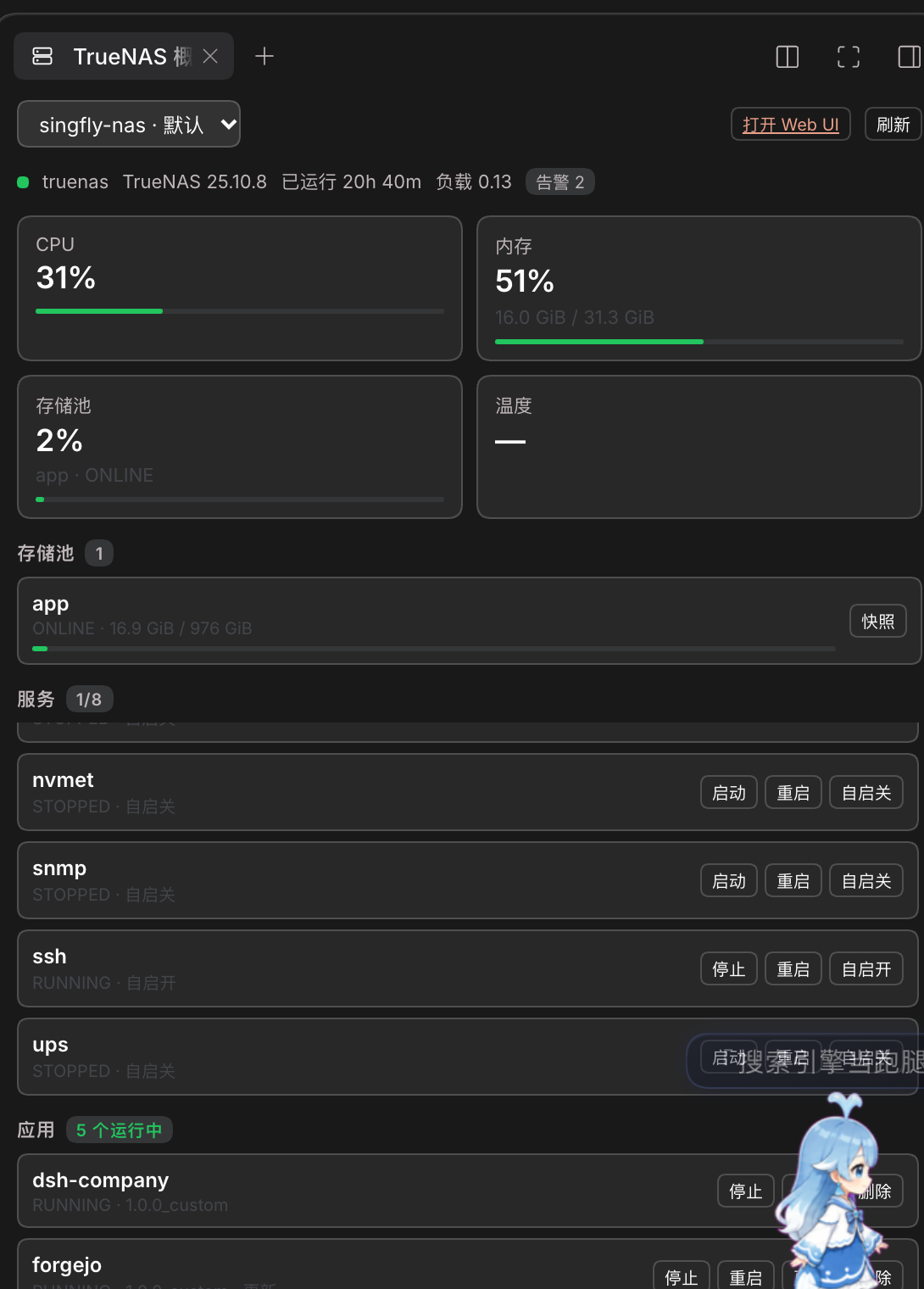
With the Better Sidebar plugin installed, this bundle adds a TrueNAS overview tab to the right sidebar. It shows one system at a time (a dropdown switches when several are configured):
Snapshot (names look like
panel-20261111-112833, so they are easy to find later);Start / Stop / Restart and a boot-flag toggle
(SMB, NFS, SSH, rsync, …);Start / Stop / Restart / Update, and
Delete behind a second click;Self-test button;Expired / Renew soon badge;Delete behind a second click;Start / Stop and their state;Abort button;Dismiss.Slow sections are cached on their own cadence (services 10 s, disks 20 s,
certificates 60 s) so a 2.5-second stream does not re-query them on every tick;
a failed refresh keeps the last good rows. Certificate renewal has no API in
TrueNAS 25.10 (certificate.* has create/update/delete/query only, and acme
is just the DNS authenticators), so the card shows the countdown and points at
the NAS web UI instead of offering a button that cannot work.
The panel never talks to a NAS from the browser. It uses three same-origin
routes — GET /dsh-truenas/panel?instance=<name>,
GET /dsh-truenas/panel/stream?instance=<name> (server-sent events) and
POST /dsh-truenas/panel/action — which reuse the plugin's pooled WebSocket
client. The stream pushes a fresh snapshot every 2.5 seconds so job progress
moves without a browser poll; when EventSource is missing or the stream drops,
the panel falls back to polling GET /dsh-truenas/panel every six seconds. Both
paths only run while the tab is visible (visible from Better Sidebar's
TabComponentProps), so a hidden panel costs nothing. app.delete is refused unless the request
carries confirm: true; the UI arms the button for five seconds instead of
using a native dialog.
Metrics come from reporting.get_data over a 20-second window, because TrueNAS
only accepts HOUR/DAY/WEEK/MONTH/YEAR units and an hourly page is over
a megabyte. CPU is the sum of the per-core shares in the newest row, memory is
physmem − available, and the temperature card shows — on hardware that
exposes no CPU sensor (both test systems do). A dropped poll (a busy browser can
return Failed to fetch) is retried once; if the retry also fails the last
snapshot stays on screen and the status line shows Refresh failed.
Everything else (pools, snapshots, shares, tasks, replication, cloud, alerts, Docker, privileges) stays available to the agent through the tools below.
| Tool | Purpose |
|---|---|
truenas_instances |
List / add / update / remove / test configured instances. |
truenas_system |
Version and hardware, alerts, services, boot environments (list/activate), update status and available versions, system dataset, SSH settings, proactive support, tunables. |
truenas_storage |
Pools, datasets, create/delete datasets, scrub. |
truenas_snapshots |
List, create, delete, roll back, clone ZFS snapshots. |
truenas_shares |
SMB and NFS shares: list, create, enable/disable, delete. |
truenas_apps |
Apps: list, inspect, config, start, stop, redeploy, upgrade, roll back, pull images, edit a custom app, list images (and outdated images); install a custom app from Compose; delete it; manage Docker registries. |
truenas_jobs |
Recent jobs, one job, wait for a job, abort. |
truenas_network |
Interfaces and link state, static routes, and hostname/domain/gateway/DNS/proxy. |
truenas_users |
Users and groups (create, update, delete), filesystem ACLs, local privileges and roles, and API keys. |
truenas_replication |
Replication tasks: list, inspect, create from a raw payload, run, delete. |
truenas_cloud |
Cloud sync (rclone) and cloud backup (restic) tasks: list, run, one-off transfer, restore, abort, delete. |
truenas_alerts |
Current alerts (dismiss/restore), alert services (email, Slack, PagerDuty, SNMP, webhook, …), and outgoing mail. |
truenas_tasks |
Cron jobs and rsync tasks: list, inspect, create, update, delete, run now. |
truenas_reporting |
Netdata graph list, time-series data (CPU, memory, disk, interface, load, …), reporting config, exporters. |
truenas_docker |
Docker engine status and configuration, networks, NVIDIA runtime, and Apps dataset backups. |
truenas_services |
System services: list, start, stop, restart, reload, and enable/disable at boot. |
truenas_certificates |
Certificates with expiry state, ACME servers and DNS authenticators; delete. Renewal itself is a web-UI action (see Notes). |
truenas_disks |
Disks with model, bus, size and temperature; start a SMART self-test; wipe a disk behind confirm. |
truenas_vms |
Virtual machines: list, inspect, status, start/stop/restart/suspend/resume, clone, delete (with confirm). |
truenas_iscsi |
iSCSI: targets, extents, portals, initiators, live sessions; guarded target/extent deletion. |
truenas_nvmet |
NVMe-oF: subsystems, hosts, namespaces, ports, live sessions; guarded subsystem deletion. |
truenas_files |
Filesystem: listdir, stat, statfs, mkdir on an absolute path. |
truenas_call |
Any JSON-RPC method, for everything the curated tools miss. |
Every tool except truenas_instances and truenas_call takes an optional
instance name. Destructive actions (delete_dataset, snapshot delete and
rollback, share delete, job abort, app delete, registry remove, instance remove,
route remove, replication/cloud sync delete, alert service delete, user/group
delete, ACL replacement, certificate delete, SMART test, disk wipe) refuse to run
unless confirm: true is passed.
truenas_call is the escape hatch, but it is not a blind one: it keeps a table
of methods that take the system down or destroy data (system.reboot,
system.shutdown, pool.export, pool.dataset.delete, disk.wipe,
update.update, failover.*, …) and refuses to invoke them without
confirm: true, including when they are wrapped in core.bulk. That table is
in lib/danger.js; add a method there when a new API surface appears.
Examples:
truenas_system action="info"
truenas_storage action="pools" instance="backup-nas"
truenas_snapshots action="rollback" snapshot="tank/media@before-upgrade" confirm=true
truenas_apps action="restart" app="plex"

# Add a Docker registry the NAS pulls images from (ask the user for the token first)
truenas_apps action="registry_add" registryName="ghcr" \
  registryUri="https://ghcr.io" registryUsername="octocat" registryPassword="ghp_..."

# Install a custom app from a Compose document
truenas_apps action="create_custom" app="my-web" compose="services:
  web:
    image: ghcr.io/octocat/my-web:latest
    ports:
      - \"8080:80\"
    restart: unless-stopped"

# Deleting an app or a registry needs an explicit second call
truenas_apps action="delete" app="my-web" confirm=true

# Networking, accounts and scheduled transfers
truenas_network action="interfaces"
truenas_network action="dns_update" nameservers=["1.1.1.1","8.8.8.8"]
truenas_users action="list"
truenas_users action="acl" path="/mnt/app/forgejo"
truenas_replication action="list"
truenas_cloud action="list"
truenas_alerts action="services"

# Scheduled work
truenas_tasks action="cron_list"
truenas_tasks action="cron_add" description="nightly scrub report" command="/usr/bin/zpool status > /tmp/zpool.txt" \
  user="root" schedule={"minute":"30","hour":"3"}

# Metrics
truenas_reporting action="graphs"
truenas_reporting action="data" graph="cpu" unit="DAY"
truenas_reporting action="data" graph="interface" identifier="enp6s18" unit="HOUR"

# Docker engine, images and app maintenance
truenas_docker action="status"
truenas_docker action="networks"
truenas_apps action="images"
truenas_apps action="upgrade" app="plex" appVersion="latest"

# Host maintenance and access
truenas_system action="boot_envs"
truenas_system action="update_status"
truenas_system action="ssh_config"
truenas_users action="privileges"
truenas_users action="api_keys"

# Virtual machines, iSCSI and files
truenas_vms action="list"
truenas_vms action="start" id="win11"
truenas_iscsi action="overview"
truenas_nvmet action="subsystems"
truenas_files action="listdir" path="/mnt/tank/media"

# Pool lifecycle, boot environments and NTP
truenas_storage action="pool_create" pool="tank" disks='["sda","sdb"]' raidType="MIRROR" confirm=true
truenas_system action="general"
truenas_system action="ntp_add" ntp={"address":"time.cloudflare.com"}

# Services, certificates and disks
truenas_services action="list"
truenas_services action="restart" name="smb"
truenas_services action="disable" name="ftp"
truenas_certificates action="list"
truenas_certificates action="authenticators"
truenas_disks action="list"
truenas_disks action="smart_test" name="sda" testType="SHORT"

# The escape hatch refuses system.reboot without confirmation too
truenas_call method="user.query" params=[[]]
Long-running methods return a job id. The curated tools wait for the jobs they
start; truenas_call does too when waitJob: true is passed.
The plugin talks to TrueNAS with Node's built-in net/tls/crypto modules
only. Its single package dependency is @deepseek-ai/schemastery, used for the
configuration schema; harness packages (dsh-tools, dsh-credentials) are
deliberately not imported, so the plugin does not break when the harness build
changes. Because the bundle is linked into the profile, install that dependency
once in the checkout:
cd /path/to/dsh-truenas
npm installlib/ws.js — a small RFC 6455 client over node:net/node:tls. It exists
because insecureTls needs rejectUnauthorized: false, which the global
WebSocket cannot do.lib/truenas.js — JSON-RPC framing, auth.login_ex (plain API key over TLS)
with a legacy fallback, request serialization (the API rejects bursts with
"too many concurrent calls"), one reconnect-and-retry on a dropped session,
and job polling through core.get_jobs.lib/instances.js — instance normalization and lookups.lib/admin.js — verify-then-save operations shared by the tools and the
settings page.lib/http.js, lib/routes.js — the settings page's same-origin routes on the
DSH web server, with an origin/host guard so only the DSH page can call them.lib/tool-kit.js — the shared tool plumbing (schema, ok/fail,
requireConfirm, the per-instance client resolution).lib/danger.js — the destructive-method table that truenas_call consults.lib/tools.js — the core tools, with compact text rendering and curated field
projections; the network, users/ACL, replication, cloud and alert tools live
next to it in lib/tools-*.js.client.js — the React settings page, rendered into the plugin row's
plugins.row.config seat. It is a plain module loaded by the harness, so it
needs no bundler and no duplicate React.index.js — configuration schema, one client per instance, the settings
routes, and persistence of the instance list through the harness config
editor. instances is a volatile field, so adding or removing an instance
takes effect immediately without a plugin restart.truenas_call is the escape hatch: all method names and parameters are
documented at https://api.truenas.com/.
node --test test/*.test.mjsThe suite runs against an in-process mock of the WebSocket API (handshake, masked client frames, JSON-RPC dispatch, jobs), so it needs no NAS.
API_KEY_PLAIN). TrueNAS 26
prefers SCRAM-SHA-512; it is not implemented here, so an API key must be
accepted through the plain mechanism (it is an explicit, supported mechanism)./websocket (the pre-25.04 protocol) and
the removed REST endpoints are not.host:port is tried over TLS first. If that port turns out to speak
plain HTTP (a reverse proxy on :80/:86 — OpenSSL reports
WRONG_VERSION_NUMBER), the plugin explains it and refuses to authenticate:
plaintext API-key login makes TrueNAS revoke the key on first use. Enable
HTTPS on the NAS or front it with a TLS listener that middleware treats as
secure, then point the plugin at that port. Verification never stores an
instance it could not authenticate.Authentication failed: the API key ... is expired or was revoked; create a new one once the instance uses TLS.MIT — see LICENSE.
CLASSIFICATION EVIDENCE
系统优先读取 GitHub Topics,再与站内分类词典和词根规则比对。当前命中: deepseek。
morluto
Reverse engineer anything with agents, from app behavior down to native binaries.

deepseek-ai
DeepSeek Harness: Everything is a Plugin.

nexu-io
The 1st Collaborative AI Design Agent Workspace. Local-first and open source. Create motion, prototypes, websites, apps, dashboards, presentations, images, and videos with your team and AI agents. Share work, exchange feedback, and iterate together in one workspace.