

模型与 MCP
待识别

rea
morluto
Reverse engineer anything with agents, from app behavior down to native binaries.
PROJECT TOPICS
INSTALL REFERENCE
dsh plugin --profile web add github:SyaJask/dsh-2sidebar
该命令指向仓库当前默认分支;尚无绑定当前 commit 的完整验证结果。
PROJECT README


A split-pane file browser for the DeepSeek Harness (DSH) right sidebar: the directory tree and the selected file side by side in one tab — both visible at once, so switching files never moves the tree. The tree starts on the left and can be switched to the right.
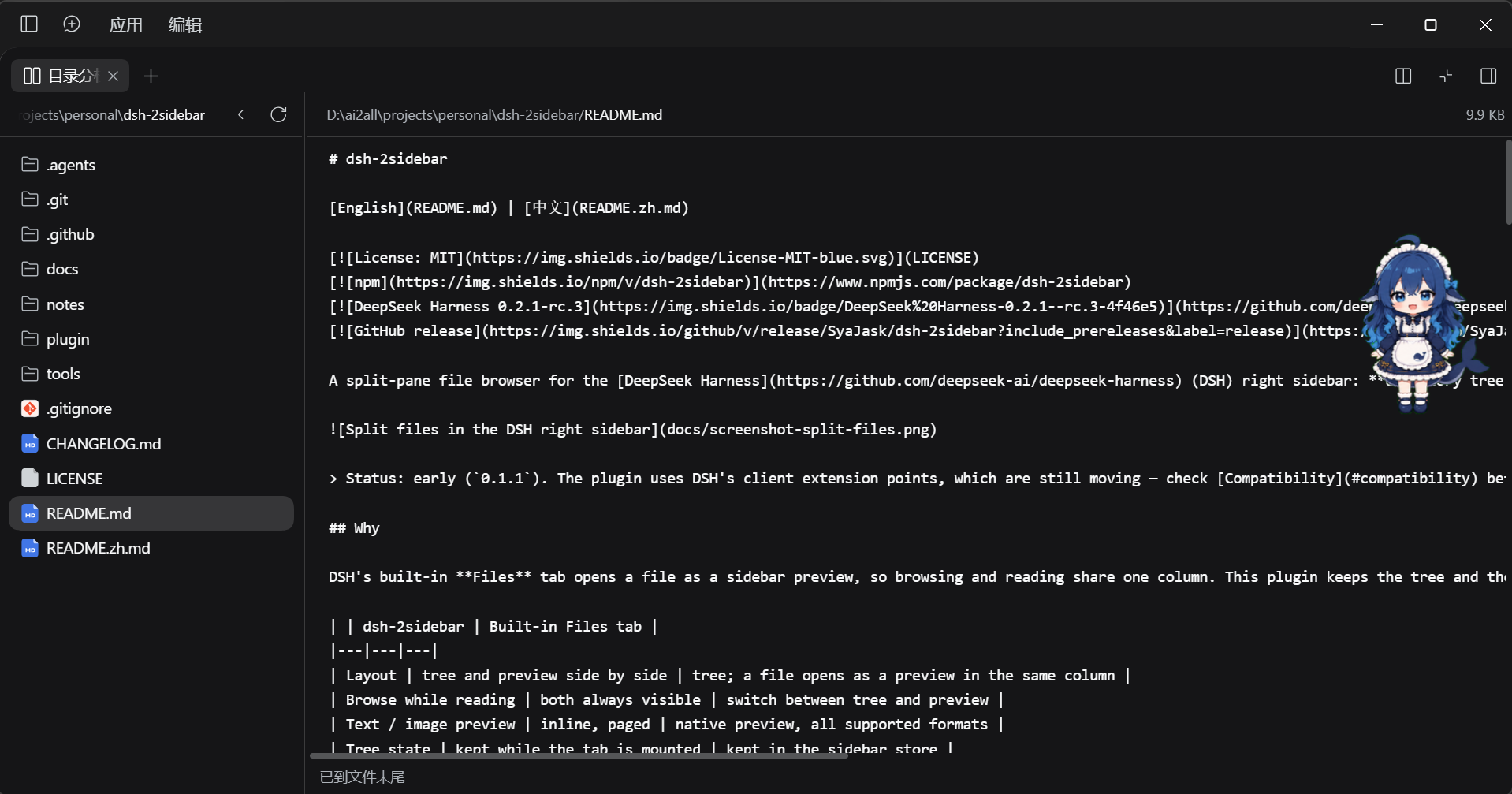
Status: early (
0.1.4). The plugin uses DSH's client extension points, which are still moving — check Compatibility before upgrading DSH.
DSH's built-in Files tab opens a file as a sidebar preview, so browsing and reading share one column. This plugin keeps the tree and the preview side by side in the same tab: click a file, the preview switches, the tree stays exactly where it was.
| dsh-2sidebar | Built-in Files tab | |
|---|---|---|
| Layout | tree and preview side by side | tree; a file opens as a preview in the same column |
| Browse while reading | both always visible | switch between tree and preview |
| Text / image preview | inline, paged | native preview, all supported formats |
| Tree state | kept while the tab is mounted | kept in the sidebar store |
| Open shortcut | header button / guide card | Mod+P |
Both can be installed and used at the same time.
Reload refreshes the root and expanded levels, and empty and truncated states are reported inline (a refresh that fails after a successful load keeps the last listing).Load more / End of file, plus a byte counter.png, jpg, jpeg, gif, webp, bmp, ico, avif and svg.workspaceFiles service, under the same caps as the built-in features.0.2.1-rc.5; see Compatibility).dsh plugin --profile desktop add dsh-2sidebarOr in the DSH Web GUI: Plugins → Add plugin → enter dsh-2sidebar → Install, then switch the Split files bundle on.
desktop is the default DSH Desktop profile; replace it if your installation uses another name. No restart is needed: the host reloads the profile in place (HMR). If a tab that is already mounted keeps the old component, press Ctrl+Shift+R.
git clone https://github.com/SyaJask/dsh-2sidebar.git
dsh plugin --profile desktop add "link:C:/src/dsh-2sidebar"
You can also point the GUI's Add plugin dialog at the absolute path of the repository root.
dsh plugin --profile desktop remove dsh-2sidebarEnd of file at the end.0.2.1-rc.5 on Windows (the client APIs used here were re-checked against 0.2.1-rc.5; 0.2.1-rc.3 was the previously tested version).slots, sessions, locale, sidebarRightTabs, sidebarRight, remote, remote.workspaceFiles) and the shell's baseline client primitives (@deepseek-ai/dsh-client-ui-primitives), and the macOS/Linux builds; the bundle itself is platform-independent.The package is a client-only bundle:
index.js is an empty host half; all rendering lives in the browser.ctx.sidebarRightTabs), its body through the sidebar.right.pane.tab slot, its title through sidebar.right.pane.tab.title, a header button through conversation.session.header.utilities, and its own locale dictionaries (zh, en).ctx.remote.workspaceFiles (list / read / readBytes); the workspace root comes from the framework's standard useSessions prop. The plugin adds no host routes and no permissions of its own.cordis.patch.yml inserts one profile row; keepMounted: true keeps the body alive across tab switches, so the tree state survives.The plugin does not show up.
Check that the installed DSH version matches the tested one, that the bundle is enabled in Plugins, and look for [split-files] messages in the DevTools console. If the bundle fails to load, the rest of DSH keeps working — the tab and header button simply do not appear.
It says "This session has no workspace directory". The tree is rooted at the session's working directory; sessions without one have nothing to browse. Open a session that has a workspace.
A file says it is too large or binary.
Text is read as line pages under the host's maxBytes (2 MiB per page) and maxLines (5,000) caps; images are read as complete files under maxFileBytes (32 MiB by default). A page whose lines together exceed 2 MiB fails as "too large" even when no single line is oversized; a single line above the cap cannot be previewed as text either.
Can I open PDF, Office or HTML files in the right pane? Not inline. Use DSH's native preview tab for those formats; this plugin focuses on code, configuration and images.
Does the plugin read or send my files anywhere? It is read-only: it calls the host's workspace file service, which applies the same workspace scoping and limits as the built-in UI. The bundle makes no network requests and has no telemetry.
Where are the split ratio, tree state and side stored?
In localStorage (dsh-2sidebar.ratio, dsh-2sidebar.tree-hidden, dsh-2sidebar.tree-side). Clear site data or those keys to reset them. The pre-rename dsh-split-files.* keys are still read as a fallback when the new key is absent.
Why are there two file tabs? The built-in Files tab is for opening files into native previews; this plugin is for reading a tree and a file at the same time. They do not conflict.
There is no build step: client.js is the deployed client bundle and index.js is the empty host half.
node --check client.js      # syntax
npm test                    # bundle and manifest tests (no dependencies)
To iterate, install from a clone with the link: spec and edit client.js; an npm installation is a copied package and does not follow source edits. The host reloads the profile on change.
Pull requests and issues are welcome. For anything that touches DSH's internal client APIs, please include the tested DSH version.
| Path | What |
|---|---|
package.json, index.js, client.js, cordis.patch.yml, locale/, icon.svg |
The plugin bundle — the npm package and the install target |
AGENTS.md |
Repository and agent conventions |
README.md, README.zh.md |
English and Chinese user documentation (npm uses README.md) |
CHANGELOG.md |
Release history in Keep a Changelog format |
LICENSE |
MIT license |
docs/ |
Screenshot and per-version release notes (docs/release-notes/<version>.md) |
.github/workflows/ |
PR checks (ci.yml) and npm publishing with provenance (publish.yml) |
.gitignore |
Ignores local editor files and the local-only .agents/ directory |
.agents/ |
Local agent notes and skills; git-ignored and not distributed |
MIT © 2026 SyaJask
CLASSIFICATION EVIDENCE
系统优先读取 GitHub Topics,再与站内分类词典和词根规则比对。当前命中: deepseek-harness。
morluto
Reverse engineer anything with agents, from app behavior down to native binaries.

deepseek-ai
DeepSeek Harness: Everything is a Plugin.

nexu-io
The 1st Collaborative AI Design Agent Workspace. Local-first and open source. Create motion, prototypes, websites, apps, dashboards, presentations, images, and videos with your team and AI agents. Share work, exchange feedback, and iterate together in one workspace.