
模型与 MCP
待识别

rea
morluto
Reverse engineer anything with agents, from app behavior down to native binaries.
PROJECT TOPICS
INSTALL REFERENCE
dsh plugin --profile web add github:SunspotAlgo/dsh-pin-default-model
该命令指向仓库当前默认分支;尚无绑定当前 commit 的完整验证结果。
PROJECT README
English | 简体中文
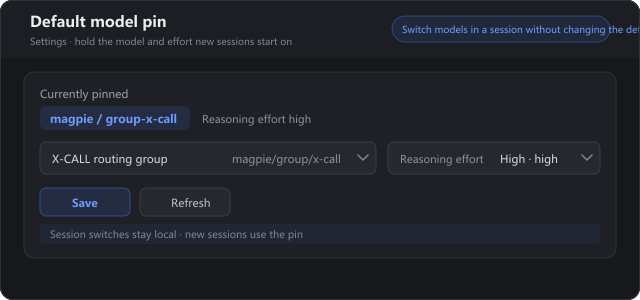
Pins the DeepSeek Harness default model and reasoning effort, so switching either inside a session never changes what the next new session starts with. Change the pin any time from Settings → Default model pin.
DSH records a model change made inside a session as the new process-wide default. In sessionController.selectModel() the choice is applied to the session, and then agentDefaultModel.saveSelection() rewrites the profile patch with the same selection.
The visible effect: every new conversation — hand-made or created by a scheduled task — silently inherits whatever model you picked last, instead of the default you configured. There is no setting that turns this off.
It replaces saveSelection on the live agentDefaultModel service with one that refuses to move the default away from the pin:
| Action | Result |
|---|---|
| Switch models inside a session | ✅ works, that session uses the new model |
| Switch reasoning effort inside a session | ✅ works, that session uses the new effort |
| New session afterwards | ✅ still starts on the pinned model and effort |
| Change the pin in Settings | ✅ applies to all later new sessions |
| Unload the plugin | ✅ original behaviour returns |
The pin is a routing triple: provider, model, and an optional reasoning effort. The browser page talks to two local host routes with plain fetch; it has no dependency on DSH's settings-client services, so it loads regardless of plugin activation order.
The effort dropdown lists the levels the selected model actually offers, taken from the live model catalog.
high) pins the route and the effort. A session that changes only its effort no longer rewrites the default.A locked effort must be one the model supports. DSH rejects a call whose effort the model does not offer (
UNSUPPORTED_REASONING_EFFORT), and some models offer no reasoning effort at all. The plugin refuses to store such a pin and the settings page shows a warning instead of failing later at session creation.
Open Settings → Default model pin and pick a model from the grouped dropdown, then pick a reasoning effort and press Save. The pin is written to the profile and survives a restart.
It can also be set by hand in cordis.patch.yml:
- insert:
    - id: dsh-pin-default-model
      name: 'dsh-pin-default-model'
      config:
        provider: magpie
        model: group/x-call
reasoningEffort: high| Field | Required | Meaning |
|---|---|---|
provider |
yes | Provider route to hold, e.g. magpie, workbuddy-ai |
model |
yes | Model id on that route, e.g. group/x-call |
reasoningEffort |
no | Reasoning effort to hold. Omit it to let the provider default apply |
With no pin configured, the bundled default magpie / group/x-call applies.
A change affects sessions created after it is saved. An open conversation keeps the model and effort recorded in its own request log.
agentDefaultModel.saveSelection). A future DSH update that renames or restructures that method may make the pin ineffective. The change is installed on the live service instance and fully reverted when the plugin unloads.From the DSH app: Settings → Plugins → Install, then search dsh-pin-default-model.
Or from a terminal:
dsh plugin --profile web add dsh-pin-default-modelPublished on npm.
>= 0.2.1node --check lib/index.js
node --check client/client.js
node test/behaviour.mjs
node test/client.mjs
node test/render.mjsMIT. See LICENSE.
CLASSIFICATION EVIDENCE
系统优先读取 GitHub Topics,再与站内分类词典和词根规则比对。当前命中: model、deepseek-harness。
morluto
Reverse engineer anything with agents, from app behavior down to native binaries.

deepseek-ai
DeepSeek Harness: Everything is a Plugin.

nexu-io
The 1st Collaborative AI Design Agent Workspace. Local-first and open source. Create motion, prototypes, websites, apps, dashboards, presentations, images, and videos with your team and AI agents. Share work, exchange feedback, and iterate together in one workspace.