
Agent 与会话
插件

nuwa-skill
alchaincyf
你想蒸馏的下一个员工,何必是同事。蒸馏任何人的思维方式——心智模型、决策启发式、表达DNA。Distill how anyone thinks.
PROJECT TOPICS
INSTALL REFERENCE
dsh plugin --profile web add github:SunspotAlgo/dsh-archive-pro
该命令指向仓库当前默认分支;尚无绑定当前 commit 的完整验证结果。
PROJECT README
English | 简体中文
Bulk management for archived DeepSeek Harness sessions: search, filter, sort, multi-select, unarchive, and permanently delete — all from Settings → Archive manager pro.
A second tab inside the same section, Scheduled sessions, does the opposite job: it finds the sessions that scheduled tasks created and are not archived yet, selects them all in one click, and archives them.
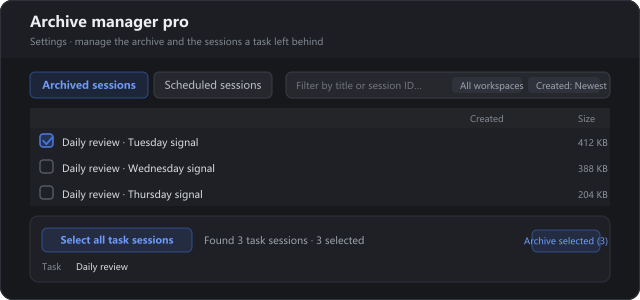
DeepSeek Harness ships with an archive feature but nothing to maintain it. Archiving a few dozen sessions leaves you with a flat, unsorted list: no search, no filters, no multi-select, and no way to reclaim disk space except clicking sessions one at a time. Archives keep their logs on disk forever, so the cost of that gap grows quietly.
The same gap exists in the other direction. A recurring scheduled task creates a fresh session on every trigger, and those sessions pile up in the sidebar until someone archives them by hand.
This plugin adds the maintenance layer the archive list is missing, on both sides.
| Capability | Detail |
|---|---|
| Keyword search | Matches session title and session ID |
| Workspace filter | One workspace, or sessions that never belonged to one |
| Log-state filter | Logs still on disk vs. leftover markers whose logs are gone |
| Age filter | Archived more than 7 / 30 / 90 days ago |
| Sorting | Created time, on-disk size, title — each in both directions |
| Multi-select | Checkbox per row, Shift-click to select a contiguous range |
| Select visible | Selects only the current filter result |
| Hidden selection count | Selections kept across filters are counted separately and called out before batch actions |
| Batch unarchive | Return many sessions to their workspace sidebar at once |
| Batch delete | Permanent, with running tasks stopped and caches cleared |
| Purge visible | Clear the whole filtered list, skipping pinned sessions by default |
| Live stats | Matched count, combined size, selected count and selected size |
On-disk size is read from the real session log directory, so the heaviest archives are easy to target first.
The Scheduled sessions tab of Settings → Archive manager pro handles the sessions a scheduled task created that are not archived yet — the opposite direction from the archive manager.
| Capability | Detail |
|---|---|
| One-click selection | Selects eligible, unpinned sessions in the current search results |
| Idle threshold | The list refreshes when this changes; only sessions whose latest delivery is older than the chosen window (1h / 6h / 24h / 7d / 30d) |
| Search scope | One-click selection uses the current search; hidden selections are counted and called out before batch actions |
| Running tasks | A task whose latest delivery is still queued or executing is skipped entirely |
| Source task shown | Each row names the scheduled task that created it |
| Safe by construction | A task that delivers into a session you already had is never included |
| Batch archive | One confirmation, then every selected session is archived |
| Partial failures | One session failing never stops the rest; the failure is reported |
| Pinned sessions | Not selected automatically; select them by hand if you want |
How the sessions are found. DSH does not mark a session with the task that produced it — the schedule runtime creates sessions without any metadata. The only reliable record is the task's own delivery receipt, whose targetSessionId names the session that accepted the delivery. This plugin reads those receipts.
Why the count stays honest. Delivery receipts are permanent: every session a task ever created stays named in them, long after the session itself is gone. "Sessions the receipts mention" is therefore a number that only ever grows, and it is not the same thing as "sessions you could archive right now". This plugin counts only the sessions that still exist — one is alive when the workspace registry still lists it or its log directory is still on disk; when neither is true it was deleted, and it is excluded.
So the page shows two numbers: "Found N task sessions" is the number you can archive now (it matches the list), and a second line explains how many sessions the delivery history names in total and how many of them were deleted. The numbers add up to the history total, so you never see "found 374" above an empty list.
A running task is never hit. A delivery creates the session and the agent then performs that run, so the time of the latest delivery is when the run began. A session is only in range once that moment is older than the chosen threshold (one hour by default); a session delivered minutes ago is left alone. The task itself staying active does not matter — its next trigger creates a new session, and archiving the old one does not disturb it. When a task's latest delivery is still queued or executing, that whole task is skipped.
Only task-created sessions count. A scheduled task can target an existing session of yours (target.kind === 'session'), and those sessions are yours — they are never touched. Only tasks that create their own sessions (new and new_once) contribute to the list.
Archiving is reversible. It moves sessions out of the sidebar and into Archive manager pro, where they can be unarchived or permanently deleted like any other archived session. Nothing is deleted here.
A scheduled task that keeps running still creates a new session on its next trigger. Pause or delete the task first if you want the inflow to stop.
The feature needs DSH's schedule service. Without it the section explains that it is unavailable instead of failing.
From the DSH app: Settings → Plugins → Install, then search for dsh-archive-pro.
Or from a terminal:
dsh plugin --profile web add dsh-archive-proThe package is published on npm as dsh-archive-pro.
After installing, open Settings → Archive manager pro and use the tab bar to switch between archived sessions and scheduled sessions.
Deleting an archived session is a controlled teardown, not just a directory removal:
Deletion cannot be undone. Unarchive remains available for as long as a session is only archived.
~/.dsh/storages/archive-manager-deleted.json and contain session IDs only — never session content.Esc dismisses any confirmation dialog.engines.dsh: >=0.2.1)package.json declares both halves of a DSH bundle:
"dsh": {
  "bundle": { "patch": "./cordis.patch.yml" },
  "client": { "platform": "web", "inject": [ ... ] }
}lib/index.js) injects webServer, storageDomain, workspaceRegistry, sessionPersistence, sessions, and agents, then mounts seven routes under /dsh-archive-pro/*.client/client.js) is a zero-build classic script loaded through window.__ModuleLoader__.load, registering two settings.section entries plus an optional native context-menu item.lib/session-lifecycle.js, which cancels agents, awaits idle/dispose, closes persistence writers, and clears memoized entries.lib/scheduled-sessions.js and reads the optional schedule service lazily, so the plugin still loads without it.lib/index.js Host entry: mounts routes, wires deletion reconciliation
lib/routes.js list, restore, delete, batch-delete, batch-restore,
scheduled-sessions, archive
lib/scheduled-sessions.js Discovery of task-created sessions
lib/session-lifecycle.js Safe session / agent / writer teardown
client/client.js Two settings sections + context menu (zero-build CJS module)
locale/zh.json Chinese market metadata
locale/en.json English market metadata
docs/DETAIL.md English detail page (single feature image)
docs/DETAIL.zh.md Chinese detail page (single feature image)
docs/preview.svg Feature image, outlined to vector paths
icon.svg Plugin icon (36×36, self-contained)
cordis.patch.yml Bundle patch inserting the pluginThere is no build step. Edit the files, install the directory as a bundle, then reload the DSH window.
# syntax check
node --check lib/index.js
node --check lib/routes.js
node --check lib/scheduled-sessions.js
node --check client/client.js

# tests
node test/scheduled-sessions.test.mjs
node test/scheduled-flow.test.mjs
node test/client.test.mjs
To install a local checkout while iterating:
dsh plugin --profile web add file:D:/path/to/dsh-archive-proNote that a locally linked directory bypasses the files whitelist, so
node_modules and scratch folders can still be picked up — keep the checkout clean.
MIT. See LICENSE.
The session teardown logic grows out of dsh-archive-manager-plus; this plugin adds filtering, sorting, multi-select, and batch operations on top of it.
CLASSIFICATION EVIDENCE
系统优先读取 GitHub Topics,再与站内分类词典和词根规则比对。当前命中: session-management。
alchaincyf
你想蒸馏的下一个员工,何必是同事。蒸馏任何人的思维方式——心智模型、决策启发式、表达DNA。Distill how anyone thinks.

freestylefly
Prompt as Code | GPT Image 2 / 2.5 提示词与案例库,530+ 个案例、20+ 套工业级模板与可复用 Skills,新增 2.5 同提示词对比专区,附完整提示词与生成记录,持续更新。

titanwings
Distilly — Distill how they think into reusable Skills for any Agent or Bot. Formerly Colleague Skill(原同事 Skill).