

模型与 MCP
待识别

rea
morluto
Reverse engineer anything with agents, from app behavior down to native binaries.
PROJECT TOPICS
INSTALL REFERENCE
dsh plugin --profile web add github:Ssupervipuser/dsh-agent-notify
该命令指向仓库当前默认分支;尚无绑定当前 commit 的完整验证结果。
PROJECT README

DSH 插件:Agent 需要你的时候,发一条真正的 Windows 系统通知(WinRT Toast,右下角横幅 + Windows 通知中心,来源显示 “DeepSeek Harness”,点击可回到应用)。
A DeepSeek Harness (dsh) plugin that raises real Windows notifications — WinRT toasts that land in the Action Center under the app's own name — at the three moments the agent stops and waits for you.
| 时机 | 触发事件 | 通知标题 |
|---|---|---|
| 任务跑完 | agent/status 从 running 回到 idle(期间有 turn/end) |
任务完成 / 任务出错 / 任务被拦截 …(按结束原因) |
| 需要授权 | 会话事件 approval/asked(工具调用被权限确认卡住) |
需要你的授权 |
| 需要你选择 | 会话事件 tool/call 且工具为 ask_user_question |
需要你的选择 |
| Moment | Hook | Notification |
|---|---|---|
| Run finished | agent/status goes running → idle after a closed turn |
per-reason headline: completed / error / blocked / interrupted / … |
| Waiting for approval | approval/asked session event |
需要你的授权 |
| Waiting for a choice | tool/call where the tool is ask_user_question |
需要你的选择 |
子会话(subagent)全部跳过,所以 agent team / 子代理不会刷屏;同一会话同类等待通知默认 20 秒冷却,重试不会连发。
Subagent sessions are skipped entirely, so a team of delegates never spams the desktop, and waiting alerts are rate-limited per session and kind (20 s by default) so retries cannot machine-gun you.
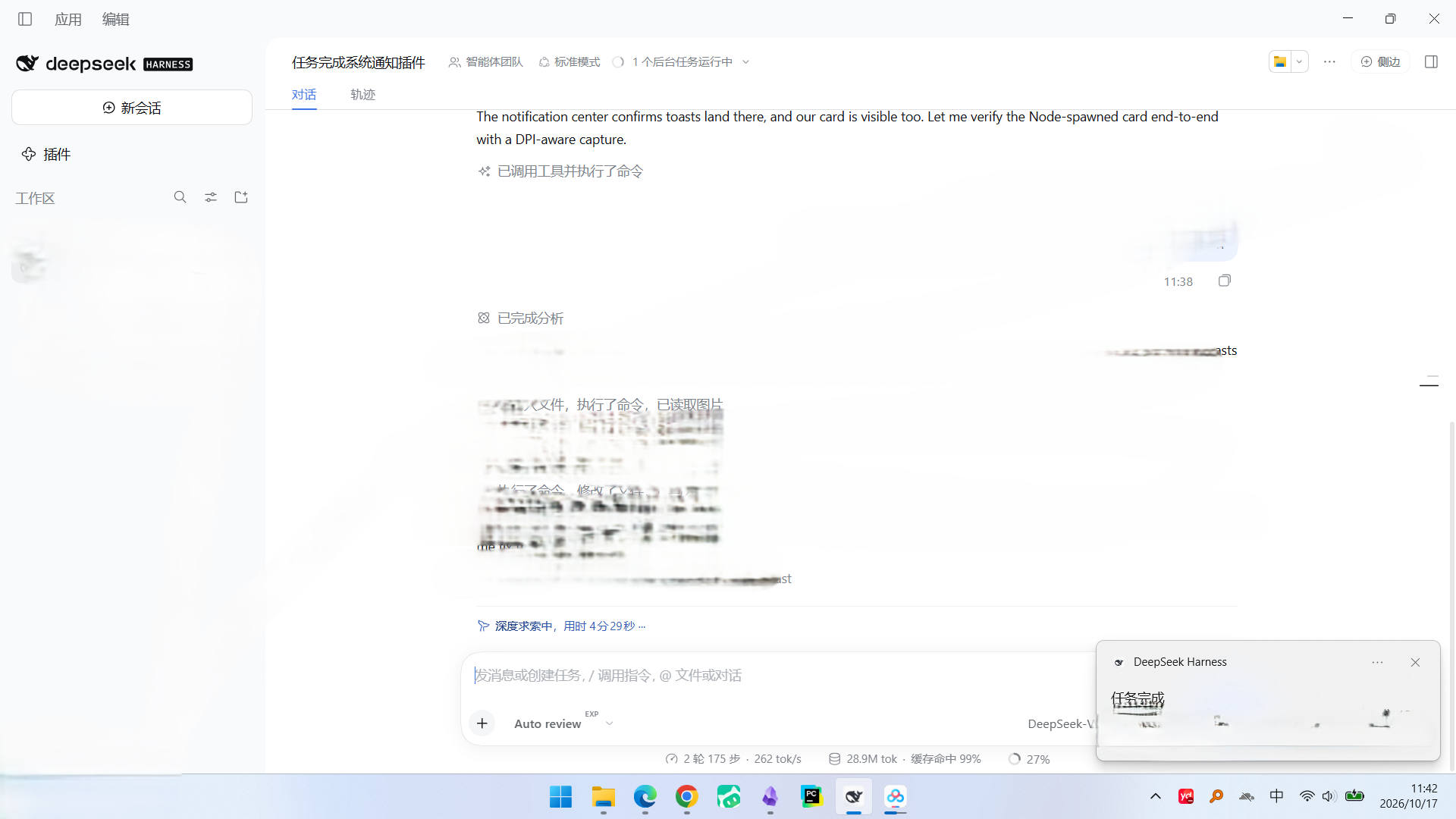
lib/notify.ps1 调 WinRT ToastNotificationManager 发送真正的系统通知。 / sends a genuine WinRT toast via ToastNotificationManager.electron.app.DeepSeek Harness),并且只向已注册的 AUMID 发送——写死一个未注册的 id 虽然不会报错,但会退化成“标题显示原始 id、没有图标、点了没反应”。 / Windows only attributes a toast (app name, icon, click target) when its AppUserModelID is registered by a Start Menu shortcut. The id is therefore discovered from the app's own shortcut and only registered ids are sent to; an unregistered id does not fail, it silently degrades into a banner titled with the raw id, no icon, and a dead click.launch 属性时,点击由该 AUMID 的快捷方式激活;应用有单实例锁,于是等于把已打开的窗口带到前台,而不是再开一个。 / without a launch override the click activates the AUMID's shortcut, and the app's single-instance lock turns that into a focus of the existing window instead of a second copy.lib/card.ps1 画一张原生置顶卡片(不是网页弹窗)。 / a bundled native card, never a browser popup.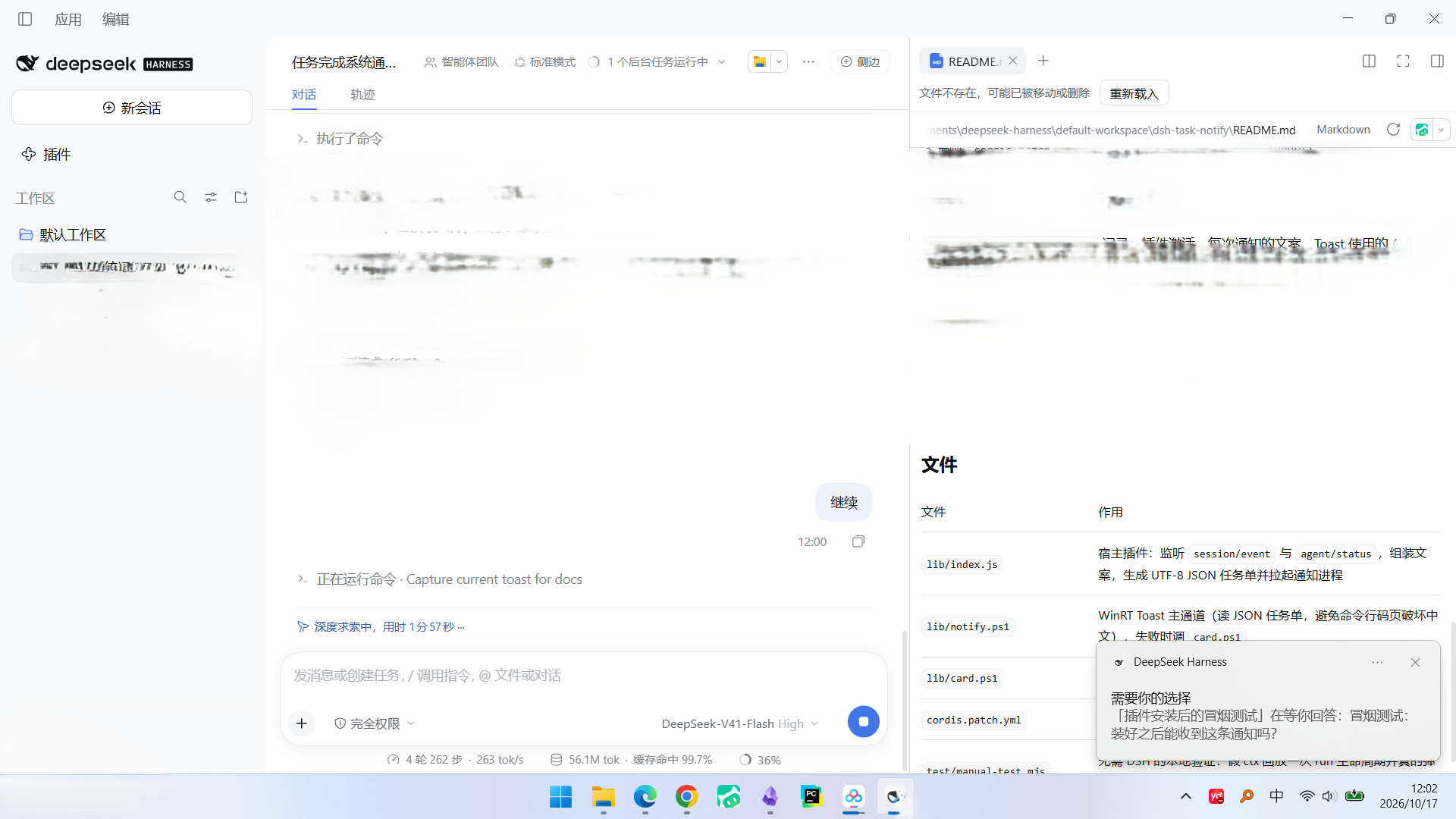
WindowsPowerShell\v1.0\powershell.exe 存在(WinRT 投影只在 PowerShell 5.1 里可用;pwsh 7 反而没有)。 / Windows 10/11 with Windows PowerShell 5.1 — the WinRT projection is the reason this uses powershell.exe rather than pwsh.从市场或 GitHub 装(任意非 desktop profile):
dsh plugin add --profile web github:Ssupervipuser/dsh-agent-notifydesktop profile 由 Electron 应用自己管理(dsh plugin 会拒绝写它),所以桌面版请用仓库自带的安装脚本:
git clone https://github.com/Ssupervipuser/dsh-agent-notify.git
node dsh-agent-notify/test/install.mjs
该脚本会:备份 profile 清单 → 发布 lib/releases/impl-<build>.js → 写入稳定入口 shim → 更新 package.json 依赖与 dsh.profile.bundles。
git 托管插件首次安装可能被 pnpm 拦住:pnpm 默认不允许执行
prepare脚本。如果dsh plugin add失败并打印了一个 key,把它加到 profile 的pnpm-workspace.yaml的allowBuilds下再重跑即可。
验证安装:node test/installed-smoke.mjs 会检查安装副本的 shim、current-build.txt、两个 .ps1 是否齐全。
在 profile 的 cordis.patch.yml 里覆盖 agent-notify 这一行的 config(整段替换,保留需要的键):
| 键 | 默认 | 含义 |
|---|---|---|
enabled |
true |
总开关 |
minDurationSec |
0 |
只通知耗时超过 N 秒的“任务完成”(0 = 总是通知) |
duration |
long |
Toast 停留时长:long(≈25 秒)/ short(≈5 秒) |
silent |
false |
静音(silent="true") |
appId |
'' |
显式指定 AppUserModelID;空 = 自动读取已注册的 AUMID(推荐留空) |
launch |
'' |
toast 的 launch 参数;空 = 点击激活应用快捷方式(推荐留空) |
fallbackCard |
true |
Toast 不可用时是否画兜底卡片 |
cardSeconds |
8 |
兜底卡片停留秒数 |
skipWhenForeground |
false |
当前窗口标题已包含该会话时跳过通知 |
title |
'' |
覆盖“任务完成”标题行;空 = 按结束原因自动取 |
notifyApprovals |
true |
权限请求(需要授权)时通知 |
notifyQuestions |
true |
需要用户选择/回答时通知 |
alertCooldownSec |
20 |
同一会话同类等待通知的最小间隔(秒) |
例如只保留“任务结束”通知、静音、且只在任务超过 30 秒时提醒:
- id: agent-notify
  config:
    enabled: true
    minDurationSec: 30
    duration: long
    silent: true
    appId: ''
    fallbackCard: true
    cardSeconds: 8
    skipWhenForeground: false
    title: ''
    notifyApprovals: false
    notifyQuestions: false
alertCooldownSec: 20lib/notify.ps1 调 WinRT ToastNotificationManager,用 DSH 桌面应用自己的 AppUserModelID(com.deepseek.dsh)发送,所以系统里显示为 “DeepSeek Harness” 的通知,进通知中心、可点回应用。lib/card.ps1 画一张原生置顶卡片(不是网页弹窗)。DSH 宿主按 URL 缓存 ESM 模块,直接改入口文件不会生效。所以安装副本里 lib/index.js 是一个永不变化的 shim,它每次激活时读 lib/current-build.txt 并 import() 对应的 lib/releases/impl-*.js;重新发布后只要配置重载(保存 profile package.json / 行开关切换都会触发),新代码就生效,无需重启应用。工作区里的 lib/index.js 始终是真正的实现源码。
如果改了 lib/index.js 之后没有自动生效:切换一下插件行开关(cordis.patch.yml 里 - id: agent-notify + disabled: true 保存,再改回 false),或重启应用。
package.json 的 dsh.profile.bundles 与 dependencies 删掉 dsh-agent-notify;node_modules/dsh-agent-notify;或者用 dsh plugin remove --profile <name> dsh-agent-notify。
日志:%TEMP%\dsh-agent-notify.log(插件激活、每次通知文案、Toast 用的 AUMID 与结果、兜底卡片是否触发)。
registered AUMIDs: 一行会列出脚本发现的已注册 id;若为空,说明开始菜单里没有带 AppUserModelID 的快捷方式(重装桌面应用可恢复)。apply() 先销毁旧监听器);若仍复现,检查日志里 plugin activated ... listeners=N 的 N 是否始终为 2。toast rejected appId=... 时会走卡片兜底,可用配置 appId 指定其他已注册 AUMID。node test/manual-test.mjs 用假 ctx 回放一次 run + 授权 + 提问,会真的弹出三条通知(并自检文案/冷却逻辑)。Windows 硬链接:pnpm 安装
file:依赖时是用硬链接把插件连进node_modules的,所以安装副本里的文件和插件源码通常是同一个文件(fsutil hardlink list <安装副本里的文件>会同时列出两个路径)。此时往里写不是“复制”而是直接改源文件:writeFileSync会把源码截断成 shim,cpSync会直接报ERR_FS_CP_EINVAL。脚本已在每次写入前先rmSync掉目标目录项(detach())来断开硬链接,所以正常情况是安全的;跑完会打印broke N hardlink(s)告诉你断开了哪些。想验证这一点(不会动到真实 profile):
node test/hardlink-safety.mjs,它在临时目录里按同样方式建硬链接再跑安装,然后断言源码哈希没变。也可以设DSH_PROFILE_DIR=<某目录>把安装重定向到沙盒里。该测试会拒绝跨盘(EXDEV),如果node_modules和插件源码不在同一个卷上,把TEMP指到源码所在的卷再跑。目录重解析点(junction / 符号链接):硬链接是“同一个文件”,而 junction 是“同一个目录”,后者更危险:如果
node_modules\dsh-agent-notify(或它下面的lib)是指向插件源码的 junction(pnpmlink:、link-workspace-packages、npm link都会造成这种布局),那么目标路径和源路径就指向同一个文件,detach()的rmSync会删掉源码本身,紧接着cpSync因找不到源文件而报ENOENT退出——源码树会被写坏甚至清空。硬链接对realpathSync不可见,所以detach()这种“先删后写”的做法对 junction 无解。脚本因此在任何写入之前先做realpathSync检查,一旦发现 profile、安装目录、lib、lib/releases或清单文件解析进了插件源码树,就直接拒绝安装并报resolves into the canonical plugin。
| 文件 | 作用 |
|---|---|
lib/index.js |
宿主插件实现:监听 session/event、agent/status,组装文案,生成 UTF-8 JSON 任务单并拉起通知进程 |
lib/notify.ps1 |
WinRT Toast 主通道(读 JSON 任务单),失败时调 card.ps1 |
lib/card.ps1 |
原生置顶通知卡片(兜底) |
cordis.patch.yml |
bundle patch:插入 agent-notify 行 |
screenshots.json |
市场详情页截图声明 |
test/manual-test.mjs |
无 DSH 的本地验证(逻辑自检 + 真实弹通知) |
test/install.mjs |
安装/更新到 profile(含热更新 shim;写入前断开硬链接) |
test/installed-smoke.mjs |
安装后的冒烟检查 |
test/hardlink-safety.mjs |
回归测试:在沙盒里复现 pnpm 硬链接布局 + junction 布局,断言安装不会破坏源码、且会拒绝目录重解析点 |
test/hot-reload-probe.mjs |
切换插件行开关,验证配置重载 |
test/double-notify.mjs |
回归测试:重复 apply() 不得叠加监听器,一次运行只发一条通知 |
test/click-focus.ps1 |
端到端验证:最小化窗口 → 发通知 → 真实点击横幅 → 断言窗口恢复并聚焦 |
test/parse-check.ps1 |
只做语法解析、不执行,用于校验 PowerShell 脚本 |
docs/capture-crop.ps1 |
只截取横幅区域,保证文档截图不含桌面与窗口标题 |
docs/toast-run-finished.png |
实测截图:任务完成通知 |
docs/toast-waiting.png |
实测截图:需要选择通知 |
这个插件会在你本机执行 PowerShell:每次通知都会用 powershell.exe -File lib/notify.ps1 起一个短命子进程,把文案以 UTF-8 JSON 任务单文件传给脚本。没有网络请求,不读取凭据,不写插件目录以外的文件(除 %TEMP% 下的日志与任务单)。通知里的文本来自会话标题和工具参数,写入 JSON 前不经过 shell,因此不会被拼进命令行。
The plugin executes PowerShell locally: one short-lived powershell.exe child per notification, fed by a JSON task file. It makes no network requests, reads no credentials, and writes nothing outside %TEMP%.
CLASSIFICATION EVIDENCE
系统优先读取 GitHub Topics,再与站内分类词典和词根规则比对。当前命中: deepseek、deepseek-harness。
morluto
Reverse engineer anything with agents, from app behavior down to native binaries.

deepseek-ai
DeepSeek Harness: Everything is a Plugin.

nexu-io
The 1st Collaborative AI Design Agent Workspace. Local-first and open source. Create motion, prototypes, websites, apps, dashboards, presentations, images, and videos with your team and AI agents. Share work, exchange feedback, and iterate together in one workspace.