
模型与 MCP
待识别

rea
morluto
Reverse engineer anything with agents, from app behavior down to native binaries.
PROJECT TOPICS
INSTALL REFERENCE
dsh plugin --profile web add github:SpokAtom/dsh-status-lamp
该命令指向仓库当前默认分支;尚无绑定当前 commit 的完整验证结果。
PROJECT README
A status light (status indicator) for the session rows in the DeepSeek Harness sidebar. It draws the two states DSH cannot show — idle and archived — and an on-hold state that is a subdivision of idle. Native pending / running / unread lamps are never touched.
English | 简体中文

DSH leaves the leading cell empty for idle sessions, and archived rows also render blank there — so idle, on-hold and archived rows look identical. This plugin draws three dots instead:
An on-hold session is not running by definition. The moment it runs again — new conversation or a started task — the hold mark is released automatically, and the row shows the native running lamp (or, once it finishes, the blue idle dot).
| Lamp | State | Appears when | Renders in |
|---|---|---|---|
| 🔵 | Idle | native primary state is idle and the row is not on hold | leading cell |
| ⚪ | On hold | marked manually, or last activity ≥ 5 days ago; released as soon as the session runs | leading cell |
| ⚫ | Archived | the session is in DSH's archived set | left of the relative time |
Native pending / running / unread keep their own lamps. Holding never covers a running row, and running clears the mark.
GitHub renders the diagram below; npm shows it as a code block, where the static image docs/state-machine-en.png (light) or docs/state-machine-en-dark.png (dark) is the readable version.
stateDiagram-v2
    direction TB

    classDef idle fill:#e8f0fe,stroke:#2f6feb,stroke-width:1.5px,color:#1f2328
    classDef hold fill:#fdf4e3,stroke:#d99a2b,stroke-width:1.5px,color:#1f2328
    classDef archive fill:#eef0f3,stroke:#8b8f98,stroke-width:1.5px,color:#1f2328
    classDef native fill:#f5f7fb,stroke:#8fa3c8,stroke-width:1.5px,color:#1f2328

    state "Idle (blue dot)" as Idle
    state "Native (running / pending / unread)" as Native
    state "On hold (hollow ring)" as OnHold
    state "Archived (solid dot)" as Archived

    class Idle idle
    class OnHold hold
    class Archived archive
    class Native native

    Idle --> Native: 1 run / approval / unread
    OnHold --> Native: 1 same, clears mark
    Native --> Idle: 2 finished / read / approved
    Idle --> OnHold: 3 Hold (manual or >= 5 days)
    OnHold --> Idle: 4 Resume
    Idle --> Archived: 5 Archive
    OnHold --> Archived: 6 Archive (mark kept)
    Archived --> Idle: 7 Unarchive: no mark and < 5 days
    Archived --> OnHold: 8 Unarchive: mark or >= 5 days
    Archived --> Native: 9 Unarchive: running / unread
Colour key: blue = idle, amber = on hold, grey = archived, pale blue-grey = native states (the plugin stays out).
1. native pending / plan review / question -> native amber dot   (plugin stays out)
2. native running / running subagents      -> native animated ring (plugin stays out)
3. native unread completion                -> native green dot   (plugin stays out)
4. manual hold mark                        -> ⚪ on hold
5. last activity >= 5 days, not woken      -> ⚪ on hold
6. everything else -> 🔵 idleupdatedAt from DSH's session list snapshot; the plugin never reads conversation content.Requires DSH 0.2.2-rc.1 or newer and the profile you actually run (desktop for the desktop app, web for the web build).
Option 1 — npm (recommended)
dsh plugin --profile desktop add dsh-status-lampOption 2 — GitHub (pin a commit for production)
dsh plugin --profile desktop add github:SpokAtom/dsh-status-lamp
# pinned: dsh plugin --profile desktop add github:SpokAtom/dsh-status-lamp#<commit>
Option 3 — a local directory (development)
dsh plugin --profile desktop add "D:\path\to\dsh-status-lamp"Restart the app afterwards; the desktop profile reads its bundles at startup. The web build only needs a refresh.
Verify: the Plugins page lists a "Status light" entry, and idle session rows show a blue dot.
… button at its end.Resuming remembers when the session was woken, so the five-day rule does not immediately put it back on hold.
A session whose last activity is at least five days old turns into a hollow ring without a refresh — a background clock recomputes it.
The threshold is one constant; change it and reinstall:
// client.js
const AUTO_HOLD_MS = 5 * 24 * 60 * 60 * 1000; // 7 days: 7 * 24 * ...The hold is released as soon as DSH reports the session as running, so the mark can never disagree with reality. Running sessions do not offer the hold action in their menu at all.
If a shipped filter was left in a non-default state (for example Only archived), opening this menu once resets it to All conversations so the checkboxes stay truthful.
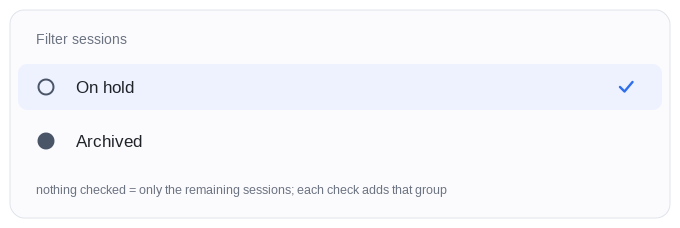
The switch lives in browser local storage and survives restarts.
Use DSH's own archive action (session row menu → Archive). Archived rows get the solid grey dot.
| Data | Location | Shape |
|---|---|---|
| hold marks / wake timestamps | browser localStorage → dsh.status-lamp.hold.v1 |
{ "explicit": ["sessionId"], "awake": { "sessionId": timestamp } } |
| filter switch | browser localStorage → dsh.status-lamp.filter.v1 |
hide or show |
| threshold | AUTO_HOLD_MS in client.js |
reinstall after editing |
Clear every manual mark:
localStorage.removeItem('dsh.status-lamp.hold.v1')desktop profile, Windows.package.json declares "engines": { "dsh": ">=0.2.2-rc.1" }.sidebar.session.row.leading, sidebar.session.row.trailing, the session-row menu via ctx.contextMenus, and the Client locale / contextMenus / sessions services.| Symptom | Likely cause | Fix |
|---|---|---|
| No blue dots | plugin disabled, or added to another profile | check the Plugins page and the profile the app runs |
| A on hold session shows a blue dot | it is running or has unread results | expected: running releases suspension, native lamps win |
| No "Hide archived and on hold" item | the DSH version changed the menu structure | update the plugin; meanwhile use the native "Hide archived" filter |
| Ticking the switch changes nothing | no archived or on hold sessions in this view | expected |
| Manual marks gone after restart | site data cleared / different browser | marks are browser-local; automatic suspension is unaffected |
| An empty workspace header remains | the filter hides rows, not group headers | known limitation |
index.js               Host half (empty; keeps the bundle valid)
client.js              all logic: two row seats, hold menu action, filter row
cordis.patch.yml       bundle patch inserting the status-lamp row
locale/{zh,en}.json    Plugin Manager title and description
test/smoke.mjs         node:vm smoke test (npm test)
test/integration.mjs   jsdom integration test for the injected menu rows
docs/                  bilingual diagrams
DESIGN.md              design notes and trade-offs
Reinstall after editing client.js — a linked install does not hot-reload:
plugin_manager: remove_bundle dsh-status-lamp -> install_bundle "D:\dsh space\plugins\dsh-status-lamp"MIT
CLASSIFICATION EVIDENCE
系统优先读取 GitHub Topics,再与站内分类词典和词根规则比对。当前命中: deepseek-harness。
morluto
Reverse engineer anything with agents, from app behavior down to native binaries.

deepseek-ai
DeepSeek Harness: Everything is a Plugin.

nexu-io
The 1st Collaborative AI Design Agent Workspace. Local-first and open source. Create motion, prototypes, websites, apps, dashboards, presentations, images, and videos with your team and AI agents. Share work, exchange feedback, and iterate together in one workspace.