
开发工具
待识别

treg
superdesigndev
OpenRouter for agent tools. Join community here: https://discord.gg/6mQYYfFMAn
PROJECT TOPICS
INSTALL REFERENCE
dsh plugin --profile web add github:SouthM/dsh-nanshan-market-publish
该命令指向仓库当前默认分支;尚无绑定当前 commit 的完整验证结果。
PROJECT README
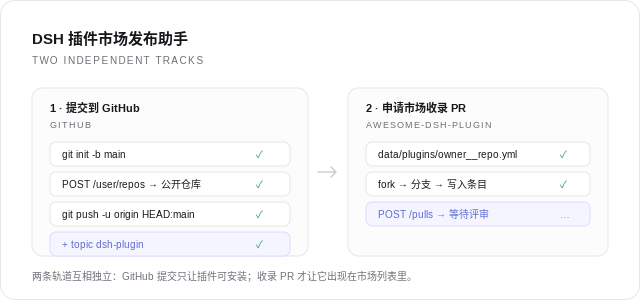
左侧栏插件:扫描本机正在开发的 DSH 组件,按官方 contributing.md 分两条互相独立的轨道引导发布:
dsh-plugin topic。data/plugins/<owner>__<repo>.yml,fork 官方列表仓库、写入条目、开 PR,并跟踪 CI 与 held: author 状态。两条轨道各自有独立的进度与按钮:只做完 GitHub 提交,组件已经是可安装的公开仓库;再做收录 PR,市场里才能搜到它。
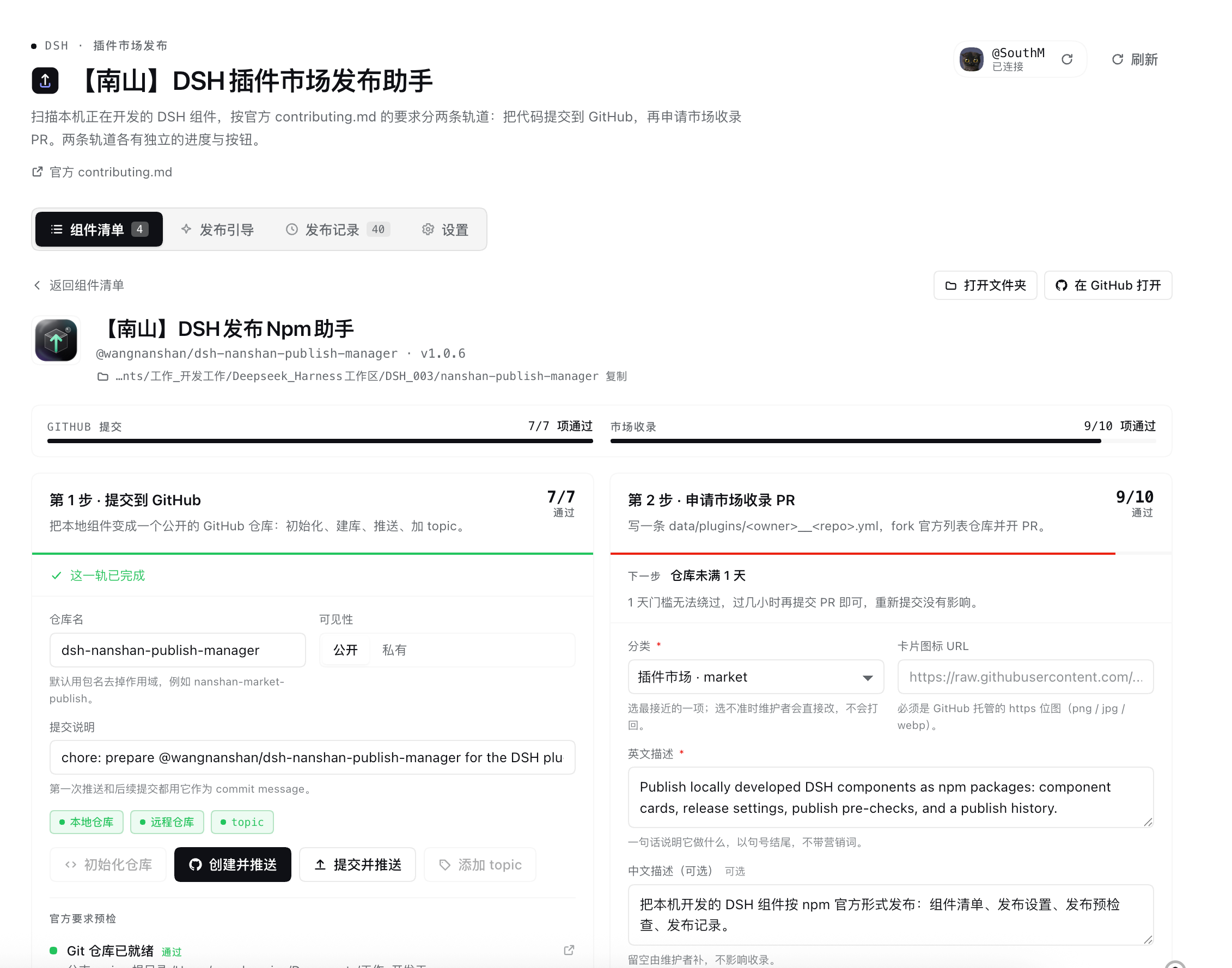
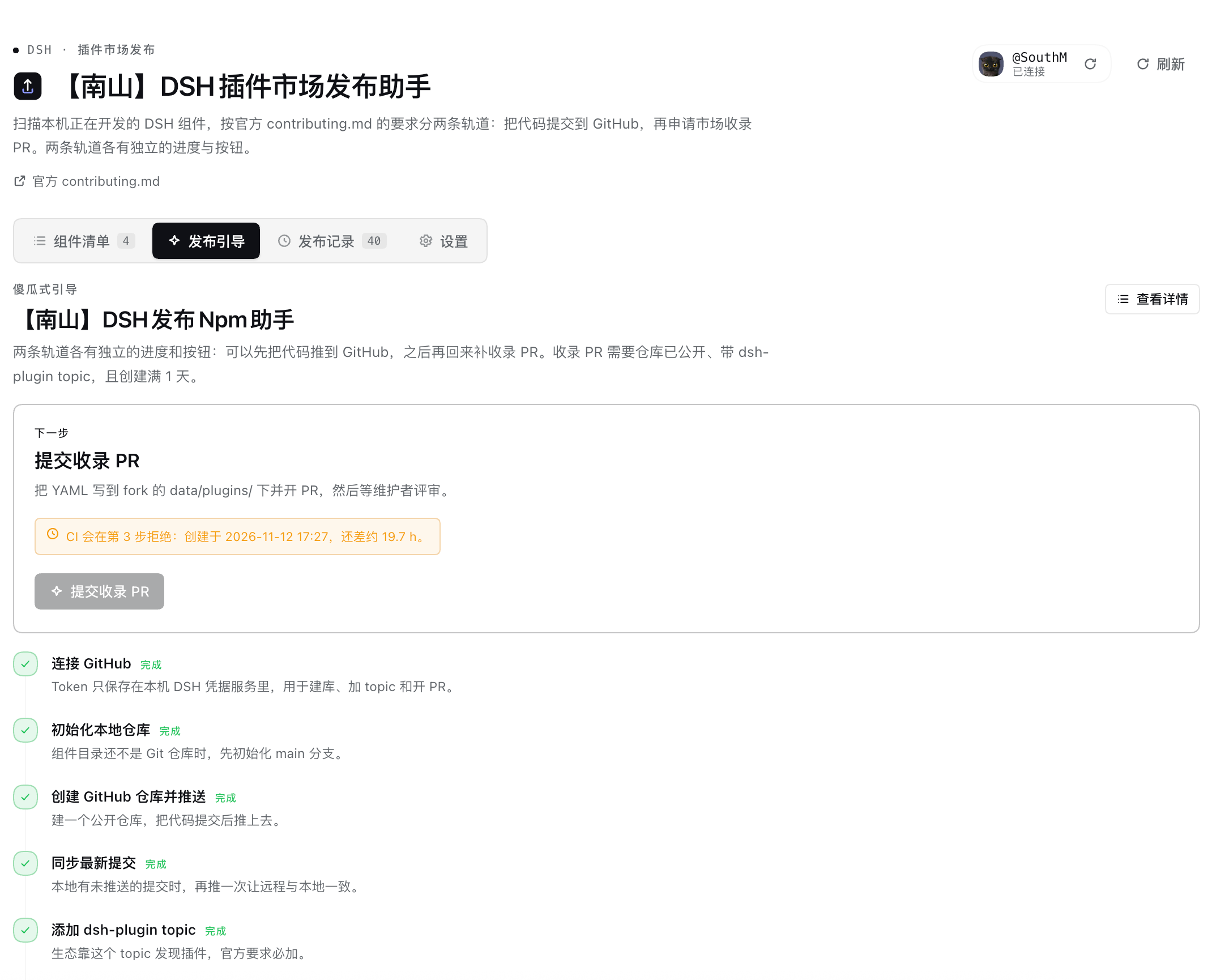
link: 安装的 DSH 组件,以及打开的 workspace;也可以点「选择文件夹」调起系统原生文件夹选择器,选中任意组件目录后加入清单(校验 package.json 里是否有 dsh.bundle / dsh.client)。原生选择器不可用时(例如某些远程页面)才会退回手工输入绝对路径。dsh.bundle 声明、真实代码、仓库公开、满 1 天、dsh-plugin topic、分类取值、英文描述必填与句号、描述含营销词、图标必须是 GitHub 托管的位图、tarball 链接、monorepo 子包路径、官方包需用 peerDependencies 等。git 与 GitHub REST API。held: author)、变更文件、最近评论;可直接补一条评论。# 本地目录安装
dsh plugin add /path/to/nanshan-market-publish或在 DSH 的 插件 页面选择 添加插件 并指向本目录。安装后在左侧栏点 「插件市场发布助手」。面板分四个页签:组件清单、发布引导、发布记录、设置。
打开 设置 → GitHub 连接,填入一个 classic Token,勾选 public_repo(需要操作私有仓库时用 repo)。
ctx.credentials 的 record),不写进配置文件、不会回传给页面、不进入状态文件。GITHUB_TOKEN / GH_TOKEN / NSMP_GITHUB_TOKEN 作为兜底来源。gh CLI。| 步骤 | 动作 | 产物 |
|---|---|---|
| 初始化 | git init -b main(父目录已是仓库时跳过) |
.git |
| 创建并推送 | POST /user/repos 建公开仓库 → 设置 origin → git add -A + git commit → git push -u origin HEAD:main |
远端仓库 |
| 提交并推送 | 之后每次改动的增量提交与推送 | 新提交 |
| 添加 topic | PUT /repos/{owner}/{repo}/topics 追加 dsh-plugin |
topic |
推送使用一次性 credential helper(Token 通过子进程环境变量传入),不会把 Token 写进 .git/config。
awesome-dsh-plugin/awesome-dsh-plugin → 从默认分支开 add-<repo>-<id> 分支 → 写入 data/plugins/<owner>__<repo>.yml → 开 PR。held: author 时给出「推同一分支 + 留一条评论」的说明。仓库创建不满 1 天时,插件会在本地拦下 PR 提交并显示还差多久——CI 一定会拒,提前开 PR 只会多一个红叉。到点后再点一次即可。
提交重试是幂等的:分支名固定为 add-plugin-<repo>,已有分支和条目文件会被复用/更新,不会每次都留下一个孤儿分支。
一个 PR 只提交 1 条条目;描述含 : 会自动加引号,避免 YAML 解析成嵌套键。
package.json 声明 dsh.bundle(只写 dsh.client 无法安装,是最常见的被拒原因)。dsh-plugin topic。screenshots.json;发 npm 时 repository 必须指回该仓库。CI 通过只是前置条件,维护者会读代码;需要修改时会被打上 held: author。
Error in the HTTP2 framing layerGitHub 的 HTTP/2 连接被代理、VPN 或公司网关打断时的典型报错。插件会自动改用 http.version=HTTP/1.1 重试一次;成功后会把「这个组件走 HTTP/1.1」记在本地,之后直接走 HTTP/1.1(操作记录里会标 HTTP/1.1)。命令行里遇到同样问题时:
git config --global http.version HTTP/1.1 # 撤销:git config --global --unset http.version如果重试仍失败,检查 HTTPS_PROXY / HTTP_PROXY 是否指向一个已经失效的代理。
Token 需要 repo 权限(classic)或对目标仓库有 Contents 写权限(fine-grained);远程地址是 SSH 时则依赖本机 SSH 密钥。
~/.dsh/nanshan-market-publish/state.json(组件清单、条目草稿、PR 编号、操作记录)。nanshan-market-publish/github-token 记录。api.github.com)与本地 git 外不发起任何网络请求。gh CLI 也能用:所有 GitHub 操作走 REST API 与 git。created_at 计算;未连接 Token 时这一项显示为「待确认」。origin 是 SSH 地址,插件会执行普通的 git push,需要你本机已配置 SSH 密钥。A left-sidebar DSH plugin that scans DSH components under development on this machine and walks you through the official
contributing.md in two independent tracks:
submitting the code to GitHub (initialise, create a public repository, commit and push, add the dsh-plugin topic) and opening
the market listing PR (generate data/plugins/<owner>__<repo>.yml, fork, write the entry, open the PR, follow CI and
held: author).
Every mechanically checkable rule from the guide is computed as a checklist with a concrete fix, and each track can be completed
without the other. A GitHub token with public_repo scope is required and is stored in the DSH credentials service; repository
creation, topics, the fork branch and the PR all go through the GitHub REST API, so no gh CLI is needed. The plugin reads only
manifests, patches, locale files, icons and Git metadata of the folders you choose, never executes component code, and sends
nothing anywhere except GitHub.
CLASSIFICATION EVIDENCE
系统优先读取 GitHub Topics,再与站内分类词典和词根规则比对。当前命中: 开发。
superdesigndev
OpenRouter for agent tools. Join community here: https://discord.gg/6mQYYfFMAn

T-Auto
A toolkit for low-level operations in DSH, designed to reduce token usage and task execution time / DSH 底层操作工具插件,旨在减少 Token 消耗与任务耗时

crafter-station
A public gallery of animated pets for Codex, Claude Code, DeepSeek Harness, Hermes, OpenCode, Gemini CLI, and more.