
其他
完整应用

deepseek-harness
deepseek-ai
DeepSeek Harness: Everything is a Plugin.
PROJECT TOPICS
INSTALL REFERENCE
dsh plugin --profile web add github:SiriusWJ/dsh-updater-npm
该命令指向仓库当前默认分支;尚无绑定当前 commit 的完整验证结果。
PROJECT README
English | 中文
DSH updater + official docs sync plugin for DeepSeek Harness (dsh).
Two cards in Settings:
@deepseek-ai/dsh on npm and updates it in one click, with live progress and a "Restart DSH" button that performs the staged swap.deepseek-ai/deepseek-harness docs/ to $DSH_HOME/docs-sync/ (skips unchanged files by GitHub blob sha) with a progress bar, and registers the dsh_docs_search / dsh_docs_read model tools.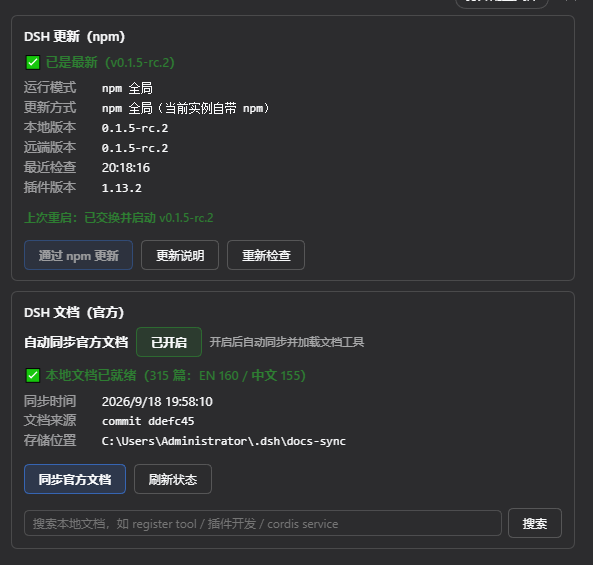
Install · Usage · Run modes · Upgrade safety net · Routes · License
# from npm (recommended)
dsh plugin --profile web add dsh-updater-npm

# or from GitHub
dsh plugin --profile web add github:SiriusWJ/dsh-updater-npm
Restart dsh web afterwards; the "DSH Update" and "DSH Docs" cards appear in Settings.
i18n: the UI and every host message support English / Chinese and follow the system language automatically (or the manual choice in Settings → General → Language). The
dsh_docs_search/dsh_docs_readtool descriptions and outputs follow it too.
npm install -g @deepseek-ai/dsh@latest with live progress (bar + the last
few lines of npm output). There is deliberately no scrolling log panel — the full npm output
is written to $DSH_HOME/plugin-data/dsh-updater-npm/last-run.log when the operation ends, so
the card stays quiet and the log is still there when you need it./bin/sh on macOS/Linux).
The same button appears after source-tree updates and deployment repairs.
No new activation URL is needed — the browser re-authenticates by itself and no new window pops up.<sibling of install dir>/dsh.old-<timestamp> (222 MB in a real case). Safety rule, enforced on
the host: only rollback points whose version differs from the running version are listed and
deleted — the live deployment is never touched.Older versions used a blunt 10-minute hard timeout for npm installs. On a slow link a staged install
was measured downloading 247 tarballs (231 of the 239 @deepseek-ai sub-packages of a 222 MB tree)
in 9 min 25 s and was then killed, reporting just staging install failed: npm — not a hang, not a
broken network, simply a hard timeout.
The watchdog is now two-threshold, and configurable through
$DSH_HOME/plugin-data/dsh-updater-npm/config.json:
{
  "docsEnabled": false,
  "npmIdleMinutes": 10,
  "npmTimeoutMinutes": 60
}| Key | Default | Meaning |
|---|---|---|
npmIdleMinutes |
10 |
minutes of zero activity before it is declared stuck and terminated (slow but moving ⇒ never killed) |
npmTimeoutMinutes |
60 |
absolute wall-clock ceiling, to stop a truly unbounded hang |
What counts as activity (corrected in v1.12.1): watching the child's stdout alone is not enough — npm prints almost nothing when it is not attached to a TTY (one measured 5-minute install produced not a single stdout line while npm's own debug log recorded 525 requests, and the watchdog killed it). Three signals are now combined, and the maximum wins:
--loglevel=http — npm logs every request/stage to stdout (measured: 1111 lines instead of 0);--logs-dir — npm's full debug log is written to plugin-data/dsh-updater-npm/npm-logs/;node_modules/ are watched as well: extraction keeps writing files there.Only when all three are idle is the install treated as stuck; during a silent phase a
[heartbeat] … line is appended every minute (into last-run.log).
[watchdog] … and [exit] … lines, and the error states
whether it was an idle timeout or the total limit, with the elapsed time — no more opaque : npm.npm install -g, and source-tree
pnpm/npm install; msiexec /qn is silent by nature and gets a 10-minute idle window./dsh-updater-npm/progress returns progress only (no log payload).dsh-updater-npm on
npm (GET https://registry.npmjs.org/dsh-updater-npm/latest, cached for 10 minutes).dsh plugin --profile <your profile> add dsh-updater-npm@<latest>). The "Update via npm" button is
disabled, and /update is refused server-side with the same message.-g on Windows and
lost every dependency after the swap).git pull) is not gated, only hinted.dsh_docs_search / dsh_docs_read tools are not
loaded. When on, the plugin syncs on first start (~217 files: English + Chinese .zh.md) and then
every 24 hours, and registers the tools. The switch state lives in
$DSH_HOME/plugin-data/dsh-updater-npm/config.json.dsh_docs_search — search the local official docs index (Chinese queries prefer Chinese docs)dsh_docs_read — read one document (section focus, 80 KB truncation, path-traversal guarded)Docs live in $DSH_HOME/docs-sync/, the index in $DSH_HOME/docs-sync/.index.json.
Windows without PowerShell 7: DSH's shell tools need
pwsh. When pwsh is missing the card shows a hint and an "Install PowerShell 7" button (trieswinget install Microsoft.PowerShell, falls back to the official win-x64 MSI with live progress; restart DSH to apply).
The plugin detects the run mode and behaves honestly:
| Mode | Detected by | How it updates | Notes |
|---|---|---|---|
| npm-global | argv[1] is <install>/lib/bin.js |
Windows: staged update (new version into a separate staging dir → "Restart DSH" atomically swaps it in, rolls back on failure). Non-Windows: in-place npm install -g, then "Restart DSH" |
The Windows update target is the running instance itself (native deps included), where an in-place install hits EBUSY and leaves a half-installed tree. The staged flow never touches the live deployment; the old directory is renamed to dsh.old-* as a rollback point; the restart script validates the staged package before doing anything; a broken deployment is reported and can be repaired with one click |
| source (source tree) | argv[1] contains bin.ts / tsx / apps/ |
Source-tree update: git fetch → git pull --ff-only → dependency install (pnpm/npm) |
Running from a source tree (pnpm dsh web) means npm -g does not affect the running instance. The card shows branch / local and remote commit / commits behind, with a one-click update; uncommitted changes or a missing git disable the button with a clear message |
Multi-copy protection: an environment may contain several dsh copies (global dirs of several Node installations, DSH profiles, …). The plugin only ever updates the currently running one, preferring the npm that belongs to the running instance's own Node install;
/checklists the other copies it detected, and an npm run that succeeds while the running copy's version does not change is reported as a failure instead of a false success. Copies are de-duplicated by realpath, so junctions/symlinks pointing at the running instance (e.g. dependency mirrors under$DSH_HOME/profiles/node_modules) are not mistaken for separate copies.
Version-drift troubleshooting: if an update reports success but a restart brings back the old version, you are running from a source tree while npm updated the global install only. Start dsh in npm-global mode (e.g. a shortcut pointing at
D:\tools\node22\dsh.cmd web) and the update applies.
Each item below was added after a real 0.1.2-rc.1 → 0.1.5-rc.1 cross-version upgrade went wrong, and has been effective since v1.10.0.
-g (layout consistency). npm install --prefix <staging> without
-g produces a hoisted tree, while an npm-global deployment is nested
(@deepseek-ai/dsh/node_modules/…, self-contained). The swap only moves the package directory, so
a hoisted staging tree means losing every dependency of the new deployment. The command now
always passes -g, and before writing the pending-swap marker the plugin verifies that a nested
live tree has a nested staging tree and that the staged lib/bin.js actually runs under the
instance's own node — any failure aborts without touching the deployment.exit 1s, leaving the old process
running rather than half-killed.dsh.old-<timestamp> (never deleted immediately) and the result is recorded. Once the new
version looks stable, the card's "Remove rollback point" button frees the space.settings.yaml,
.credentials.yaml, .agent-presets/ and every profile's package.json / cordis*.yml /
pnpm-lock.yaml are snapshotted to $DSH_HOME/upgrade-backups/dsh-<from>-to-<to>-<timestamp>/;
session logs (up to 256 MB) are copied too, because sessions migrate to a format that cannot be
read back by older versions. The newest 5 snapshots are kept.?token= URL, wrote
activation-url.txt and opened a browser window; that whole path was removed in v1.12.3 as it was
not needed.)/check reports unreferenced staging-* / repair-*
directories (one unfinished update left 222 MB behind) and npm's interrupted-install
.<name>-<hash> leftovers (65 MB in a real case); the card offers "Clean leftovers", and staging
directories older than 6 hours are reclaimed automatically at startup.0.1.5:
V3 session format, persona text → prefix/suffix, plugin API and slot changes) shows a notice
with a release-notes link.spawn('powershell.exe', …, { detached: true })
on Windows equals DETACHED_PROCESS: the script does not run a single line while spawn still
reports exit=0 — a silent false success that left the swap undone. The launcher now starts a
detached node bootstrap which runs the platform script as an ordinary child and writes
node bootstrap started <token> into restart.log; the plugin only hands over the staged package
after that token shows up (≤ 5 s), and otherwise keeps pending-swap.json and the staged tree and
reports a clear error.GET /dsh-updater-npm/check — update check (10-minute cache; includes the cross-version notice, last restart result, pending swap, leftovers and rollback points)POST /dsh-updater-npm/update — run the npm update (same-origin only; backs up first, then stages)POST /dsh-updater-npm/restart — restart this DSH instance (same-origin only; atomically swaps a pending staged package into place, Windows/macOS/Linux)POST /dsh-updater-npm/cleanup — remove leftover staging dirs and npm install leftovers (same-origin only)POST /dsh-updater-npm/cleanup-rollback — remove rollback points whose version differs from the running one (same-origin only)GET /dsh-updater-npm/progress — live update/sync progress (polled)GET /dsh-updater-npm/docs/status — docs sync statusPOST /dsh-updater-npm/docs/sync — trigger a docs sync (same-origin only)GET /dsh-updater-npm/docs/search?q=&lang=&limit= — search the local docs indexGET /dsh-updater-npm/docs/read?path=§ion= — read one documentAn audit of how the plugin behaves on DSH deployments other than the one it was developed on turned up seven defects. All seven are fixed, and each was reproduced and verified against a real deployment.
locale.register(ns, dicts)
treats each key of the second argument as a locale id and validates it against
dsh-client-locale's LOCALE_ID_PATTERN (/^[A-Za-z]{2,8}(-[A-Za-z0-9]{1,8})*$/u). The plugin
passed a synthetic "~nav…" key, which fails that check, so register() threw before
publish() bumped the revision — and the surrounding catch swallowed the error. The shell
recomputes the nav rows only when the slot version or the locale revision changes, so the red dot
never appeared or disappeared. It now uses the three-argument form with a unique namespace.locateInstall()'s fallback was dead code. It derived the install directory from an agent
preset path ending in /agent-presets/<id>/agent.cordis.yml. That layout no longer exists:
shipped presets live at <dsh>/node_modules/@deepseek-ai/dsh-agent-presets/presets/<id>/ and
user presets at <DSH_HOME>/.agent-presets/<id>/. Neither contains /agent-presets/, so the
suffix test was always false and update / repair / restart / the docs tools had no recovery path
whenever argv[1] is not bin.js. It now resolves @deepseek-ai/dsh/package.json and realpaths
it. The anchor is the profile directory, not import.meta.url: with a link: or junction
install Node rewrites the module URL to the package's real path, where no node_modules exists.buildRestartScript() took a platform argument but joined paths with the host's
path.join. Production only ever passed process.platform, which hid the mismatch — but a
POSIX script generated on Windows came out fully backslashed (a leading / became \), and the
script then aborted with staging incomplete and skipped the swap entirely. It now selects
posix.join / win32.join from the argument.verifyStagedBinary() passed
the number 60000 as runInstallCmd's third argument, but that parameter has since become a
limits object; (60000).idleMs is undefined, so the call silently fell back to the
5-minute / 60-minute defaults and a half-broken staged package could stall this step for an hour..credentials.yaml and
the whole sessions/ tree. The backup directory was created with the default umask (commonly
0755 on POSIX), so other local accounts could read the credential copy. The backup root and the
new backup directory are now 0700.registry.npmjs.org. With a mirror or an internal registry,
the plugin queried npmjs while npm itself installed from the mirror — slow at best, and behind
a firewall it reported "registry unreachable" for an update that would have worked. It now
resolves env → ./.npmrc → ~/.npmrc → default, skipping any value that is not an http(s) URL.resolveProfileName() mis-detected shared installs. When the plugin lives only in the shared
profiles/node_modules (hoisted, or some pnpm layouts), every per-profile probe returns false
and the function discarded an argv-derived profile in favour of the hard-coded 'web', so the
printed self-update command could name the wrong profile. It now checks the shared location too.Verification: the local smoke suite gained assertions for platform path joining, registry parsing,
the locale-bump contract and the locateInstall fallback. test/smoke.mjs still reports
57 passed / 1 failed — the same pre-existing EPERM failure it shows on the untouched upstream
commit. The POSIX restart + swap flow was executed for real under Git Bash sh (swap, rollback
point, staging cleanup, relaunch of the new deployment), which is also what exposed the
path.join defect above.
docs/dsh-update-card-1.13.png. The version in the file name is deliberate — GitHub's
raw CDN keeps serving the old bytes for a while when a file is overwritten.glob('{README,README.*}') and takes the first markdown-ish hit; README.zh.md matches that
pattern and sorts before README.md (the check regex is unanchored, so a trailing .zh.md
counts as markdown), so the Chinese file won. The Chinese README is therefore named
README_zh.md (underscore), which the glob cannot match — npm now publishes the English
README.md. A note in both files records why the underscore must stay.README.md) plus a Chinese
translation (README_zh.md), cross-linked at the top; the Chinese file is shipped in the npm package./progress?since=; the safety net no longer describes activation-URL
scraping (the browser re-authenticates by itself); the route list gained cleanup-rollback; the
rollback point is now described as the card's button; and the restart-launcher fix (node bootstrap)
became safety-net item 9.POST /dsh-updater-npm/cleanup-rollback). The safety
rule is enforced on the host: only <leaf>.old-<timestamp> directories whose version differs from
the running version are listed and removed, so the live deployment is never affected (hard assertions
in the smoke tests).updNote / docsNote / pluginOutdatedBody
were removed entirely and the remaining strings were compressed to a single line (srcDirty,
pwshMissingHint, deployBrokenWarn, npmMismatch, stagingWasteFound, repairRunning,
docs*Hint, …), leaving state and actions only.Subtracting, on user feedback:
plugin-data/dsh-updater-npm/last-run.log when an operation ends ([watchdog] / [exit] lines
included) and the card keeps only the progress bar and the last few lines. /progress no longer
carries log / limits.--loglevel=http (it is the watchdog's real heartbeat, not decoration), the three-signal
activity probe, and the idle/hard timeout pair.last-run.log assertion (56 total).Fixes the broken chain "the built-in restart does nothing, and after an external restart you are still
on the old version": the staged install had actually succeeded (verbose exit 0 / info ok), but
the restart step failed silently, so the swap never happened.
launchRestartScript used
spawn('powershell.exe', […], { detached: true }). On Windows that is DETACHED_PROCESS: the console
program exits immediately with exit=0 without executing a single line of the script, while spawn
reports no error. A/B test: the same script run through a detached node bootstrap executes fine.node bootstrap that runs the platform script as an ordinary
child; the bootstrap writes node bootstrap started <token> into restart.log.restartNow now waits for that token (up to 5 s) before handing over the
staged package. If it never appears, it returns a clear error and keeps pending-swap.json and the
staging directory — the old code deleted the marker here, so the 222 MB staged tree was later swept
as "leftover garbage" and the user could neither upgrade nor recover it./check returns pendingSwap, and the card shows "staged, waiting to be swapped" while
keeping the "Restart DSH" button, so an external restart can still be completed with one click; a
marker whose staging directory is gone is cleaned up automatically.waitForBootstrap does not report
false positives, and launcher + swap script perform a real directory swap on a fake deployment. The
old code necessarily fails these, which is exactly why it slipped past the previous 36 tests.--loglevel=http --progress=false, --logs-dir and a three-signal activity probe; default npmIdleMinutes 5 → 10.
Measured end-to-end: 520 packages in 1m, 222.6 MB / 25474 files, exit code 0 (the cold-cache run of
the same command never finished in 9m25s).npmIdleMinutes / npmTimeoutMinutes; the watchdog and the run log were introduced (log panel
removed again in 1.12.3); the source-tree dependency install reuses the same watchdog./update refuses too; offline pass-through).-g + layout/executability validation, validate-before-kill, rollback point, rename retries,
pre-upgrade backups, output redirection, leftover cleanup, breaking-change notices.Full Chinese changelog with every measurement: README_zh.md.
CLASSIFICATION EVIDENCE
系统优先读取 GitHub Topics,再与站内分类词典和词根规则比对。当前命中: 无有效分类标签。
deepseek-ai
DeepSeek Harness: Everything is a Plugin.

anywhere-labs
为 DeepSeek Harness (DSH) 插件生态打造的现代化桌面端解决方案。万物皆「插件」,桌面本身也是「插件」。

walkinglabs
Harness engineering beginner tutorial, from 0 to 1